
1. Giriş
This manual provides instructions for the setup, operation, and maintenance of your Bose MediaMate Computer Speakers. These speakers are designed to enhance the audio experience for your computer, whether for music, movies, or gaming. The compact design and upward-angled sound projection optimize audio delivery for desktop use, occupying minimal desk space.
2. Təhlükəsizlik Məlumatı
Please read and follow all safety instructions before using this product to prevent electric shock, fire, or injury. Keep this manual for future reference.
- Do not expose the speakers to water or moisture.
- Do not place the speakers near heat sources such as radiators, heat registers, stoves, or other apparatus (including ampistilik əmələ gətirən qaldırıcılar).
- Yalnız istehsalçı tərəfindən müəyyən edilmiş əlavələrdən/aksesuarlardan istifadə edin.
- İldırım fırtınası zamanı və ya uzun müddət istifadə edilmədikdə bu cihazı elektrik şəbəkəsindən ayırın.
- Bütün xidmətlər üçün ixtisaslı xidmət personalına müraciət edin. Aparat hər hansı şəkildə zədələndikdə, məsələn, enerji təchizatı kabeli və ya tıxacı zədələndikdə, maye töküldükdə və ya cihazın içərisinə əşyalar düşdükdə, cihaz yağışa və ya nəmə məruz qaldıqda, normal işləmədikdə xidmət tələb olunur. , ya da atılıb.
3. Paketin məzmunu
Bütün əşyaların paketinizdə olduğunu yoxlayın:
- Bose MediaMate Computer Speakers (2 units)
- Güc adapteri
- Audio Cable (3.5mm stereo jack)
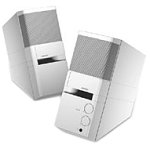
Image: The Bose MediaMate Computer Speakers in Gray. The image shows two compact speakers, one with visible volume and mix controls, and a headphone jack.
4. Quraşdırma
Follow these steps to set up your Bose MediaMate Computer Speakers:
- Yerləşdirmə: Place the speakers on a flat, stable surface on either side of your computer monitor. Ensure they are angled slightly upward towards your listening position for optimal sound.
- Audio kabeli birləşdirin: Connect the 3.5mm audio cable from the back of the primary speaker (the one with controls) to the audio output jack on your computer.
- Güc bağlayın: Plug the power adapter into the power input on the primary speaker, then plug the adapter into a wall outlet.
- Güc Aktivdir: Turn on the speakers using the volume knob. The power indicator light should illuminate.
5. Əməliyyat Təlimatları
Once set up, operating your MediaMate speakers is straightforward:
- Səs səviyyəsinə nəzarət: Use the large knob labeled "VOLUME" on the front of the primary speaker to adjust the overall sound level.
- Mix Control: The "MIX" knob allows you to blend audio from two different sources if you have a second device connected to the auxiliary input.
- Qulaqlıq Jack: For private listening, plug your headphones into the headphone jack located on the front of the primary speaker. This will mute the speakers.
- İkili Girişlər: The speakers feature dual inputs, allowing you to connect and mix two audio sources simultaneously. For example, you can connect your computer and a portable music player.
6. Baxım
Dinamiklərinizin uzunömürlülüyünü və optimal performansını təmin etmək üçün:
- Təmizləmə: Use a soft, dry cloth to clean the exterior surfaces of the speakers. Do not use liquid cleaners or aerosols.
- Toz: Səs keyfiyyətinə təsir edə biləcək toz yığılmasının qarşısını almaq üçün dinamik barmaqlıqlarını müntəzəm olaraq silin.
- Yaddaş: Dinamikləri uzun müddət saxlayırsınızsa, onları elektrik enerjisindən ayırın və sərin, quru yerdə saxlayın.
7. Giderme
If you encounter issues with your Bose MediaMate speakers, refer to the following common problems and solutions:
| Problem | Mümkün Səbəb | Həll |
|---|---|---|
| Səs yoxdur |
|
|
| Təhrif edilmiş səs |
|
|
| Only one speaker working |
|
|
8. Spesifikasiyalar
- Brend: Bose
- Model: MediaMate
- Bağlantı: 3.5mm Audio Input, AC Power
- Audio Çıxış: Stereo
- Dinamik növü: Multimedia
- Material: Metal
- Dinamik Ölçüsü: 6 Centimeters (Audio Driver)
- Maddə çəkisi: 3 funt sterlinq
- Rəng: Boz
9. Zəmanət və Dəstək
Bose MediaMate Computer Speakers come with a limited warranty. For specific warranty details and duration, please refer to the warranty card included with your product or visit the official Bose websayt.
For technical support, product registration, or service inquiries, please contact Bose customer service:
- Telefon: 800-444-2673
- Websayt: www.bose.com
Please have your product model number (MediaMate) and purchase date available when contacting support.