
Giriş
This manual provides detailed instructions for the installation, operation, and maintenance of your VTech VTCS6619 DECT 6.0 Expandable Speakerphone with Caller ID. Please read this manual thoroughly before using your new telephone system to ensure proper functionality and to take full advantagonun xüsusiyyətlərindən e.
Paketin məzmunu
Paketinizdə aşağıdakı elementlərin olduğunu yoxlayın:
- Cordless Phone with Caller ID/Call Waiting
- Telephone Base Unit
- AC Güc Adapteri
- Telefon xətti kabeli
- Telefon üçün təkrar doldurulan batareya
- Telefonun qapağı
Quraşdırma
Follow these steps to set up your VTech VTCS6619 telephone system.
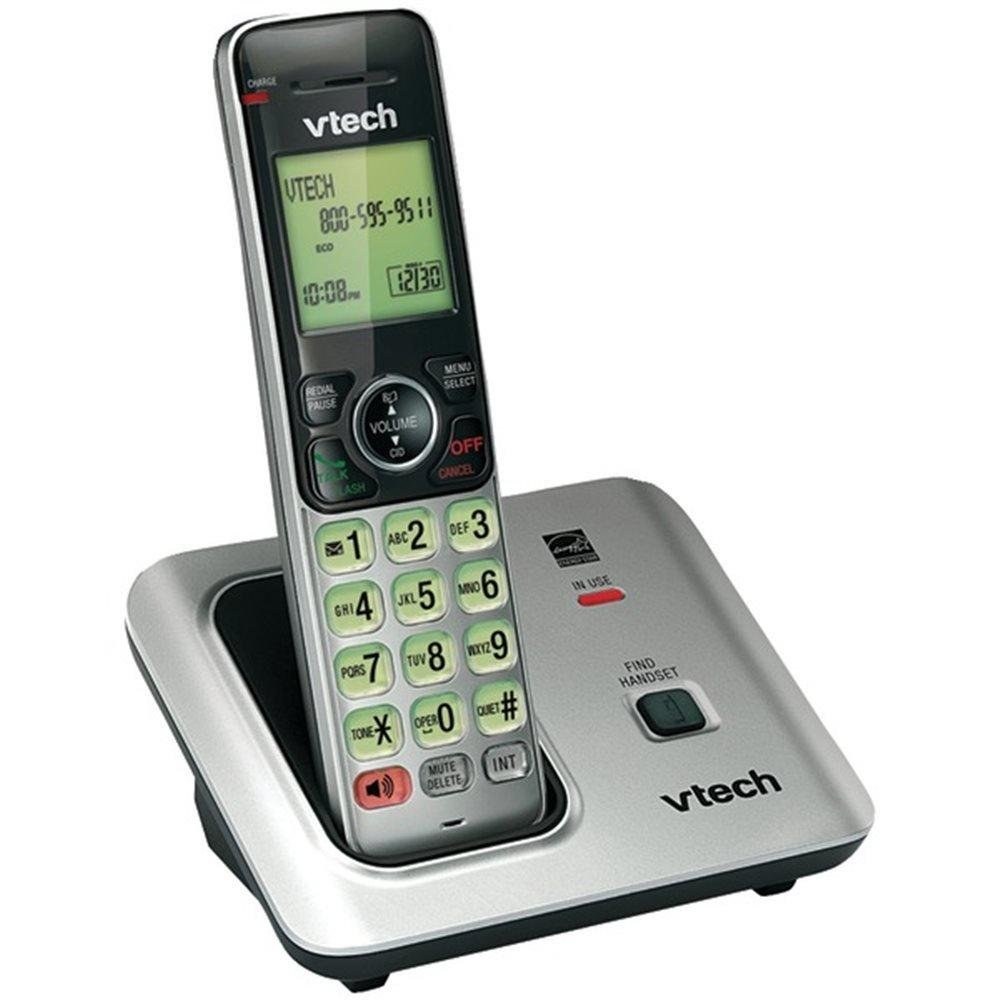
Image: The VTech VTCS6619 DECT 6.0 Cordless Speakerphone with Caller ID, showing the black handset and base unit.
1. Batareyanın quraşdırılması
- Telefonun arxasındakı batareya bölməsinin qapağını açın.
- Batareya paketinin fişini bölmənin içərisindəki yuvaya etibarlı şəkildə qoşun.
- Place the battery pack with the label UP and tuck the wires neatly inside the compartment.
- Batareya bölməsinin qapağını bağlayın.
2. Əsas Vahid Bağlantısı
- AC enerji adapterinin kiçik ucunu telefon bazasının arxasındakı enerji yuvasına qoşun.
- AC güc adapterinin böyük ucunu divar açarı ilə idarə olunmayan divar rozetkasına qoşun.
- Plug one end of the telephone line cord into the TEL LINE jack on the back of the telephone base.
- Telefon xətti kabelinin digər ucunu divardakı telefon yuvasına qoşun.
3. Telefonun doldurulması
Once the battery is installed and the base unit is connected, place the handset on the telephone base. The CHARGE light on the handset will illuminate, indicating that the battery is charging. Allow the handset to charge for at least 10 hours before initial use.
Əməliyyat Təlimatları
This section details the basic functions and features of your VTech VTCS6619 phone.
Zənglərin edilməsi və qəbulu
- Zəng etmək üçün: basın SÖZ/FLAŞ or SPİKER, sonra telefon nömrəsini yığın.
- Zəngə cavab vermək üçün: Telefon zəng çalanda basın SÖZ/FLAŞ or SPİKER.
- Zəngi bitirmək üçün: basın SÖNDÜR/SİL or place the handset back on the telephone base.
Dinamik funksiyası
Zəng zamanı dinamiki aktivləşdirmək üçün düyməsini basın SPİKER düyməsi. Telefonun qulaqcığına qayıtmaq üçün onu yenidən basın.
Zəng edənin ID-si və Zəng Gözləməsi
The phone displays the caller's name and number (if available) before you answer. If you subscribe to Call Waiting service, the phone will alert you to an incoming call while you are on another call. Press FLASH zənglər arasında keçid etmək.
Konfrans Zəngi
The VTech VTCS6619 supports 3-way conference calls. While on a call, you can add a third party by pressing the FLASH button, dialing the new number, and then pressing FLASH bütün tərəfləri birləşdirmək üçün yenidən.
Rəqəmsal Cavablandırma Sistemi
The integrated digital answering system records incoming messages when you are unavailable. Access messages by pressing the PLAY/STOP button on the base or through the handset menu. Refer to the full user guide for detailed instructions on setting up your outgoing message and managing messages.
Baxım
Proper care ensures the longevity of your telephone system.
Təmizləmə
Clean the telephone and base unit with a soft, damp cloth. Do not use cleaning sprays or liquid cleaners, as they may damage the finish or electrical components.
Batareyaya qulluq
To maintain optimal battery performance, avoid exposing the handset to extreme temperatures. If the phone will not be used for an extended period, remove the battery to prevent leakage.
Problemlərin aradan qaldırılması
If you experience any issues with your phone, refer to the following common problems and solutions:
| Problem | Həll |
|---|---|
| Zəng tonu yoxdur | Telefon xətti kabelinin həm baza qurğusuna, həm də divar rozetkasına etibarlı şəkildə qoşulduğundan əmin olun. AC güc adapterinin düzgün qoşulduğunu yoxlayın. |
| Zəif səs keyfiyyəti | Move the handset closer to the base unit. Check for interference from other electronic devices. Ensure the battery is fully charged. |
| Telefon doldurulmur | Verify the handset is correctly placed on the base unit. Clean the charging contacts on both the handset and base with a dry cloth. Check the power connection to the base unit. |
| Zəng edənin ID-si göstərilmir | Ensure you have subscribed to Caller ID service from your telephone service provider. The feature may not work if the caller has blocked their number. |
Spesifikasiyalar
- Brend: VTech
- Model: VTCS6619
- Telefon növü: Simsiz
- Rəng: Qara
- Batareyaların sayı: 1 AAA batareya tələb olunur (daxildir)
- Material: plastik
- Güc mənbəyi: Batareya ilə işləyir
- Zəng edən növü: Ton
- Ölçülər (U x G x Y): 6.9 x 5.2 x 6.7 düym
- Cavab sisteminin növü: Rəqəmsal
- Maddə çəkisi: 1 funt sterlinq
- Uyğun Cihazlar: VTech CS6619 handsets, basic answering machines
- Konfrans Zəngi qabiliyyəti: 3 tərəfli
- Çoxxətli əməliyyat: Tək xəttli əməliyyat
- Telefon Gözləmə Vaxtı: 7200 dəqiqə
- Zəng edənin ID-si: Bəli
Zəmanət və Dəstək
Your VTech VTCS6619 telephone system is covered by a 1 İl Məhdud Zəmanət from the date of purchase. This warranty covers defects in material and workmanship under normal use. For warranty service or technical support, please refer to the contact information provided in your product packaging or visit the official VTech webmüştəri xidməti təfərrüatları üçün sayt.
Zəmanət iddiaları üçün satınalma qəbzinizi satınalmanın sübutu kimi saxlayın.