
1. Giriş
This manual provides essential information for the safe and efficient operation, installation, and maintenance of your Carrier Durakool Plus 42KGL-024D+51MSG-024RD Split Air Conditioner. Please read this manual thoroughly before using your AC unit and retain it for future reference. Proper use and maintenance will ensure optimal performance and longevity of your appliance.
2. Təhlükəsizlik Məlumatı
Əhəmiyyətli Təhlükəsizlik Təlimatları: Yanğın, elektrik şoku və ya yaralanma riskini azaltmaq üçün həmişə əsas təhlükəsizlik tədbirlərinə əməl edin.
- Installation must be performed by qualified personnel in accordance with all applicable national wiring standards.
- Enerji təchizatının səslə uyğun olduğundan əmin oluntage specified on the unit's nameplate.
- Do not operate the AC unit with wet hands or when standing on a wet surface.
- Uşaqları cihazdan və pultdan uzaq tutun.
- Hava çıxışı və ya girişinə əşyalar daxil etməyin.
- Təmizləmədən və ya hər hansı texniki xidmətdən əvvəl enerji təchizatını söndürün.
- In case of abnormal operation (e.g., burning smell), immediately turn off the unit and disconnect the power supply. Contact a qualified service technician.
3. Məhsul bitdiview
The Carrier Durakool Plus 42KGL-024D+51MSG-024RD is a 2 Ton, 2 Star rated split air conditioner designed for residential use. It features a robust rotary compressor and an anti-bacterial filter for improved air quality.
Əsas Xüsusiyyətlər:
- 2 Ton Capacity, 2 Star Energy Rating
- Rotary Compressor for efficient cooling
- Anti Bacterial Filter and Electrostatic Dust Filter for cleaner air
- Sleep Mode and Auto Restart functions
- LCD Remote Control and LED Panel Display
- Auto Fan Speed, Auto Swing, Real Time Clock, Auto Mode, Turbo Mode
Daxil olan komponentlər:
- 1 x Main Unit (Indoor Unit)
- 1 x Outdoor Unit (Required, not explicitly listed in "whats_in_the_box" but implied by "Split AC" and "Is Outdoor Unit Required: Yes")
- 1 x Uzaqdan İdarəetmə
- 1 x Zəmanət Kartı
- İstifadəçi Təlimatı (bu sənəd)
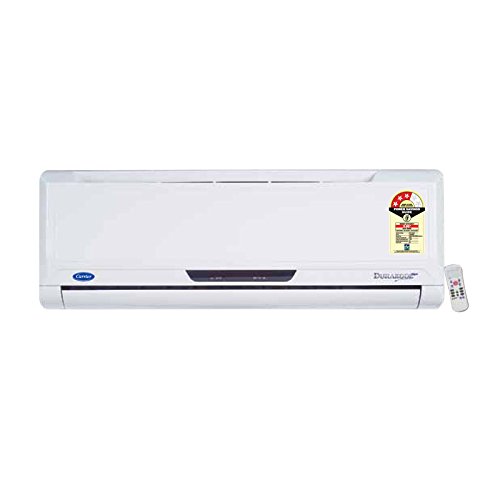
Figure 3.1: Carrier Durakool Plus Split AC Indoor Unit. This image shows the white indoor unit of the air conditioner, typically mounted on a wall.
4. Quraşdırma
The Carrier Durakool Plus is a split system air conditioner, requiring both an indoor and an outdoor unit. Professional installation is mandatory to ensure proper functioning, safety, and warranty validity.
4.1 Professional quraşdırma
Due to the complexity of refrigerant handling, electrical connections, and structural mounting, installation must be carried out by a certified HVAC technician. Attempting self-installation may void your warranty and pose significant safety risks.
4.2 Sayt seçimi
- Bağlı vahid: Select a location that allows for even air distribution throughout the room, away from direct sunlight or heat sources. Ensure sufficient space around the unit for maintenance.
- Xarici bölmə: Choose a well-ventilated area, free from obstructions, and away from direct sunlight or excessive dust. Ensure the unit is placed on a stable, level surface. The outdoor unit should be easily accessible for maintenance.
4.3 Elektrik bağlantısı
The unit requires a dedicated power circuit. The electrical wiring must comply with local and national electrical codes. Ensure the power source is properly grounded. Refer to the wiring diagram provided with the outdoor unit for specific connection details.
5. Əməliyyat Təlimatları
Your Carrier Durakool Plus AC unit is controlled via an LCD remote control. Familiarize yourself with the remote's functions for optimal use.
5.1 Uzaqdan İdarəetmə Funksiyaları
The remote control allows you to adjust temperature, fan speed, operating mode, and set timers. An LED display on the indoor unit will show current settings. Refer to the remote control's specific user guide for detailed button functions and display indicators.
- Güc düyməsi: Cihazı yandırır və ya söndürür.
- Rejim düyməsi: Cycles through operating modes: Auto, Cool, Dry, Fan, Heat (if applicable).
- Temperatur Düymələri (▲/▼): İstədiyiniz otaq temperaturunu tənzimləyir.
- Fan sürəti düyməsi: Fan sürətini seçir (Avtomatik, Aşağı, Orta, Yüksək).
- Yelləncək düyməsi: Activates or deactivates the automatic vertical air swing.
- Yuxu rejimi: Optimizes temperature and fan speed for comfortable sleep and energy saving.
- Taymer AÇIQ/SÖNDÜRÜLÜB: Sets a specific time for the unit to turn ON or OFF.
- Turbo rejimi: Provides rapid cooling by operating at maximum fan speed and cooling capacity.
- Avtomatik yenidən başladın: If power is interrupted, the unit will automatically restart with previous settings once power is restored.
6. Baxım
Regular maintenance ensures efficient operation and extends the lifespan of your air conditioner. Always disconnect power before performing any maintenance.
6.1 Hava filtrinin təmizlənməsi
The unit is equipped with an electrostatic dust filter and an active carbon filter. Clean these filters regularly (every 2-4 weeks, depending on usage and air quality) to maintain cooling efficiency and air quality.
- Turn off the AC unit and disconnect the power supply.
- Daxili blokun ön panelini açın.
- Hava filtrlərini diqqətlə çıxarın.
- Clean the filters using a vacuum cleaner or wash them with lukewarm water and a mild detergent. Rinse thoroughly.
- Filtrləri yenidən yerləşdirməzdən əvvəl kölgəli bir yerdə tamamilə qurumağa qoyun.
- Close the front panel and restore power.
6.2 Ümumi təmizləmə
- Wipe the indoor unit's exterior with a soft, damp parça. Sərt kimyəvi maddələrdən və ya aşındırıcı təmizləyicilərdən istifadə etməyin.
- Ensure the outdoor unit's coils are free from debris, leaves, and dirt. Use a soft brush or vacuum to clean the fins.
6.3 Mövsümi texniki qulluq
It is recommended to have your AC unit professionally serviced annually, especially before the cooling season, to check refrigerant levels, electrical connections, and overall system performance.
7. Giderme
Xidmətə müraciət etməzdən əvvəl aşağıdakı ümumi problemləri yoxlayın:
| Problem | Mümkün Səbəb | Həll |
|---|---|---|
| Vahid işə düşmür | No power supply; Remote control batteries depleted; Circuit breaker tripped. | Elektrik bağlantısını yoxlayın; Uzaqdan batareyaları dəyişdirin; Elektrik kəsicisini sıfırlayın. |
| Qeyri-kafi soyutma | Dirty air filters; Doors/windows open; Temperature setting too high; Outdoor unit obstructed. | Clean air filters; Close doors/windows; Lower temperature setting; Clear obstructions from outdoor unit. |
| Qeyri -adi səs -küy | Loose parts; Unit not level; Debris in fan. | Ensure unit is securely mounted; Check for and remove debris. If noise persists, contact service. |
| Daxili blokdan su sızması | Tıxanmış drenaj borusu; Yanlış quraşdırma. | Clear drain pipe obstruction; Contact professional for inspection. |
If the problem persists after attempting these solutions, please contact Carrier customer support or a qualified service technician.
8. Spesifikasiyalar
| Xüsusiyyət | Detal |
|---|---|
| Brend | Daşıyıcı |
| Model Adı | Durakool Plus 42KGL-024D+51MSG-024RD |
| Tutum | 2 ton |
| Soyutma Gücü | 6741 Vt |
| Enerji Effektivliyi | 2 Star BEE Rating |
| Xüsusi Xüsusiyyətlər | Anti Bacterial Filter, Electrostatic Dust Filter, Sleep Mode, Auto Restart, Auto Swing, Turbo Mode |
| Rəng | Ağ |
| Səs-küy səviyyəsi (Daxili) | 47 desibel |
| İnverter növü | İnverter yoxdur |
| Quraşdırma növü | Split sistemi |
| Kompressor növü | Dönər Sürüşdürmə |
| Əsas material | Mis |
| Güc mənbəyi | Kabelli Elektrik |
| Tövsiyə olunan Mərtəbə Sahəsi | 180 kvadrat fut |
| Nəzarət metodu | Uzaqdan İdarəetmə |
9. Zəmanət və Dəstək
9.1 Zəmanət Məlumatı
Your Carrier Durakool Plus AC unit comes with a limited warranty:
- 1 il zəmanət məhsulun üzərində.
- 5 il zəmanət kompressorun üstündə.
Please retain your purchase receipt and warranty card for any warranty claims. The warranty terms and conditions are detailed on the warranty card included with your product.
9.2 Müştəri dəstəyi
For technical assistance, service requests, or further inquiries, please contact Carrier customer support. Refer to your warranty card or the official Carrier webən son əlaqə məlumatları üçün sayt.
You can also visit the official Carrier store for more information: Carrier Store on Amazon.in