
1. Giriş
This manual provides essential information for the proper setup, operation, and maintenance of your Sony SLV-FT5 VHS Video Cassette Recorder (VCR). Please read these instructions thoroughly before using the unit to ensure optimal performance and safety.
2. Təhlükəsizlik Məlumatı
Yanğın, elektrik şoku və yaralanma riskini azaltmaq üçün bu məhsuldan istifadə edərkən həmişə əsas təhlükəsizlik tədbirlərinə əməl edin.
- Cihazı yağışa və ya nəmə məruz qoymayın.
- Şkafı açmayın. Xidməti yalnız ixtisaslı işçilərə müraciət edin.
- Düzgün havalandırma təmin edin; havalandırma deliklərini bağlamayın.
- Yalnız bu cihaz üçün nəzərdə tutulmuş enerji təchizatından istifadə edin.
- Cihazı istilik mənbələrindən və birbaşa günəş işığından uzaq tutun.
3. Quraşdırma
3.1 Qabın açılması
Carefully remove the VCR and all accessories from the packaging. Verify that all components are present: the SLV-FT5 VCR unit, remote control, and necessary connection cables (e.g., RCA audio/video cables).
3.2 Televiziyaya qoşulma
To connect the VCR to your television, use the provided RCA audio/video cables. Match the colored plugs to the corresponding colored jacks on both the VCR and your TV (Yellow for Video, White for Left Audio, Red for Right Audio).

Şəkil 1: Rear panel of the Sony SLV-FT5 VCR. This image displays the various input and output ports, including RCA jacks for audio and video, and the power input. The product label with model number SLV-FT5 and power specifications (100V 18W 50/60Hz) is also visible.
3.3 Enerji Bağlantısı
Plug the VCR's power cord into a standard electrical outlet (AC 100V, 50/60Hz). Ensure the power outlet is easily accessible.
3.4 Uzaqdan İdarəetmə Quraşdırması
Open the battery compartment on the back of the remote control and insert two AA batteries, observing the correct polarity (+/-). Close the compartment securely.

Şəkil 2: The Sony RMT-V219 remote control, designed for the SLV-FT5 VCR. This image also shows the included RCA audio/video cables, which are typically used for connecting the VCR to a television.
4. VCR-in idarə edilməsi
4.1 Yandırma/Söndürmə
düyməsini basın GÜC button on the VCR's front panel or the remote control to turn the unit on or off.
4.2 Loading and Unloading a VHS Tape
- Yüklənir: Insert a VHS cassette into the tape slot on the front of the VCR with the tape window facing forward. The VCR will automatically pull the tape in.
- Yükləmə: düyməsini basın ÇIXARIN button on the VCR or remote control. The tape will be ejected.
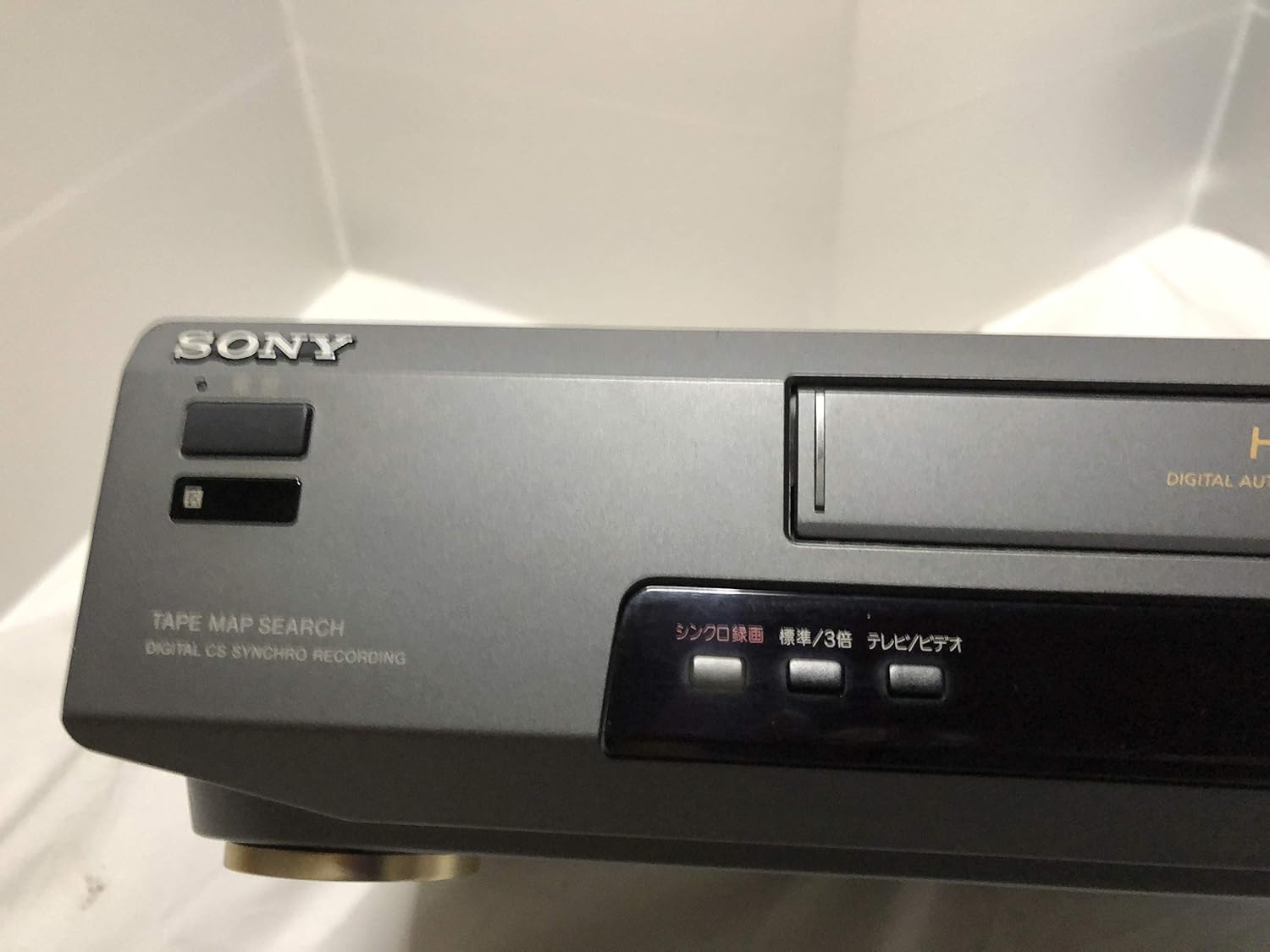
Şəkil 3: Front left section of the Sony SLV-FT5 VCR. This view highlights the tape loading slot and the 'TAPE MAP SEARCH' feature, which assists in navigating recorded content on a tape.
4.3 Oynatma
After loading a tape, press the OYNA button (►) on the VCR or remote control to begin playback. Use the PAUZA (∥), STOP (■), GERİ YÜRÜŞ (◀◀), and Sürətli İrəli (►►) buttons to control playback.

Şəkil 4: Front right section of the Sony SLV-FT5 VCR. This image displays the main playback controls (Play, Stop, Rewind, Fast Forward, Pause) and additional buttons for 'Quick Timer' and 'Tracking' adjustments.
4.4 Qeyd
To record, ensure a blank or recordable tape is inserted. Select the desired input source (e.g., TV channel). Press the REC (●) button on the VCR or remote control. Press STOP (■) to end recording.
4.5 Tracking Adjustment
If the picture quality during playback is poor (e.g., horizontal lines or noise), use the İZLƏMƏ buttons on the front panel or remote control to fine-tune the tape's alignment with the VCR's heads.
5. Baxım
5.1 Cihazın təmizlənməsi
Wipe the exterior of the VCR with a soft, dry cloth. For stubborn stains, use a cloth lightly dampened with a mild detergent solution, then wipe dry. Do not use abrasive cleaners or solvents.
5.2 Baş Təmizləmə
Over time, VCR heads can accumulate dirt, leading to poor picture and sound quality. Use a commercially available dry-type VHS head cleaning cassette according to its instructions. Avoid wet-type cleaners as they can damage the heads.
5.3 Saxlama
When not in use for extended periods, disconnect the VCR from the power outlet. Store the unit in a cool, dry place, away from dust and direct sunlight.
6. Giderme
If you encounter issues with your VCR, refer to the following common problems and solutions before seeking professional service.
| Problem | Mümkün Səbəb | Həll |
|---|---|---|
| Güc yoxdur | Elektrik kabeli ayrıldı; elektrik çıxışı problemi | Elektrik kabelinin əlaqəsini yoxlayın; fərqli çıxışı sınayın. |
| Şəkil/səs yoxdur | Incorrect TV input; loose A/V cables | Select correct TV input (e.g., Video 1, AV); ensure A/V cables are securely connected. |
| Poor picture quality (snowy, lines) | Dirty VCR heads; tracking issue; old/damaged tape | Clean VCR heads; adjust tracking; try a different tape. |
| Tape won't eject | Power issue; mechanical malfunction | Ensure power is on; try pressing EJECT multiple times. If issue persists, seek service. |
| Pult işləmir | Dead batteries; obstructed sensor | Replace batteries; ensure no obstacles between remote and VCR sensor. |
7. Spesifikasiyalar
| Xüsusiyyət | Spesifikasiya |
|---|---|
| Brend | Sony |
| Model nömrəsi | SLV-FT5 |
| Media növü | VHS |
| Qətnamə | 720 x 480 piksel |
| Məhsul Çəkisi | 4160 qram |
| Səs Çıxış Modu | Stereo |
| Dəstəklənən Audio Formatlar | Monaural, Stereo |
| Video Kodlaşdırma | Analoq |
| Uyğun Cihazlar | Televiziya |
| Giriş Video Uyğunluğu | NTSC |
| Güc Tələbləri | 100V, 18W, 50/60Hz |
8. Zəmanət və Dəstək
For warranty information and customer support, please refer to the documentation included with your purchase or visit the official Sony websayt. Zəmanət iddiaları üçün satınalma sübutunuzu saxlayın.