
1. Başlanğıc
1.1 Paketin məzmunu
Verify that all items are present in your Ultimate Ears Boom 2 package:
- Ultimate Ears Boom 2 Bluetooth Speaker
- Micro-USB şarj kabeli
- Enerji Adapteri (regiondan asılı olaraq dəyişə bilər)
1.2 Dinamikin doldurulması
Before initial use, fully charge your Ultimate Ears Boom 2 speaker. Connect the micro-USB cable to the charging port on the speaker and the other end to the power adapter, then plug into a wall outlet. The LED indicator will show charging status.

The Ultimate Ears Boom 2 speaker, ready for charging.
1.3 Bluetooth Qoşulması
Dinamikinizi Bluetooth aktiv cihaza qoşmaq üçün:
- Press and hold the Power button on the top of the speaker until you hear a tone and the LED flashes white.
- Mobil cihazınızda Bluetooth parametrlərinə keçin.
- Select 'UE Boom 2' from the list of available devices.
- Once connected, you will hear a confirmation tone from the speaker.

Üst view of the speaker, highlighting the power and Bluetooth pairing buttons.
1.4 Ultimate Ears App
For enhanced control and additional features, download the Ultimate Ears app from your device's app store (iOS 9.0 or later required for Apple devices, Android compatible). The app allows for remote power control, equalizer adjustments, and PartyUp mode.
2. Speaker Operation
2.1 Yandırma/Söndürmə
Press the Power button located on the top of the speaker to turn it on or off. A distinct sound will indicate the power status.
2.2 Səs səviyyəsinə nəzarət
Adjust the volume using the large '+' and '-' buttons located on the side of the speaker. You can also control the volume from your connected Bluetooth device.
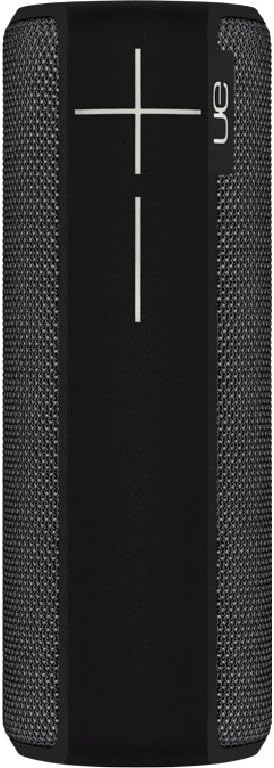
Yan view of the speaker, featuring the prominent volume control buttons.
2.3 Music Control (Tap Gestures)
The Boom 2 features tap controls for music playback:
- Bir kran: Tap the top of the speaker once to play or pause the current track.
- İki dəfə vurun: Tap the top of the speaker twice to skip to the next track.
2.4 Batareya Vəziyyəti
To check the battery level, press both the '+' and '-' volume buttons simultaneously. The speaker will announce the remaining battery percentage.
2.5 Suya davamlılıq və davamlılıq xüsusiyyətləri
The Ultimate Ears Boom 2 is designed to be waterproof (IPX7 rated) and shockproof. It can be immersed in water up to 1 meter for 30 minutes. Ensure the charging port cover is securely closed before exposing the speaker to water.

The speaker's waterproof design allows for use in various environments.

The Ultimate Ears Boom 2 demonstrating its water resistance.
2.6 PartyUp Mode (Connecting Multiple Speakers)
Use the Ultimate Ears app to connect multiple Boom speakers together for a more expansive sound experience. Follow the instructions within the app to activate PartyUp mode.
3. Qulluq və Baxım
3.1 Təmizləmə Təlimatları
Dinamikinizi təmizləmək üçün yumşaq, d istifadə edinamp cloth. Avoid using harsh chemicals or abrasive cleaners, as these can damage the speaker's finish or waterproof seals. Ensure the charging port is dry before charging.
3.2 Batareyanın Uzunömürlülüyü
To maximize battery life, avoid fully discharging the speaker frequently. Charge the speaker regularly, and if storing for an extended period, ensure it has at least a 50% charge.
3.3 Saxlama
Store the speaker in a cool, dry place away from direct sunlight and extreme temperatures. Ensure the charging port cover is closed to prevent dust and debris from entering.
4. Problemlərin aradan qaldırılması üçün təlimat
4.1 Güc yoxdur
- Ensure the speaker is charged. Connect it to the power adapter and allow it to charge for at least 15 minutes before attempting to power on.
- Güc düyməsini bir neçə saniyə möhkəm basıb saxlayın.
4.2 Bluetooth Bağlantı Problemləri
- Ensure the speaker is in pairing mode (flashing white LED).
- Mobil cihazınızda Bluetooth-u söndürün və yandırın.
- Forget 'UE Boom 2' from your device's Bluetooth list and attempt to re-pair.
- Move the speaker closer to your device; the maximum range is approximately 33 meters (100 feet).
4.3 Səs yoxdur və ya aşağı səs
- Həm dinamikdə, həm də qoşulmuş cihazda səs səviyyəsini artırın.
- Dinamikin Bluetooth vasitəsilə düzgün qoşulduğundan əmin olun.
- Check if the audio source on your device is playing correctly.
4.4 Sound Distortion
- Həm dinamikdə, həm də qoşulmuş cihazınızda səs səviyyəsini azaldın.
- Səsdən əmin olun file or streaming quality is not low.
- Move away from potential sources of interference (e.g., Wi-Fi routers, other Bluetooth devices).
4.5 Tətbiq Bağlantısı Problemləri
- Ensure your mobile device's operating system meets the app's requirements (iOS 9.0+).
- Tətbiqi yenidən başladın və ya yenidən quraşdırın.
- Ensure the speaker's firmware is up to date via the app.
5. Texniki spesifikasiyalar
| Xüsusiyyət | Spesifikasiya |
|---|---|
| Model Adı | Bum 2 |
| Model nömrəsi | 984-000557 |
| ASIN | B0141208EA |
| Bağlantı texnologiyası | Bluetooth, USB |
| Simsiz Rabitə Texnologiyası | Bluetooth |
| Uyğun Cihazlar | Computers, Smartphones (Android, iOS) |
| Batareya Ömrü | 15 saata qədər |
| Suya davamlı reytinq | IPX7 (up to 1 meter for 30 minutes) |
| Maksimum Aralıq | 33 metr (100 fut) |
| Dinamik Çıxış Gücü | 25 Vt |
| Məhsul Ölçüləri | 6.7D x 6.7W x 18H cm (approx. 15 x 5 x 5 cm; 0.54 grams) |
| Səs Çıxış Modu | Ətraf |
| Güc mənbəyi | Batareya ilə işləyir (1 Litium Polimer batareya daxildir) |
6. Zəmanət və Müştəri Dəstəyi
6.1 Məhdud Zəmanət
The Ultimate Ears Boom 2 comes with a Limited Warranty. For specific details regarding warranty coverage, terms, and conditions, please refer to the warranty documentation included with your product or visit the official Ultimate Ears websayt.
6.2 Müştəri dəstəyi
If you encounter any issues not covered in this manual or require further assistance, please contact Ultimate Ears customer support through their official website. For return policies or issues related to your purchase, consult the retailer's (e.g., Amazon.it) help pages.