
Giriş
This manual provides instructions for the setup, operation, maintenance, and troubleshooting of your Soundcandy Rave Ball Light Show Bluetooth Speaker. Please read this manual thoroughly before using the device to ensure proper function and longevity.
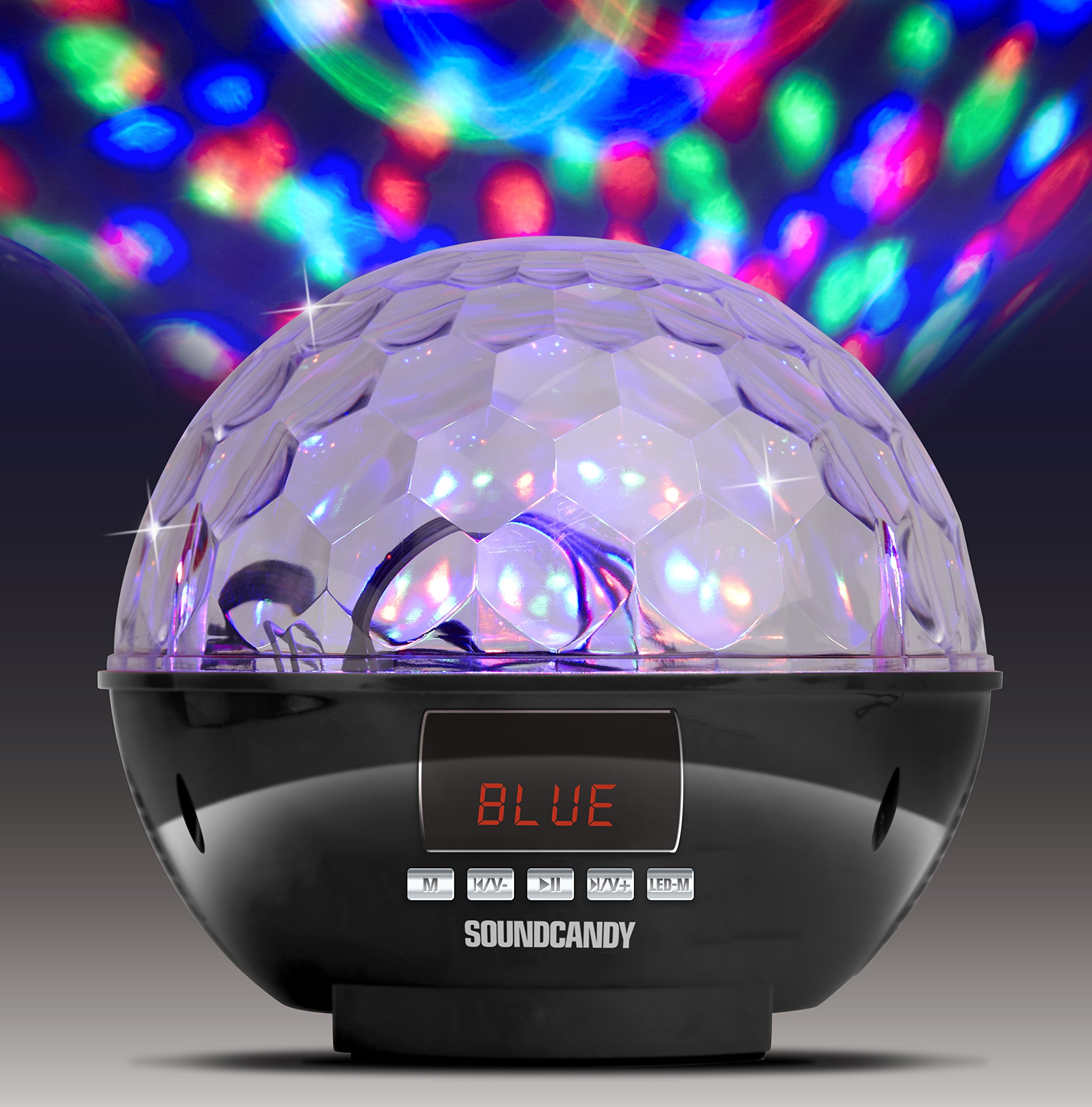
Image: The Soundcandy Rave Ball Light Show Bluetooth Speaker, a spherical device with a faceted top surface designed to project light patterns. The base contains control buttons and input ports.
Qutuda nə var
Qutudan çıxararkən bütün komponentlərin mövcud olduğundan əmin olun:
- Rave Ball Spikeri
- USB Şarj Kabeli (Note: Some packages may not include this cable.)
- 3.5mm Audio Cable (Note: Some packages may not include this cable.)
If any items are missing, please contact customer support.
Quraşdırma
1. Dinamikin doldurulması
- Dinamikdə şarj portunu tapın.
- Connect the provided USB charging cable to the speaker and a compatible USB power adapter (not included) or computer USB port.
- Şarj göstəricisi işığı yanacaq. Tam doldurma üçün təxminən 2-3 saat gözləyin.
- Tam şarj 4 saata qədər oynatma müddəti təmin edir.
2. Açma / Söndürmə
- To power on, press and hold the Power button until the device activates.
- Söndürmək üçün cihaz bağlanana qədər Güc düyməsini yenidən basıb saxlayın.
Əməliyyat Təlimatları
1. Bluetooth Cütləşdirmə
- Ensure the speaker is powered on and in Bluetooth mode (indicated by a specific light or display).
- Mobil cihazınızda Bluetooth-u aktiv edin və mövcud cihazları axtarın.
- Select "Soundcandy Rave Ball" from the list of devices.
- Once paired, the speaker will emit an audible confirmation, and you can begin playing audio from your device.
2. Playing Music from USB Drive or Micro SD Card
- Insert a USB drive or Micro SD card containing MP3 audio files dinamikdəki müvafiq porta daxil edin.
- The speaker will automatically detect the storage device and begin playing music.
- Use the control buttons on the speaker to navigate tracks (next/previous) and adjust volume.
3. Using Aux-in Connection
- Connect one end of a 3.5mm audio cable (if included) to the Aux-in port on the speaker.
- Connect the other end of the cable to the headphone jack or audio output of your external device (smartphone, radio, etc.).
- The speaker will automatically switch to Aux-in mode. Play audio from your external device.
4. FM Radio Əməliyyatı
- Switch the speaker to FM Radio mode.
- Use the control buttons to scan for available radio stations. The digital LCD display will show the station frequency.
- Səs səviyyəsini lazım olduqda tənzimləyin.
5. İşıq Şousu Rejimləri
- The speaker features a built-in rotation motor that creates a spinning light effect.
- There are four different light modes with various rotating lighting effects and colors.
- Press the "Light Mode" button (or similar, refer to device markings) to cycle through the available light patterns.
- The light effects are designed to fill a room with dynamic visuals.
Baxım
Təmizləmə
Dinamikinizin görünüşünü və funksionallığını qorumaq üçün:
- Xarici səthləri yumşaq, quru bir parça ilə silin.
- Aşındırıcı təmizləyicilər, həlledicilər və ya sərt kimyəvi maddələrdən istifadə etməyin.
- Hər hansı bir açılışa nəm daxil olmaqdan çəkinin.
Batareyaya qulluq
- Batareyanın ömrünü uzatmaq üçün tez-tez batareyanı tam boşaltmaqdan çəkinin.
- Dinamik uzun müddət saxlanılırsa, onu bir neçə aydan bir təxminən 50%-ə qədər doldurun.
Problemlərin aradan qaldırılması
| Problem | Mümkün Səbəb | Həll |
|---|---|---|
| Güc yoxdur | Batareya boşaldı. | USB şarj kabelindən istifadə edərək dinamiki doldurun. |
| Bluetooth vasitəsilə cütləşdirmək mümkün deyil | Dinamik cütləşmə rejimində deyil və ya cihazdan çox uzaqdadır. | Ensure speaker is in Bluetooth mode. Move device closer to speaker. Restart both devices. |
| Səs yoxdur | Volume too low, incorrect input mode, or faulty connection. | Increase volume on both speaker and connected device. Verify correct input mode (Bluetooth, USB, Aux, FM). Check cable connections. |
| İşıq şousu işləmir | Light mode is off or device malfunction. | Press the "Light Mode" button to activate or change patterns. If issue persists, contact support. |
Spesifikasiyalar
| Xüsusiyyət | Detal |
|---|---|
| Model nömrəsi | SC3002BKB-BT |
| Brend | səs konfeti |
| Rəng | Gümüş |
| Forma | Dəyirmi |
| Material | plastik |
| Bitirmə növü | Metal Gümüş |
| İşıq mənbəyi növü | İşıq Yayan Diod (LED) |
| Güc mənbəyi | Batareya ilə işləyir, Elektrik kabeli |
| Batareya növü | 1 Litium Polimer batareya (daxildir) |
| Batareya Ömrü | 4 saata qədər oyun |
| Montaj növü | Plug Montajı |
| Xüsusi Xüsusiyyətlər | Light Modes, FM Radio, Rechargeable Battery, Bluetooth Connectivity, USB/Micro SD Playback, Aux-in |
| İşıq mənbələrinin sayı | 4 |
| Maddə Çəkisi | 1.2 funt sterlinq |
| İstehsalçı | Gluten Free Palace - HPC |
| UPC | 814092020231 |
| ASIN | B017DV02P6 |
Zəmanət və Dəstək
Zəmanət Məlumatı
This product comes with a standard manufacturer's warranty. Please retain your proof of purchase for warranty claims. For specific warranty terms and conditions, refer to the documentation included with your purchase or contact the manufacturer directly.
Müştəri dəstəyi
If you encounter any issues not covered in the troubleshooting section or require further assistance, please contact Soundcandy customer support. Contact details can typically be found on the product packaging or the official Soundcandy websayt.