
1. Giriş
This manual provides detailed instructions for the installation, operation, and maintenance of your PolarLander Single DIN Multimedia Car Stereo. This versatile unit combines a car stereo, DVD player, and FM radio, offering multiple connectivity options including Bluetooth, USB, SD card, and Aux input. Please read this manual thoroughly before use to ensure proper functionality and safety.

Şəkil 1: Ön view of the PolarLander Single DIN Multimedia Car Stereo.
2. Quraşdırma
2.1. Paketin məzmunu
Before installation, verify that all components are present:
- 1 x In-dash Car DVD Player
- 1 x Uzaqdan İdarəetmə
- 1 x Elektrik kabeli
- 1 x Quraşdırma Aləti
- 1 x İngilis dili təlimatı
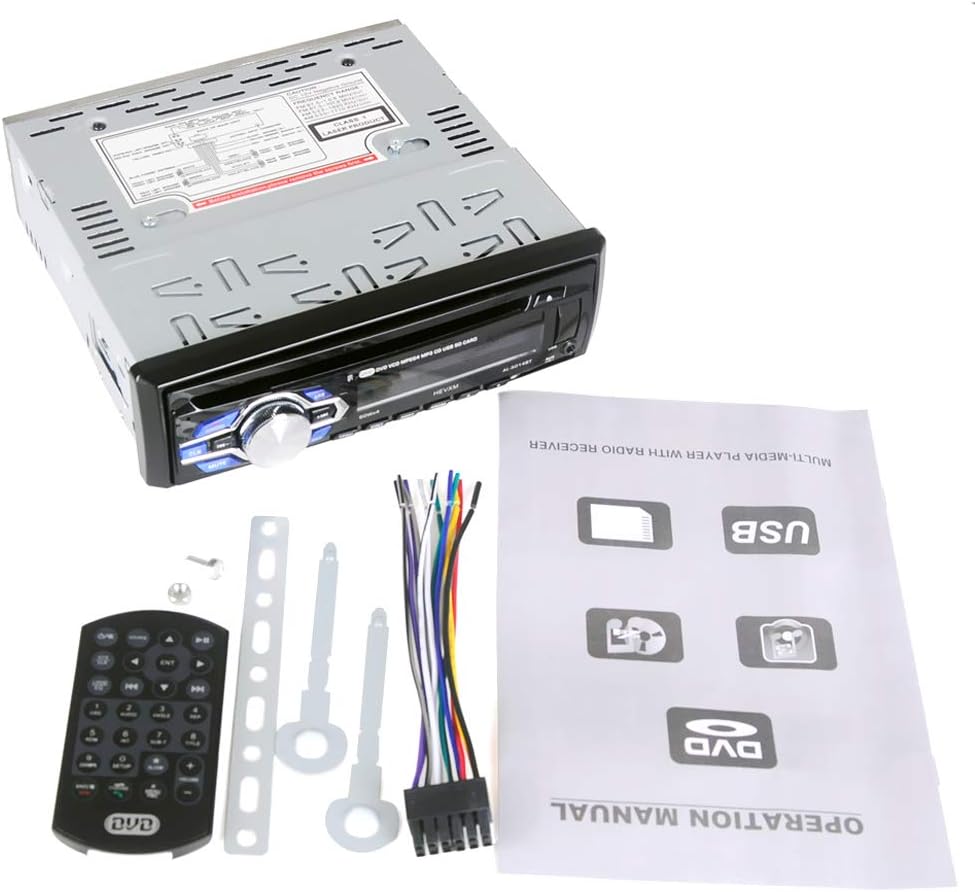
Figure 2: The car stereo unit along with its remote control, wiring harness, and installation tools.
2.2. Quraşdırma
Professional installation is recommended. Ensure the vehicle's power is disconnected before proceeding. Refer to the wiring diagram on the unit and in the included manual for correct connections. The unit requires a DC 12V power supply and has a maximum current draw of 10A.
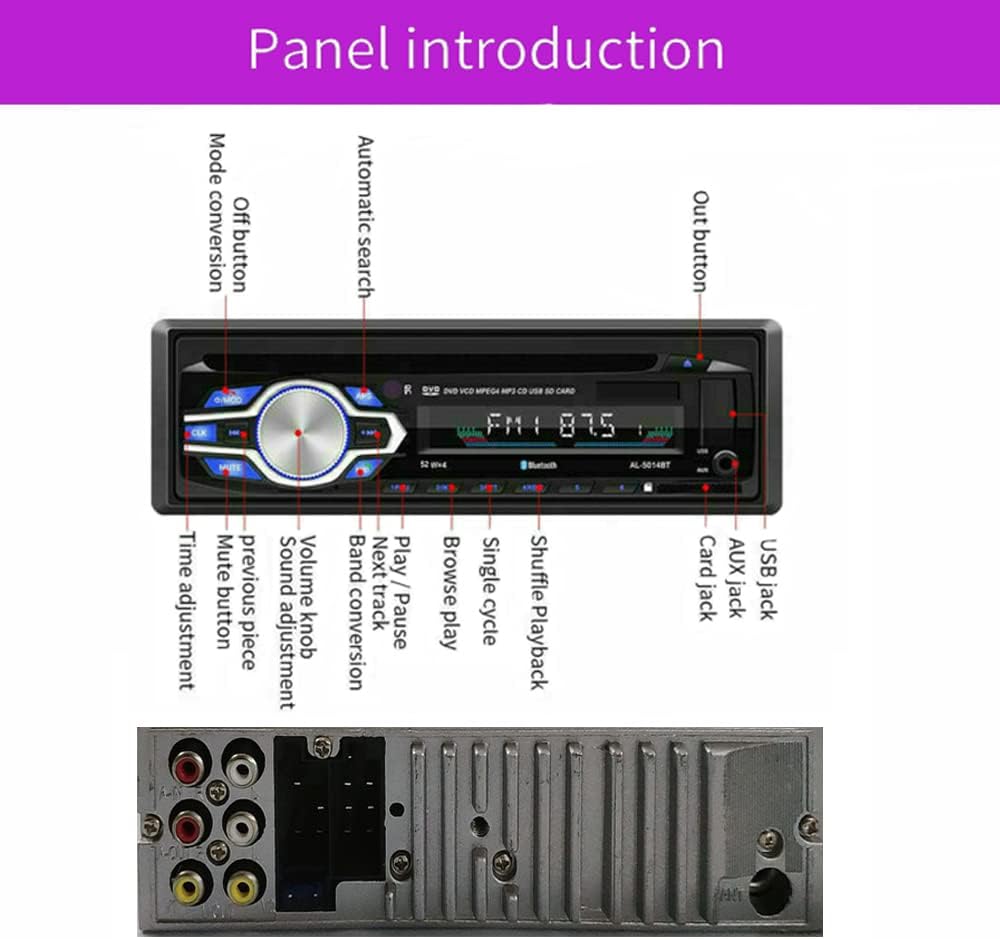
Figure 3: Rear panel of the car stereo, illustrating the wiring diagram and various input/output ports for installation.
3. Əməliyyat Təlimatları
3.1. Əsas Nəzarətlər
The front panel features a main rotary knob for volume control and various buttons for mode selection, mute, track navigation, and EQ settings. The unit also comes with a remote control for convenient operation.
3.2. Radio funksiyası
The unit supports FM radio with a frequency range of 87.50-108.00 MHZ. It features automatic search and storage for up to 18 radio stations across FM1/FM2/FM3 bands. Use the tuning buttons to scan for stations and the memory function to save your favorites.

Figure 4: The car stereo's display showing the FM radio function in operation.
3.3. DVD/CD Oynatma
Insert a DVD or CD into the disc slot. The player is compatible with DVD/DVD+R/DVD-R/DVD-RW/VCD/MP3/CD/CD-RW/CD-R/WMA formats. The DVD OSD (On-Screen Display) language is English. The unit supports external display output via RCA video outputs.

Figure 5: Illustrates inserting a DVD into the car stereo and its capability to connect to an external display.
3.4. USB/SD Kart Oynatma
The unit features built-in USB and SD card slots. The USB port supports flash drives or MP3 players up to 8GB. The SD card port supports SDHC cards up to 8GB. Simply insert your USB device or SD card to play MP3/WMA format audio files birbaşa.

Figure 6: The car stereo's front panel, highlighting the USB and SD card input slots.
3.5. Bluetooth bağlantısı
The car stereo has built-in Bluetooth and a microphone. Pair your cellphone to the unit to answer calls hands-free and stream music wirelessly. The unit supports Bluetooth audio streaming (BT Audio) and phone functions (BT Phone).

Şəkil 7: bitdiview of the car stereo's multimedia capabilities, including Bluetooth, USB, and AUX input.
3.6. USB şarj
The USB port also supports 5V charging for compatible cellphones, allowing you to listen to music and charge your device simultaneously.

Figure 8: The car stereo's USB port being used to charge a smartphone.
3.7. EQ Effects
Adjust the audio output with preset EQ effects: POP, ROCK, CLASSIC, and JAZZ. Use the EQ button to cycle through these options.
4. Məhsulun nümayişi videosu
Video 1: A demonstration of the PolarLander Single DIN Multimedia Car Stereo's features, including radio, USB, DVD, and Bluetooth functions.
5. Baxım
- Təmizləmə: Use a soft, dry cloth to clean the unit's exterior. Do not use abrasive cleaners or solvents.
- Disk Baxımı: Handle discs by their edges. Keep them clean and free of scratches to ensure optimal playback.
- Temperatur: Cihazı uzun müddət həddindən artıq temperaturda və ya birbaşa günəş işığında saxlamaqdan çəkinin.
6. Giderme
Problemlərlə qarşılaşsanız, aşağıdakı ümumi problemlərə və həll yollarına müraciət edin:
- Güc yoxdur: Check all power connections and the vehicle's fuse box. Ensure the unit is correctly wired to a 12V DC source.
- Səs yoxdur: Verify speaker connections. Check volume levels and ensure the unit is not muted. Confirm correct audio output settings.
- Disc Playback Issues: Ensure the disc is clean and free of scratches. Check if the disc format is supported.
- USB/SD Not Reading: Ensure the USB drive or SD card is formatted correctly (FAT32) and contains supported audio files (MP3/WMA). Check for maximum capacity limits (8GB for USB, 8GB for SDHC).
- Bluetooth Cütləmə Xətası: Ensure Bluetooth is enabled on both the stereo and your device. Make sure the device is discoverable and within range.
7. Spesifikasiyalar
| Xüsusiyyət | Detal |
|---|---|
| Enerji təchizatı | DC 12V |
| Max Cari | 10A |
| Amplifier Çıxış | 4*45W (7388) |
| Məhsul Ölçüsü (UxGxY) | 188mm x 170mm x 5.8mm |
| Xalis Çəki | 1.26 kq |
| Bluetooth | Built-in Bluetooth and Microphone |
| EQ effektləri | POP, ROCK, CLASSIC, JAZZ |
| USB portu | Supports USB flash drive/MP3 player (max 8G), 5V charging |
| SD Kart Portu | Supports SDHC Card (max 8G) |
| Uyğun Disk Formatları | DVD/DVD+R/DVD-R/DVD-RW/VCD/MP3/CD/CD-RW/CD-R/WMA |
| Radio FM Range | 87.50-108.00 MHZ |
| Giriş/Çıxış | 1 x Radio Antenna Input, 1 x Aux In Port, 2 x RCA Video Output, RCA Audio FL/FR/RL/RR/Subwoofer Output, 1 x USB In port |
| Xüsusi Xüsusiyyətlər | Auto-Memory Function, Built-in LCD Clock Display, Adjustable Function, Remote Control Function |
8. Zəmanət və Dəstək
For warranty information or technical support, please refer to the contact details provided with your purchase documentation or visit the official PolarLander websayt. Satınalma qəbzini alışın sübutu olaraq saxlayın.