
1. Giriş
This manual provides comprehensive instructions for the safe and effective use of the PCE Instruments PCE-170 A Light Meter. This device is designed for measuring illuminance (lux or foot-candles) in various environments, such as offices, factories, and outdoor settings. It features a wide measurement range, fast response time, and a compact design for ease of use.
Cihazı istifadə etməzdən əvvəl bu təlimatı diqqətlə oxuyun və gələcəkdə istifadə üçün saxlayın.
2. Təhlükəsizlik Məlumatı
Observe the following safety precautions to prevent injury and avoid damage to the device:
- Cihazı həddindən artıq temperatura, rütubətə və ya birbaşa günəş işığına məruz qoymayın.
- Güclü vibrasiya və ya təsirlərdən çəkinin.
- Cihazı açmağa və ya dəyişdirməyə cəhd etməyin. Bütün xidmət işlərini ixtisaslı mütəxəssislərə həvalə edin.
- Keep the light sensor clean and free from obstructions to ensure accurate readings.
- Sızmanın qarşısını almaq üçün cihaz uzun müddət istifadə edilməyəcəksə, batareyanı çıxarın.
- Batareyaları və cihazı yerli qaydalara uyğun atın.
3. Məhsul bitdiview
The PCE-170 A Light Meter consists of a main unit with a display and control buttons, and an integrated light sensor.

Şəkil 1: Ön view of the PCE-170 A Light Meter, showing the display, control buttons, and light sensor at the top.
3.1 Komponentlər
- İşıq Sensoru: Located at the top of the device, protected by a white dome. This silicon photodiode measures incident light.
- LCD displey: A 5-digit display showing measurement values, units (lux/fc), and function indicators (e.g., AUTO RANGE, HOLD, MIN, MAX).
- Güc düyməsi (Açma/Söndürmə): Cihazı yandırır və ya söndürür.
- CAL düyməsi: Used for zero adjustment.
- TUTMA Düyməsi: Ekrandakı cari oxunuşu dondurur.
- fc/lx Button: Toggles between foot-candle (fc) and lux (lx) measurement units.
- RANGE düyməsi: Manually selects measurement ranges or activates auto-ranging.
- Batareya bölməsi: Located at the rear, houses the 9V battery.

Şəkil 2: Yaxın plan view of the LCD display, showing a reading of "534 lx" and "AUTO RANGE 4 000".
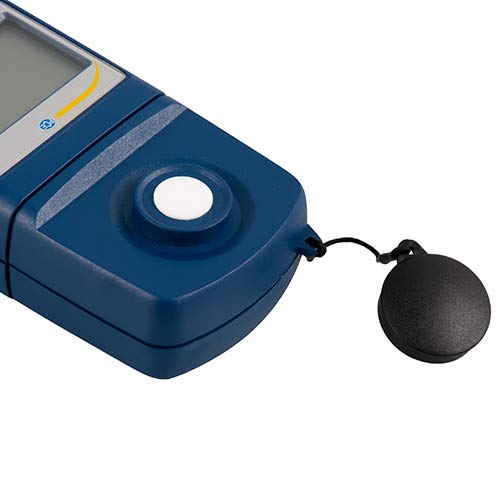
Şəkil 3: Ətraflı view of the light sensor at the top of the device, with its protective cap removed.
4. Quraşdırma
4.1 Batareyanın quraşdırılması
- Cihazın arxasındakı batareya bölməsinin qapağını tapın.
- Slide the cover open or unscrew it, depending on the model.
- Insert one 9V battery, observing the correct polarity (+/-).
- Batareya bölməsinin qapağını etibarlı şəkildə dəyişdirin.
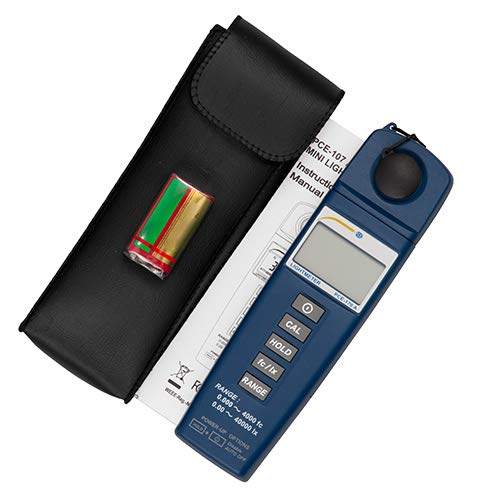
Şəkil 4: The PCE-170 A Light Meter shown with its carrying case and the included 9V battery, ready for installation.
4.2 İlkin işə salınma
düyməsini basın Güc button to turn on the device. The display will illuminate and show a reading. If the battery symbol appears, replace the battery.
5. Əməliyyat Təlimatları
5.1 Ölçmə
- istifadə edərək cihazı yandırın Güc düyməsi.
- Ensure the light sensor is clean and unobstructed.
- Position the light sensor at the location where illuminance is to be measured. Ensure the sensor is facing the light source directly for accurate readings.
- The current illuminance value will be displayed on the LCD.

Şəkil 5: A user measuring light levels in an office environment with the PCE-170 A Light Meter.
5.2 Changing Measurement Units (fc/lx)
düyməsini basın fc/lx button to toggle between foot-candles (fc) and lux (lx) units. The selected unit will be indicated on the display.
5.3 HOLD funksiyası
düyməsini basın BAXIN Ekrandakı cari göstəricini dondurmaq üçün düyməni basın. Saxlamanı buraxmaq və canlı ölçmələrə davam etmək üçün yenidən basın.
5.4 Zero Adjustment (CAL)
Sıfır tənzimləmə etmək üçün:
- Place the light sensor in a completely dark environment (e.g., cover it with the protective cap or place it in a dark box).
- düyməsini basın KAL düyməsinə basın. Ekranda "0.00" və ya sıfıra çox yaxın bir dəyər göstərilməlidir.
- If the display does not show zero, repeat the process.
5.5 Aralığın seçimi
The device typically operates in auto-ranging mode. To manually select a range or cycle through available ranges, press the RANGE button. The display will indicate the active range. Press and hold the RANGE button to return to auto-ranging mode.
5.6 Min/Max Function (Power-Up Option)
The PCE-170 A supports Min/Max recording. To activate this feature, refer to the power-up options indicated on the device label (e.g., press and hold a specific button during power-on). This function records the minimum and maximum illuminance values detected during a measurement session.
6. Baxım
6.1 Təmizləmə
Wipe the device with a soft, dry cloth. Do not use abrasive cleaners or solvents. Keep the light sensor clean and free of dust or smudges, as this can affect measurement accuracy.
6.2 Saxlama
When not in use, store the PCE-170 A Light Meter in its carrying case in a cool, dry place, away from direct sunlight and extreme temperatures. Remove the battery if storing for extended periods.
7. Giderme
| Problem | Mümkün Səbəb | Həll |
|---|---|---|
| Cihaz açılmır. | Ölü və ya səhv quraşdırılmış batareya. | Batareyanın qütblüyünü yoxlayın və ya yeni 9V batareya ilə əvəz edin. |
| Ekranda "OL" (Artıq yüklənmə) göstərilir. | Light intensity exceeds the current measurement range. | Switch to a higher measurement range using the RANGE button, or move to a less intensely lit area. |
| Qeyri-dəqiq oxunuşlar. | Dirty sensor, incorrect zero adjustment, or sensor not facing light source correctly. | Clean the sensor, perform zero adjustment in darkness, and ensure the sensor is properly oriented. |
| Ekran boşdur və ya titrəyir. | Aşağı batareya. | 9V batareyanı dəyişdirin. |
8. Spesifikasiyalar
| Parametr | Dəyər |
|---|---|
| Ölçmə diapazonları | 0.00 ... 40,000 lux / 0.000 ... 4000 fc |
| Qətnamə | 0.01 lüks / 0.001 fc |
| Dəqiqlik | ±3% of measurement value + 5 digits |
| Aşırı yükləmə göstəricisi | "OL" |
| Ölçmə dərəcəsi | Hər 2 saniyədən bir |
| İşləmə temperaturu | 0 ... 40°C / 32 ... 104°F |
| İşıq sensoru | Silicon photodiode, corrected cosine angle |
| Ekran | 5 rəqəmli LCD |
| Güc mənbəyi | 9V batareya (daxildir) |
| Ölçülər | 33 x 54 x 196 mm / 1.3 x 2.1 x 7.7 düym |
| Çəki | 180 g / <1 lb (approx. 9.17 ounces) |
8.1 Çatdırılma sahəsi
The standard delivery package includes:
- 1 x PCE-170 A Lux Meter
- 1 x 9V batareya
- 1 x Daşıma çantası
- 1 x İstifadəçi təlimatı (bu sənəd)
9. Zəmanət və Dəstək
PCE Instruments provides a warranty for this product against defects in materials and workmanship. For specific warranty terms and conditions, please refer to the warranty card included with your purchase or visit the official PCE Instruments website. For technical support, service, or calibration inquiries, please contact PCE Instruments customer service.
PCE Instruments US: Mağazaya baş çəkin