
1. Giriş
This manual provides comprehensive instructions for the HeiL PR781 Performance Studio Microphone system. The system comprises the HeiL PR781 dynamic cardioid microphone, an Auray SSM-BC10 Suspension Shockmount, and an Auray BAI-2X Two-Section Broadcast Arm. This integrated system is engineered for professional audio capture in various settings, including amateur radio, broadcasting, voiceovers, and podcasting, ensuring high-quality speech reproduction and effective isolation from mechanical noise.
Əsas Xüsusiyyətlər:
- Tezliyə cavab: 50 Hz - 16,000 Hz
- Empedans: Balanced 600 Ohms Out, 3-pin XLR
- Qütb nümunəsi: Kardioid
- Çıxış Level: -55 dB
- Diafraqma: Low-mass aluminum
- Bitir: Black Satin Epoxy

Figure 1.1: The complete HeiL PR781 microphone system, including the microphone, suspension shockmount, and two-section broadcast arm.
2. Quraşdırma
Proper setup is crucial for optimal performance of your HeiL PR781 microphone system. Follow these steps carefully.
2.1 Qablaşdırmanın açılması və komponentlərin müəyyənləşdirilməsi
Carefully remove all components from the packaging. Verify that you have the following items:
- HeiL PR781 Dynamic Microphone
- Auray SSM-BC10 Suspension Shockmount
- Auray BAI-2X Two-Section Broadcast Arm with integrated XLR cable

Figure 2.1: The HeiL PR781 Dynamic Microphone.

Figure 2.2: The Auray SSM-BC10 Suspension Shockmount.
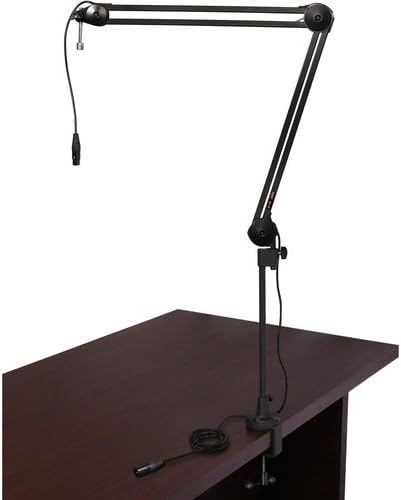
Figure 2.3: The Auray BAI-2X Two-Section Broadcast Arm.
2.2 Assembling the Microphone and Shockmount
- Gently insert the HeiL PR781 microphone into the Auray SSM-BC10 Suspension Shockmount. Ensure the microphone is securely seated within the shockmount's clips or cradle.
- Tighten any securing mechanisms on the shockmount to hold the microphone firmly in place without over-tightening.
2.3 Attaching the Broadcast Arm to a Desk
- Select a sturdy desk or table edge for mounting the broadcast arm.
- C-cl əlavə edinamp base of the Auray BAI-2X Broadcast Arm to the chosen surface.
- C-cl-ni sıxınamp securely until the arm base is stable and does not wobble.
- Insert the broadcast arm into the base. Ensure it is fully seated and secured, typically with a set screw or locking mechanism.
2.4 Mounting the Microphone Assembly to the Broadcast Arm
- Screw the assembled microphone and shockmount onto the threaded stud at the end of the broadcast arm.
- Ensure the shockmount is oriented correctly, allowing the microphone's front address to face the sound source.
- Adjust the angle and position of the microphone using the arm's joints and pivot points.
2.5 Connecting the XLR Cable
- Connect the integrated XLR cable from the broadcast arm to the XLR input on the HeiL PR781 microphone.
- Connect the other end of the XLR cable to your audio interface, mixer, or amateur radio transceiver.
- Ensure all connections are firm and secure to prevent signal loss or interference.
3. Əməliyyat Təlimatları
The HeiL PR781 is designed for clear voice reproduction. Follow these guidelines for optimal operation.
3.1 Mikrofonun Yerləşdirilməsi
- Position the microphone approximately 6 to 12 inches (15-30 cm) from your mouth.
- Speak directly into the front of the microphone (the end with the HeiL logo) for best results, utilizing its cardioid polar pattern to reject off-axis sounds.
- Adjust the broadcast arm to maintain a consistent distance and angle during use.
3.2 Gain and Audio Settings
- Adjust the input gain on your audio interface, mixer, or radio transceiver to achieve an appropriate signal level. Avoid clipping (distortion) by keeping peak levels below the maximum input.
- The PR781 is compatible with various amateur radio transceivers, including models from Kenwood, Yaesu, Ten Tec, and iCOM. Refer to your transceiver's manual for specific microphone input settings and equalization adjustments.
- Experiment with your device's equalizer settings to tailor the microphone's sound to your voice and desired audio characteristics. Many users find adjusting low and high frequencies beneficial for voice clarity.
4. Baxım
Regular maintenance helps ensure the longevity and performance of your microphone system.
4.1 Təmizləmə
- Use a soft, dry cloth to wipe down the microphone body, shockmount, and broadcast arm.
- İnadkar kirlər üçün bir az damp cloth with mild soap can be used, followed by a dry cloth. Avoid harsh chemicals or abrasive cleaners.
- Do not spray cleaning solutions directly onto the microphone grille or electronic components.
4.2 Komponentlərə qulluq
- Periodically check all screws and connections on the broadcast arm and shockmount for tightness.
- Inspect the integrated XLR cable for any signs of wear or damage. Replace if necessary.
- Be aware that the plastic insert/collar in some broadcast arm table mounts may degrade over time. If the arm becomes wobbly, inspect this component for wear and consider replacement if it is the cause.
5. Giderme
If you encounter issues with your HeiL PR781 microphone system, refer to the following troubleshooting tips.
5.1 Səs çıxışı yoxdur
- Bağlantıları yoxlayın: Ensure all XLR cables are securely connected at both the microphone and the audio input device.
- Giriş seçimi: Verify that the correct input channel is selected on your mixer, audio interface, or radio.
- Qazanma Parametrləri: Confirm that the input gain is not set to minimum or muted on your audio device.
- Kabel bütövlüyü: Test with a different XLR cable if possible, to rule out a faulty cable.
5.2 Poor Audio Quality (Distortion, Low Volume, Hum)
- Qazanc Tənzimlənməsi: If audio is distorted, reduce the input gain. If volume is too low, increase the gain.
- Mikrofonun Yerləşdirilməsi: Ensure the microphone is positioned correctly and not too close or too far from the sound source.
- Ekoloji səs-küy: Check for sources of electrical interference (e.g., power cables, fluorescent lights) near the microphone or cables.
- Kabel Uyğunluğu: While the integrated XLR cable is standard, some older or specialized radio equipment may require specific wiring configurations. Consult your radio's manual if issues persist.
- Shockmount Effectiveness: Ensure the shockmount is properly installed and isolating the microphone from desk vibrations.
6. Spesifikasiyalar
| Xüsusiyyət | Spesifikasiya |
|---|---|
| Brend | HeiL |
| Model nömrəsi | PR-781 |
| Mikrofon Forma Faktoru | Cədvəl Massivi |
| Qütb nümunəsi | Kardioid (bir istiqamətli) |
| Tezliyə cavab | 50 Hz - 16,000 Hz |
| Empedans | 600 Ohm |
| Output Level (Audio Sensitivity) | -55 dB (55 Decibels) |
| Siqnal-to-küy nisbəti | 55 dB |
| Bağlantı texnologiyası | XLR |
| Bağlayıcı növü | XLR |
| Uyğun Cihazlar | Radio |
| Material | Alüminium |
| Rəng | Qara |
| Məhsulun Ölçüləri (U x G x Y) | 7 x 6 x 3 düym |
| Maddə Çəkisi | 1 funt (16 unsiya) |
| Daxil olan komponentlər | Mikrofon |
7. Zəmanət Məlumatı
This product is covered by a manufacturer's warranty. For detailed information regarding warranty terms, conditions, and duration, please refer to the official HeiL Sound website or the warranty card included with your product packaging. Please retain your proof of purchase for any warranty claims.
8. Dəstək
For technical assistance, troubleshooting beyond this manual, or customer service inquiries, please contact HeiL Sound directly. Their official website typically provides contact information, FAQs, and additional resources.
- İstehsalçı: Heil Sound, Ltd.
- Websayt: www.heilsound.com (Please verify current URL)