
1. Giriş
This manual provides instructions for the proper setup, operation, and maintenance of your Acer B247Y 23.8-inch LED LCD Monitor. Please read this manual thoroughly before using your monitor to ensure optimal performance and to prevent damage.
The Acer B247Y is a 23.8-inch Full HD (1920 x 1080) monitor featuring an IPS panel for wide viewing angles, an anti-glare display, and a frameless design on three sides. It includes multiple connectivity options and an ergonomic stand for comfortable viewing.
2. Paketin məzmunu
Verify that all items are present in your package. If any items are missing or damaged, contact your retailer.
- Acer B247Y 23.8-inch LED LCD Monitor
- Monitor Stend (Baza və Boyun)
- Power Adapter (Internal) and Power Cable
- VGA Kabel
- DisplayPort 1.2 Kabel
- HDMI Kabel
- Audio-in Cable (if included)
- Audio-out Cable (if included)
- İstifadəçi Təlimatı (bu sənəd)
3. Quraşdırma
3.1 Monitor stendinin yığılması
The monitor comes with a detachable foot stand. Follow these steps to assemble:
- Monitor və dayaq komponentlərini qablaşdırmadan ehtiyatla çıxarın.
- Stend boynunu monitor panelinə bərkidin. Onun təhlükəsiz şəkildə yerinə oturduğundan əmin olun.
- Attach the stand base to the stand neck. Tighten any screws if provided, usually located on the underside of the base.
- Yığılmış monitoru sabit, düz bir səthə qoyun.
Qeyd: The monitor also supports VESA mount (100 x 100 mm) for wall or arm mounting. Refer to your VESA mount kit instructions for installation.
3.2 Monitorun qoşulması
Müvafiq kabellərdən istifadə edərək monitoru kompüterinizə və ya digər cihazlara qoşun.
- Video bağlantısı:
- Connect one end of the DisplayPort cable to the DisplayPort output on your computer and the other end to the DisplayPort input on the monitor.
- Alternatively, connect an HDMI cable from your computer's HDMI output to the monitor's HDMI input.
- For older systems, connect a VGA cable from your computer's VGA output to the monitor's VGA input.
- Səs bağlantısı:
- If using VGA or DisplayPort without audio, connect an audio cable from your computer's audio output to the monitor's audio-in port for integrated speakers.
- To connect external speakers or headphones, use the monitor's audio-out port.
- Enerji bağlantısı:
- Elektrik kabelini monitorun enerji girişinə qoşun, sonra digər ucunu torpaqlanmış elektrik rozetkasına qoşun.

Figure 3.2.1: Acer B247Y Monitor with Stand. This image illustrates the overall appearance of the monitor when fully assembled on its stand.
4. Əməliyyat Təlimatları
4.1 Yandırma/Söndürmə
Monitoru yandırmaq və ya söndürmək üçün adətən monitorun aşağı sağ və ya arxa hissəsində yerləşən güc düyməsini basın. Monitor açıq olduqda güc göstəricisi işığı yanacaq.
4.2 Adjusting Monitor Settings (OSD)
The monitor features an On-Screen Display (OSD) menu for adjusting various settings. Use the control buttons (typically located near the power button) to navigate and select options within the OSD menu.
Ümumi OSD parametrlərinə aşağıdakılar daxildir:
- Şəkil: Brightness, Contrast, Color Temperature, Gamma, Acer eColor Management modes (e.g., Dark Room, Eco).
- Audio: Volume control for integrated speakers or audio-out.
- Giriş: Select the active video input source (VGA, DisplayPort, HDMI).
- OSD: OSD timeout, language.
- İdarəetmə: Zavod parametrlərinə yenidən qurun.
4.3 Erqonomik Tənzimləmələr
The Acer B247Y monitor stand offers several ergonomic adjustments to optimize your viewtəcrübə:
- Əymək: Adjust the screen angle from -5 degrees to 25 degrees (forward/backward).
- Fırlanan: Rotate the monitor horizontally up to +/- 45 degrees.
- Hündürlük tənzimlənməsi: Adjust the screen height by up to 120mm.
- Pivot: Portret üçün ekranı 90 dərəcə çevirin viewing.
5. Baxım
Düzgün qulluq monitorunuzun uzunömürlülüyünü və optimal işləməsini təmin edir.
- Ekranın təmizlənməsi: Ekranı yumşaq, tüysüz bir parça ilə yumşaq bir şəkildə silin. İnadkar izlər üçün dampen the cloth with a small amount of water or a non-abrasive screen cleaner. Do not spray liquid directly onto the screen.
- C-nin təmizlənməsiasing: Monitoru təmizləmək üçün yumşaq, quru bir parça istifadə edin.asing. Güclü yuyucu vasitələrdən və ya aşındırıcı təmizləyicilərdən istifadə etməkdən çəkinin.
- Havalandırma: Həddindən artıq istiləşmənin qarşısını almaq üçün monitordakı havalandırma deliklərinin bağlanmadığından əmin olun.
- Söndürmək: Always turn off the monitor and unplug it from the power outlet before cleaning or when not in use for extended periods.
6. Giderme
Monitorunuzla bağlı problemlərlə qarşılaşsanız, aşağıdakı ümumi problemlərin aradan qaldırılması addımlarına baxın:
- No Power / Monitor Does Not Turn On:
- Ensure the power cable is securely connected to both the monitor and a working electrical outlet.
- Elektrik rozetkasının işlək olduğunu başqa bir cihaza qoşaraq yoxlayın.
- Güc düyməsini möhkəm basın.
- No Image / "No Signal" Message:
- Check that the video cable (DisplayPort, HDMI, or VGA) is securely connected to both the monitor and your computer.
- Kompüterinizin açıldığından və yuxu rejimində olmadığından əmin olun.
- Use the OSD menu to manually select the correct input source.
- Əgər varsa, fərqli bir video kabeli və ya portu sınayın.
- Image is Distorted or Unclear:
- Ensure the display resolution on your computer is set to the monitor's native resolution (1920 x 1080).
- Adjust brightness, contrast, and other picture settings via the OSD menu.
- Check for any physical damage to the screen or cables.
- Dinamiklərdən səs yoxdur:
- Increase the volume using the OSD menu or your computer's sound settings.
- Ensure the audio cable (if used) is properly connected.
- Kompüterinizin səs parametrlərində düzgün səs çıxışı cihazının seçildiyini yoxlayın.
7. Spesifikasiyalar
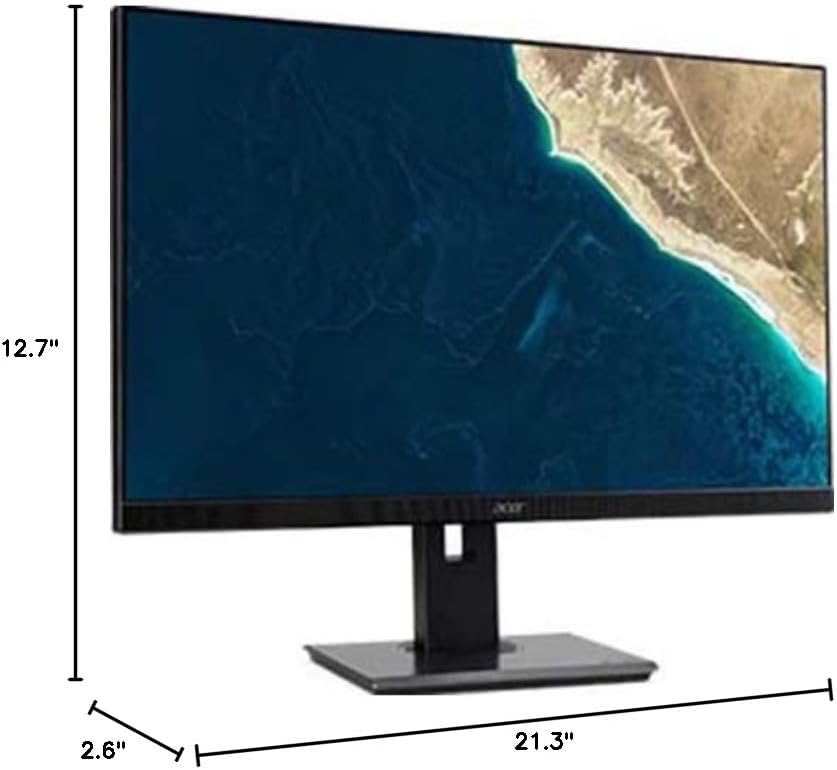
Figure 7.1.1: Acer B247Y Monitor Dimensions. This image shows the approximate height (12.7"), width (21.3"), and depth (2.6") of the monitor without the stand.
| Xüsusiyyət | Spesifikasiya |
|---|---|
| Model nömrəsi | B247Y |
| Ekran Ölçüsü | 23.8 düym (60.5 sm) |
| Ekran növü | LED LCD, IPS Panel, Anti-glare (AG) |
| Maksimum Çözünürlük | 1920 x 1080 (Full HD) |
| Aspekt nisbəti | 16:9 |
| Yeniləmə dərəcəsi | 75 Hz |
| Cavab vaxtı | 4ms (gray-to-gray) |
| Parlaqlıq (tipik) | 250 cd/m² |
| Yerli kontrast nisbəti | 1,000:1 |
| Dinamik kontrast nisbəti | 100,000,000:1 |
| Viewaçılar (H/V) | 178° / 178° |
| Bağlantı | VGA, DisplayPort 1.2, HDMI, Audio-in, Audio-out |
| İnteqrasiya Dinamiklər | 2 x 2.0 Vt |
| Erqonomik Tənzimləmələr | Tilt (-5° to 25°), Swivel (+/- 45°), Height Adjustment (120mm), Pivot (90°) |
| VESA Mount Support | 100 x 100 mm |
| Stend ilə ölçülər (G x Y x D) | 21.3" x 14.9"~19.6" x 7.6" (54.0cm x 37.9cm~49.9cm x 19.3cm) |
| Stend ilə çəki | 12.3 funt (5.6 kq) |
| Güc adapteri | Daxili |
| Rəng | Qara |
8. Zəmanət və Dəstək
Your Acer B247Y monitor comes with a Limited Three-Year Warranty. Please retain your proof of purchase for warranty claims.
For technical support, service, or warranty inquiries, please refer to the official Acer support website or contact their customer service department. Contact information can typically be found on the Acer websaytda və ya məhsulunuzla birlikdə verilən zəmanət kartında.
Kensington Kilidi: The monitor supports a Kensington lock for security. Attach a compatible Kensington lock (sold separately) to the security slot on the monitor to deter theft.