
Easytry123 Easytry2094
Easytry123 Replacement Remote Control User Manual
For Samsung HW-J450/ZA, PS-WJ651, PS-WJ470/ZA, HW-J6502, HW-J650 Audio Soundbar Systems
1. Giriş
This manual provides instructions for the Easytry123 replacement remote control, designed for use with various Samsung audio soundbar systems. This remote control offers basic functionality for compatible models. Please note that as a replacement unit, it may not support all advanced functions of the original remote control.
Uyğun Modellər:
- Samsung HW-J450/ZA
- Samsung PS-WJ651
- Samsung PS-WJ651/ZA
- Samsung PS-WJ470/ZA
- Samsung HW-J6502
- Samsung HW-J650
2. Quraşdırma
2.1 Batareyanın quraşdırılması
The remote control requires batteries for operation. Batteries are not included with the remote control and must be purchased separately. This remote typically uses standard Lithium batteries.
- Pultun arxasındakı batareya bölməsini tapın.
- Remove the battery compartment cover by sliding or gently prying it open.
- Bölmənin içərisində göstərildiyi kimi düzgün qütblüyü (+ və -) təmin edərək yeni batareyaları yerləşdirin.
- Batareya bölməsinin qapağını yerinə etibarlı şəkildə oturana qədər bağlayın.

Figure 1: Remote control with battery compartment open.
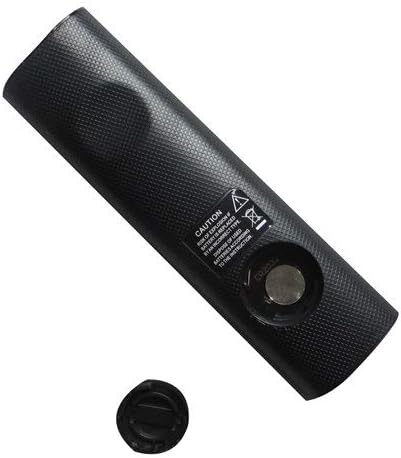
Figure 2: Remote control showing the battery cap detached.
2.2 İlkin İstifadə
This remote control utilizes infrared (IR) technology. No complex pairing or programming is typically required. Once batteries are installed, point the remote directly at your Samsung soundbar system and begin operation.
3. Əməliyyat Təlimatları
The remote control features 15 buttons for various functions. While specific button labels may vary, common functions include:
- Güc: Turns the soundbar system on or off.
- Səs artır/aşağı: Audio çıxış səviyyəsini tənzimləyir.
- Səssiz: Səs çıxışını səssizləşdirir.
- Giriş/Mənbə: Cycles through available audio input sources (e.g., HDMI, Optical, Bluetooth).
- Naviqasiya düymələri: Used for menu navigation (if supported by the soundbar and remote).
- Oynatma nəzarətləri: Play, Pause, Skip (if controlling a connected media device).
For optimal performance, ensure a clear line of sight between the remote control and the soundbar's IR receiver. The maximum effective range is approximately 10 meters (33 feet).
4. Baxım
4.1 Batareyanın dəyişdirilməsi
Replace batteries when the remote control's response becomes inconsistent or stops working. Always replace all batteries at the same time with new ones of the same type. Do not mix old and new batteries, or different types of batteries.
4.2 Təmizləmə
To clean the remote control, wipe it with a soft, dry cloth. Do not use liquid cleaners, abrasive pads, or chemical solvents, as these can damage the remote's surface or internal components.
4.3 Saxlama
Pultu birbaşa günəş işığından və həddindən artıq temperaturdan uzaq sərin, quru yerdə saxlayın. Pult uzun müddət istifadə edilməyəcəksə, sızmanın qarşısını almaq üçün batareyaları çıxarmaq tövsiyə olunur.
5. Giderme
- Pult cavab vermir:
- Batareyaların düzgün polarite ilə düzgün daxil edilib-edilmədiyini yoxlayın.
- Batareyaları təzələri ilə əvəz edin.
- Ensure there is a clear line of sight between the remote and the soundbar's IR receiver. Remove any obstructions.
- Make sure you are within the effective operating range (approximately 10 meters).
- Bəzi funksiyalar işləmir:
- As a replacement remote, it may not support all advanced or specific functions of the original equipment. This is normal for universal or replacement remotes.
- Verify that your soundbar model is listed as compatible in the Introduction section.
6. Spesifikasiyalar
| Xüsusiyyət | Spesifikasiya |
|---|---|
| Brend | Easytry123 |
| Model Adı | Easytry2094 |
| Bağlantı texnologiyası | İnfraqırmızı (IR) |
| Düymə Miqdarı | 15 |
| Nəzarətçi növü | Düymə İdarəsi |
| Maksimum Aralıq | 10 Metr |
| Batareya növü | Litium (daxil deyil) |
| Rəng | Qara |
| Uyğun Cihazlar | Samsung Audio Soundbar Systems (specific models listed) |
7. Zəmanət və Dəstək
For warranty information and customer support, please refer to the seller or retailer from whom you purchased this product. Specific warranty terms and support channels are typically provided at the point of sale.
Ask a question about this manual
Ask about setup, troubleshooting, compatibility, parts, safety, or missing instructions. Manuals+ will review the question and use this page’s manual context to help answer it.