
1. Giriş
Thank you for choosing the MAJORITY Snowdon Bluetooth Soundbar. This manual provides essential information for the safe and efficient operation of your device. Please read it thoroughly before use and retain it for future reference.

Image: The MAJORITY Snowdon Soundbar, a sleek black unit, is shown with its remote control. Key features like Bluetooth connectivity, 120 Watts power output, and 2.1 audio channels are highlighted.
2. Təhlükəsizlik Məlumatı
Zəhmət olmasa aşağıdakı təhlükəsizlik tədbirlərinə əməl edin:
- Cihazı yağışa, nəmə və ya həddindən artıq temperatura məruz qoymayın.
- Düzgün havalandırma təmin edin; heç bir havalandırma dəliyini bağlamayın.
- Yalnız cihazla birlikdə verilmiş güc adapterindən istifadə edin.
- Cihazı özünüz açmağa və ya təmir etməyə çalışmayın. Bütün xidmət işlərini ixtisaslı mütəxəssislərə həvalə edin.
- Cihazı radiatorlar, istilik registrləri, sobalar və ya istilik yaradan digər cihazlar kimi istilik mənbələrindən uzaq tutun.
3. Paketin məzmunu
Bütün əşyaların paketdə olduğunu yoxlayın:
- MAJORITY Snowdon Soundbar
- Uzaqdan İdarəetmə
- Güc adapteri
- 3.5 mm Audio Kabel (AUX Kabel)
- RCA Cable
- İstifadəçi təlimatı
- Wall Mounting Screws and Plugs (for optional wall installation)

Image: A clear layout of the MAJORITY Snowdon Soundbar and its accessories. The soundbar is positioned at the top, with the remote control, RCA cable, AUX cable, power adapter, and user manual arranged below it.
4. Məhsul bitdiview
4.1 Ön və Üst Panel İdarəetmələri
- GÜÇ: Cihazı yandırmaq və ya söndürmək üçün basın.
- MƏNBƏ: Press to cycle through input modes (Bluetooth, Optical, AUX, RCA).
- VOL+: Həcmi artırın.
- VOL-: Həcmi azaldın.
- Cütlük: Press and hold to initiate Bluetooth pairing.
- XƏTTİ: 3.5mm AUX input port.
4.2 Arxa Panel Əlaqələri
- OPTİK: For connecting to devices via optical cable.
- DC 18V: Güc giriş portu.
- L/R RCA: For connecting to devices via RCA cables.

Image: A close-up of the rear panel of the soundbar, clearly displaying the various input ports including AUX, Optical, and RCA connections, along with the DC 18V power input.
5. Quraşdırma
5.1 Yerləşdirmə
The soundbar can be placed on a flat surface in front of your TV or wall-mounted.
- Stolüstü Yerləşdirmə: Position the soundbar on a stable, flat surface directly below your television.
- Divar montajı: Use the provided screws and plugs to securely mount the soundbar to a wall. Ensure the wall can support the weight of the soundbar.

Image: The MAJORITY Snowdon Soundbar is shown mounted on a wall directly beneath a television, demonstrating its wall-mountable capability in a home environment.
5.2 Gücə qoşulma
- Connect the power adapter to the DC 18V input port on the rear of the soundbar.
- Elektrik adapterini rozetkaya qoşun.
5.3 Səs əlaqələri
Səs mənbəyinizi birləşdirmək üçün aşağıdakı üsullardan birini seçin:
5.3.1 Bluetooth bağlantısı
- düyməsini basın GÜC button on the soundbar or remote to turn it on.
- düyməsini basın MƏNBƏ button repeatedly until 'BT' (Bluetooth) mode is selected. The indicator light will flash.
- On your device (e.g., smartphone, tablet), enable Bluetooth and search for 'MAJORITY Snowdon'.
- Select 'MAJORITY Snowdon' to pair. Once connected, the indicator light will stop flashing.

Image: The MAJORITY Snowdon Soundbar is depicted alongside a smartphone, which shows a music player interface and a prominent 'Bluetooth 5.0' graphic, illustrating wireless connectivity.
5.3.2 Optik əlaqə
- Connect one end of an optical cable to the OPTICAL OUT port on your TV or audio device.
- Digər ucunu da bağlayın OPTİK İN səs çubuğundakı port.
- düyməsini basın MƏNBƏ button on the soundbar or remote until 'OPT' (Optical) mode is selected.
5.3.3 AUX bağlantısı
- Connect one end of the 3.5mm audio cable to the headphone jack or AUX OUT port on your device.
- Digər ucunu da bağlayın SƏTİR səs çubuğundakı port.
- düyməsini basın MƏNBƏ button on the soundbar or remote until 'AUX' mode is selected.
5.3.4 RCA Connection
- Connect the red and white plugs of the RCA cable to the corresponding audio output ports on your TV or audio device.
- Connect the other end of the RCA cable to the L/R RCA input ports on the soundbar.
- düyməsini basın MƏNBƏ button on the soundbar or remote until 'RCA' mode is selected.
6. Əməliyyat Təlimatları
6.1 Yandırma/Söndürmə
düyməsini basın GÜC cihazı yandırmaq və ya söndürmək üçün səs paneli və ya pultdakı düymə.
6.2 Mənbə seçimi
düyməsini basın MƏNBƏ button on the soundbar or remote control to switch between input modes: Bluetooth, Optical, AUX, and RCA.
6.3 Səs səviyyəsinə nəzarət
istifadə edin VOL+ və həcmdə buttons on the soundbar or the volume buttons on the remote control to adjust the audio level.
6.4 Uzaqdan İdarəetmə Funksiyaları
The included remote control provides convenient access to all soundbar functions:
- Güc: Turn the soundbar on or off.
- Mənbə: Select input mode.
- Səs artır/aşağı: Səs səviyyəsini tənzimləyin.
- Səssiz: Səsi söndürün və ya söndürün.
- Oynat/Pauza: Bluetooth rejimində media oxutmanı idarə edin.
- Əvvəlki/Sonrakı Trek: Skip tracks in Bluetooth mode.
- EQ rejimləri: Select preset equalizer settings (e.g., Music, Movie, News).
7. Baxım
Səs panelinizin uzunömürlülüyünü və optimal performansını təmin etmək üçün:
- Təmizləmə: Soundbarın xarici hissəsini təmizləmək üçün yumşaq, quru parça istifadə edin. Maye təmizləyicilərdən və ya aşındırıcı materiallardan istifadə etməyin.
- Yaddaş: Soundbar uzun müddət saxlanılırsa, onu elektrik enerjisindən ayırın və sərin, quru yerdə saxlayın.
- Maneələrdən qaçın: Dinamik barmaqlıqlarını və ya ventilyasiya deliklərini heç bir obyektin bağlamadığından əmin olun.
8. Giderme
Soundbarınızla bağlı problemlərlə qarşılaşsanız, aşağıdakı ümumi problemlərə və həll yollarına müraciət edin:
| Problem | Mümkün Səbəb | Həll |
|---|---|---|
| Güc yoxdur | Elektrik kabeli qoşulmayıb; Elektrik rozetkası aktiv deyil | Elektrik kabelinin əlaqəsini yoxlayın; Fərqli elektrik rozetkasını sınayın |
| Səs yoxdur | Incorrect input source selected; Volume too low; Audio cable not connected properly | Select correct input source; Increase volume; Reconnect audio cables securely |
| Bluetooth cütləşməsi uğursuz oldu | Səs paneli cütləşmə rejimində deyil; Cihaz çox uzaqdır; Müdaxilə | Soundbarın BT cütləşdirmə rejimində olduğundan əmin olun; Cihazı yaxınlaşdırın; Digər Bluetooth cihazlarını söndürün |
| Təhrif edilmiş səs | Səs çox yüksəkdir; Səs mənbəyinin keyfiyyəti aşağıdır; Kabel bağlantısı zəifdir | Reduce volume; Try a different audio source; Check cable connections |
9. Spesifikasiyalar
| Xüsusiyyət | Detal |
|---|---|
| Model Adı | Snowdon |
| Brend | ƏSƏRLİĞİ |
| Güc Çıxışı | 120 Vt |
| Səs kanalları | 2.1 (with integrated subwoofer) |
| Bağlantı texnologiyası | Bluetooth, AUX, Optical, RCA |
| Bluetooth versiyası | 5.0 |
| Ölçülər (L x D x Y) | 81 sm x 8.3 sm x 8.3 sm |
| Çəki | 1.2 kiloqram |
| Tezliyə cavab | 18 KHz |
| Nəzarət metodu | Uzaqdan İdarəetmə |
| Material | plastik |
| Rəng | Qara |
| Montaj növü | Divara quraşdırıla bilən |
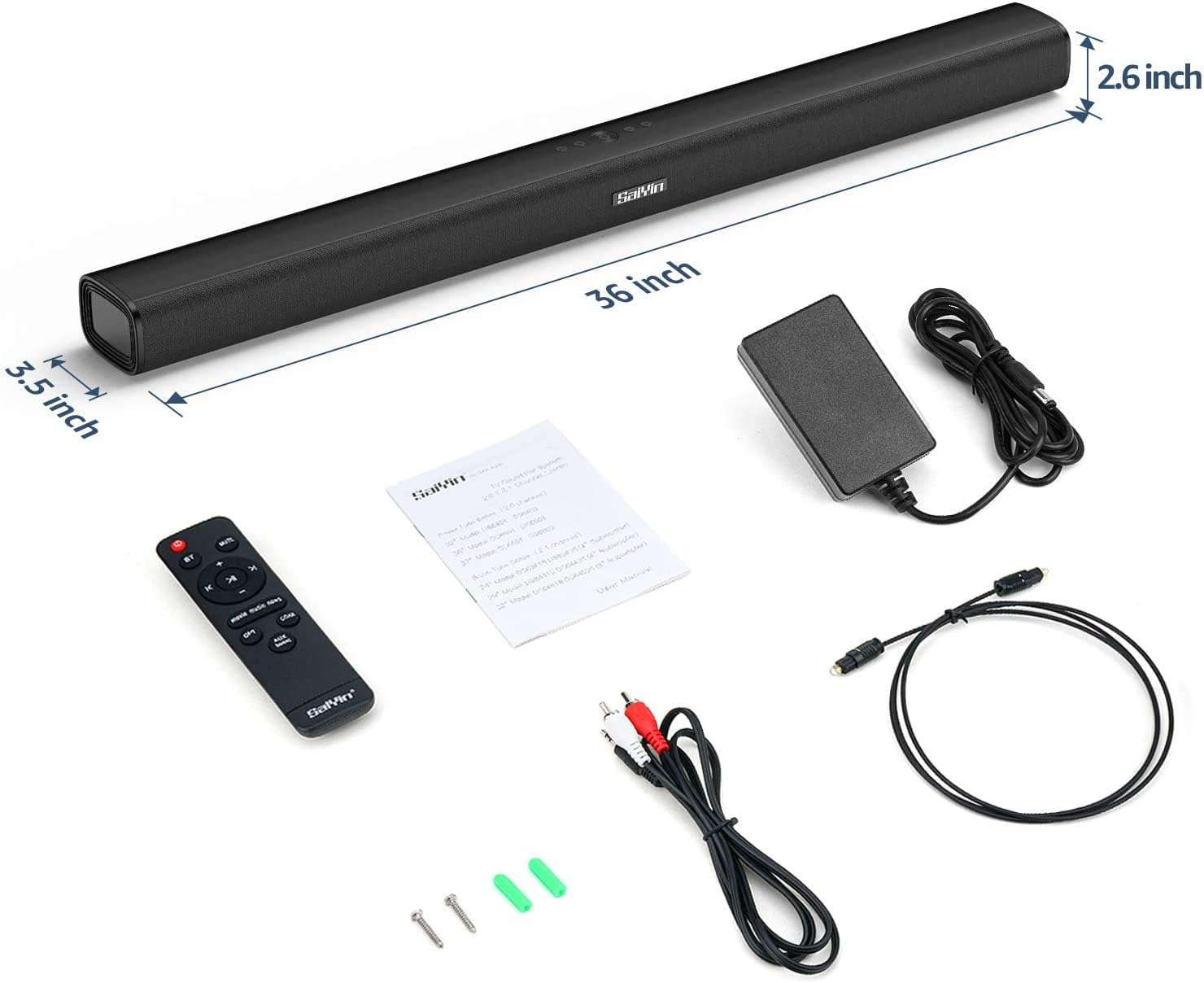
Image: The MAJORITY Snowdon Soundbar is displayed with its accessories, including the remote, power adapter, and various cables. Dimensions are overlaid on the image, showing the soundbar's length as 36 inches (approximately 91.4 cm), depth as 3.5 inches (approximately 8.9 cm), and height as 2.6 inches (approximately 6.6 cm).

Şəkil: ətraflı view of the soundbar's internal speaker component, emphasizing its 120W power output and Xtra Bass technology for enhanced low-frequency audio.
10. Zəmanət və Dəstək
10.1 Zəmanət Məlumatı
The MAJORITY Snowdon Soundbar comes with a 3 illik uzadılmış zəmanət. Please retain your proof of purchase for warranty claims. For specific terms and conditions, refer to the warranty card included in your package or visit the official MAJORITY websayt.
10.2 Müştəri dəstəyi
For technical assistance, troubleshooting beyond this manual, or warranty inquiries, please contact MAJORITY customer support through their official websayt və ya məhsul sənədlərinizdə göstərilən əlaqə məlumatı.