
1. Giriş
Thank you for choosing the Easytry123 Replacement Remote Control. This remote is designed to provide convenient control for various Goodman AC Air Conditioner models. It is an infrared, button-controlled device, engineered for ease of use.
Compatible Goodman AC Models include: WMC-24-1-KFAA, WMH241, WMH181A, HDP181A, HG31ES, WMH121, HG31AS, WMH241A.
Important Note: As a replacement unit, this remote control may not support all functions of your original air conditioner remote. Please verify compatibility with your specific AC model before use.
2. Quraşdırma: Batareyanın quraşdırılması
Your Easytry123 Replacement Remote Control requires two (2) AAA batteries (not included) for operation. Follow these steps to install the batteries:
- Pultun arxasındakı batareya bölməsini tapın.
- Press down on the tab and slide the battery compartment cover downwards to open it.
- Müsbət (+) və mənfi (-) terminalların bölmənin içərisindəki işarələrlə düzgün uyğunlaşdığına əmin olaraq iki AAA batareyasını daxil edin.
- Batareya bölməsinin qapağını təhlükəsiz şəkildə kliklənənə qədər yerinə sürüşdürün.
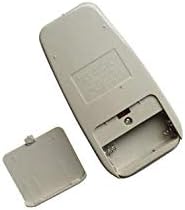
Figure 1: Back of the remote control with the battery cover removed, illustrating the battery compartment for AAA batteries.
After installing the batteries, the remote control is ready for use.
3. Əməliyyat Təlimatları
To operate your Goodman AC Air Conditioner using the Easytry123 Replacement Remote Control, follow these general guidelines:
- Point the Remote: Ensure the remote control is pointed directly at the infrared receiver on your Goodman AC unit. Obstructions between the remote and the AC unit can prevent proper communication.
- Yandırma/Söndürmə: düyməsini basın GÜC Kondisioneri yandırmaq və ya söndürmək üçün düymə.
- Temperaturu tənzimləyin: istifadə edin TEMP UP (▲) və TEMP AŞAĞI (▼) buttons to set your desired temperature.
- Rejimi seçin: düyməsini basın MODE button to cycle through available operating modes such as Cool, Fan, Dry, or Heat (if supported by your AC unit).
- Fan sürəti: istifadə edin Azarkeş sürəti button to adjust the fan's intensity (e.g., Low, Medium, High, Auto).
- Taymer funksiyaları: If your AC unit and this replacement remote support timer functions, refer to your AC unit's original manual for specific timer settings.
Familiarize yourself with the buttons on the remote and their corresponding functions. Due to the nature of replacement remotes, some advanced features present on your original remote may not be available or function identically.
4. Baxım
Proper care and maintenance will extend the life of your remote control:
- Təmizləmə: Wipe the remote control with a soft, dry cloth. Do not use liquid cleaners, abrasive pads, or chemical solvents, as these can damage the surface or internal components.
- Batareyanın dəyişdirilməsi: Replace batteries promptly when the remote's range decreases or it stops responding. Always replace both batteries at the same time with new AAA batteries. Do not mix old and new batteries, or different types of batteries.
- Yaddaş: If the remote control will not be used for an extended period, remove the batteries to prevent leakage and potential damage. Store the remote in a cool, dry place away from direct sunlight and extreme temperatures.
- Damlalardan çəkinin: Protect the remote from physical impact. Dropping the remote can damage its internal circuitry.
5. Giderme
If you encounter issues with your Easytry123 Replacement Remote Control, please refer to the following troubleshooting steps:
- Pult Cavab Vermir:
- Check the batteries. Ensure they are inserted correctly with the correct polarity (+/-).
- Batareyaları təzə AAA batareyaları ilə əvəz edin.
- Ensure there are no obstructions between the remote control and the AC unit's infrared receiver.
- Confirm you are within the effective operating range of the AC unit (typically within 20 feet and direct line of sight).
- Certain Functions Not Working:
- As a replacement remote, some specific or advanced functions of your original AC remote may not be supported. This is normal for universal or replacement remotes.
- Verify that your AC unit model is listed as compatible in the introduction section of this manual.
- AC Unit Not Responding to Any Remote:
- Ensure the AC unit itself is powered on and receiving electricity.
- Consult your Goodman AC unit's original user manual for troubleshooting steps related to the AC unit's receiver.
6. Spesifikasiyalar
| Brend | Easytry123 |
| Model nömrəsi | Easytry3659 |
| Uyğun Cihazlar | Goodman AC Air Conditioners (specific models listed in Introduction) |
| Bağlantı texnologiyası | İnfraqırmızı |
| Nəzarətçi növü | Düymə İdarəsi |
| Batareya növü | 2 x AAA batareya (daxil deyil) |
| Xüsusi Xüsusiyyət | Erqonomik dizayn |
7. Zəmanət və Dəstək
For any questions, concerns, or support regarding your Easytry123 Replacement Remote Control, please contact the seller directly through the platform where you made your purchase.
Please note that the product typically comes with a return policy of 30 days from the date of purchase. Refer to your purchase details for specific return and warranty information.