
1. Giriş
The Zerone Sport Action DV Camera is a compact and portable device designed for capturing high-definition video during various outdoor activities. Featuring 1080P and 720P recording options, a 120-degree wide-angle lens, and an IPX-4 waterproof aluminum alloy shell, this camera is built for durability and ease of use. It includes a built-in microphone for audio recording and provides vibration feedback for operational status.
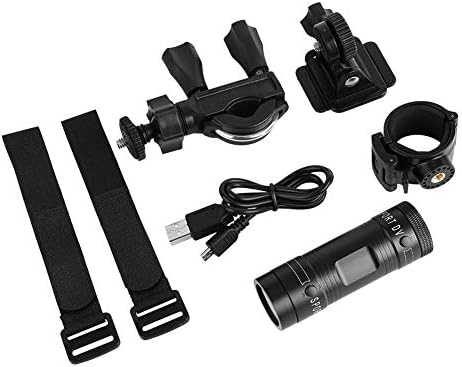
Image 1.1: The Zerone Sport Action DV Camera unit.
2. Təhlükəsizlik Məlumatı
- Kameranı uzun müddət həddindən artıq temperaturlara və ya birbaşa günəş işığına məruz qoymayın.
- While the camera features an IPX-4 waterproof rating, it is designed to withstand splashes and light rain. Do not submerge or soak the camera in water.
- Cihazı güclü maqnit sahələrindən uzaq tutun.
- Zərərin qarşısını almaq üçün yalnız göstərilən şarj kabeli və güc adapterindən istifadə edin.
- Kameranı sökməyə və ya dəyişdirməyə çalışmayın, çünki bu, zəmanəti ləğv edəcək və zədələnməyə səbəb ola bilər.
- Store the camera in a dry, cool place when not in use.
3. Paketin məzmunu
Bütün əşyaların mövcud olduğundan əmin olmaq üçün paketi yoxlayın:
- Zerone Sport Action DV Camera Unit
- USB şarj kabeli
- Mounting Accessories (e.g., bike mount, helmet mount, strap mounts)
- Rechargeable Battery (may be pre-installed)
- İstifadəçi Təlimatı (bu sənəd)
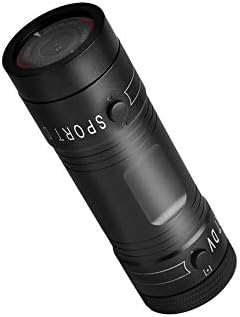
Image 3.1: Contents of the Zerone Sport Action DV Camera package, showing the camera, USB cable, and various mounting options.
4. Kamera bitdiview
Kameranın komponentləri və idarəetmə elementləri ilə tanış olun.
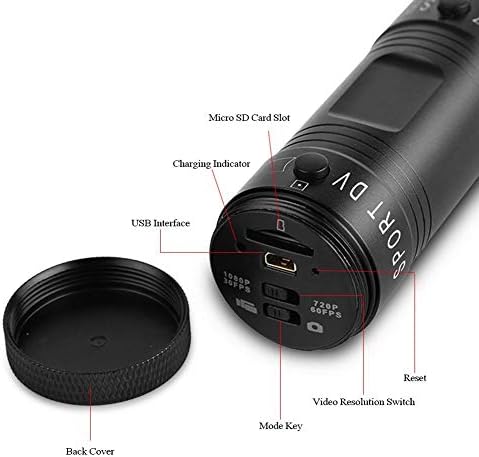
Şəkil 4.1: Ətraflı view of the camera's rear end, highlighting the Micro SD card slot, USB interface, charging indicator, mode key, video resolution switch (1080P 30fps / 720P 60fps), and reset button.
- Micro SD Kart Yuvası: Insert your Micro SD card here. A card is required for operation.
- Doldurma göstəricisi: Displays charging status. A red light indicates charging; it turns off when fully charged.
- USB interfeysi: Kompüteri doldurmaq və ona qoşulmaq üçün.
- Rejim Açarı: Used to switch between recording modes (e.g., video, photo).
- Video Çözünürlük Keçidi: Selects between 1080P 30fps and 720P 60fps recording resolutions.
- Sıfırlama düyməsi: Cihaz cavab vermədikdə onu yenidən qurmaq üçün istifadə olunur.
- Power Button (Front): Located on the front side of the camera.
- Record/Stop Button (Back): Located on the back side of the camera.
5. Quraşdırma
5.1 Batareyanın doldurulması
- Connect the camera to a USB power source (e.g., computer, wall adapter) using the provided USB cable.
- The qırmızı işıq on the back of the camera will illuminate, indicating that it is charging.
- Tam doldurulduqdan sonra qırmızı işıq sönəcək.
- Note: If the camera blinks red and blue when plugged in, it indicates that an SD card is not inserted. This is not a charging indicator.
5.2 Micro SD kartın daxil edilməsi
A Micro SD card (not included) is required for recording video and photos. The camera supports Micro SD cards up to a certain capacity (check product packaging for maximum supported size, typically 32GB or 64GB for similar devices).
- Kameranın arxa qapağını açın.
- Locate the Micro SD card slot (refer to Image 4.1).
- Gently insert the Micro SD card into the slot until it clicks into place. Ensure the card is oriented correctly.
- Replace the back cover, ensuring it is securely tightened to maintain water resistance.
5.3 Kameranın quraşdırılması
The camera comes with various mounting accessories for different applications.
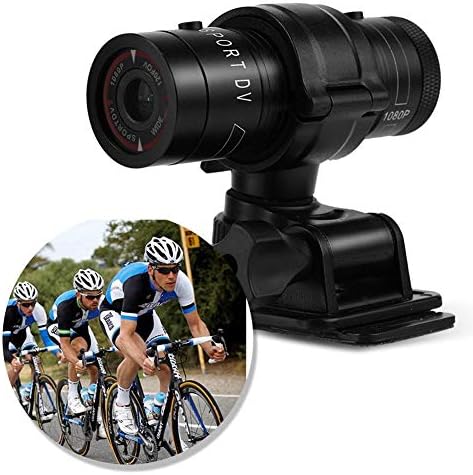
Image 5.1: The camera attached to a bicycle handlebar, demonstrating one of its mounting options.
- Bike Mount: cl istifadə edinamp mount to attach the camera securely to bicycle handlebars or other tubular structures.
- Dəbilqə Montajı: Utilize the adhesive or strap mounts to fix the camera to a helmet.
- Strap Mounts: For attaching to various gear or body parts.
Ensure all mounts are securely fastened before engaging in activities to prevent the camera from falling.
6. Kameranın işlədilməsi
6.1 Yandırma/Söndürmə
- Yandırmaq üçün düyməsini basıb saxlayın Güc düyməsi (front switch) until the camera vibrates.
- Söndürmək üçün düyməsini basıb saxlayın Güc düyməsi again until the camera vibrates once.
6.2 Selecting Video Resolution
Before recording, select your desired video resolution using the switch on the back of the camera (refer to Image 4.1).
- Düyməni sürüşdürün "1080P 30fps" for Full HD video at 30 frames per second.
- Düyməni sürüşdürün "720P 60fps" for HD video at 60 frames per second.
6.3 Videonun Yazılması
- Kameranın işə salındığından əmin olun.
- düyməsini basın Record/Stop düyməsi (back switch) to start recording. The camera will vibrate three times to indicate recording has started.
- Qeyd etməyi dayandırmaq üçün basın Record/Stop düyməsi again. The camera will vibrate once to indicate recording has stopped.
6.4 Kompüterə qoşulma
Köçürmək üçün files or access recorded content:
- Kameranın söndürüldüyünə əmin olun.
- Verilən USB kabeldən istifadə edərək kameranı kompüterinizə qoşun.
- The camera will be recognized as a removable storage device.
- You can then access and transfer your video files.
7. Baxım
- Təmizləmə: Use a soft, dry cloth to clean the camera body. For the lens, use a specialized lens cleaning cloth and solution. Avoid abrasive materials.
- Yaddaş: When not in use for extended periods, store the camera in a cool, dry place. Ensure the battery is partially charged (around 50%) to prolong its lifespan.
- Suya davamlılıq: Regularly check that the back cover is securely tightened to maintain the IPX-4 water resistance. Avoid exposing the USB port or SD card slot to moisture when the cover is open.
- Batareyaya qulluq: Avoid fully discharging the battery frequently. Recharge it when the low battery indicator appears.
8. Giderme
| Problem | Mümkün Səbəb | Həll |
|---|---|---|
| Kamera işə düşmür. | Batareya bitib. | Charge the camera fully. |
| Camera blinks red and blue, then turns off. | No Micro SD card inserted or card is faulty. | Insert a functional Micro SD card. Ensure it is properly seated. |
| Video yazmaq mümkün deyil. | No Micro SD card, card full, or card error. | Insert a Micro SD card, delete old files, və ya kartı formatlayın (bu, bütün məlumatları siləcək). |
| Zəif video keyfiyyəti. | Linza çirklidir; az işıq şəraiti; səhv qətnamə ayarı. | Clean the lens. Ensure adequate lighting. Select 1080P resolution for higher detail. |
| Kamera cavab vermir. | Proqram təminatı xətası. | Use a thin object (like a paperclip) to press the Sıfırlama düyməsi (refer to Image 4.1). |
9. Spesifikasiyalar
| Xüsusiyyət | Detal |
|---|---|
| Brend | Sıfır |
| Model nömrəsi | Zeronefg3h149y2s |
| Video çəkiliş həlli | 1080p (30 kadr), 720p (60 kadr) |
| Lens bucağı | 120-degree A+ grade wide-angle |
| Suya davamlı reytinq | IPX-4 (splash-proof) |
| Qabıq materialı | Alüminium ərintisi |
| Foto Sensor Texnologiyası | CMOS |
| Maksimum diyafram | 1.8 Millimetr |
| Flash Yaddaş Tipi | Micro SD (card not included) |
| Video çəkiliş formatı | AVI |
| Dəstəklənən Audio Format | AAC, MP3, PCM, FLAC, or Dolby Digital/AC-3 |
| Bağlantı texnologiyası | USB |
| Maddə Çəkisi | 10.8 unsiya (təxminən 306 qram) |
| Məhsul Ölçüləri | 11.81 x 6.3 x 5.91 düym (təxminən 30 x 16 x 15 sm) |
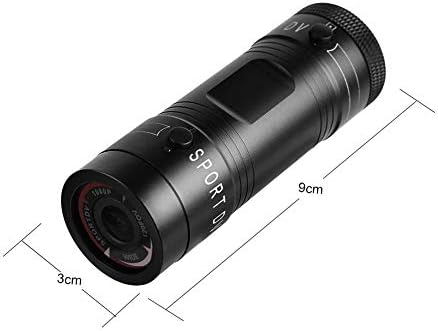
Image 9.1: Physical dimensions of the camera, showing a length of 9cm and a diameter of 3cm.
10. Zəmanət və Dəstək
Zəmanət məlumatı və texniki dəstək üçün, xahiş edirik, alışınızla birlikdə təqdim edilən sənədlərə baxın və ya birbaşa pərakəndə satıcı/istehsalçı ilə əlaqə saxlayın. Zəmanət tələbləri üçün alış-veriş sənədinizi saxlayın.
Manufacturer: Zerone
For further assistance, you may visit the Zerone Store on Amazon: Zerone Store