
Giriş
This manual provides essential information for the proper use and maintenance of your Easytry123 replacement infrared remote control. This remote is designed to be compatible with specific Philips LED HDTV TV models, including 49PUS6501/12, 49PUS6551/12, 49PUS6561/12, 49PUS7101/12, 49PUS7181/12, 49PUT6801/98, and 55PUS6501/12. Please verify your TV model number to ensure compatibility.
Important Note: This is a replacement remote control and may not support all functions of your original TV remote. It is not a universal remote control.
Məhsul Bitdiview

Şəkil 1: Ön view of the Easytry123 replacement remote control, showing the power button, navigation pad, channel/volume controls, and numeric keypad.
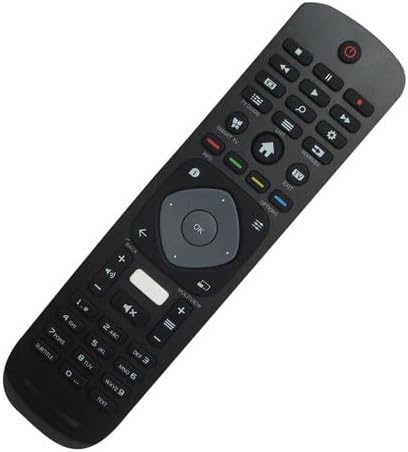
Şəkil 2: Bucaqlı ön view of the remote control, highlighting its ergonomic design and button layout.

Şəkil 3: Geri view batareya bölməsinin qapağını göstərən pultun.
The Easytry123 replacement remote control features a standard button layout for TV operation, including power, channel, volume, navigation, and numeric input. It is designed for comfortable handling and intuitive use.
Quraşdırma
1. Batareyanın quraşdırılması
- Pultun arxasındakı batareya bölməsini tapın.
- Açmaq üçün batareya bölməsinin qapağını aşağı və ya xaricə sürüşdürün.
- Müsbət (+) və mənfi (-) terminalların bölmənin içindəki diaqramlara uyğun olduğundan əmin olaraq iki (2) AAA batareyasını daxil edin.
- Batareya bölməsinin qapağını etibarlı şəkildə bağlayın.
No setup or coding is required for this remote control. Once batteries are installed, it is ready for use with compatible Philips TV models.
Əməliyyat Təlimatları
This remote control operates using infrared (IR) technology. Ensure there is a clear line of sight between the remote control and the IR receiver on your television for optimal performance.
- Güc düyməsi: Televizoru açmaq və ya söndürmək üçün basın.
- Rəqəmsal Klaviatura (0-9): Kanal nömrələrini birbaşa daxil etmək üçün istifadə edin.
- Kanal Yuxarı/Aşağı: Press to change channels sequentially.
- Səs artır/aşağı: Press to adjust the sound volume.
- Səssiz düymə: Press to mute or unmute the TV sound.
- Naviqasiya Paneli (Ox Düymələri və OK): Use to navigate menus and confirm selections.
- Back/Exit Buttons: Used to return to the previous screen or exit menus.
- Smart TV/Home Button: Accesses the TV's smart features or home screen.
Functionality may vary depending on your specific TV model. Some advanced features or specific buttons present on your original remote may not be replicated on this replacement unit.
Baxım
Batareyanın dəyişdirilməsi
Replace batteries when the remote control's response becomes sluggish or stops working. Always replace both batteries at the same time with new AAA batteries. Do not mix old and new batteries, or different types of batteries.
Təmizləmə
Pultu təmizləmək üçün yumşaq, quru parça istifadə edin. İnadkar kirlər üçün bir az dampParçanı su ilə yuyun. Sərt kimyəvi maddələrdən, aşındırıcı təmizləyicilərdən və ya həddindən artıq nəmdən istifadə etməkdən çəkinin, çünki bunlar pulta zərər verə bilər.
Problemlərin aradan qaldırılması
- Pult cavab vermir:
- Batareyaların düzgün polarite ilə düzgün daxil edilib-edilmədiyini yoxlayın.
- Köhnə batareyaları yeni AAA batareyaları ilə əvəz edin.
- Pultla televizorun IR qəbuledicisi arasında heç bir maneə olmadığından əmin olun.
- Confirm that the remote is pointed directly at the TV.
- Bəzi funksiyalar işləmir:
- As a replacement remote, it may not support all functions of the original TV remote. This is normal for some replacement units.
- Televizor modelinizin uyğun olaraq siyahıda göstərildiyini yoxlayın.
- Qısa əməliyyat diapazonu:
- Batareyaları dəyişdirin.
- Güclü işıq mənbələrinin (məsələn, birbaşa günəş işığı) infraqırmızı siqnala mane olmadığından əmin olun.
Spesifikasiyalar
| Brend | Easytry123 |
| Model nömrəsi | Easytry5633 |
| Uyğun Cihazlar | Television (Specific Philips LED HDTV models) |
| Bağlantı texnologiyası | İnfraqırmızı (IR) |
| Nəzarətçi növü | Düymə İdarəsi |
| Maksimum Aralıq | 10 Metr (təxminən 33 fut) |
| Batareyalar Tələb olunur | 2 x AAA batareya (daxil deyil) |
| Xüsusi Xüsusiyyət | Replacement item; may not work with all original functions. Not a universal remote. |
Zəmanət və Dəstək
Zəmanət Məlumatı
This Easytry123 remote control comes with a 90-day warranty from the date of purchase. This warranty covers manufacturing defects under normal use. It does not cover damage caused by misuse, accidents, unauthorized modifications, or battery leakage.
Müştəri dəstəyi
For any questions, issues, or warranty claims regarding your Easytry123 remote control, please contact the seller or manufacturer directly through your purchase platform. Provide your order number and a detailed description of the issue for prompt assistance.