
1. Giriş
Thank you for choosing the Targus W620 Wireless Optical Mouse. This manual provides detailed instructions for setting up, operating, and maintaining your mouse to ensure optimal performance and longevity. The Targus W620 offers reliable 2.4 GHz wireless connectivity, a precise 1600 DPI optical sensor, and a compact design suitable for both office and mobile use.
2. Paketin məzmunu
Zəhmət olmasa paketi aşağıdakı maddələr üçün yoxlayın:
- Targus W620 Wireless Optical Mouse
- USB Qəbuledici
- 2 x AAA batareyaları
3. Məhsul bitdiview
Familiarize yourself with the components of your Targus W620 Wireless Optical Mouse.
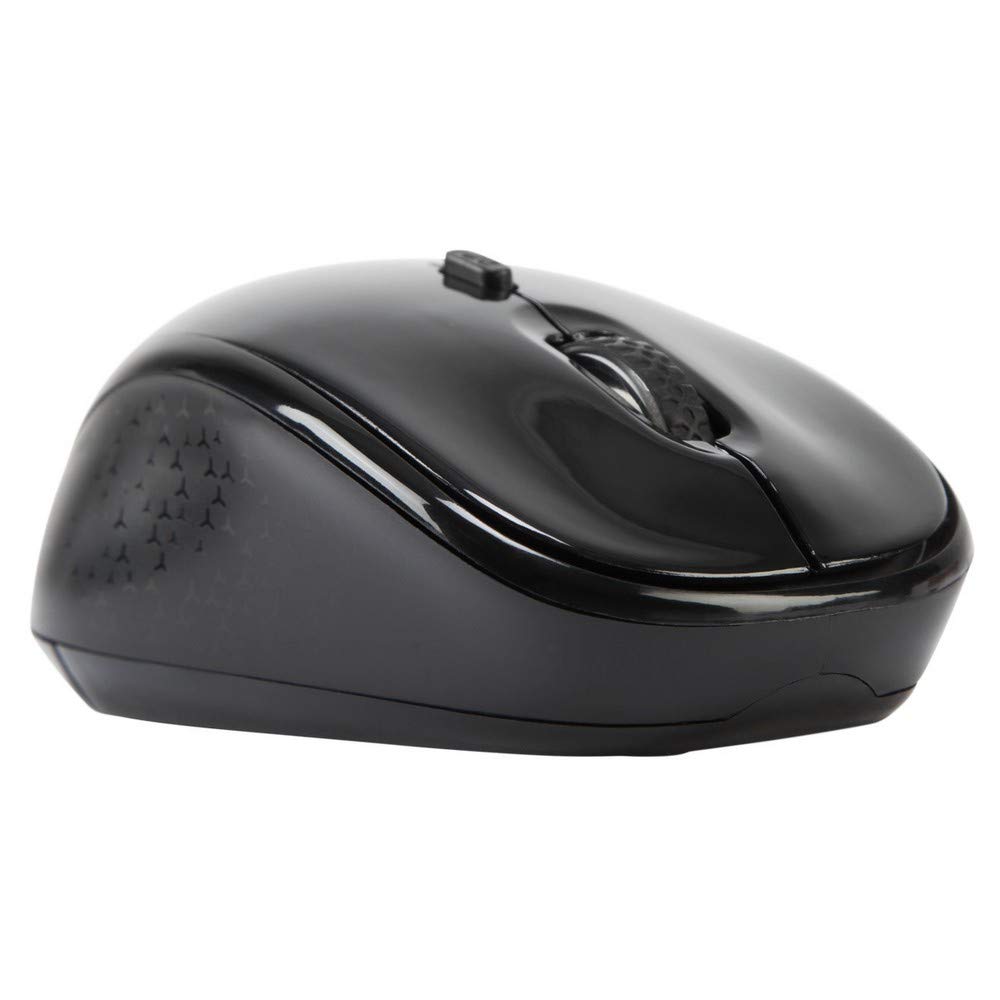
Şəkil 3.1: Üst view of the Targus W620 Wireless Optical Mouse. This image displays the primary buttons and scroll wheel.
- Sol Klik Düyməsi: Standart əsas klik funksiyası.
- Sağ Klik Düyməsi: Standart ikinci dərəcəli klik funksiyası.
- Sürüşmə çarxı: Şaquli sürüşdürmə və orta klik funksiyası üçün.
- DPI düyməsi: Adjusts the mouse sensitivity (DPI).
- Optik Sensor: Located on the bottom, detects mouse movement.
- Batareya bölməsi: Located on the bottom, holds two AAA batteries.
- USB qəbuledicinin yaddaşı: A dedicated slot on the bottom for storing the USB receiver when not in use.

Şəkil 3.2: Aşağı view of the mouse, highlighting the battery compartment and optical sensor.
4. Quraşdırma Təlimatları
Follow these steps to set up your Targus W620 Wireless Optical Mouse:
- Batareyaları quraşdırın:
- Siçanın altındakı batareya bölməsinin qapağını tapın.
- Qapağı sürüşdürərək açın.
- Düzgün polariteyi (+/-) təmin edərək iki AAA batareyasını daxil edin.
- Batareya bölməsinin qapağını etibarlı şəkildə bağlayın.
- USB qəbuledicini qoşun:
- The USB receiver is typically stored in a slot on the bottom of the mouse for transport. Gently remove it.
- USB qəbuledicisini kompüterinizdə mövcud olan USB portuna qoşun.

Şəkil 4.1: The mouse with its USB receiver, ready for connection.
- Güc Aktivdir:
- There is no explicit power switch on this model; the mouse activates upon movement and connection.
- Kompüteriniz lazımi sürücüləri avtomatik olaraq aşkar edib quraşdırmalıdır. Bu bir neçə dəqiqə çəkə bilər.
- Once drivers are installed, the mouse is ready for use.
5. Əməliyyat Təlimatları
The Targus W620 Wireless Optical Mouse is designed for intuitive use. Here are its primary functions:
- Əsas Naviqasiya: Ekrandakı kursoru idarə etmək üçün siçanı düz bir səthdə hərəkət etdirin.
- Sol Klik: Əşyaları seçmək, açmaq üçün istifadə edin files və ya funksiyaları aktivləşdirir.
- Sağ klikləyin: Use for accessing context menus or secondary functions.
- Sürüşmə çarxı: Rotate the wheel to scroll vertically through documents and web pages. Press the scroll wheel for a middle-click function, often used for opening links in new tabs or auto-scrolling.
- DPI Tənzimlənməsi: Press the DPI button (located behind the scroll wheel) to cycle through the available DPI settings (800, 1200, 1600 DPI). This changes the sensitivity of the mouse cursor. A higher DPI means the cursor moves further with less physical mouse movement.
6. Baxım
Proper maintenance ensures the longevity and performance of your mouse.
- Təmizləmə: Siçanın xarici hissəsini təmizləmək üçün yumşaq, quru, tüksüz bir parça istifadə edin. İnadkar çirk üçün bir az təmizləyin.ampsu ilə parça. Sərt kimyəvi maddələrdən və ya aşındırıcı təmizləyicilərdən istifadə etməyin.
- Optik Sensor: Dəqiq izləməni təmin etmək üçün siçanın alt hissəsindəki optik sensor sahəsini təmiz və toz və ya zibildən təmiz saxlayın.
- Batareyanın dəyişdirilməsi: When the mouse performance degrades or stops responding, it is likely time to replace the batteries. Follow the steps in Section 4.1 to replace the two AAA batteries.
- Yaddaş: When transporting or storing the mouse, always place the USB receiver back into its dedicated storage slot on the bottom of the mouse to prevent loss.
7. Giderme
If you encounter issues with your Targus W620 mouse, try the following solutions:
| Problem | Mümkün Həll |
|---|---|
| Mouse not responding or cursor not moving. |
|
| Kursorun hərəkəti qeyri-sabit və ya həyəcanlıdır. |
|
| DPI button not changing sensitivity. |
|
| Simsiz bağlantı problemləri. |
|
8. Spesifikasiyalar
| Brend | Targus |
| Model nömrəsi | AMW620AP |
| Bağlantı texnologiyası | 2.4 GHz Simsiz (Radio Tezliyi) |
| Hərəkətin aşkarlanması texnologiyası | Optical (BlueTrace Technology) |
| DPI səviyyələri | 800 / 1200 / 1600 DPI (Tənzimlənən) |
| Düymələrin sayı | 4 (Left, Right, Scroll Wheel, DPI) |
| Əl istiqaməti | Right (Comfortable for ambidextrous use) |
| Güc mənbəyi | 2 x AAA Batareyalar (Daxildir) |
| Maddə Çəkisi | 26 qram |
| Əməliyyat Sistemi Uyğunluğu | Linux, Windows XP (Compatible with modern Windows and macOS) |
| Avadanlıq Platforması | Mac, PC |
| Rəng | Qara |
9. Zəmanət və Dəstək
Zəmanət Məlumatı: The Targus W620 Wireless Optical Mouse comes with a 3 illik istehsalçı zəmanəti satın alındığı tarixdən. Bu zəmanət normal istifadə zamanı material və işlənmə qüsurlarını əhatə edir. Zəmanət iddiaları üçün satınalma sübutunuzu özündə saxlayın.
Müştəri Dəstəyi: For technical assistance, troubleshooting beyond this manual, or warranty inquiries, please visit the official Targus website or contact their customer support service. Refer to the contact information provided with your product packaging or on the Targus official websayt.