
1. Giriş
This manual provides instructions for the proper setup, operation, and maintenance of your Mitel Cordless Headset and DECT Module Bundle. This bundle is designed to enhance communication efficiency by providing wireless freedom for users of compatible Mitel IP phones.
Məhsul Uyğunluğu: This bundle is compatible with Mitel 5330e, 5340e, and 5360e IP phones.
2. Paketin məzmunu
Before proceeding with the setup, ensure all components are present in your package:
- Mitel Cordless Headset
- Mitel DECT Module (Model 50005712)
- Headset Charging Cradle
- Headband, Battery, and Earhook accessories for the headset
- Connecting cables for the DECT Module

Figure 2.1: Included Headset Accessories (Headband, Battery, Earhook)
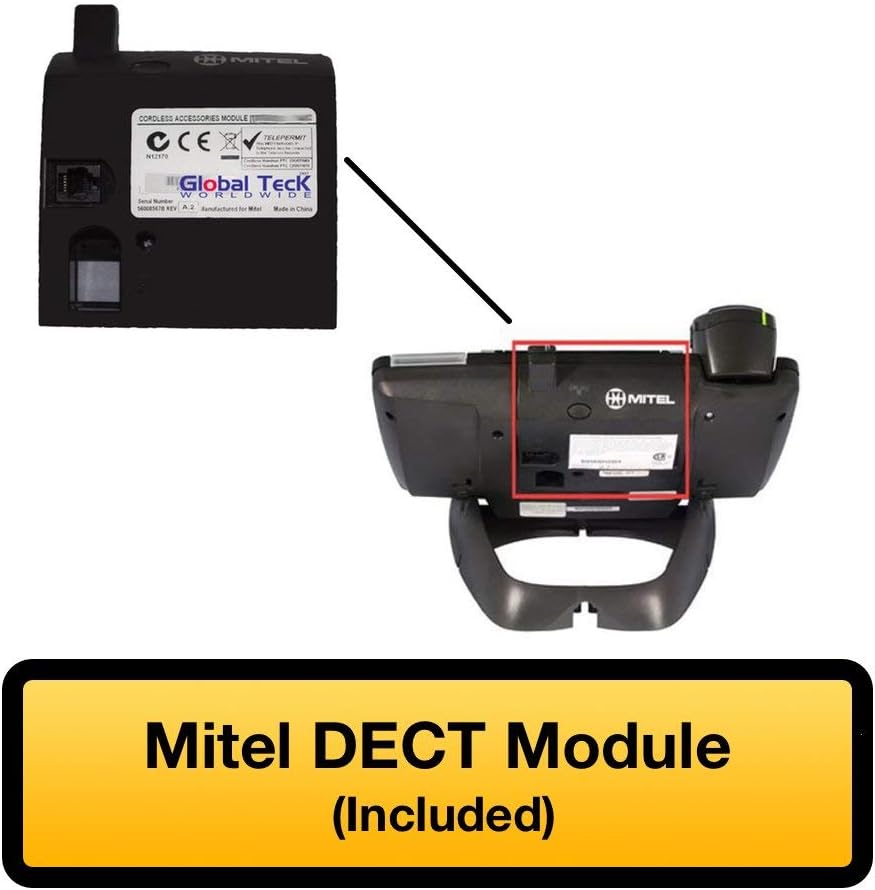
Figure 2.2: Mitel DECT Module
3. Quraşdırma Təlimatları
3.1. Installing the DECT Module
- Locate the accessory port on the back of your compatible Mitel IP phone (5330e, 5340e, or 5360e).
- Carefully align the Mitel DECT Module with the accessory port and slide it into place until it clicks securely.
- Connect the provided cable from the DECT Module to the headset charging cradle.

Figure 3.1: Mitel IP Phone with DECT Module Installed

Figure 3.2: DECT Module with Cable Connection
3.2. Qulaqlığın doldurulması
Place the cordless headset into the charging cradle. Ensure the headset is properly seated and the charging indicator light illuminates. A full charge provides approximately 8 hours of talk time and 43 hours of standby time.
3.3. Pairing the Headset with the DECT Module
The headset and DECT module are typically pre-paired. If re-pairing is necessary:
- Qulaqlığın doldurulduğundan və işə salındığından əmin olun.
- Locate the Cordless Module pairing button on the DECT Module (refer to Figure 3.3).
- Press and hold the pairing button on the DECT Module until the indicator light begins to flash.
- Follow the headset's specific pairing instructions, usually involving pressing a button on the headset. The indicator lights on both devices will confirm successful pairing.

Figure 3.3: DECT Module Features - Pairing Button and Cradle Cable
4. Əməliyyat Təlimatları
4.1. Qulaqlıq taxmaq
The headset can be worn in an over-the-head style using the included headband for comfort and stability.

Figure 4.1: Over-the-Head Wearing Style
4.2. Zənglərin idarə edilməsi
- Initiate Call: Press the call button on the headset. Dial the number using your Mitel IP phone.
- Zəngə cavab: When an incoming call rings, press the call button on the headset.
- Zəngi bitir: Press the call button on the headset to terminate an active call.
- Səs səviyyəsinə nəzarət: Use the volume controls on the headset or your Mitel IP phone to adjust audio levels.
The integrated functionality of the Cordless (DECT) Headset eliminates the need for a handset lifter, allowing direct call control from the headset.
4.3. LED göstəriciləri
The headset features LED indicators that provide status information, such as power, charging status, and call activity. Refer to the headset's specific user guide for detailed indicator meanings.
5. Baxım
To ensure the longevity and optimal performance of your Mitel Cordless Headset and DECT Module:
- Təmizləmə: Use a soft, dry cloth to clean the headset and DECT module. Avoid using harsh chemicals or abrasive materials.
- Yaddaş: When not in use, store the headset in its charging cradle to maintain battery life.
- Batareyaya qulluq: Avoid fully discharging the headset battery frequently. Charge it regularly.
6. Giderme
If you encounter issues with your Mitel Cordless Headset and DECT Module, try the following:
- No Audio/Cannot Hear: Ensure the headset is powered on and properly paired. Check the volume settings on both the headset and the Mitel IP phone.
- Zəng etmək/qəbul etmək mümkün deyil: Verify the DECT Module is securely connected to the IP phone. Confirm the headset is paired and within range.
- Qulaqlıq Şarj Etmir: Ensure the headset is correctly seated in the charging cradle and the cradle cable is connected to the DECT module. Check for any obstructions on the charging contacts.
- Müdaxilə: Müdaxilə yarada biləcək digər simsiz cihazlardan uzaqlaşın.
- Yenidən cütləşmə: If connection issues persist, attempt to re-pair the headset with the DECT module as described in Section 3.3.
7. Spesifikasiyalar
| Xüsusiyyət | Spesifikasiya |
|---|---|
| Model Adı | Mitel Cordless Headset |
| Element Model nömrəsi | 50005712 |
| Bağlantı texnologiyası | Simsiz |
| Simsiz Rabitə Texnologiyası | DEK |
| Uyğun Cihazlar | Mitel Phones (5330e, 5340e, 5360e) |
| Batareya Ömrü (danışıq vaxtı) | 8 saat |
| Batareya Ömrü (Gözləmə vaxtı) | 43 saat |
| Nəzarət növü | Media Nəzarəti, Uzaqdan |
| Material | Metal, Plastik |
| Rəng | Qara/Gümüş |
| Maddə Çəkisi | 16 unsiya (1 funt) |
| Məhsul Ölçüləri | 8.6 x 5.2 x 5 düym |
| UPC | 751889011785 |
| İstehsalçı | Mitel |
8. Zəmanət və Dəstək
8.1. Amazon Yenilənmiş Zəmanəti
This product is part of the Amazon Renewed program. If you are not satisfied with your purchase, renewed products are eligible for replacement or refund under the Amazon Renewed Guarantee. Please refer to Amazon's official Renewed program terms for full details.
8.2. Texniki Dəstək
For technical assistance or further inquiries, Global Teck's US-based support specialists are available to help. Contact information can typically be found on your purchase documentation or the Global Teck websayt.