
1. Giriş
This manual provides essential information for the safe and efficient operation of your RAGGIE RGS 1500W 12V Solar Power Inverter. This device is designed to convert 12V DC electricity from batteries or solar panels into 220V AC electricity, allowing you to power standard household appliances from a DC power source. Please read this manual thoroughly before installation and use.
2. Təhlükəsizlik Məlumatı
XƏBƏRDARLIQ: Bu təhlükəsizlik qaydalarına əməl edilməməsi elektrik cərəyanı vurması, yanğın, ciddi xəsarət və ya ölümlə nəticələnə bilər.
- Ensure the inverter is installed in a well-ventilated, dry, and cool environment, away from direct sunlight, heat sources, and flammable materials.
- Do not expose the inverter to rain, moisture, or liquids.
- Connect the inverter only to a 12V DC power source. Connecting to a different voltage vahidi zədələyə bilər.
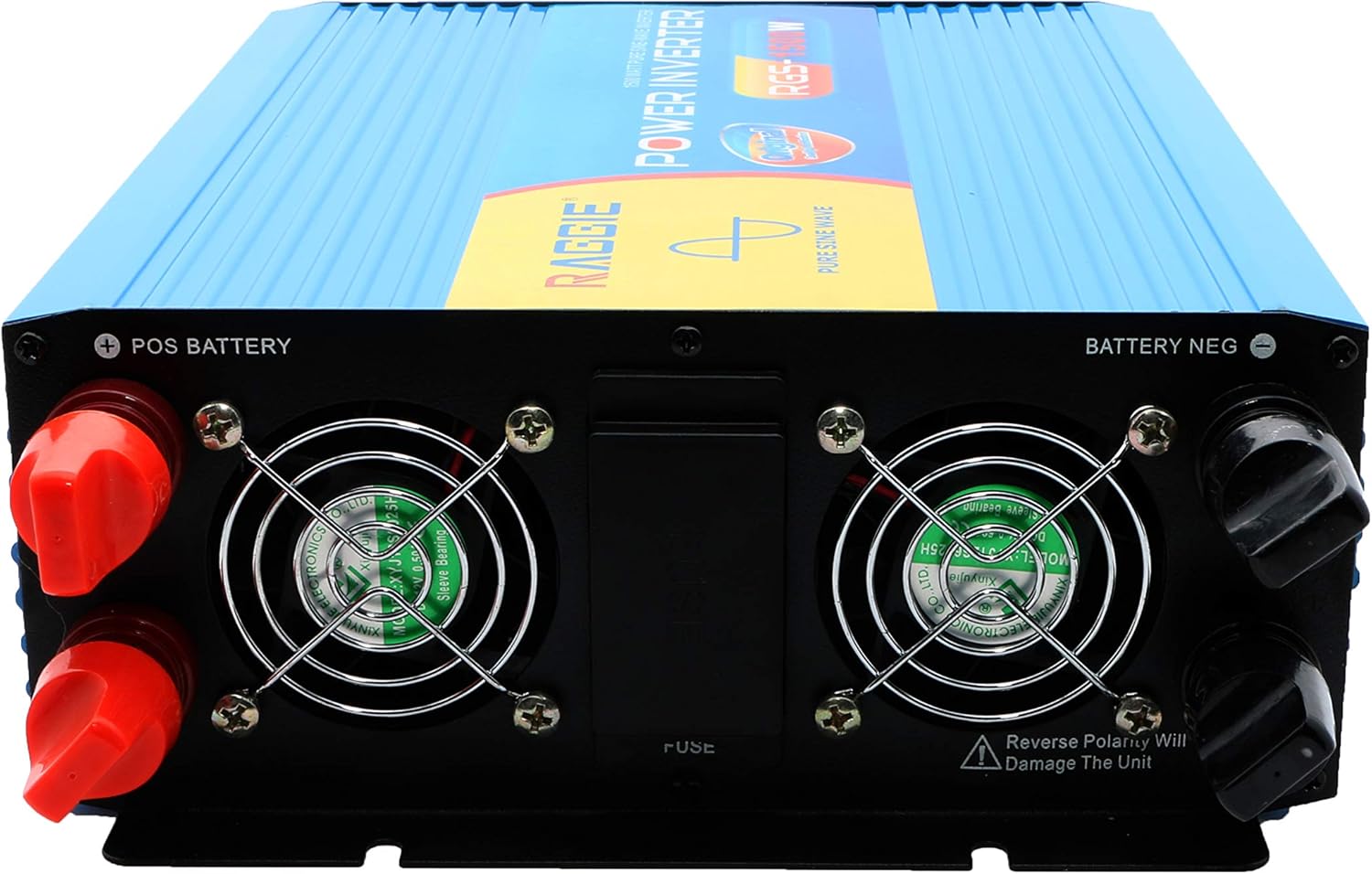
- Always connect the battery terminals with correct polarity: positive (+) to positive, and negative (-) to negative. Reverse polarity will damage the unit.
- Həddindən artıq istiləşmə və qövslənmənin qarşısını almaq üçün bütün əlaqələrin möhkəm və etibarlı olduğundan əmin olun.
- İnverteri açmayın casing. İçəridə istifadəçi tərəfindən xidmət edilə bilən hissələr yoxdur. Bütün xidmətlər üçün ixtisaslı işçilərə müraciət edin.
- Uşaqları çeviricidən və onun birləşmələrindən uzaq tutun.
- Always disconnect the DC power source before performing any maintenance or troubleshooting.
- Ensure the inverter is properly grounded.
3. Məhsul bitdiview
The RAGGIE RGS 1500W inverter features robust construction and essential ports for reliable power conversion.
3.1 Arxa Panel Komponentləri
The rear panel includes the DC input terminals for connecting to your 12V battery or solar array, along with cooling fans and a fuse compartment.
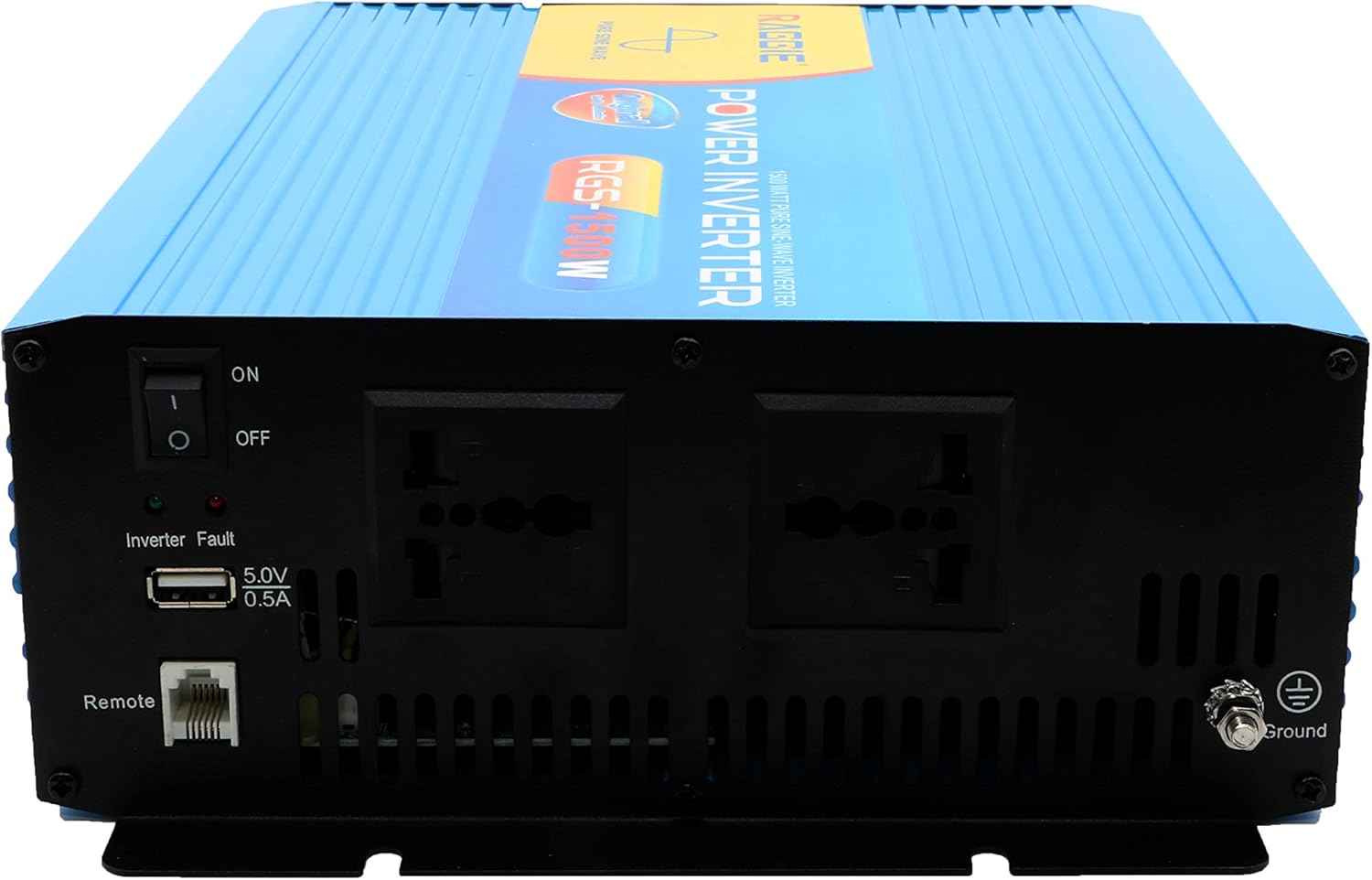
3.2 Ön Panelin Komponentləri
The front panel provides the AC output sockets for connecting your appliances, the main power switch, a USB charging port, and a remote control port.
4. Quraşdırma və Quraşdırma
Follow these steps for proper installation of your inverter.
4.1 Qabın açılması və yoxlanılması
- Carefully remove the inverter from its packaging.
- Inspect the unit for any signs of damage during transit. If damage is found, do not proceed with installation and contact your supplier.
- Bütün aksesuarların mövcud olduğundan əmin olun.
4.2 Yerləşdirmə
- Choose a location that is dry, cool, and well-ventilated.
- Avoid areas with direct sunlight, high temperatures, or excessive dust.
- Mount the inverter securely on a stable surface.
- Ensure there is adequate clearance around the cooling fans for proper airflow.
4.3 DC Input Connection (Battery/Solar)
IMPORTANT: Ensure the inverter's power switch is in the OFF position before making any connections.
- Use appropriate gauge cables for your 12V DC input. Refer to the specifications for recommended cable sizes.
- birləşdirin QIRMIZI (+) cable to the positive terminal of your 12V battery/solar array.
- Digər ucunu birləşdirin QIRMIZI (+) cable to the positive terminal (POS BATTERY) on the inverter's rear panel.
- birləşdirin QARA (-) cable to the negative terminal of your 12V battery/solar array.
- Digər ucunu birləşdirin QARA (-) cable to the negative terminal (BATTERY NEG) on the inverter's rear panel.
- Bütün əlaqələrin möhkəm və etibarlı olduğundan əmin olun.
4.4 Torpaqlama
For safety, the inverter must be properly grounded.
- Connect a grounding wire from the ground terminal on the inverter's front panel to a suitable earth ground point (e.g., vehicle chassis, ground rod).
4.5 AC Output Connection (Appliances)
- Plug your AC appliances directly into the AC output sockets on the inverter's front panel.
- Ümumi vatdan əmin oluntage of all connected appliances does not exceed the inverter's continuous output power (1500W).
5. Əməliyyat Təlimatları
5.1 Turning On the Inverter
- Ensure all DC and AC connections are correctly made and secure.
- Switch the main power switch on the inverter's front panel to the ON mövqe.
- The inverter will typically emit a short beep and an indicator light will illuminate, indicating it is operational.
5.2 Turning Off the Inverter
- Disconnect all AC appliances from the inverter.
- Switch the main power switch on the inverter's front panel to the OFF mövqe.
5.3 USB Şarj Portu
- The inverter includes a 5.0V 0.5A USB port for charging small electronic devices.
- Plug your USB device into this port for charging.
6. Baxım
Mütəmadi texniki xidmət inverterinizin optimal işləməsini və uzunömürlülüyünü təmin edir.
- Təmizləmə: Periodically clean the exterior of the inverter with a dry, soft cloth. Ensure cooling vents are free from dust and debris. Do not use liquid cleaners.
- Bağlantı yoxlanışı: Regularly inspect all DC and AC connections to ensure they remain tight and free from corrosion. Loose connections can cause overheating and power loss.
- Sigortanın dəyişdirilməsi: The inverter is equipped with internal fuses. If the inverter stops working and troubleshooting does not resolve the issue, the fuse may need replacement. This should only be performed by qualified personnel.
7. Giderme
Bu bölmədə inverterlə qarşılaşa biləcəyiniz ümumi problemlərə toxunulur.
| Problem | Mümkün Səbəb | Həll |
|---|---|---|
| No power output / Inverter not turning on | Loose DC connections Aşağı batareya həcmitage Yanmış qoruyucu İnverteri OFF | Check and tighten DC cables Batareyanı yenidən doldurun və ya dəyişdirin Check and replace fuse (by qualified personnel) Turn inverter switch ON |
| Overload warning / Inverter shuts down | Connected load exceeds 1500W Surge power too high | Ümumi vat azaldıntage of connected appliances Ensure appliance starting current is within inverter's peak capacity |
| Overheating warning / Inverter shuts down | Zəif ventilyasiya Həddindən artıq mühit temperaturu Blocked cooling fans | Ensure adequate airflow around the inverter Move inverter to a cooler location Clean cooling fans and vents |
| Aşağı batareya həcmitage xəbərdarlıq | Batareya azdır | Batareyanı doldurun |
8. Spesifikasiyalar
| Xüsusiyyət | Spesifikasiya |
|---|---|
| Brend | RAGGIE |
| Model nömrəsi | RGS 1500W |
| Davamlı Çıxış Gücü | 1500 Vt |
| Giriş həcmitage | 12 Volt DC |
| Çıxış həcmitage | AC (Standard for region, typically 220V) |
| Güc mənbəyi | External (Battery/Solar) |
| Tövsiyə olunan istifadələr | Provide AC power from a DC source, operate AC devices using DC power. |
| Pik çıxış gücü | 18000 Watts (Momentary Surge) |
| Sertifikatlar | UL, ETL, CE |
| İlk Əlçatan Tarix | 9 iyul 2019-cü il |
9. Zəmanət və Dəstək
For warranty information or technical support, please refer to the documentation provided with your purchase or contact the manufacturer directly. Keep your purchase receipt as proof of purchase.