
1. Giriş
Thank you for choosing the Depusheng DT8 Professional 8-Channel Mixer. This manual provides essential information for the safe and efficient operation of your new audio mixer. Please read this manual thoroughly before use and retain it for future reference.

Figure 1: Depusheng DT8 Professional 8-Channel Mixer overview.
2. Təhlükəsizlik Təlimatları
- Enerji təchizatı: Yalnız müəyyən edilmiş güc adapterindən istifadə edin. Həcmi təmin edintage yerli enerji təchizatınıza uyğun gəlir.
- Su və nəm: Do not expose the mixer to water, rain, or excessive moisture. Avoid placing liquid-filled objects on the unit.
- Havalandırma: Adekvat ventilyasiyanı təmin edin. Havalandırma deliklərini bağlamayın.
- İstilik mənbələri: Keep the mixer away from heat sources such as radiators, heat registers, stoves, or other heat-producing appliances.
- Təmizləmə: Təmizləmədən əvvəl elektrik enerjisini ayırın. Quru, yumşaq bir parça istifadə edin. Maye təmizləyicilərdən və ya aerozol təmizləyicilərindən istifadə etməyin.
- Xidmət: Bu məhsula özünüz xidmət göstərməyə çalışmayın. Bütün xidmətlər üçün ixtisaslı xidmət personalına müraciət edin.
- Phantom Güc: When using +48V phantom power, ensure microphones are connected before activating to prevent damage.
3. Məhsul bitdiview
The Depusheng DT8 is a professional 8-channel audio mixer designed for various applications, including live performances, studio recording, and home use. It features built-in DSP digital effects, USB playback, Bluetooth connectivity, and +48V phantom power.
Əsas Xüsusiyyətlər:
- Built-in DSP digital effects for enhanced audio.
- Eight audio input interfaces for versatile connectivity.
- USB playback function for direct media access.
- +48V phantom power supply for condenser microphones.
- Üç stage equilibrium adjustment (3-band EQ) on all channels.
- Wireless Bluetooth audio streaming.
- Ultra-thin and robust casing with dust-resistant rotary knobs.
4. Quraşdırma
4.1 Enerji Bağlantısı
Connect the provided power adapter to the AC IN socket on the rear panel of the mixer. Plug the adapter into a suitable power outlet. Use the Power Switch to turn the unit on or off.

Figure 2: Rear panel showing Power Switch and external power input socket. The USB interface is also visible on the top panel.
4.2 Audio Giriş Bağlantıları
The DT8 mixer offers various input options:
- XLR Girişləri: For microphones. Channels 1-8 feature XLR inputs.
- 6.35 mm Jack Girişləri: For line-level instruments or other audio sources. Channels 1-8 also feature 6.35mm unbalanced jack inputs.
- Stereo Xətt Girişləri: Dedicated stereo line inputs for devices like keyboards or media players.
- USB interfeysi: Connect a USB flash drive for MP3 playback or connect to a computer for digital audio interface functionality.
4.3 Audio Çıxış Bağlantıları
Connect your monitoring and recording equipment to the appropriate output interfaces:
- Main Output (MIX L/R): XLR and 6.35mm jack outputs for connecting to main speakers or power amphəyatını itirənlər.
- Control Room Output (CTRL ROOM): 6.35mm jack outputs for connecting to studio monitors.
- Monitor Headphones (PHONES): Qulaqlıq monitorinqi üçün 6.35 mm stereo giriş.
- Auxiliary Send (AUX SEND): 6.35mm jack for sending audio to external effects processors or monitor mixes.
- Effect Send (EFFECT): 6.35mm jack for sending audio to the internal effects processor.
- REC Output (RCA): RCA outputs for connecting to recording devices.
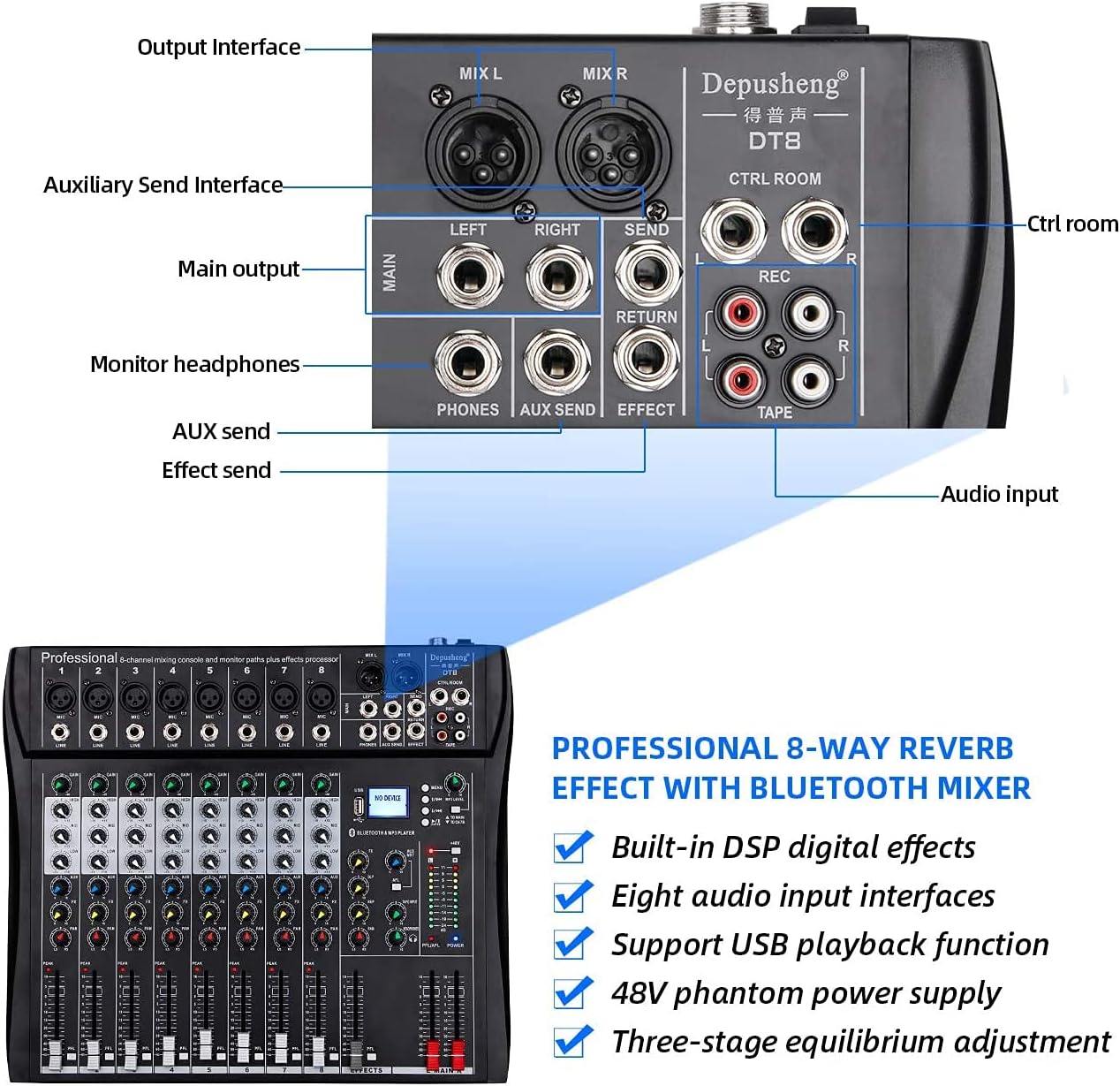
Figure 3: Rear panel showing various output and auxiliary interfaces.
5. Əməliyyat Təlimatları
5.1 Kanal İdarəetmələri
Each input channel features the following controls:
- QAZANMA: Adjusts the input sensitivity for the microphone or line input.
- HIGH, MID, BASS (EQ): Three-band equalizer for adjusting the treble, midrange, and bass frequencies of the input signal.
- Xarici valyuta: Daxili effektlər prosessoruna göndərilən siqnalın miqdarına nəzarət edir.
- Tava: Kanal siqnalının stereo mövqeyini tənzimləyir (soldan sağa).
- PFL (Pre-Fader Dinləmə): Activates pre-fader monitoring of the channel through headphones.
- Volume Fader: Controls the output level of the channel to the main mix.

Şəkil 4: Ətraflı view of a single channel strip with Gain, EQ, Effect, Balance, and Volume Fader controls.
5.2 USB/MP3 Player Operation
The integrated USB/MP3 player allows for direct playback of audio files from a USB flash drive or connection to a computer.
- USB interfeysi: Insert a USB flash drive into the USB port. The display will show "NO DEVICE" until a compatible device is detected.
- Nəzarətlər: Use the dedicated buttons for Previous Song, Next Song, Play/Pause, and Enter to navigate and control playback.
- MP3 Səviyyəsi: Adjust the volume of the MP3 player using the corresponding level control.

Figure 5: MP3 player controls, FX section, and +48V phantom power button.
5.3 Bluetooth bağlantısı
Bluetooth vasitəsilə simsiz səs yayımlamaq üçün:
- Mikserin işə salındığından əmin olun.
- Activate Bluetooth mode on the mixer (refer to the display for mode selection).
- On your smartphone or tablet, search for available Bluetooth devices and select "Depusheng DT8" (or similar name).
- Cütləşdirildikdən sonra cihazınızdan mikserə səs yayımlaya bilərsiniz.

Figure 6: Illustrates Bluetooth wireless streaming from a smart device to the mixer.
5.4 Fantom Gücü (+48V)
The mixer provides +48V phantom power for condenser microphones. Locate the +48V button on the mixer's control panel. Press this button to activate phantom power. Ensure all condenser microphones are connected before activating phantom power to prevent damage.
6. Baxım
- Təmizləmə: Regularly wipe the mixer's surface with a soft, dry cloth. Avoid abrasive cleaners or solvents.
- Tozdan qorunma: Keep the mixer covered when not in use to prevent dust accumulation, especially on faders and knobs.
- Yaddaş: Cihazı birbaşa günəş işığından və həddindən artıq temperaturdan uzaq sərin, quru yerdə saxlayın.
- Kabel İdarəetmə: Konnektorlara və portlara zərər verməmək üçün kabellərin səliqəli şəkildə düzülmüş və gərginlik altında olmadığından əmin olun.
7. Giderme
| Problem | Mümkün Səbəb | Həll |
|---|---|---|
| Güc yoxdur | Power cable disconnected; Power switch off; Faulty power adapter | Check power cable connection; Turn on power switch; Test with another power adapter if available |
| Səs çıxışı yoxdur | Volume faders down; Output cables disconnected; Speakers off/faulty | Increase master and channel faders; Check all output cable connections; Verify speakers are powered on and working |
| Giriş siqnalı yoxdur | Input cable disconnected; Gain knob too low; Microphone/instrument off/faulty; Phantom power off for condenser mics | Check input cable connections; Increase GAIN knob; Verify microphone/instrument functionality; Activate +48V phantom power for condenser mics |
| Bluetooth bağlantısı problemləri | Mikser Bluetooth rejimində deyil; Cihaz çox uzaqdadır; Müdaxilə | Ensure mixer is in Bluetooth mode; Move device closer to mixer; Reduce other wireless interference |
| USB oxutma işləmir | USB sürücüsü düzgün daxil edilməyib; Uyğun deyil file format; USB drive faulty | Reinsert USB drive; Ensure audio files are in a compatible format (e.g., MP3); Try a different USB drive |
8. Spesifikasiyalar
| Xüsusiyyət | Detal |
|---|---|
| Model nömrəsi | DT8 |
| Kanalların sayı | 8 |
| Məhsulun Ölçüləri (U x G x Y) | 33.6 x 39 x 3.5 sm |
| Maddə Çəkisi | 4.67 kiloqram |
| Bağlantı texnologiyası | Bluetooth, USB |
| Güc mənbəyi | Elektrik kabeli |
| Tezliyə cavab | 20 Hz (minimum specified) |
| Çıxış Konnektorunun Tipi | 6.35 mm, RCA, XLR |
| Audio Giriş | Microphone, Music |
| Sound Level / Noise Level | 90 desibel |
| Cildtage | 220 Volt (AC) |
| İstehsalçı | Depusheng |
9. Zəmanət və Dəstək
For warranty information and technical support, please refer to the documentation included with your purchase or contact Depusheng customer service through their official website or your retailer. Keep your proof of purchase for warranty claims.