
1. Əhəmiyyətli Təhlükəsizlik Məlumatı
Before operating the Zipro Nix Rower, please read and understand all instructions in this manual. Keep this manual for future reference.
- Hər hansı bir məşq proqramına başlamazdan əvvəl həkiminizlə məsləhətləşin.
- Hər istifadədən əvvəl bütün hissələrin düzgün yığıldığından və bərkidildiyindən əmin olun.
- Place the rower on a flat, stable surface. Ensure adequate clear space around the equipment (at least 0.6 meters).
- Əməliyyat zamanı uşaqları və ev heyvanlarını avadanlıqdan uzaq tutun.
- Maksimum istifadəçi çəkisi 120 kq (264 funt)-dan çox olmamalıdır.
- Müvafiq idman geyimi və ayaqqabı geyin.
- Ağrı, başgicəllənmə və ya nəfəs darlığı hiss edirsinizsə, dərhal məşqləri dayandırın və həkimə müraciət edin.
- Regularly inspect the rower for wear and tear, especially cables, straps, and moving parts. Do not use if damaged.
2. Paketin məzmunu
Carefully unpack the carton and verify all parts are present and undamaged. If any parts are missing or damaged, contact customer support immediately.
- Main Rower Frame (pre-assembled components)
- Seat and Rail Assembly
- Ayaq dayaqları
- Sükan
- Kompüter Konsolu
- Avadanlıq dəsti (boltlar, yuyucular, qoz-fındıq, alətlər)
- İstifadəçi təlimatı
3. Quraşdırma və Quraşdırma
Follow these steps to assemble your Zipro Nix Rower. It is recommended to have two people for assembly.
- Komponentləri qablaşdırmadan çıxarın: Lay out all parts on a clean, flat surface. Refer to the parts diagram in the included manual for identification.
- Stabilizatorları əlavə edin: Secure the front and rear stabilizers to the main frame using the provided bolts and washers. Ensure they are tightly fastened for stability.
- Install Seat Rail: Attach the seat rail to the main unit. Ensure the seat carriage slides smoothly along the rail.
- Mount Footrests: Secure the footrests to the main frame. Ensure the adjustable straps are correctly positioned.
- Sükanı birləşdirin: Attach the handlebar to the pulling mechanism. Verify the strap or chain is securely connected.
- Install Computer Console: Mount the computer console onto its designated bracket. Connect any necessary sensor cables from the main unit to the console. Insert batteries if required.
- Son yoxlama: Double-check all bolts and connections to ensure they are secure. Test the seat movement and handlebar pull for smooth operation.

Şəkil 3.1: The Zipro Nix Rower with its approximate dimensions: Length 183 cm, Width 46 cm, Height 48 cm. These dimensions are important for planning the placement of the rower in your home.
4. Əməliyyat Təlimatları
4.1. Müqavimətin tənzimlənməsi
The Zipro Nix Rower features an 8-level magnetic resistance system. To adjust the resistance, locate the rotary knob on the main unit, typically near the footrests. Turn the knob clockwise to increase resistance (levels 1-8) and counter-clockwise to decrease it. Start with a lower resistance level and gradually increase as your fitness improves.

Şəkil 4.1: Yaxın plan view of the adjustable footrests and the 8-level resistance control knob on the Zipro Nix Rower.
4.2. Using the Computer Console
The easy-to-use LCD computer console displays various workout data to help you monitor your progress.
Şəkil 4.2: The LCD computer display of the Zipro Nix Rower, showing icons for Time, Calories, Speed, and Pulse, along with numerical readouts.
- Yandırma/Söndürmə: The console typically powers on automatically when you begin rowing or press any button. It will power off after a period of inactivity.
- Funksiyalar: The display cycles through or allows selection of the following metrics:
- VAXT: Məşqinizin müddəti.
- COUNT (Strokes): Total number of strokes performed.
- KALORİYALAR: Məşq zamanı yandırılmış kalorilərin hesablanması.
- SÜRƏT: Cari avarçəkmə sürəti.
- Nəbz: Heart rate (if a compatible heart rate monitor is used and connected).
- Sıfırlayın: Press and hold the button (usually marked 'MODE' or 'RESET') to clear all current workout data.
4.3. Proper Rowing Technique
To maximize effectiveness and prevent injury, maintain proper form:
- Tutmaq: Start with knees bent, arms extended forward, and back straight.
- Sürücü: Push off with your legs, then lean back slightly, and finally pull the handlebar towards your abdomen.
- Bitir: Ayaqlar uzadılıb, bədən bir qədər arxaya əyilib, sükan qarnınızdadır.
- Bərpa: Qollarınızı irəli uzatın, sonra irəli əyilin və nəhayət tutma vəziyyətinə qayıtmaq üçün dizləri bükün.

Şəkil 4.3: The ergonomically designed seat of the Zipro Nix Rower, providing comfort during extended workouts.
5. Baxım və Saxlama
5.1. Təmizləmə
Wipe down the rower after each use with a damp cloth to remove sweat and dust. Do not use abrasive cleaners or solvents, as they may damage the finish or electronic components.
5.2. Yağlama
The magnetic resistance system is largely maintenance-free. However, periodically check the seat rail for any debris and wipe it clean. If the seat movement becomes less smooth, a small amount of silicone-based lubricant can be applied to the rail, but avoid oil-based lubricants.
5.3. Saxlama
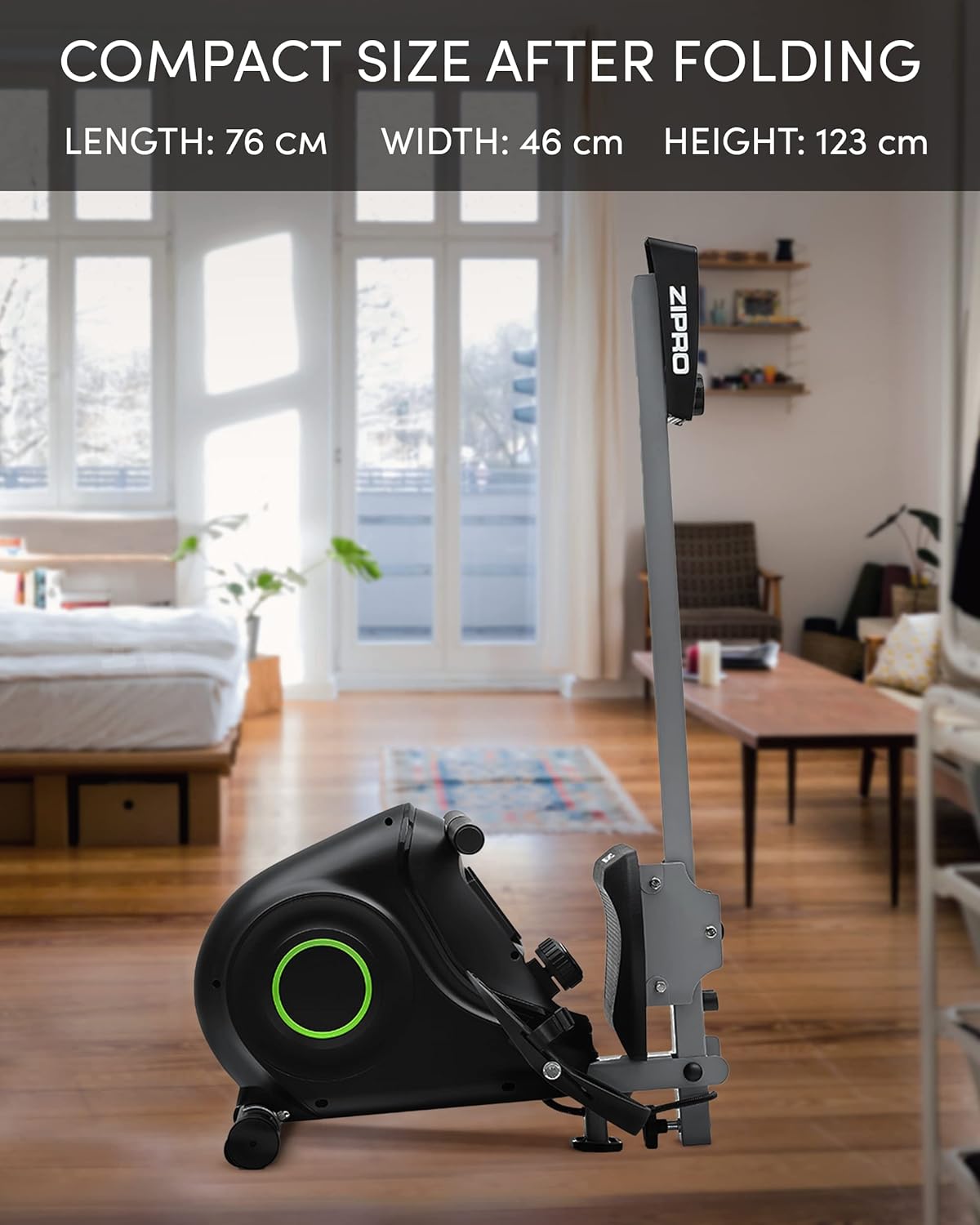
The Zipro Nix Rower is designed to be foldable for compact storage, saving space when not in use.
- Qatlanan: Follow the instructions in your assembly manual for folding the rower into its vertical position. This typically involves releasing a locking pin or knob and folding the rail upwards.
- Nəqliyyat: Utilize the integrated transport wheels located on the rear stabilizer to easily move the rower. Tilt the rower onto its wheels and push it to your desired storage location.

Şəkil 5.1: The Zipro Nix Rower in its compact, folded position, ideal for space-saving storage.

Şəkil 5.2: Yaxın plan view of the transport wheels on the Zipro Nix Rower, facilitating easy relocation of the unit.
6. Giderme
If you encounter issues with your Zipro Nix Rower, refer to the following common problems and solutions:
| Problem | Mümkün Səbəb | Həll |
|---|---|---|
| No display on computer console | Batteries are dead or incorrectly installed. Loose sensor cable connection. | Replace batteries. Check battery orientation. Ensure sensor cable is securely plugged into the console. |
| Resistance feels inconsistent or too low/high | Resistance knob not set correctly. Internal magnetic mechanism issue. | Adjust the resistance knob to a different level. If problem persists, contact customer support. |
| Seat does not slide smoothly | Debris on the rail. Rail or wheels need lubrication. | Clean the seat rail and wheels. Apply a small amount of silicone-based lubricant to the rail. |
| Əməliyyat zamanı qeyri-adi səslər | Loose bolts or components. Internal friction. | Check and tighten all visible bolts. If noise persists, discontinue use and contact customer support. |
7. Spesifikasiyalar
Detailed technical specifications for the Zipro Nix Rower:
| Xüsusiyyət | Spesifikasiya |
|---|---|
| Model nömrəsi | 6299217 |
| Brend | ZIPRO |
| Müqavimət Mexanizmi | Maqnit |
| Müqavimət Səviyyələri | 8 |
| Ekran növü | LCD |
| Displayed Metrics | Time, Strokes (Count), Calories, Speed, Pulse |
| Çərçivə materialı | Karbon Polad |
| Maksimum İstifadəçi Çəkisi | 120 Kiloqram (264 funt) |
| Məhsulun Ölçüləri (U x G x Y) | 183 x 46 x 48 sm (72 x 18.1 x 18.9 düym) |
| Qatlanmış Ölçülər (U x G x Y) | təqribən. 76 x 46 x 123 sm (30 x 18.1 x 48.4 düym) |
| Maddə Çəkisi | 27 Kiloqram (59.5 funt) |
| Enerji mənbəyi (Konsol) | Batareya ilə işləyir |
| Xüsusi Xüsusiyyətlər | Adjustable foot strap, Foldable design, Transport wheels |
8. Zəmanət və Dəstək
For warranty information, please refer to the warranty card included with your product or visit the official ZIPRO website. If you require technical assistance, replacement parts, or have any questions not covered in this manual, please contact ZIPRO customer support through their official channels.
Lütfən, dəstək xidməti ilə əlaqə saxlayarkən model nömrənizi (6299217) və satınalma sübutunuzu hazırlayın.