
1. Giriş
Aldığınız üçün təşəkkür edirikasing the Trevi CMP 588 DAB Portable Stereo System. This manual provides essential information for the safe and correct operation of your device. Please read it thoroughly before use and retain it for future reference.
The Trevi CMP 588 DAB is a versatile portable stereo system featuring DAB/DAB+ and FM radio with RDS, a CD/MP3 player, USB input, AUX-in, Bluetooth connectivity, and a headphone jack, all designed for an enhanced audio experience.
2. Təhlükəsizlik Məlumatı
- Güc mənbəyi: Yalnız göstərilən güc adapterindən və ya batareyalardan istifadə edin. Səs səviyyəsinintage bölmənin tələblərinə uyğundur.
- Su və nəm: Cihazı yağışa, nəmə məruz qoymayın və ya suya salmayın. Cihazın üzərinə vaza kimi maye ilə doldurulmuş əşyalar qoymaqdan çəkinin.
- Havalandırma: Adekvat ventilyasiyanı təmin edin. Havalandırma deliklərini bağlamayın.
- İstilik: Cihazı radiatorlar, istilik registrləri, sobalar və ya digər cihazlar (o cümlədən) kimi istilik mənbələrindən uzaq saxlayın. ampistilik əmələ gətirən qaldırıcılar).
- Təmizləmə: Təmizləmədən əvvəl cihazı elektrik rozetkasından ayırın. Yumşaq, quru parça istifadə edin. Maye təmizləyicilərdən və ya aerozol təmizləyicilərindən istifadə etməyin.
- Xidmət: Bu məhsula özünüz xidmət göstərməyə çalışmayın. Bütün xidmətlər üçün ixtisaslı xidmət personalına müraciət edin.
- CD pleyer: Heç vaxt birbaşa lazer şüasına baxmayın.
3. Paketin məzmunu
Bütün əşyaların mövcud olduğunu və yaxşı vəziyyətdə olduğunu yoxlayın:
- Trevi CMP 588 DAB Portable Stereo System
- AC Güc Kabeli
- Uzaqdan İdarəetmə
- İstifadəçi Təlimatı (bu sənəd)
4. Məhsulun xüsusiyyətləri
- DAB/DAB+ and FM Radio with RDS
- High Readability Dot Matrix Display
- CD Player (supports CD-DA, MP3)
- USB Input for MP3 Playback
- AUX-in for external audio devices
- Bluetooth Bağlantısı
- Qulaqlıq yuvası
- Daşıma sapı ilə portativ dizayn
- Uzaqdan İdarəetmə daxildir
5. Nəzarət və əlaqələr

Şəkil 1: Ön view of the Trevi CMP 588 DAB, showing speakers, display, and main controls.
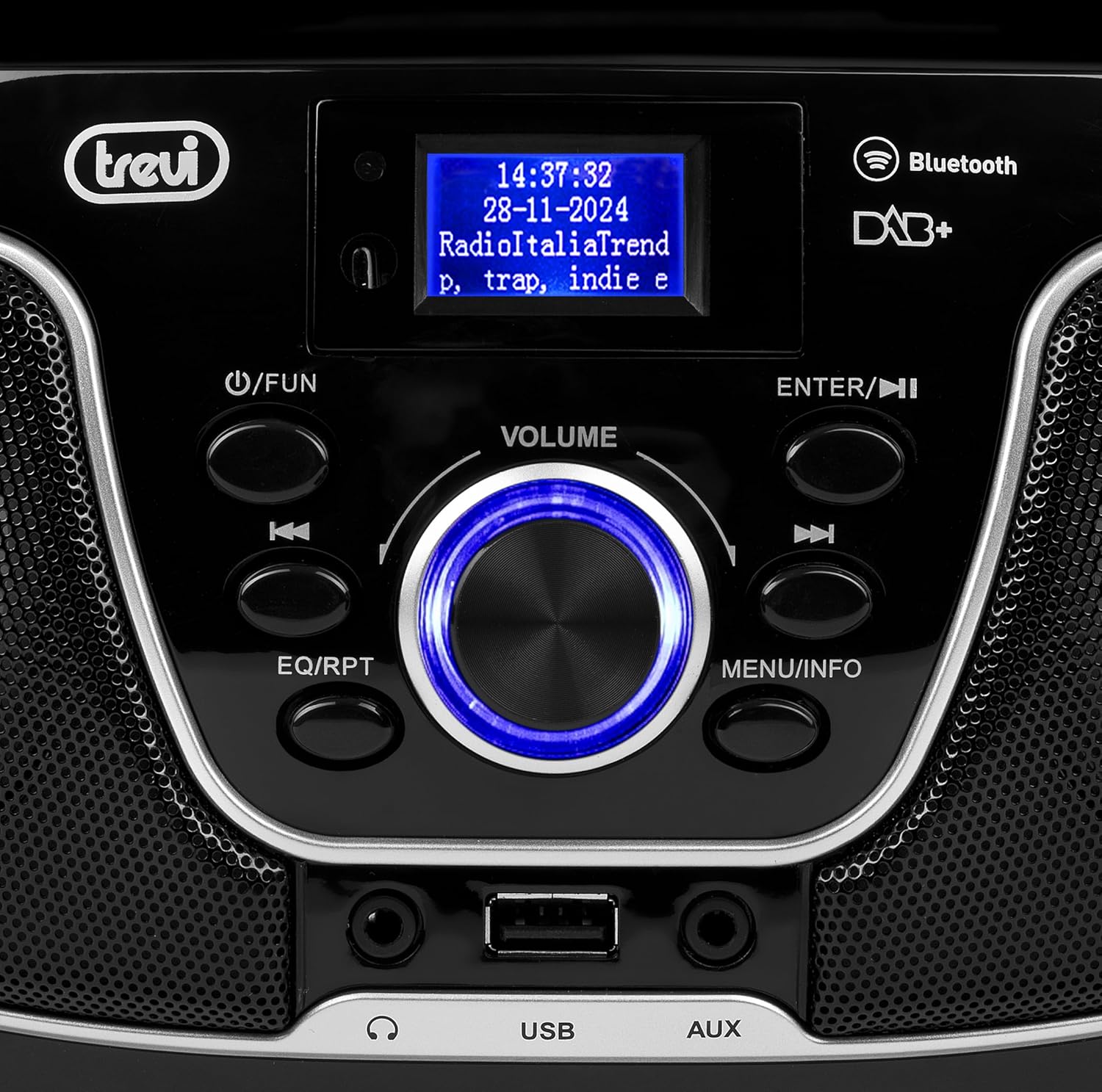
Şəkil 2: Ətraflı view of the control panel, including power, function, volume knob, and navigation buttons.
Ön Panel Nəzarətləri:
- POWER / FUN button: Press to turn on/off, press to switch functions (CD/USB/DAB/FM/Bluetooth/AUX).
- Həcm düyməsi: Rotate to adjust volume. Press to confirm selections.
- ENTER / ►►I button: Confirm selection / Skip to next track/station.
- I▼▼ / EQ/RPT button: Skip to previous track/station / Equalizer settings / Repeat mode.
- MENU / INFO button: Access menu / Display information.
- USB Port: Connect USB storage devices for MP3 playback.
- AUX giriş yuvası: Xarici audio cihazlarını birləşdirin.
- Qulaqlıq Jack: Şəxsi dinləmə üçün qulaqlıq bağlayın.

Şəkil 3: Arxa view of the Trevi CMP 588 DAB, showing the power input and telescopic antenna.
Arxa Panel Əlaqələri:
- AC Elektrik Girdi: Təchiz edilmiş AC elektrik kabelini qoşun.
- Teleskopik antena: Optimal radio qəbulu üçün genişləndirin.

Figure 4: Remote control for the Trevi CMP 588 DAB, showing various function buttons.
Uzaqdan İdarəetmə Funksiyaları:
- DƏSTƏK: Açma / söndürmə.
- FUNC: Switch between modes (CD, USB, DAB, FM, Bluetooth, AUX).
- SƏSSİZ: Səsi söndürün/səsin açın.
- RPT: Oxutma rejimini təkrarlayın.
- SCAN: Auto scan for radio stations.
- F+/CH+, F-/CH-: Navigate folders/channels.
- EQ: Ekvalayzer parametrləri.
- PLAY/PAUSE (►II): Oxunuma oynatmaq/pauza vermək.
- PREV/TUN- (▼▼): Previous track/tune down.
- NEXT/TUN+ (►►): Next track/tune up.
- STOP (■): Çalmağı dayandırın.
- Menyu: Menyuya daxil olun.
- MƏLUMAT: Məlumatı göstərin.
- PROQ: Program tracks/stations.
- VOL+ / VOL-: Səs səviyyəsini tənzimləyin.
6. Quraşdırma
6.1 Enerji Bağlantısı
- AC Gücü: Connect the supplied AC power cable to the AC power input on the rear of the unit, then plug the other end into a wall outlet.
- Battery Operation (Optional): For portable use, insert 6 x C-size batteries (not included) into the battery compartment on the bottom of the unit. Ensure correct polarity.
6.2 İlkin işə salınma
düyməsini basın POWER / FUN vahiddəki düyməni və ya Gözlə button on the remote control to turn on the system. The display will light up.
6.3 Setting Up the Antenna
For optimal radio reception, fully extend the telescopic antenna located at the rear of the unit. Adjust its position for the best signal.
7. Əməliyyat Təlimatları
7.1 DAB/DAB+ Radio Əməliyyatı
- düyməsini basın POWER / FUN button repeatedly until "DAB" mode is selected.
- The unit will automatically scan for available DAB/DAB+ stations on first use. To perform a manual scan, press the MENU button, navigate to "Full Scan" and press ENTER.
- Skanlama tamamlandıqdan sonra istifadə edin ▼▼ or ►► buttons to browse through the available stations. Press ENTER stansiya seçmək.
- düyməsini basın MƏLUMAT button to cycle through different information displays (e.g., program type, signal strength, time).
7.2 FM Radio Əməliyyatı
- düyməsini basın POWER / FUN button repeatedly until "FM" mode is selected.
- To auto-scan and store stations, press the SCAN button on the remote. The unit will scan and save strong signals.
- Əl ilə kökləmək üçün basıb saxlayın ▼▼ or ►► buttons to search for the next available station. Press briefly to fine-tune the frequency.
- The RDS function will display station information (if available).
7.3 CD/MP3 Oxutma

Şəkil 5: Üst view of the Trevi CMP 588 DAB with the CD compartment open, ready for disc insertion.
- CD bölməsinin qapağını açın.
- Place a CD (CD-DA or MP3 CD) onto the spindle with the label side facing up.
- CD bölməsinin qapağını bağlayın.
- düyməsini basın POWER / FUN button repeatedly until "CD" mode is selected.
- The unit will read the disc. Press PLAY/PAUSE (►II) oxutmaya başlamaq üçün.
- istifadə edin ▼▼ or ►► to skip tracks. Press and hold to fast forward/rewind.
- basın STOP (■) oxutmanı dayandırmaq üçün.
7.4 USB Oynatma
- MP3 olan USB flash sürücüsünü daxil edin files USB portuna daxil edin.
- düyməsini basın POWER / FUN "USB" rejimi seçilənə qədər düyməni dəfələrlə basın.
- Cihaz avtomatik olaraq MP3-ü aşkarlayacaq və çalmağa başlayacaq files.
- istifadə edin ▼▼ or ►► trekləri atlamaq üçün.
7.5 Bluetooth Pairing and Playback
- düyməsini basın POWER / FUN button repeatedly until "Bluetooth" mode is selected. The display will show "BT" or "PAIRING".
- Mobil cihazınızda (smartfon, planşet və s.) Bluetooth-u aktivləşdirin.
- axtarın available devices and select "TREVI CMP 588 DAB" from the list.
- Once paired, you can play audio from your device through the stereo system.
- Use the controls on your mobile device or the stereo system to manage playback.
7.6 AUX-in Operation
- Connect an external audio device (e.g., MP3 player, smartphone) to the AUX-in jack using a 3.5mm audio cable (not included).
- düyməsini basın POWER / FUN "AUX" rejimi seçilənə qədər düyməni dəfələrlə basın.
- Play audio from your connected device. The volume can be controlled via both the stereo system and the external device.
8. Baxım
8.1 Cihazın təmizlənməsi
Cihazın xarici hissəsini yumşaq, quru bir parça ilə silin. Aşındırıcı təmizləyicilərdən, mumlardan və ya həlledicilərdən istifadə etməyin, çünki onlar örtüyə zərər verə bilər. Təmizləmədən əvvəl cihazın elektrik şəbəkəsindən çıxarıldığından əmin olun.
8.2 CD Linza Baxımı
If the CD player experiences reading errors, the lens may be dirty. Use a commercially available CD lens cleaner to clean the lens. Do not touch the lens with your fingers.
8.3 Saxlama
If the unit will not be used for an extended period, remove the batteries (if applicable) and unplug the power cable. Store the unit in a cool, dry place away from direct sunlight and extreme temperatures.
9. Giderme
| Problem | Mümkün Səbəb | Həll |
|---|---|---|
| Güc yoxdur | Elektrik kabeli qoşulmayıb; Batareyalar tükənib və ya səhv yerləşdirilib. | Check power cable connection; Replace batteries or ensure correct polarity. |
| Səs yoxdur | Səs çox aşağı; Səssiz funksiyası aktivdir; Yanlış mənbə seçildi. | Increase volume; Deactivate mute; Select correct function (CD, USB, DAB, FM, BT, AUX). |
| Zəif radio qəbulu | Antenna not extended or positioned incorrectly; Weak signal area. | Teleskopik antenanı tam uzadın və tənzimləyin; Cihazı başqa bir yerə köçürməyə çalışın. |
| CD/USB oxunmur | Disc dirty/scratched; Incorrect file format on USB; USB drive not properly inserted. | Clean or replace disc; Ensure MP3 format for USB; Reinsert USB drive. |
| Bluetooth cütləşməsi uğursuz oldu | Device too far; Bluetooth not enabled on source device; Unit not in pairing mode. | Move devices closer; Enable Bluetooth on source device; Ensure unit is in Bluetooth mode and searching. |
10. Spesifikasiyalar
- Model: CM 588 DAB
- Güc mənbəyi: AC 230V ~ 50Hz or 6 x C-size batteries (not included)
- Enerji istehlakı: 15 Vt
- Dinamik növü: Stereo (2 speakers)
- Bağlantı: Bluetooth, USB, AUX-in
- Dəstəklənən Audio Formatlar: CD audio (CD-DA), MP3
- Radiotezliklər: DAB/DAB+, FM with RDS
- Ölçülər (U x G x Y): 50 x 50 x 28 sm (təxminən)
- Çəki: 1.5 Kilograms (approximate)
- Rəng: Qara
11. Zəmanət və Dəstək
This product is covered by a standard manufacturer's warranty. Please refer to the warranty card included in your package for specific terms and conditions, including the warranty period and coverage details.
For technical support, service, or warranty claims, please contact your retailer or the official Trevi customer service. Contact information can typically be found on the Trevi websaytda və ya məhsulun qablaşdırmasında.
Please retain your proof of purchase (receipt) for any warranty-related inquiries.