
Giriş
This instruction manual provides comprehensive guidance for the SOAR NFL True Wireless Earbuds V.4. These earbuds feature Bluetooth 5.0 technology, a built-in microphone, and touch controls, offering 3-4 hours of playtime per charge. The included charging case ensures portability and extended use. Please read this manual thoroughly before using your earbuds to ensure proper operation and longevity.
Qutuda nə var
Upon opening your SOAR NFL True Wireless Earbuds V.4 package, you should find the following items:
- One (1) Pair of True Wireless Earbuds
- Bir (1) Şarj Qutusu
- Bir (1) Micro-USB şarj kabeli

The image above displays the SOAR NFL True Wireless Earbuds V.4 in their retail packaging. The package includes the earbuds, the charging case, and a micro-USB charging cable.
Məhsul Bitdiview
The SOAR NFL True Wireless Earbuds V.4 consist of two individual earbuds and a portable charging case. Each earbud features a touch-sensitive area for controls and an LED indicator. The charging case has a lid, charging ports for the earbuds, and LED indicators to show its battery status.

This image shows the earbuds outside their charging case, which is open and connected to a charging cable. The charging case has designated slots for each earbud (Left and Right) and LED indicators for charging status.
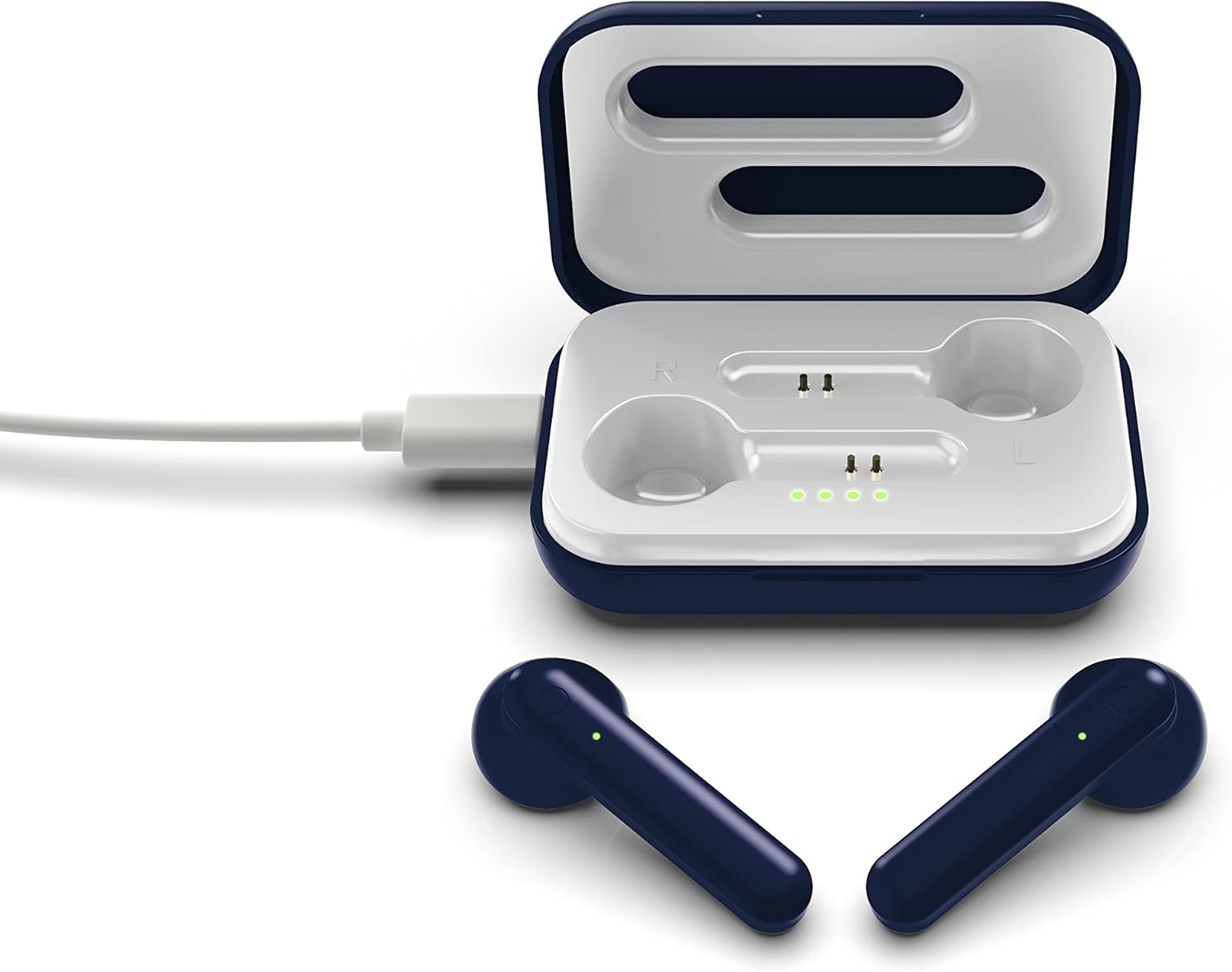
The image above illustrates the earbuds securely placed within their charging case. The illuminated LED lights on the case indicate the charging status of both the case and the earbuds.
Quraşdırma
1. Qulaqlıqların və qutunun doldurulması
İlk istifadə etməzdən əvvəl həm qulaqcıqları, həm də doldurma qutusunu tam doldurun.
- Çantanın doldurulması: Connect the provided Micro-USB cable to the charging port on the case and the other end to a USB power source (e.g., computer, wall adapter). The LED indicators on the case will illuminate to show charging progress.
- Qulaqlıqların doldurulması: Place the earbuds into their respective slots in the charging case. Ensure they are correctly seated. The earbuds will begin charging automatically from the case's internal battery. The LED indicators on the earbuds will show their charging status.
- A full charge provides approximately 3-4 hours of playtime.
2. Bluetooth Cütləşdirmə
Qulaqcıqlarınızı cihaza qoşmaq üçün:
- Qulaqlıqların doldurulduğundan əmin olun.
- Open the charging case. The earbuds will automatically power on and enter pairing mode. The LED indicator on one earbud will flash, indicating it is ready to pair.
- Cihazınızda (smartfon, planşet və s.) Bluetooth-u aktiv edin.
- axtarın available Bluetooth devices and select "SOAR TWS4" from the list.
- Once connected, the earbud LED indicator will stop flashing. You will hear an audible confirmation.
- Cihazda Bluetooth aktivləşdirilərsə, qulaqlıqlar qutudan çıxarıldıqda avtomatik olaraq sonuncu qoşalaşmış cihaza yenidən qoşulacaq.
Əməliyyat Təlimatları
The SOAR NFL True Wireless Earbuds V.4 feature touch controls for easy management of audio and calls.
Gücü yandırın/söndürün
- Güc Aktivdir: Şarj qutusunu açın və ya hər iki qulaqcığın toxunma sahəsini 3 saniyə basıb saxlayın.
- Söndürmək: Qulaqlıqları yenidən şarj qutusuna yerləşdirin və qapağı bağlayın, yaxud hər iki qulaqlığın toxunma sahəsini 5 saniyə basıb saxlayın.
Musiqi çalma
- Oynat/Pauza: Hər iki qulaqcığa bir dəfə toxunun.
- Növbəti trek: Sağ qulaqcığa iki dəfə toxunun.
- Əvvəlki Track: Sol qulaqcığa iki dəfə toxunun.
Zəng İdarəetmə
- Zəngə Cavab Vermək/Bitirmək: Daxil olan və ya aktiv zəng zamanı qulaqcıqdan bir dəfə toxunun.
- Zəngi rədd edin: Long-press on either earbud for 2 seconds during an incoming call.
Səsli köməkçi
- Səs köməkçisini aktivləşdirin: Hər iki qulaqcığa üç dəfə toxunun.
Baxım
Proper care will extend the life of your earbuds.
- Təmizləmə: Qulaqcıqları və şarj qutusunu təmizləmək üçün yumşaq, quru bir parça istifadə edin. Sərt kimyəvi maddələrdən və ya aşındırıcı materiallardan istifadə etməyin.
- Yaddaş: İstifadə edilmədikdə qulaqcıqları qorumaq və doldurulmuş vəziyyətdə saxlamaq üçün onları doldurma qutusunda saxlayın.
- Suya davamlılıq: Bu qulaqcıqlar suya davamlı deyil. Avoid exposure to liquids, moisture, and extreme temperatures.
- Doldurulur: Use only the provided Micro-USB cable or a certified equivalent for charging.
Problemlərin aradan qaldırılması
Qulaqlıqlarınızla bağlı problemlərlə qarşılaşsanız, aşağıdakı ümumi həllərə baxın:
| Problem | Həll |
|---|---|
| One earbud is not connecting or producing sound. |
|
| Earbuds are not pairing with my device. |
|
| Qulaqlıqlar doldurulmur. |
|
Spesifikasiyalar
| Xüsusiyyət | Detal |
|---|---|
| Model Adı | Əsl Simsiz Qulaqlıqlar V.4 |
| Element Model nömrəsi | NFL-TWS4-SHKS |
| Bağlantı texnologiyası | Bluetooth, Simsiz |
| Simsiz Rabitə Texnologiyası | Bluetooth 5.0 |
| Bluetooth diapazonu | 30 fut (9.14 metr) qədər |
| Batareya Ömrü (Oynama Müddəti) | Bir şarj üçün 3-4 saat |
| Nəzarət növü | Touch, Media Control |
| Xüsusi Xüsusiyyət | Mikrofon Daxildir |
| Qulaqların Yerləşdirilməsi | Qulaqda |
| Suya davamlılıq səviyyəsi | Suya davamlı deyil |
| Material | plastik |
| Məhsul Ölçüləri | 1.25 x 4.5 x 6.5 düym |
| Maddə Çəkisi | 3.52 unsiya |
| İstehsalçı | Prime Brands Group, Inc. |
| UPC | 192129070757 |
Rəsmi Məhsul Videosu
Bu video görüntünün bitməsini təmin edirview of the SOAR TWS4 True Wireless Earbuds V.4, highlighting key features such as the wireless charging case, touch controls, and Bluetooth 5.0 technology. It demonstrates the product's design and functionality.
Zəmanət və Dəstək
Your SOAR NFL True Wireless Earbuds V.4 are covered by a 1 İl Məhdud Zəmanət. This warranty covers manufacturing defects and issues arising from normal use. It does not cover damage caused by misuse, accidents, unauthorized modifications, or exposure to liquids.
For warranty claims, technical support, or further assistance, please contact the manufacturer, Prime Brands Group, Inc., or visit their official websayt. Zəmanətin yoxlanılması üçün satınalma sübutunuzu saxlayın.