
Giriş
Thank you for choosing the Hbada Ergonomic Gaming Chair. This manual provides essential information for the safe and efficient assembly, operation, and maintenance of your new chair. Please read these instructions carefully before use and retain them for future reference.

Image: The Hbada Ergonomic Gaming Chair in a modern gaming environment, showcasing its design and presence.
Təhlükəsizlik Məlumatı
- Quraşdırmadan əvvəl bütün komponentlərin mövcud olduğundan və zədələnməmiş olduğundan əmin olun. Hər hansı bir hissə əskik və ya qırıq olduqda istifadə etməyin.
- Follow the assembly instructions precisely. Incorrect assembly can lead to instability and injury.
- Stulda dayanmayın. Yalnız oturmaq üçün istifadə edin.
- Maksimum çəki tutumunu aşmayın (spesifikasiyalara baxın).
- Yığım zamanı uşaqları və ev heyvanlarını stuldan uzaq tutun.
- Materialın parçalanmasının qarşısını almaq üçün kreslonu birbaşa günəş işığına və ya həddindən artıq temperatura məruz qoymayın.
Məhsul Ölçüləri
Understanding the dimensions of your chair is important for proper placement and comfortable use. Below are the key measurements:
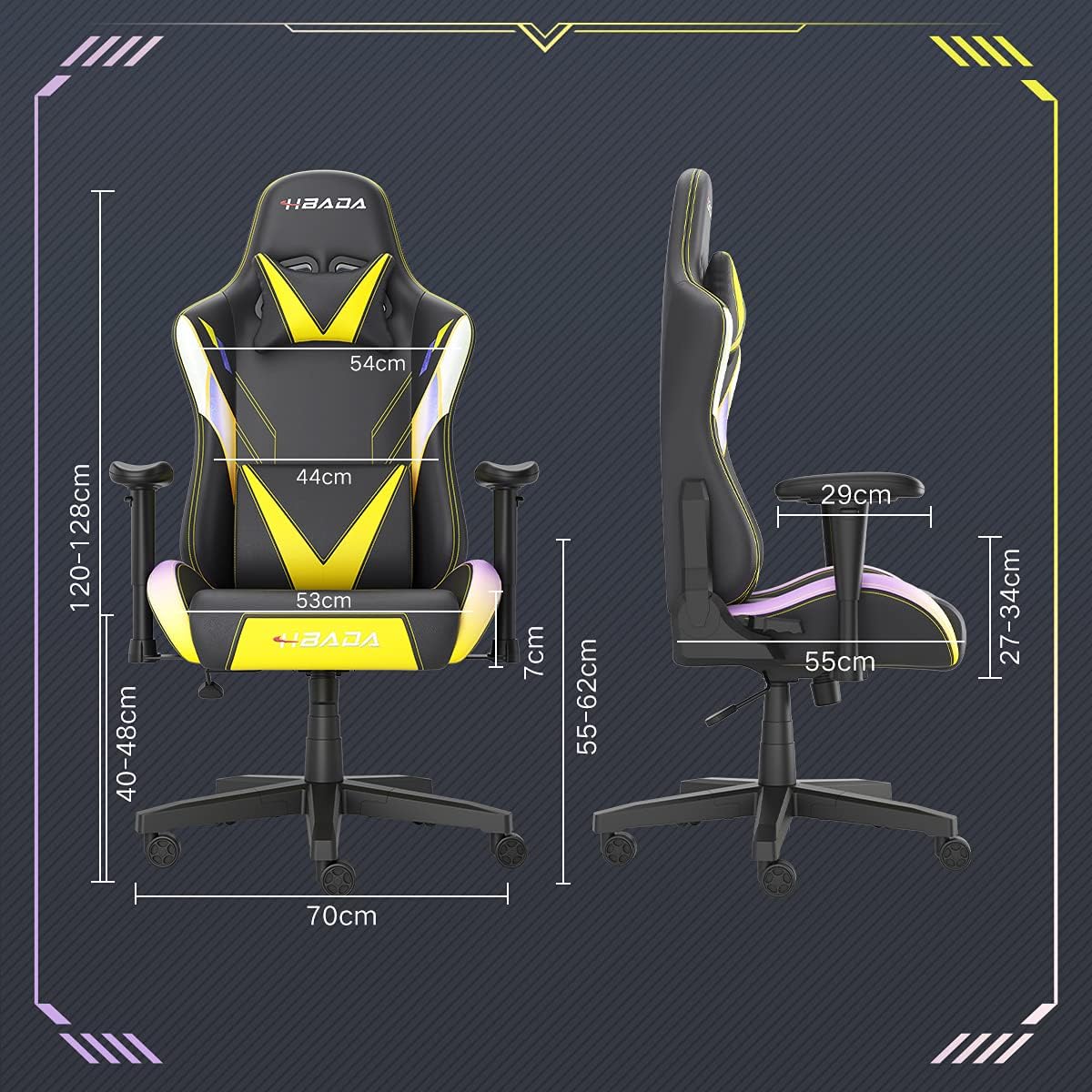
Image: A detailed diagram illustrating the various dimensions of the Hbada Gaming Chair, including height, width, and depth measurements.
- Ümumi Hündürlük: 120-128 cm (adjustable)
- Oturacaq Hündürlüyü: 40-48 cm (adjustable)
- Oturacaq eni: 53 sm
- Oturacaq dərinliyi: 55 sm
- Arxa dayaq eni: 54 cm (shoulder area), 44 cm (lumbar area)
- Qol dayaqlarının hündürlüyü (oturacaqdan): 7 cm (adjustable)
- Baza diametri: 70 sm
Quraşdırma və montaj
Please follow these steps carefully to assemble your Hbada Gaming Chair. It is recommended to have a clear, spacious area for assembly.
Montaj addımları:
- Step 1: Assemble the Base and Wheels
Insert the five casters into the holes on the star base. Then, place the gas lift cylinder into the center hole of the base.

Image: Illustration of attaching the five casters to the chair's star-shaped base and inserting the gas lift cylinder.
- Step 2: Attach the Seat and Backrest
Connect the backrest to the seat using the provided screws and mounting plates. Ensure all screws are tightened securely.

Image: Diagram showing the process of securing the backrest to the seat cushion using screws and brackets.
- Addım 3: Qol dayaqlarını quraşdırın
Attach the armrests to the sides of the seat using the designated screws. Make sure they are firmly attached.

Image: Visual guide for attaching the armrests to the chair's seat base.
- Step 4: Connect Seat to Base
Carefully place the assembled seat onto the gas lift cylinder, ensuring it is properly seated and stable.

Image: Depiction of lowering the assembled seat onto the gas lift cylinder, connecting the upper and lower parts of the chair.
- Step 5: Attach Headrest and Lumbar Pillow
Secure the detachable headrest and lumbar support pillow to the chair as desired for optimal comfort.

Image: Instructions for attaching the headrest and lumbar support pillows to the gaming chair.
Əməliyyat Təlimatları
Your Hbada Gaming Chair is designed with several adjustable features to provide personalized comfort and support.
Key Adjustable Functions:
- Adjustable Sitting Height: Use the lever located under the seat on the right side to raise or lower the chair. Pull the lever up to adjust the height, then release it at your desired position. The seat has an 8 cm elevation range.
- Reclining Backrest (90° to 155°): The backrest can be reclined from 90 degrees (upright) to 155 degrees (nearly flat). Use the recline lever on the side of the chair to adjust the angle. Lean back to your preferred position and lock the lever.
- Tənzimlənən qolçaqlar: The armrests can be adjusted in height by 7 cm. Locate the button or lever on the side of each armrest to unlock, adjust, and then lock them into your desired height.
- 360° Free Swivel: The chair features a full 360-degree swivel function, allowing for easy movement and access to your surroundings without needing to move the entire chair.
- Detachable Headrest and Lumbar Support: The chair includes a removable headrest pillow and lumbar support cushion for enhanced ergonomic comfort. Adjust their positions or remove them based on your preference.

Şəkil: Artıqview of the chair's ergonomic systems, highlighting adjustable sitting height, armrests, 155° reclining, 360° swivel, cool racing casters, and durable base.

Image: The Hbada Gaming Chair demonstrated in its 155-degree reclined position, illustrating the recline controller.
Baxım
Regular maintenance will help prolong the life and appearance of your Hbada Gaming Chair.
- PU Dəri Təmizləmə: PU dəri səthlərini yumşaq, d ilə silinamp cloth. For stubborn stains, use a mild soap solution and then wipe with a clean, damp Parça. Sərt kimyəvi maddələrdən və ya aşındırıcı təmizləyicilərdən çəkinin, çünki bunlar materiala zərər verə bilər.
- Kaster Baxımı: Periodically check the casters for accumulated dust or hair. Clean them with a brush or vacuum cleaner to ensure smooth movement and prevent damage to your flooring.
- Frame and Components: Regularly inspect all screws and bolts to ensure they are tight. Re-tighten if necessary to maintain stability.
- Birbaşa günəş işığından çəkinin: Prolonged exposure to direct sunlight can cause the PU leather to fade and crack. Position your chair away from direct sunlight when possible.
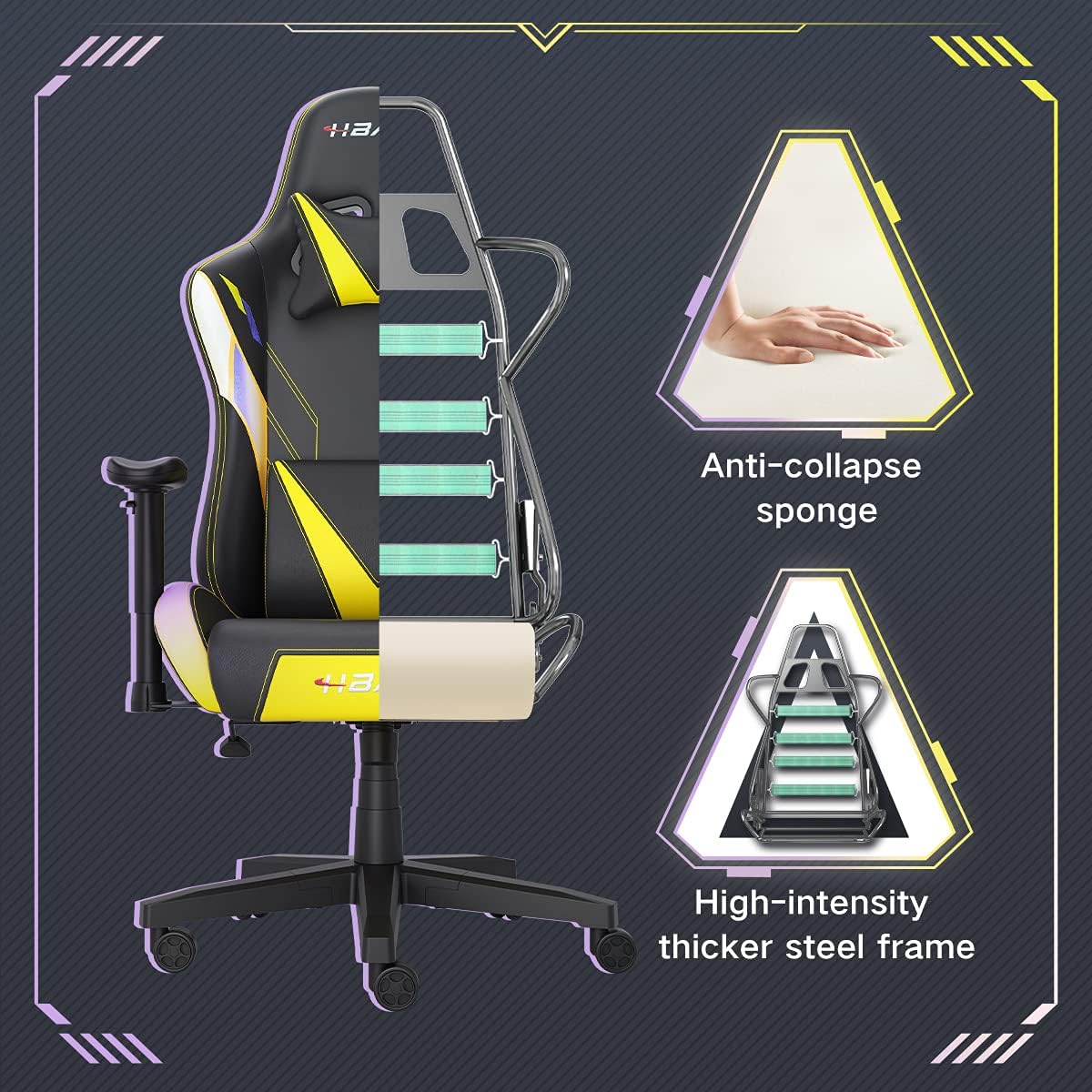
Şəkil: bir kəsik view of the chair's internal structure, highlighting the anti-collapse sponge padding and the high-intensity thicker steel frame, indicating durable construction.
Problemlərin aradan qaldırılması
If you encounter any issues with your Hbada Gaming Chair, refer to the following common problems and solutions:
| Problem | Mümkün Səbəb | Həll |
|---|---|---|
| Kreslo hündürlüyü tənzimləmir | Qaz liftinin nasazlığı və ya qolu işə düşməməsi. | Hündürlük tənzimləmə qolunun tam işlədiyinə əmin olun. Problem davam edərsə, qaz liftinin dəyişdirilməsi tələb oluna bilər. Müştəri dəstəyi ilə əlaqə saxlayın. |
| Chair is wobbly or unstable | Boş vintlər və ya düzgün olmayan montaj. | Check all assembly screws and bolts, and tighten them securely. Refer to the assembly instructions. |
| Təkərlər hamar şəkildə yuvarlanmır | Təkərlərə ilişmiş zibil (saç, toz). | Turn the chair over and remove any debris from the caster wheels. |
| Arxa dayaq əyilmir və ya kilidlənmir | Əyilmiş mexanizm ilişib qalıb və ya ling işə düşməyib. | Ensure the recline lever is fully engaged. Check for any obstructions around the mechanism. |
Spesifikasiyalar
| Xüsusiyyət | Detal |
|---|---|
| Brend | Hbada |
| Model nömrəsi | W203YMA/EU |
| ASIN | B095PSFLKX |
| Rəng | Sarı |
| Material | PU Leather, Metal Frame |
| Məhsul Ölçüləri | 70 x 70 x 128 sm (Uzunluq x Eni x Hündürlük) |
| Məhsul Çəkisi | 22 kiloqram |
| Xüsusi Xüsusiyyətlər | Ergonomic, Swivel, Casters, Headrest Support, Adjustable Recline (90°-155°), Adjustable Seat Height (8cm range), Adjustable Armrests (7cm range) |
| Vahidlərin sayı | 1.0 sayı |
Zəmanət və Dəstək
Your Hbada Gaming Chair comes with a bir il zəmanət satın alındığı tarixdən etibarən. Bu zəmanət normal istifadə zamanı istehsal qüsurlarını və material qüsurlarını əhatə edir.
If you experience any issues during use, including problems with installation, damage, or missing parts, please do not hesitate to contact Hbada customer service. We are committed to providing reliable service and can offer free exchanges for covered issues.
For support, please visit the official Hbada websayta daxil olun və ya satıcınızla əlaqə saxlayın.