
CDIYTOOL 4yhujuyj
CDIYTOOL 100A MPPT Solar Charge Controller User Manual
Model: 4yhujuyj
Giriş
This manual provides essential information for the safe and efficient operation of your CDIYTOOL 100A MPPT Solar Charge Controller. This controller is designed for 36V, 48V, and 60V battery systems and features an LCD display, multiple load control modes, and dual USB outputs. Please read this manual thoroughly before installation and use.
The controller automatically adapts to 36V/48V/60V systems and is not suitable for 12V/24V systems. It utilizes innovative MPPT technology for high tracking efficiency, detecting the maximum charging current.
Təhlükəsizlik Təlimatları
Always adhere to the following safety guidelines to prevent injury and damage to the controller or other components.
- Ensure the battery has sufficient voltage for the controller to recognize the correct battery type upon first use.
- Connect the battery to the controller first, then connect the solar panels. Reversing this order can damage the controller.
- Maksimum giriş həcmitage is 50V. Ensure your solar panel configuration does not exceed this limit. For example, a 19V photovoltaic panel matches a 12V battery, and a 38V photovoltaic panel matches a 24V battery. When a 38V panel is connected, the maximum voltage may reach 42V.
- The controller is suitable for various battery types (including open, lead-acid, gel, and lithium batteries). Refer to the controller's settings for specific battery types.
- The controller provides protection against overvoltage, short circuit, overload, overcharge, and over-discharge.
- Do not attempt to disassemble or repair the controller yourself. Contact qualified personnel for service.

Image: Excerpt from the user manual detailing safety instructions and a connection diagram.
Məhsul Xüsusiyyətləri
- Multi-function LCD Display: Provides real-time display of charging current, discharge current, and power generation.
- MPPT Texnologiyası: Innovative Maximum Power Point Tracking with high efficiency (up to 99%) for optimal solar energy harvesting.
- Etibarlı Qoruma: Overvol daxildirtage, short circuit, overload, overcharge, and over-discharge protection.
- Automatic Focusing MPPT Tracking: Ensures high charging efficiency and bidirectional focusing tracking.
- Temperatur kompensasiyası: Şarj həcmini avtomatik olaraq tənzimləyirtage based on ambient temperature changes.
- İkili USB çıxışları: Provides 5V/2A output for charging mobile devices.

Şəkil: Ön view of the CDIYTOOL 100A MPPT Solar Charge Controller, highlighting the LCD display and dual USB ports.
Quraşdırma və Quraşdırma
Follow these steps for proper installation of the solar charge controller:
- Naqilləri hazırlayın: Ensure all wires are correctly sized for the expected current and are properly insulated.
- Batareyanı birləşdirin: Connect the battery to the charge controller first. Ensure correct polarity (+ to + and - to -). The controller requires sufficient battery voltage to recognize the system type.
- Günəş panelini birləşdirin: Connect the solar panel(s) to the charge controller. Ensure correct polarity. Do not exceed the maximum input voltage 50V.
- Connect Load (Optional): Connect your DC load to the load terminals of the controller. The controller can manage load output based on settings.
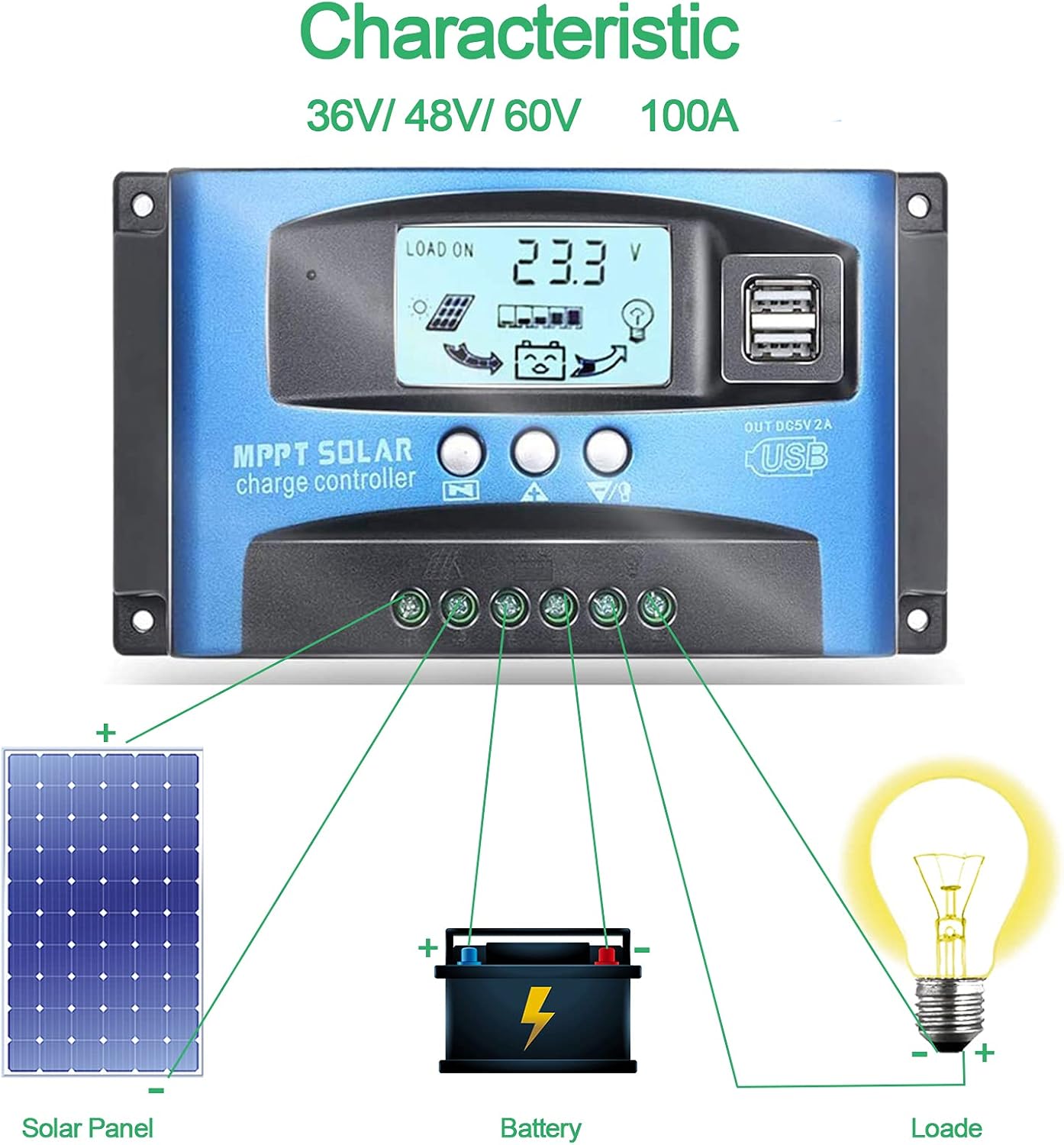
Image: Connection diagram illustrating how to connect solar panels, battery, and load to the charge controller.

Şəkil: Ətraflı view of the controller with labels for its components, including buttons, LCD, USB ports, and connection points.
Əməliyyat Təlimatları
The controller features an LCD display and three buttons for operation: Menu, Page Up, and Page Down/Manual.
LCD displey
The LCD displays various parameters including battery voltage, charging current, discharge current, and system status. The icons on the display indicate solar panel activity, battery charge level, and load status.
Düymə funksiyaları
- Menyu düyməsi: Press to enter the menu interface and cycle through different settings. Long press to modify parameters.
- Səhifə yuxarı düyməsi: Used to increase values or navigate upwards in menus.
- Page Down/Manual Button: Used to decrease values or navigate downwards in menus. Also functions as a manual load control switch (on/off) when on the main interface.
USB doldurulması
The controller is equipped with dual USB ports providing 5V/2A output for charging compatible devices such as mobile phones and tablets.

Image: Demonstration of the controller's dual USB ports being used to charge a mobile phone.
Baxım
Mütəmadi texniki xidmət günəş enerjisi tənzimləyicinizin uzunömürlülüyünü və optimal işini təmin edir.
- Bağlantıları yoxlayın: Periodically check all wiring connections for tightness and corrosion. Loose connections can lead to power loss or overheating.
- Təmiz Nəzarətçi: Keep the controller clean and free from dust and debris. Use a dry cloth to wipe the surface. Do not use liquid cleaners.
- Monitor Performansı: Regularly check the LCD display for normal operation and expected voltage/current readings.
- Batareya Sağlamlığı: Ensure your battery is well-maintained and within its recommended operating parameters.
Problemlərin aradan qaldırılması
Bu bölmə qarşılaşa biləcəyiniz ümumi problemlərin həllini təqdim edir.
| Vəziyyət | Ehtimal olunan Səbəb | Həll |
|---|---|---|
| Ekranda görüntü yoxdur | Batareya qoşulmayıb və ya səs səviyyəsi aşağıdırtage | Connect battery, check battery voltage |
| No charge when sunny | Solar panel reversed or open circuit | Reconnect solar panel, check wiring |
| Yükləmə işləmir | Load short circuit, overload, or over-discharge protection | Check load wiring, reduce load, or charge battery |
| Nəzarətçi şarj etmir | Günəş paneli cildtage too low or battery full | Ensure sufficient solar input, check battery status |
The controller includes built-in protections for reverse polarity, overvoltage, short circuit, overload, overcharge, and over-discharge. If an issue persists after troubleshooting, contact customer support.
Spesifikasiyalar
| Parametr | Dəyər |
|---|---|
| Model | 4yhujuyj |
| Brend | CDIYTOOL |
| Nominal cərəyan | 100A |
| Sistem Cildtage | 36V/48V/60V Auto Adapt (Not for 12V/24V) |
| Maksimum Günəş Girişi Həcmitage | 50V |
| USB çıxışı | Dual 5V/2A |
| Ekran növü | LCD |
| Maddə Çəkisi | 14.4 unsiya |
| Paket Ölçüləri | 6.81 x 3.98 x 2.01 düym |

Image: Diagram showing the physical dimensions of the solar charge controller.
Əlavə Resurslar və Dəstək
For further assistance or to access the mobile application for monitoring, please refer to the following:
Mobil Tətbiq
The BL-912V APP can be installed on your Android phone to monitor and control the solar charge controller. Scan the QR code below or visit the provided link to download and install the application.
Yükləmə Linki: http://fir.sdhzwl.cn/5w4b
The mobile phone app allows for remote monitoring of charging and discharging data, daily power generation, and other functions.
Image: Section of the user manual detailing the BL-912V APP installation process, including a QR code.
Zəmanət və Müştəri Xidməti
For warranty information or technical support, please contact CDIYTOOL customer service through the platform where you purchased the product. Keep your purchase receipt for warranty claims.
Tipik Tətbiqlər
The CDIYTOOL MPPT Solar Charge Controller is suitable for a variety of off-grid solar power applications, including:
- Residential solar power systems
- RV and marine solar setups
- Solar street lighting
- Remote monitoring stations
- Agricultural irrigation systems

Şəkil: Məsamples of typical applications for the solar charge controller in various settings.
Ask a question about this manual
Ask about setup, troubleshooting, compatibility, parts, safety, or missing instructions. Manuals+ will review the question and use this page’s manual context to help answer it.