
PowMr ML2440
PowMr 40A MPPT Günəş Şarj Nəzarətçisi İstifadəçi Təlimatı
Model: ML2440
1. Giriş
This manual provides essential information for the safe and efficient operation of your PowMr 40A MPPT Solar Charge Controller, model ML2440. Please read this manual thoroughly before installation and use to ensure optimal performance and longevity of the product.
2. Təhlükəsizlik Təlimatları
- Ensure all wiring is correctly connected and secured to prevent short circuits or damage.
- Always connect the battery to the charge controller first, then the solar panels, and finally the load. Disconnect in the reverse order.
- Do not attempt to repair or modify the controller yourself. Contact qualified personnel for service.
- Install the controller in a well-ventilated area, away from flammable materials and direct sunlight.
- Elektrik sistemləri ilə işləyərkən müvafiq fərdi qoruyucu vasitələrdən (FQV) istifadə edin.
- Sistemin həcmini təmin edintage matches the controller's specifications (12V/24V auto-detection).
3. Məhsul bitdiview
The PowMr 40A MPPT Solar Charge Controller is designed to efficiently manage power from your solar panels to charge various battery types, including Lithium, Sealed, Gel, and Flooded batteries. It features Maximum Power Point Tracking (MPPT) technology for optimized solar energy harvesting, automatic 12V/24V system voltage detection, and a clear LCD display for monitoring system status.
Şəkil 3.1: Ön view PowMr 40A MPPT Günəş Şarj Nəzarətçisinin.
This image shows the main unit of the PowMr 40A MPPT Solar Charge Controller, highlighting its compact design and integrated LCD screen.
The controller supports a maximum solar input voltage of 100V and a maximum input power of 1100W for a 24V system (550W for 12V). It also includes temperature compensation for accurate charging across varying environmental conditions.

Şəkil 3.2: Temperature compensation feature.
This image illustrates the temperature compensation capability of the controller, ensuring optimal battery charging performance in both hot and cold environments.
4. Quraşdırma və naqillər
Proper installation is crucial for the safe and efficient operation of your solar charge controller. Follow these steps carefully.
4.1 Naqil sxemi

Şəkil 4.1: Wiring diagram for the PowMr MPPT Solar Charge Controller.
This diagram illustrates the correct connection order for the battery, solar panels, DC load, and optional inverter. A temperature sensor is also shown.
4.2 Qoşulma addımları
- Connect Battery First: Connect the battery to the charge controller's battery terminals. Ensure correct polarity. The controller will auto-detect 12V or 24V system voltage.
- Connect Solar Panels: Connect the solar panels to the PV input terminals. Ensure correct polarity. The controller will begin charging if sufficient sunlight is available.
- DC Yükünü Qoşun (İsteğe bağlı): If using a DC load directly from the controller, connect it to the load terminals.
- Connect Inverter (Optional): If using an inverter, connect it to the battery terminals (not directly to the load terminals of the controller).
- Temperatur Sensorunu Qoşun: For accurate temperature compensation, connect the provided temperature sensor to the designated port on the controller and place the sensor near the battery.
Bağlantıdan çıxma əmri: To disconnect the system, always follow the reverse order: Disconnect load, then solar panels, then battery.
5. Əməliyyat Təlimatları
This section details how to monitor and configure your charge controller using its integrated LCD display and the optional Bluetooth mobile application.
5.1 LCD displey bitdiview

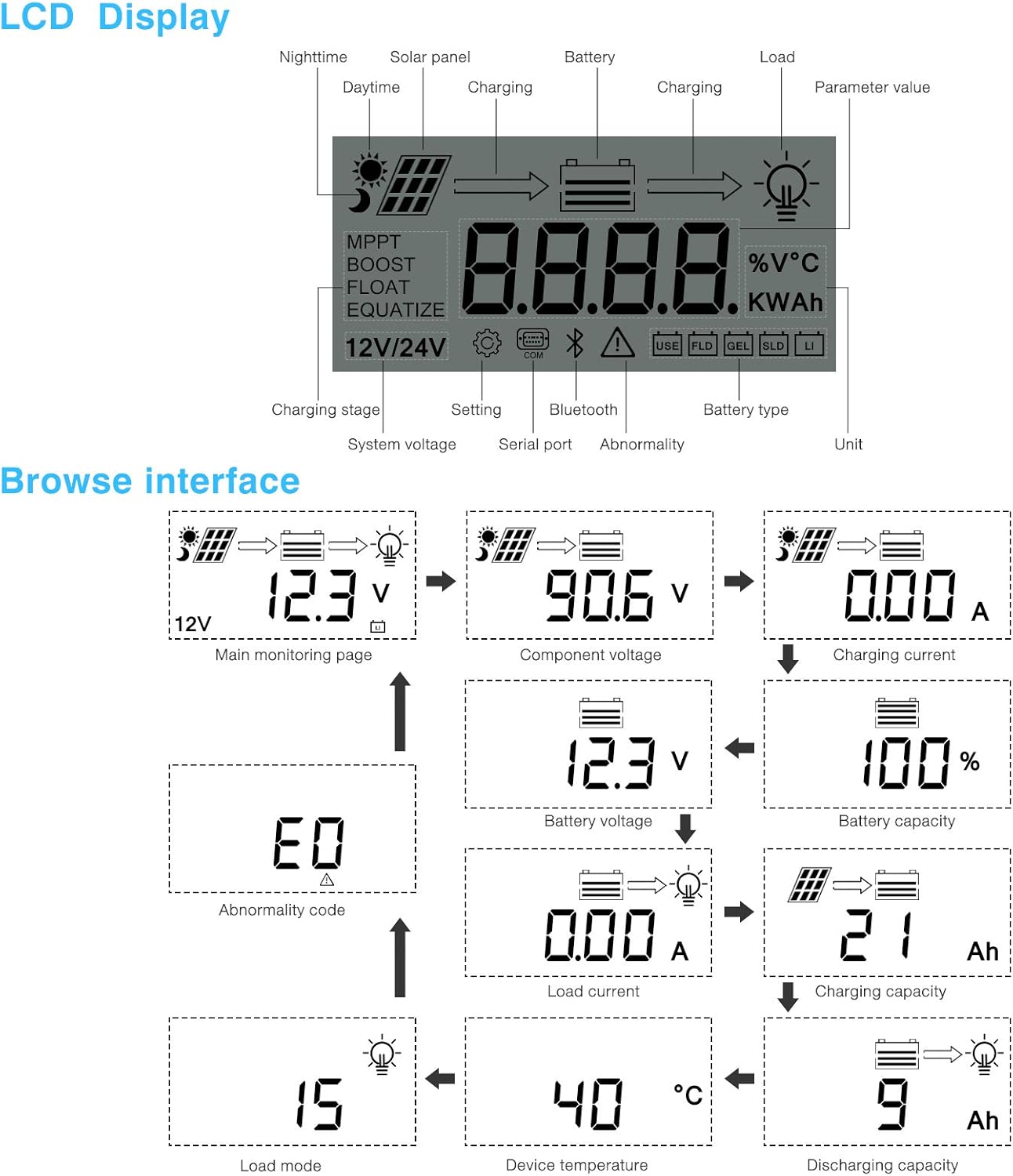
Şəkil 5.1: LCD Display and Browse Interface.
This image shows the various icons and parameters displayed on the LCD screen, along with the navigation flow through different monitoring pages.
The LCD provides real-time information about your solar system. Key indicators include:
- Doldurma Stage: MPPT, Boost, Float, Equalize.
- Sistem Cildtage: 12V/24V auto-detected.
- Batareya növü: Icons for Lithium (Li), Sealed (SLD), Gel (GEL), Flooded (FLD).
- Vəziyyət göstəriciləri: Solar panel activity, battery charging, load status, abnormality.
- Parametr dəyəri: cild göstərirtage, current, capacity, temperature, etc.
Use the buttons below the LCD to navigate through different screens to view parameters such as main monitoring page, component voltage, şarj cərəyanı, batareyanın həcmitage, battery capacity, load current, charging capacity, device temperature, discharging capacity, abnormality codes, and load mode.
5.2 Bluetooth Mobile Application
The controller supports an optional Bluetooth module (BT-1) for remote monitoring and parameter adjustment via a mobile application (available for Apple iOS and Android devices). The Bluetooth module connects to the RS232 port on the controller.

Şəkil 5.2: Controller with optional Bluetooth module.
This image displays the PowMr MPPT Solar Charge Controller alongside its optional BT-1 Bluetooth communication module and connecting cable.

Şəkil 5.3: BT-1 Bluetooth module.
Ətraflı view of the BT-1 Bluetooth module, which enables wireless communication with the solar charge controller for remote monitoring and settings adjustments.

Şəkil 5.4: Bluetooth Mobile Interface Display.
This image shows various screens from the mobile application, including real-time monitoring, data records, energy records, and parameter settings.
The mobile application allows you to:
- Monitor real-time system data (voltage, current, power, temperature).
- View historical data and energy records.
- Adjust various charging parameters and battery settings.
- Standart zavod parametrlərini bərpa edin.
6. Baxım
Regular maintenance ensures the longevity and optimal performance of your charge controller.
- Təmizləmə: Toz və zibilləri təmizləmək üçün kontrollerin xarici hissəsini vaxtaşırı quru parça ilə təmizləyin. Havalandırma dəliklərinin təmiz olduğundan əmin olun.
- Əlaqələr: Bütün naqil birləşmələrini hər il möhkəmlik və korroziya üçün yoxlayın. Boş birləşmələr həddindən artıq istiləşməyə və zəif işləməyə səbəb ola bilər.
- Ətraf mühit: Ensure the installation environment remains within the specified operating temperature range and is free from excessive moisture or dust.
7. Giderme
This section provides guidance for common issues. Refer to the LCD display for abnormality codes.
- Ekran yoxdur/Güc yoxdur:
- Check battery connections and ensure the battery voltage əməliyyat diapazonundadır.
- Verify that the battery fuse (if installed) is intact.
- Doldurulmur:
- Ensure solar panels are connected correctly and receiving sufficient sunlight.
- Günəş paneli voltage və cari.
- Verify that the battery is not fully charged or in a protection state.
- Yükləmə İşləmir:
- Check load connections and ensure the load current does not exceed the controller's rating.
- Batareyanın həcmini yoxlayıntage aşağı həcmdən yuxarıdırtage disconnect (LVD) setting.
- Check for any abnormality codes on the LCD related to load output.
- Abnormality Codes (e.g., "E0"):
- Refer to the specific abnormality code displayed on the LCD. Consult the full product manual or manufacturer's support for detailed explanations and solutions for each code.
8. Spesifikasiyalar
Technical specifications for the PowMr 40A MPPT Solar Charge Controller (Model ML2440).

Şəkil 8.1: Product Specifications Table.
This table provides detailed technical parameters for the ML2420, ML2430, and ML2440 models. The ML2440 column is relevant for this 40A controller.
| Parametr | Value (ML2440) |
|---|---|
| Model | ML2440 |
| Sistem həcmitage | 12V / 24V Auto |
| Yük itkisi | 0.7 W - 1.2W |
| Batareya həcmitage | 9 ilə 35V arasında |
| Maks. günəş enerjisi girişitage | 100V (25°C), 90V (-25°C) |
| Maks. güc nöqtəsi cildtage sıra | Batareya həcmitage +2V - 75V |
| Nominal şarj cərəyanı | 40A |
| Nominal yük cərəyanı | 20A |
| Maks. kapasitiv yük tutumu | 10000 uF |
| Maks. fotovoltaik sistem giriş gücü | 550W/ 12V, 1100W/ 24V |
| Dönüşüm səmərəliliyi | ≤ 98% |
| MPPT izləmə səmərəliliyi | > 99% |
| Temperatur kompensasiya faktoru | -3.0mv/ °C/ 2V (default) |
| İşləmə temperaturu | -35°C-dən +45°C-dək |
| Qoruma dərəcəsi | IP32 |
| Çəki | 2 kq |
| Ünsiyyət üsulu | RS232 |
| Hündürlük | ≤ 3000 m |
| Məhsul ölçüləri | 238*173*72.5 mm |
9. Zəmanət və Dəstək
For warranty information, please refer to the documentation included with your product packaging or visit the official PowMr website. If you encounter any issues not covered in this manual or require further assistance, please contact PowMr customer support.
PowMr Official Websayt: Amazon-da PowMr Mağazasına baş çəkin
Ask a question about this manual
Ask about setup, troubleshooting, compatibility, parts, safety, or missing instructions. Manuals+ will review the question and use this page’s manual context to help answer it.