
1. Giriş
This manual provides essential instructions for setting up, operating, and maintaining your Fossil Bronson HR Hybrid Smartwatch (Model FTW7059). This device combines the classic aesthetics of a traditional watch with modern smartwatch functionalities, including heart rate monitoring, activity tracking, and smartphone notifications. Please read this manual thoroughly before using your watch.
2. Quraşdırma
2.1 Qutunun açılması və ilkin ödəniş
Upon unboxing, ensure all components are present: the Fossil Bronson HR Hybrid Smartwatch and its charging cable. Before first use, fully charge your watch. Connect the charging cable to the watch's charging points and a USB power source. A full charge typically takes approximately 2 hours.
2.2 Proqram Quraşdırılması və Qoşulması
- yükləyin Fossil Smartwatches smartfonunuzun tətbiq mağazasından tətbiq (iOS və Android üçün mövcuddur).
- Proqramı açın və hesab yaradın və ya daxil olun.
- Follow the on-screen instructions to add a new device. Select your Bronson HR Hybrid Smartwatch from the list.
- The app will guide you through the Bluetooth pairing process. Ensure your watch is sufficiently charged and your phone's Bluetooth is enabled.
- Once paired, the app will synchronize with your watch, allowing you to customize settings and view data.
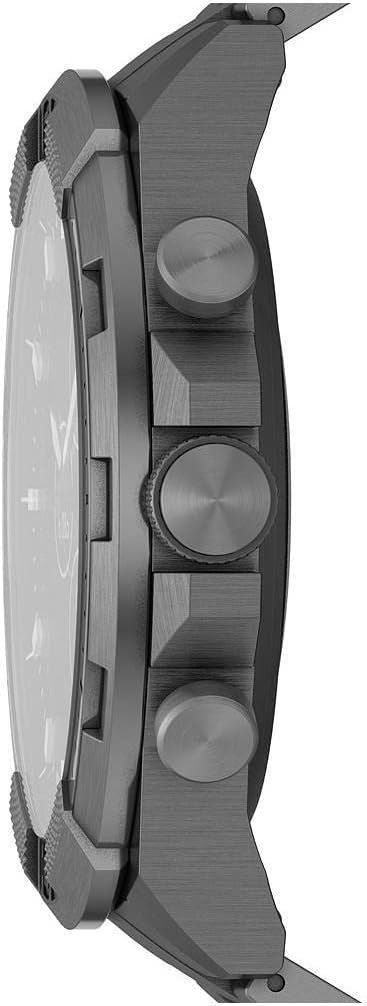
Şəkil: Yan view of the Fossil Bronson HR Hybrid Smartwatch, highlighting the functional buttons and crown.
3. Əməliyyat Təlimatları
3.1 Əsas naviqasiya
Your Bronson HR Hybrid Smartwatch features a traditional watch face with physical hands and a discreet digital display. It is operated primarily through its three side buttons and the crown.
- Üst itələyici: Customizable function (e.g., view date, control music).
- Middle Crown: Used for navigating menus on the digital display and confirming selections.
- Alt itələyici: Customizable function (e.g., start workout, check heart rate).
3.2 Fəaliyyət və Sağlamlıq İzləməsi
The watch continuously tracks your heart rate, steps, and sleep patterns. This data is synchronized with the Fossil Smartwatches app, where you can view detailed statistics and progress over time.
- Ürək dərəcəsi: The watch monitors your heart rate throughout the day and during workouts.
- Addımlar: Tracks your daily step count and estimated distance.
- Yuxu: Automatically detects sleep and tracks sleep stages (light, deep, awake) and duration.
3.3 Notifications and Smart Features
Once paired with your smartphone, the watch can display notifications for calls, messages, and app alerts. You can customize which notifications appear via the Fossil Smartwatches app.
- Smartfon bildirişləri: Receive discreet vibrations and text previews on your watch.
- Musiqiyə nəzarət: Smartfonunuzda musiqinin səsləndirilməsini birbaşa saatınızdan idarə edin.
- Hava: View cari hava şəraiti və proqnozlar.
- Təqvim: See upcoming events from your synced calendar.

Image: The hybrid display of the Fossil Bronson HR Smartwatch, illustrating various data points like heart rate, steps, and weather.
4. Baxım
4.1 Saatınızın təmizlənməsi
Regularly clean your watch to maintain its appearance and functionality. Use a soft, damp cloth to wipe the case and band. For stainless steel bands, a mild soap solution can be used, followed by thorough rinsing and drying. Avoid harsh chemicals or abrasive materials.
4.2 Suya davamlılıq
The Fossil Bronson HR Hybrid Smartwatch is water-resistant. It is suitable for everyday use, including splashes, rain, and showering. However, it is not recommended for diving or high-pressure water activities. Avoid pressing buttons underwater.
4.3 Batareya Baxımı
To maximize battery life, avoid extreme temperatures. Charge the watch fully when the battery is low. The watch offers over 2 weeks of battery life on a single charge, depending on usage.
4.4 Proqram Yeniləmələri
Ensure your Fossil Smartwatches app is up to date, as it delivers firmware updates to your watch. These updates can improve performance, add new features, and fix bugs.
5. Giderme
5.1 Watch Not Connecting to Phone
- Smartfonunuzda Bluetooth-un aktiv olduğundan əmin olun.
- Check if the watch is sufficiently charged.
- Restart both your watch and your smartphone.
- Try unpairing and re-pairing the watch through the Fossil Smartwatches app.
5.2 Qeyri-dəqiq İzləmə Məlumatları
- Saatın biləyinizə möhkəm taxıldığından, çox boş və ya çox sıx olmadığından əmin olun.
- Saatın arxasındakı ürək döyüntüsü sensorunu təmizləyin.
- Saat proqram təminatını tətbiq vasitəsilə yeniləyin.

Şəkil: Geri view of the Fossil Bronson HR Hybrid Smartwatch, displaying the heart rate sensor and Fossil logo.
5.3 Qısa Batareya Ömrü
- Bildirişlərin tezliyini azaldın.
- Saatın hər dəfə tam doldurulduğundan əmin olun.
- Avoid using the watch in extreme temperatures.
5.4 Ekran Cavab Vermir
- Perform a soft reset by holding down the middle crown for approximately 10-15 seconds until the watch restarts.
- Saatın doldurulduğundan əmin olun.
6. Spesifikasiyalar
| Model nömrəsi | FTW7059 |
| Brend | Fosil |
| Ekran növü | Analog with Digital Screen |
| Dava materialı | Paslanmayan Polad |
| Band materialı | Paslanmayan Polad |
| Band Rəngi | Boz |
| Kassa Forması | Dəyirmi |
| Ekran Ölçüsü | 44 Millimetr |
| Bant Genişliyi | 22 Millimetr |
| Suya davamlılıq səviyyəsi | Suya davamlı |
| Əməliyyat sistemi | AsteroidOS |
| Bağlantı texnologiyası | Bluetooth |
| Uyğun Cihazlar | Smartphone (iPhone and Android) |
| Batareya Hüceyrəsinin Tipi | Gümüş oksidi |
7. Zəmanət
This product is covered by a manufacturer's warranty. For detailed information regarding warranty terms, conditions, and duration, please refer to the official Fossil websayt və ya satınalmanıza daxil olan zəmanət kartı. Zəmanət iddiaları üçün satınalma sübutunuzu saxlayın.
8. Dəstək
Əlavə yardım, texniki dəstək və ya view frequently asked questions, please visit the official Fossil support website. You can typically find contact information for customer service there as well.