
1. Giriş
Aldığınız üçün təşəkkür edirikasing the Depusheng U6 Audio Mixer. This 6-channel DJ sound controller is designed for versatile audio mixing, recording, and live streaming applications. It features a built-in USB audio interface, Bluetooth connectivity, and U-Disk playback/recording capabilities. This manual provides essential information for safe operation, setup, and optimal performance of your device. Please read it thoroughly before use and retain it for future reference.
2. Təhlükəsizlik Məlumatı
- Güc mənbəyi: Use only the specified power adapter or a compatible USB power source. Ensure the voltage cihaz tələblərinə uyğundur.
- Su və nəm: Do not expose the mixer to water, rain, or excessive moisture. Avoid placing liquid-filled objects on the unit.
- Havalandırma: Düzgün havalandırma təmin edin. Havalandırma deliklərini bağlamayın.
- İstilik: Cihazı radiatorlar, istilik cihazları, sobalar və ya digər istilik yaradan cihazlar kimi istilik mənbələrindən uzaq tutun.
- Təmizləmə: Yalnız quru parça ilə təmizləyin. Maye təmizləyicilərdən və ya aerozol təmizləyicilərdən istifadə etməyin.
- Xidmət: Bu məhsula özünüz xidmət göstərməyə çalışmayın. Bütün xidmətlər üçün ixtisaslı xidmət personalına müraciət edin.
- Phantom Güc: When using condenser microphones, ensure +48V phantom power is activated only when necessary and that the microphone is compatible.
3. Paketin məzmunu
Zəhmət olmasa, paketinizdə aşağıdakı bütün əşyaların olub olmadığını yoxlayın:
- Depusheng U6 Audio Mixer
- USB Güc Kabeli
- İstifadəçi təlimatı
4. Məhsul bitdiview
The Depusheng U6 is a compact 6-channel mixer designed for various audio applications. It features multiple input and output options, integrated effects, and digital connectivity.
4.1 Ön Panel İdarəetmələri və Əlaqələri
The front panel provides access to all mixing controls and primary input/output ports.

Şəkil təsviri: Ətraflı view of the Depusheng U6 Audio Mixer's front panel, showing all knobs, faders, buttons, and the digital display for USB/Bluetooth functions. Key controls include GAIN, HIGH, LOW, EFX, PEAK, VOL for each channel, along with DELAY, REPEAT, and MAIN volume controls. The USB port and Bluetooth indicator are also visible.
- MIC/LINE Girişləri (Kanal 1-4): Combo jacks supporting both XLR and 1/4" (6.35mm) inputs for microphones or line-level instruments.
- +48V PHANTOM: Button to activate +48V phantom power for condenser microphones on channels 1-4.
- QAZANMA: Hər bir kanal üçün giriş həssaslığını tənzimləyir.
- YÜKSƏK/AŞAĞI: 2-band equalizer for adjusting treble and bass frequencies for each channel.
- EFX: Sends signal to the built-in effects processor (DELAY/REPEAT).
- PEAK LED: Giriş siqnalı çox yüksək olduqda yanır və potensial kəsilməni göstərir.
- CİLD: Channel volume control.
- S/S (Stereo Input 5/6): 1/4" stereo inputs for connecting line-level devices.
- REC/MAIN OUT (RCA): Stereo RCA outputs for recording or connecting to external devices.
- MAIN OUT (1/4"): Stereo 1/4" outputs for connecting to power ampqaldırıcılar və ya aktiv dinamiklər.
- USB Port: For U-Disk playback/recording and connection to a computer as an audio interface.
- MODE/BT (Bluetooth): Button to switch between USB, Bluetooth, and other modes.
- PLAY/PAUSE, PREVIOUS, NEXT: Controls for U-Disk and Bluetooth playback.
- DELAY/REPEAT: Controls for adjusting the built-in delay effect.
- CLIP LED: Indicates output signal clipping.
- GÜÇ LED: Cihazın işə salındığını göstərir.
- ƏSAS: Master volume control for the main output.
- TELEFON: Qulaqlıq səs səviyyəsinə nəzarət.
- Qulaqlıq Jack: 1/4" stereo output for monitoring.
4.2 Input Interface Types

Şəkil təsviri: Yaxın plan view of the input jacks on the Depusheng U6 Audio Mixer, illustrating both the 6.5mm (1/4 inch) and XLR connection types for microphones and line-level devices. This image highlights the versatility of the combo input jacks.
- 6.5mm (1/4") Interface: For connecting instruments or line-level audio sources.
- XLR interfeysi: For connecting microphones, providing a balanced connection.
5. Quraşdırma
5.1 Mikserin işə salınması
The Depusheng U6 mixer can be powered via its USB port.

Şəkil təsviri: This image demonstrates two methods of powering the Depusheng U6 Audio Mixer via USB: connecting it to a computer's USB port or to a portable power bank. This highlights the flexibility of its power options.
- Connect the provided USB cable to the mixer's USB power input.
- Connect the other end of the USB cable to a computer's USB port or a USB power adapter (not included) connected to a wall outlet, or a power bank.
- The POWER LED on the mixer will illuminate when power is supplied.
5.2 Əsas Əlaqələr
Refer to the diagram below for typical connection setups.

Şəkil təsviri: A comprehensive diagram illustrating various connection possibilities for the Depusheng U6 Audio Mixer. It shows connections for a computer, condenser microphone, dynamic microphone, wireless microphone receiver, power amplifier, passive speakers, and headphones, demonstrating a complete audio setup.
- Mikrofonlar: Connect dynamic or condenser microphones to the MIC/LINE inputs (Channels 1-4) using XLR cables. Activate +48V phantom power for condenser microphones.
- Alətlər/Xətt Cihazları: Connect instruments or other line-level devices to the MIC/LINE inputs (Channels 1-4) using 1/4" cables, or to the S/S (Stereo Input 5/6) using 1/4" stereo cables.
- Output to Speakers/Ampömürlük: Connect the MAIN OUT (1/4") to your power ampqaldırıcı və ya aktiv dinamiklər.
- Qulaqlıqlar: Connect headphones to the PHONE jack for monitoring.
- Kompüter: Connect the mixer's USB port to your computer for use as an audio interface.
6. Əməliyyat Təlimatları
6.1 Wireless Bluetooth Streaming
The U6 mixer supports wireless Bluetooth audio streaming from compatible devices.
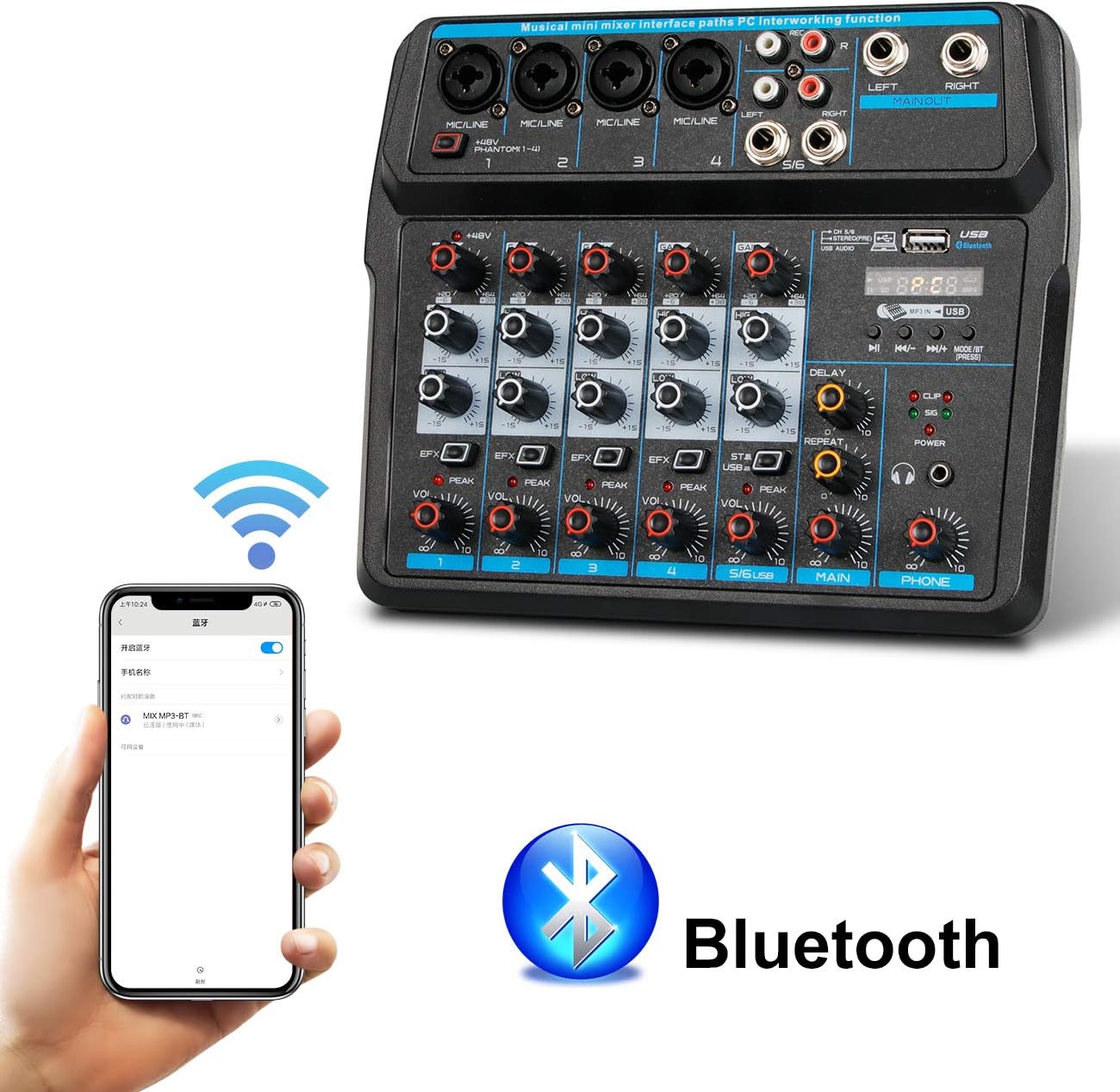
Şəkil təsviri: This image shows a smartphone displaying its Bluetooth settings, with the Depusheng U6 Audio Mixer (labeled 'U6 MP3-BT') available for connection. A large Bluetooth logo is also present, indicating the wireless connectivity feature.
- düyməsini basın MODE/BT button on the mixer until the Bluetooth indicator lights up and the display shows 'BT'.
- Mobil cihazınızda (smartfon, planşet və s.) Bluetooth-u aktivləşdirin və mövcud cihazları axtarın.
- Select 'U6 MP3-BT' from the list to pair.
- Once paired, you can stream audio wirelessly from your device to the mixer. Bluetooth operates effectively within approximately 1.5 feet.
6.2 USB Audio Interface (PC Recording/Playback)
The U6 mixer can function as an external sound card for your computer.

Şəkil təsviri: This diagram illustrates how to connect the Depusheng U6 Audio Mixer to a laptop via USB for both playback and recording. It shows audio signals flowing from the computer to the mixer (background music) and from the mixer to the computer (for recording), with a close-up of the USB connection port on the mixer.
- Connect the mixer to your PC using a USB cable.
- The mixer will be recognized as a USB audio device by your computer.
- In your computer's sound settings or DAW (Digital Audio Workstation) software (e.g., Pro Tools, Logic Pro X, GarageBand, Audacity), select the U6 mixer as the input and output audio device.
- You can now record audio from the mixer's inputs to your computer or play back audio from your computer through the mixer.
6.3 U-Disk Playback and Recording
The mixer supports direct playback of audio files from a USB flash drive (U-Disk) and recording to it.

Şəkil təsviri: This image highlights the U-Disk functionality of the Depusheng U6 Audio Mixer. It shows a USB flash drive inserted into the mixer's USB port, with text indicating its capabilities: 1. Play MP3/WAV/WMA/FLAC files, and 2. Record audio. The mixer's digital display shows '88:88', likely indicating playback time or a menu option.
- Oynatma: Insert a U-Disk containing audio files (MP3/WAV/WMA/FLAC) into the USB port. The mixer will automatically switch to U-Disk mode or you may need to press MODE/BT. Use the PLAY/PAUSE, PREVIOUS, and NEXT buttons to control playback.
- Qeyd: To record to a U-Disk, ensure it is inserted and the mixer is in U-Disk mode. Follow the specific recording instructions in the full manual (if available) or typically press and hold the PLAY/PAUSE button to initiate recording.
6.4 Using Effects (DELAY and REPEAT)
The U6 mixer includes built-in DELAY and REPEAT effects to enhance your audio.
- istifadə edin EFX knob on each channel to send a portion of that channel's signal to the effects processor.
- tənzimləyin GECİKME knob to control the delay time of the effect.
- tənzimləyin TƏKRAR EDİN knob to control the number of repetitions of the delay effect.
- The overall level of the effects return can be controlled via a dedicated EFX return knob (if present) or integrated into the main mix.
7. Baxım
- Təmizləmə: Use a soft, dry cloth to clean the surface of the mixer. Do not use abrasive cleaners, waxes, or solvents.
- Yaddaş: Mikseri uzun müddət istifadə etmədikdə, onu sərin və quru yerdə, birbaşa günəş işığından və həddindən artıq temperaturdan uzaq saxlayın.
- Kabel Baxımı: Always grasp the connector, not the cable, when unplugging. Avoid bending or kinking cables excessively.
8. Giderme
If you encounter issues with your Depusheng U6 Audio Mixer, refer to the following common problems and solutions:
| Problem | Mümkün Səbəb | Həll |
|---|---|---|
| Səs çıxışı yoxdur |
|
|
| Mikrofon işləmir |
|
|
| Bluetooth qoşulmur |
|
|
| USB recording/playback issues |
|
|
9. Spesifikasiyalar
| Xüsusiyyət | Spesifikasiya |
|---|---|
| Brend | Depusheng |
| Model nömrəsi | U6 |
| Kanalların sayı | 6 |
| Bağlantı texnologiyası | Bluetooth, USB |
| Audio Giriş | XLR, 1/4" (6.35mm) |
| Güc mənbəyi | USB kabel |
| Maddə Çəkisi | 1.02 kiloqram |
| Paket Ölçüləri | 29.3 x 24.3 x 9.2 sm |
| Avadanlıq interfeysi | Bluetooth |
10. Zəmanət və Dəstək
Depusheng products are designed for reliability and performance. This product comes with a standard manufacturer's warranty. For specific warranty terms and conditions, please refer to the documentation provided at the time of purchase or contact your retailer.
If you require technical support or have questions not covered in this manual, please contact Depusheng customer service through the retailer where you purchased the product. Please have your model number (U6) and purchase information ready.