
Giriş
Aldığınız üçün təşəkkür edirikasing the Max Power MPD15EQ Portable Rechargeable PA Speaker. This manual provides important information regarding the setup, operation, and maintenance of your speaker. Please read it thoroughly before using the product to ensure proper function and to maximize its lifespan.
Təhlükəsizlik Təlimatları
- Yanğın və ya şok təhlükələrinin qarşısını almaq üçün cihazı yağışa və ya nəmə məruz qoymayın.
- Do not open the speaker cabinet. There are no user-serviceable parts inside. Refer all servicing to qualified personnel.
- Düzgün havalandırma təmin edin. Heç bir ventilyasiya açılışını bağlamayın.
- Yalnız cihazla birlikdə verilmiş güc adapterindən istifadə edin.
- Keep the speaker away from heat sources, direct sunlight, and strong magnetic fields.
- Yalnız quru parça ilə təmizləyin.
Paketin məzmunu
- Max Power MPD15EQ PA Speaker
- Simli Mikrofon
- Uzaqdan İdarəetmə
- Güc adapteri
- İstifadəçi Təlimatı (bu sənəd)
Məhsul Bitdiview
Familiarize yourself with the various parts of your MPD15EQ speaker.
Ön Panel
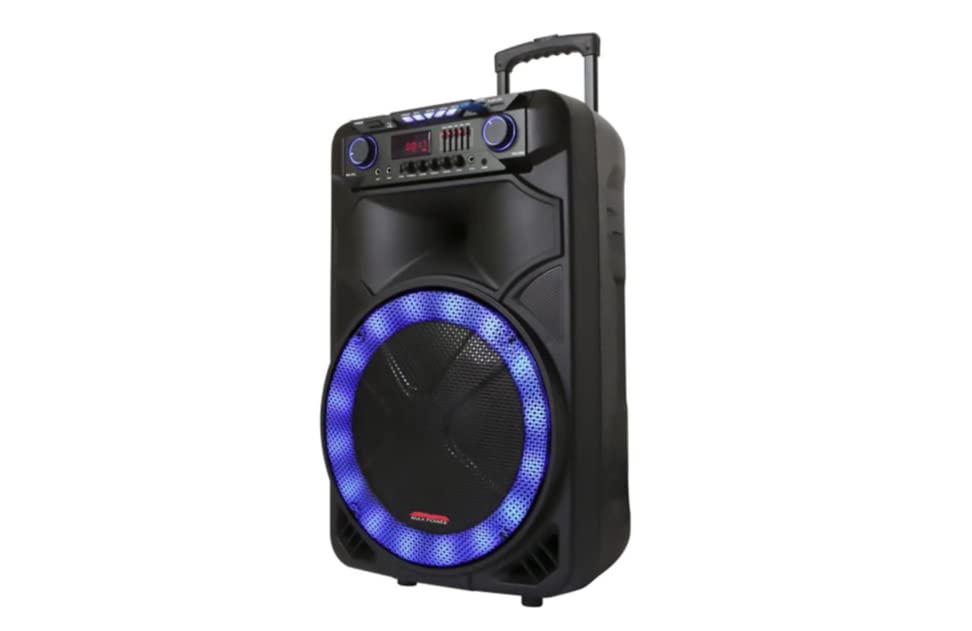
Şəkil təsviri: This image displays the front of the Max Power MPD15EQ speaker. It features a large 15-inch woofer at the bottom, a 5-inch horn tweeter above it, and a control panel with an LED display screen. The speaker grille covers the woofer and tweeter, and the overall design is robust and portable.
- 15" Vufer: Provides powerful bass frequencies.
- 5" Horn Tweeter: Delivers clear high frequencies.
- LED Ekran: Cari rejimi, trek məlumatlarını və parametrləri göstərir.
- İdarəetmə Paneli: Buttons and knobs for various functions (volume, EQ, mode, etc.).
- LED Light On/Off Switch: Controls the integrated LED lighting.
Arxa Panel (Məsample - specific details not provided in source)
The rear panel typically includes input/output ports and the power connection.
- Güc Girişi: For connecting the power adapter to charge the battery or operate the unit.
- USB Port: USB disklərdən audio oxutmaq üçün.
- SD Kart Yuvası: For playing audio from SD cards.
- Mikrofon Girişi: Simli mikrofonu qoşmaq üçün.
- Köməkçi Giriş: Xarici səs cihazlarını 3.5 mm və ya RCA kabeli vasitəsilə birləşdirmək üçün.
Quraşdırma
Batareyanın doldurulması
The MPD15EQ features a built-in rechargeable battery. Before first use, fully charge the speaker for approximately 6-8 hours.
- Connect the supplied power adapter to the speaker's power input port.
- Elektrik adapterini standart rozetkaya qoşun.
- The LED display or an indicator light will show the charging status.
- Tam doldurulduqdan sonra güc adapterini ayırın.
İlkin Güc Aktivdir
- Ensure the speaker is fully charged or connected to power.
- Locate the power switch (usually on the rear or control panel) and turn it to the "ON" position.
- The LED display will illuminate, indicating the speaker is ready for use.
Əməliyyat Təlimatları
Bluetooth bağlantısı
- Turn on the MPD15EQ speaker.
- Press the "MODE" button on the control panel until "BLUETOOTH" or "BT" appears on the LED display.
- Smartfonunuzda, planşetinizdə və ya digər audio cihazınızda Bluetooth-u aktivləşdirin.
- axtarın available devices and select "MPD15EQ" from the list.
- Once paired, you will hear a confirmation sound, and you can now play audio wirelessly.
Simli Mikrofondan istifadə
- Connect the supplied wired microphone to the "MIC IN" port on the speaker.
- Adjust the microphone volume knob (if available) on the control panel to your desired level.
- Mikrofona danışın.
USB/SD Kart Oynatma
- USB flash sürücüsünü və ya SD kartı (MP3 audio ilə əvvəlcədən yüklənmiş) daxil edin files) müvafiq limana.
- The speaker should automatically switch to USB/SD mode and begin playing. If not, press the "MODE" button.
- Use the playback controls (Play/Pause, Next, Previous) on the control panel or remote control.
5-Band Graphic EQ Adjustment
The MPD15EQ features a 5-band graphic equalizer to fine-tune your audio output.
- Locate the EQ sliders on the control panel.
- Each slider corresponds to a specific frequency band. Adjust them up or down to boost or cut those frequencies.
- Experiment with the settings to achieve your preferred sound profile.
LED İşıqlar
The speaker includes integrated LED lights. Use the "LED Light On/Off Switch" to activate or deactivate them.
Uzaqdan İdarəetmə İstifadəsi
The included remote control allows for convenient operation from a distance. It typically includes buttons for power, mode selection, volume, track control, and EQ presets.
Baxım
Təmizləmə
- Təmizləmədən əvvəl həmişə söndürün və dinamiki ayırın.
- Xarici səthləri silmək üçün yumşaq, quru bir parça istifadə edin.
- Do not use liquid cleaners, aerosols, or abrasive chemicals.
Saxlama
- Dinamiki birbaşa günəş işığından və həddindən artıq temperaturdan uzaq sərin, quru yerdə saxlayın.
- If storing for extended periods, charge the battery periodically (e.g., every 3 months) to maintain battery health.
Problemlərin aradan qaldırılması
| Problem | Mümkün Səbəb | Həll |
|---|---|---|
| Güc yoxdur | Batareya boşalıb; Elektrik kabeli qoşulmayıb; Elektrik açarı söndürülüb. | Charge the battery; Check power cable connection; Turn power switch ON. |
| Səs yoxdur | Volume too low; Incorrect input mode; Device not paired (Bluetooth). | Increase master volume; Select correct input mode (Bluetooth, USB, AUX); Re-pair Bluetooth device. |
| Mikrofon işləmir | Microphone not connected; Microphone volume low; Microphone switch off. | Ensure microphone is securely plugged in; Increase microphone volume; Check microphone's ON/OFF switch. |
| Bluetooth bağlantısı qeyri-sabitdir | Cihaz çox uzaqdadır; Müdaxilə; Batareya azdır. | Move device closer to speaker; Avoid obstacles; Ensure speaker battery is charged. |
Spesifikasiyalar
- Vufer: Single 15"
- Tvitter: Single 5" Horn
- Tezliyə cavab: 40Hz-20KHz
- Empedans: 4 Ohm
- Həssaslıq: 93dB
- Ölçülər (G x D x Y): 19" x 16.75" x 32"
- Çəki: Təxminən 38 funt
- Batareya: Daxili təkrar doldurulan
- Bağlantı: Bluetooth, USB, SD Card, Microphone Input, Auxiliary Input
- EQ: 5 Band Qrafik EQ
- Ekran: LED Ekran
- Daxil olan aksesuarlar: Wired Microphone, Remote Control
Zəmanət və Dəstək
Max Power products are designed for reliability and performance. For warranty information or technical support, please refer to the warranty card included with your purchase or visit the official Max Power websayt. Zəmanət iddiaları üçün satınalma sübutunuzu saxlayın.
Əlaqə məlumatı: Please refer to the packaging or official website for the most up-to-date contact details for customer service.
Rəsmi Məhsul Videoları
No official product videos from the seller were available for embedding at this time. If available, they would appear here with detailed descriptions.