
Giriş
Aldığınız üçün təşəkkür edirikasing the Polarlander 9602G 1 Din Car Stereo. This manual provides detailed instructions for the installation, operation, and maintenance of your new multimedia player. Please read this manual thoroughly before use to ensure proper functionality and to prevent damage.
The Polarlander 9602G features a 7-inch retractable HD touchscreen, GPS navigation, Bluetooth connectivity, FM radio, USB/TF/AUX input, Mirror Link for Android/iOS devices, steering wheel control compatibility, and support for DVR and rear view kameralar.
Quraşdırma və Quraşdırma
1. Paketin məzmunu
Quraşdırmadan əvvəl, bütün komponentlərin mövcudluğunu yoxlayın:
- Main Unit (Car Stereo)
- İstifadəçi təlimatı
- Installation Keys (2)
- Elektrik kabeli (3)
- Uzaqdan İdarəetmə
- GPS antenası
- Arxa View Kamera
- DVR
2. Naqillərin diaqramıview
The unit requires a 12V DC power supply. Ensure all connections are secure and correctly matched to your vehicle's wiring harness. Incorrect wiring can cause damage to the unit or vehicle electrical system.
- Güc: Connect the yellow wire to the constant 12V supply, the red wire to the accessory 12V supply (switched with ignition), and the black wire to ground.
- Natiqlər: Connect the speaker wires to your vehicle's speakers. Ensure correct polarity for optimal sound.
- GPS Antenası: Connect the GPS antenna to the dedicated port on the rear of the unit and mount it in a location with a clear view səmanın.
- Arxa View Kamera: Connect the camera's video output to the 'CAM IN' port and its power to the reverse light circuit for automatic activation.
- DVR: Connect the DVR to the designated USB port or input.
- Sükan çarxına nəzarət: Connect the steering wheel control wires to your vehicle's steering wheel control interface, if applicable.
3. Fiziki Quraşdırma
Install the 1 Din unit into your vehicle's dashboard opening. Secure it using the provided installation keys or mounting hardware. Ensure the retractable screen mechanism has sufficient clearance to operate freely.

Image: Unit dimensions for installation reference. The unit measures approximately 18.8cm (width) x 5cm (height) x 16.5cm (depth) with the screen retracted, and the screen extends to 7 inches.
Əməliyyat Təlimatları
1. Əsas Nəzarətlər
- Yandırma/Söndürmə: Cihazı yandırmaq və ya söndürmək üçün güc düyməsini basın.
- Həcmi: Səs səviyyəsini tənzimləmək üçün fırlanan düymədən və ya sensor ekranlı idarəetmə vasitələrindən istifadə edin.
- Ekranın geri çəkilməsi: The 7-inch screen is retractable. Use the dedicated button or touchscreen option to extend or retract the display.
- Sensorlu ekran: Navigate menus and control functions by touching the screen.
2. GPS Naviqasiyası
The unit comes with built-in GPS functionality. Access the navigation application from the main menu. Ensure the GPS antenna is properly installed for accurate positioning.

Image: The car stereo displaying GPS navigation, showing a map with route guidance and traffic information.
3. Bluetooth bağlantısı
Pair your mobile phone via Bluetooth for hands-free calling and audio streaming.
- Go to the Bluetooth menu on the car stereo.
- Enable Bluetooth on your mobile phone and search for available devices.
- Select 'Topway(3A30)' or similar device name from your phone's list.
- Enter the PIN '0000' if prompted.
- Qoşulduqdan sonra zəng edə/qəbul edə və simsiz olaraq musiqi dinləyə bilərsiniz.
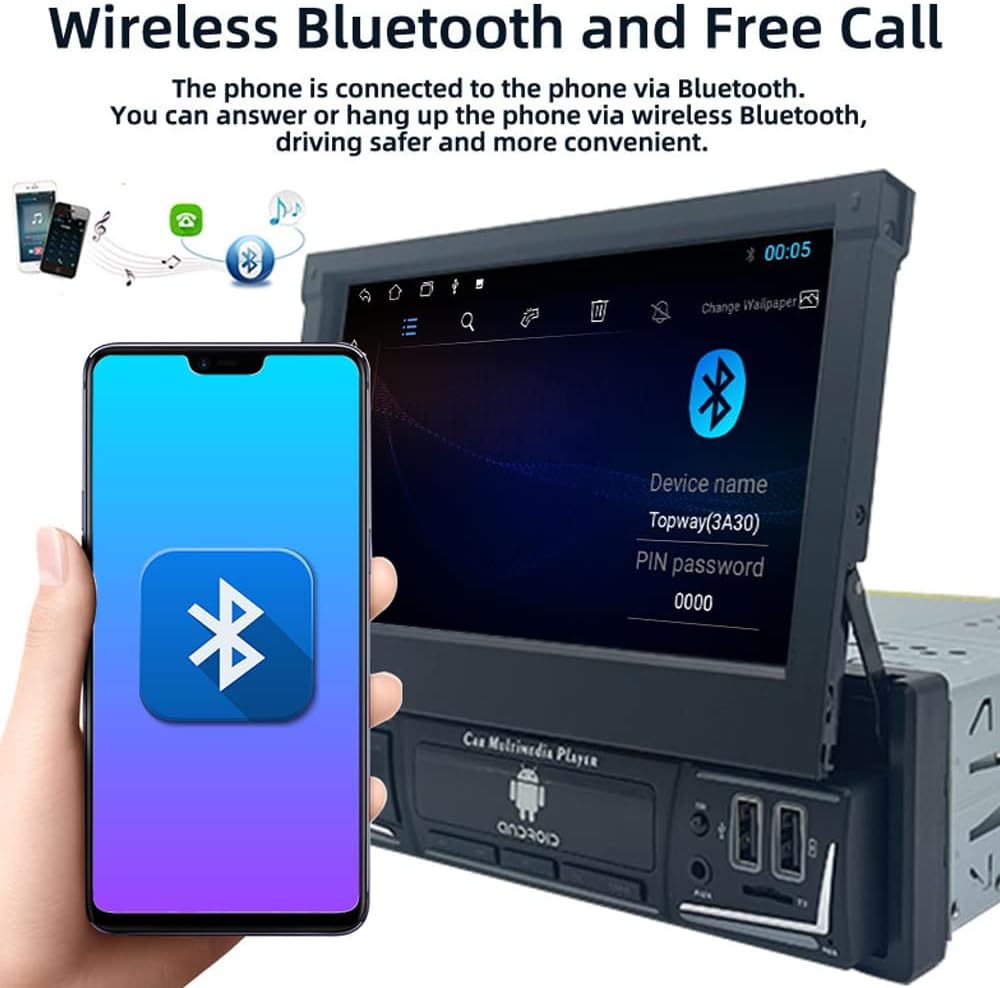
Image: The car stereo displaying the Bluetooth pairing screen, indicating a device name and PIN for connection.
4. FM Radio
Sevimli stansiyalarınızı dinləmək üçün FM radio funksiyasına daxil olun.
- Avtomatik Tarama: Use the 'AS' button to automatically search and store available stations.
- Əl ilə tənzimləmə: Tezlikləri əl ilə tənzimləmək üçün ox düymələrindən istifadə edin.
- Əvvəlcədən: Store up to 18 FM stations across three bands (FM1, FM2, FM3).

Image: The car stereo displaying the FM radio interface, showing the current frequency and preset options.
5. Media Playback (USB/SD/AUX)
The unit supports various media sources for audio and video playback.
- USB: Insert a USB flash drive into the USB port. The unit will automatically detect and play compatible media files.
- TF Kartı: Insert a TF (microSD) card into the TF card slot.
- AUX girişi: Connect external audio devices using a 3.5mm audio cable to the AUX-in port.

Image: The car stereo displaying music playback, with icons representing USB, SD card, and AUX input options.
6. Güzgü Bağlantısı Funksiyası
Mirror Link allows you to display your smartphone's screen on the car stereo's display and control it from the stereo.
- Connect your Android or iOS phone to the unit via a USB cable.
- Follow the on-screen prompts to enable Mirror Link.
- For Android, you may need to enable USB debugging in developer options.

Image: The car stereo screen mirroring a smartphone, demonstrating the Mirror Link feature.
7. Sükan İdarəetməsi
If your vehicle supports steering wheel controls, you can configure them to operate the car stereo.
- Access the 'Steering Wheel Control' settings in the unit's menu.
- Follow the on-screen instructions to program each button on your steering wheel to a corresponding function on the stereo.

Image: The car stereo displaying its main menu with app icons, illustrating the use of steering wheel controls to navigate functions.
8. Backlight Button Colors
Customize the backlight color of the physical buttons on the unit.
- Navigate to the 'Settings' menu and find 'Button Backlight' or similar option.
- Choose from 7 available colors or set it to cycle automatically.

Image: The car stereo unit showcasing its buttons illuminated in various colors, demonstrating the 7-color backlight feature.
9. Arxa View Camera and DVR
The unit supports a rear view camera and DVR for enhanced safety and recording.
- Arxa View Kamera: Avtomobil geriyə keçirildikdə, ekranda avtomatik olaraq arxa görüntü görünəcək view camera feed.
- DVR: If a DVR is connected, access its functions through the dedicated app on the stereo's interface to record and manage footage.
Baxım
- Ekranın təmizlənməsi: Toxunma ekranını yumşaq bir şəkildə silmək üçün yumşaq, tüysüz parçadan istifadə edin. Aşındırıcı təmizləyicilərdən və ya həlledicilərdən çəkinin.
- Proqram təminatı yeniləmələri: Dövri olaraq istehsalçını yoxlayın weboptimal performansı və yeni xüsusiyyətlərə çıxışı təmin etmək üçün mövcud olan hər hansı bir proqram təminatı və ya proqram təminatı yeniləmələri üçün sayt.
- Ümumi Baxım: Cihazı həddindən artıq temperatura, uzun müddət birbaşa günəş işığına və ya həddindən artıq nəmə məruz qoymaqdan çəkinin.
Problemlərin aradan qaldırılması
Problemlərlə qarşılaşsanız, aşağıdakı ümumi problemlərə və həll yollarına müraciət edin:
- Güc yoxdur:
- Check all power connections (yellow, red, black wires) for proper contact and voltage.
- Verify the vehicle's fuse for the stereo is intact.
- Səs yoxdur:
- Dinamik naqillərinin düzgün bir şəkildə qoşulduğundan və qısaqapanma olmadığından əmin olun.
- Check volume levels and mute settings.
- Verify audio source selection.
- Bluetooth qoşulmur:
- Həm stereoda, həm də telefonunuzda Bluetooth-un aktiv olduğundan əmin olun.
- Əvvəlki cütləşmələri silin və yenidən cütləşməyə cəhd edin.
- Hər iki cihazı yenidən başladın.
- GPS Not Working / Inaccurate:
- GPS antenasının düzgün qoşulduğundan və şəffaf olduğundan əmin olun view səmanın.
- Check GPS settings in the unit's menu.
- Ekran Cavab Vermir:
- Perform a soft reset by pressing the reset button (if available) or turning the unit off and on.
- Ekranın təmiz və zibil olmadığından əmin olun.
Problemlər davam edərsə, ixtisaslı texniki ilə məsləhətləşin və ya müştəri dəstəyi ilə əlaqə saxlayın.
Spesifikasiyalar
| Model nömrəsi | 9602G |
| Ekran Ölçüsü | 7 Inch Retractable HD Touch Screen |
| Enerji təchizatı | 12V DC |
| Bağlantı | Bluetooth, Wi-Fi, USB, Auxiliary |
| Nəzarətçi növü | Android, iOS (via Mirror Link) |
| Xüsusi Xüsusiyyətlər | Touchscreen, GPS Navigation, FM Radio, Mirror Link, Steering Wheel Control, DVR & Rear View Kamera dəstəyi |
| Radio Frequency | FM 87.5MHz - 108MHz |
| Səs Çıxış Modu | Stereo |
| Dəstəklənən Formatlar | MPEG, WAV, WMA (and others via MP5 player) |
| Ölçülər (təxminən) | 18.8cm x 5cm x 16.5cm (unit body) |
Zəmanət Məlumatı
This product is covered by a manufacturer's warranty against defects in materials and workmanship. The specific terms and duration of the warranty may vary. Please retain your proof of purchase for warranty claims. For detailed warranty information, refer to the documentation included with your purchase or contact the seller.
Müştəri dəstəyi
If you require further assistance, have questions not covered in this manual, or need technical support, please contact the seller or manufacturer directly. Provide your product model number (9602G) and purchase details when seeking support.
Ümumi suallar üçün müraciət edə bilərsiniz Polarlander brand page on Amazon.