
1. Məhsul bitdiview
The havit GK59 Gaming Microphone is designed for clear audio capture during gaming, streaming, and voice communication. It features a condenser microphone for high-quality sound and a versatile design for ease of use.

Şəkil 1.1: Ön view of the havit GK59 Gaming Microphone, showcasing its main body, stand, and control buttons.
Əsas Xüsusiyyətlər:
- İstifadəsi asan: Simple plug-and-play functionality.
- Good Performance: Delivers clear and consistent audio.
- Good Quality: Etibarlı istifadə üçün davamlı konstruksiya.
- Portativ dizayn: Kompakt və daşınması asan.
- Tənzimlənən dayaq: Allows for flexible positioning.
2. Quraşdırma Təlimatları
2.1 Paketin məzmunu
Zəhmət olmasa paketi aşağıdakı maddələr üçün yoxlayın:
- havit GK59 Gaming Microphone
- USB Bağlantı Kabeli
- İstifadəçi Təlimatı (bu sənəd)
2.2 Mikrofonun qoşulması
The GK59 microphone offers versatile connectivity options for various devices.
- USB Bağlantısı: Connect the provided USB cable to the USB-C port on the back of the microphone and the other end to an available USB port on your computer or gaming console. The microphone is plug-and-play and should be automatically recognized by most operating systems.
- 3.5 mm Jack Bağlantısı: For devices supporting a 3.5mm auxiliary input, connect a 3.5mm audio cable (not included) to the 3.5mm jack on the back of the microphone and to your device's audio input.
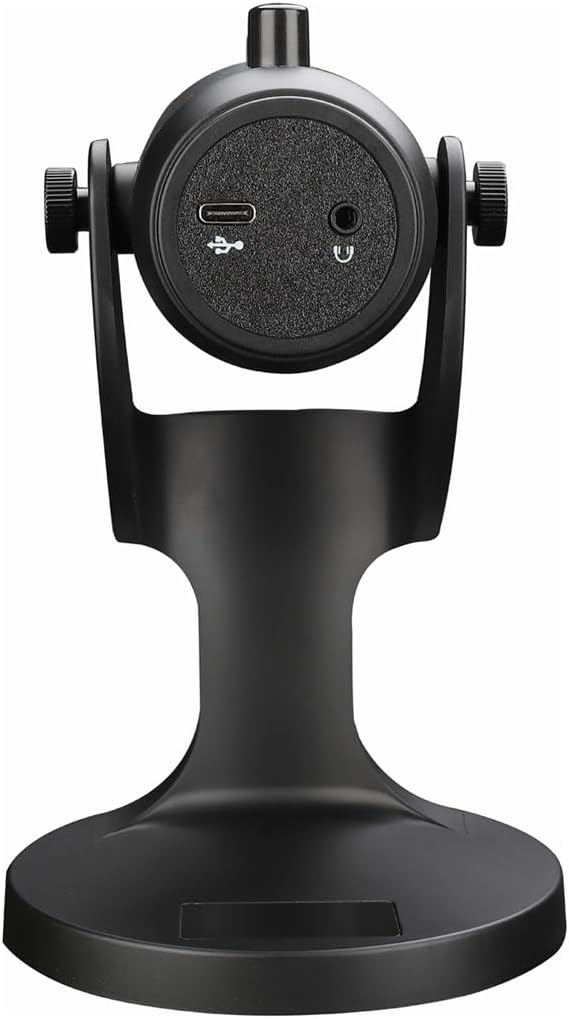
Şəkil 2.1: Arxa view of the havit GK59 Gaming Microphone, highlighting the USB-C port for data and power, and the 3.5mm headphone jack for monitoring.
After connecting, ensure the microphone is selected as the default input device in your system's sound settings or your gaming/streaming software.
3. Əməliyyat Təlimatları
3.1 Əsas idarəetmə vasitələri
The havit GK59 features intuitive controls located on the front of the microphone body:
- Səssiz düymə: Press to mute or unmute the microphone. An indicator light will typically show the mute status.
- MIC +/- Buttons: Adjust the microphone input sensitivity (gain). Press '+' to increase, '-' to decrease.
- VOL +/- Düymələri: Adjust the headphone output volume for monitoring. Press '+' to increase, '-' to decrease.
- ECHO +/- Buttons: Adjust the echo effect level. Press '+' to increase, '-' to decrease.
Şəkil 3.1: Ətraflı view of the microphone's control panel, including the mute button, microphone gain, volume, and echo adjustment buttons.
3.2 Mikrofon Vəziyyətinin Tənzimlənməsi
The microphone is equipped with an adjustable stand, allowing you to optimize its position for best sound capture and comfort.
- Gently hold the microphone body and the base of the stand.
- Tilt the microphone forward or backward to achieve the desired angle. The stand's design helps reduce vibration and abnormal sounds during use.
- Position the microphone approximately 6-12 inches (15-30 cm) from your mouth for optimal voice clarity.

Figure 3.2: The havit GK59 microphone demonstrating its adjustable tilt feature on the stand, designed for anti-vibration.
4. Baxım
4.1 Təmizləmə
To maintain the microphone's performance and appearance:
- Disconnect the microphone from its power source before cleaning.
- Xarici səthləri silmək üçün yumşaq, quru bir parça istifadə edin.
- Maye təmizləyicilər, aerozollar və ya həlledicilərdən istifadə etməyin, çünki bunlar finiş və ya daxili komponentlərə zərər verə bilər.
4.2 Saxlama
When not in use, store the microphone in a cool, dry place away from direct sunlight and extreme temperatures. Protect it from dust and moisture.
5. Giderme
If you encounter issues with your havit GK59 Gaming Microphone, please refer to the following table for common problems and solutions:
| Problem | Mümkün Səbəb | Həll |
|---|---|---|
| No sound input from microphone | Mikrofon düzgün qoşulmayıb Incorrect input device selected Mikrofon səsi kəsildi | USB kabelin etibarlı şəkildə qoşulduğundan əmin olun. Check system sound settings and select GK59 as input. Press the Mute button on the microphone to unmute. |
| Aşağı mikrofon səsi | Microphone gain too low System input volume too low | Press the 'MIC +' button on the microphone. Adjust input volume in your system's sound settings. |
| Təhrif edilmiş və ya aydın olmayan səs | Microphone gain too high Microphone too close to mouth Ətrafdakı səs-küy | Press the 'MIC -' button on the microphone. Mikrofonun vəziyyətini tənzimləyin (ağızdan 6-12 düym). Reduce background noise in your environment. |
| No headphone monitoring sound | Qulaqlıqlar qoşulmayıb Headphone volume too low | Ensure headphones are plugged into the 3.5mm jack. Press the 'VOL +' button on the microphone. |
6. Texniki spesifikasiyalar
Below are the technical specifications for the havit GK59 Gaming Microphone:
| Xüsusiyyət | Spesifikasiya |
|---|---|
| Brend | zərər |
| Model nömrəsi | GK59 |
| Bağlantı texnologiyası | USB, 3.5 mm Jack (Auxiliary) |
| Tövsiyə olunan istifadələr | Oyun |
| Qütb nümunəsi | Bir istiqamətli |
| Mikrofon Forma Faktoru | Handheld (with desktop stand) |
| Maddə Çəkisi | 429 qram |
| Empedans | 250 Ohm |
| Siqnal-to-küy nisbəti | 18 dB |
| Səslənən Səs-küy | 18 desibel |
| Güc mənbəyi | Kabelli Elektrik (USB vasitəsilə) |
| Uyğun Cihazlar | Gaming Consoles, PCs |
| Element Ölçüləri (UxGxY) | 5.59 x 4.92 x 9.06 düym |
| Rəng | Qara |
7. Zəmanət və Dəstək
7.1 Zəmanət Məlumatı
The havit GK59 Gaming Microphone comes with a standard manufacturer's warranty. Please refer to the warranty card included in your product packaging or visit the official havit webətraflı zəmanət şərtləri üçün sayt.
7.2 Müştəri dəstəyi
For technical assistance, troubleshooting not covered in this manual, or warranty claims, please contact havit customer support through their official channels. You can find more information and contact details on the havit Store on Amazon və ya onların vəzifəli şəxsləri websayt.