
1. Giriş
This manual provides instructions for the proper use and maintenance of your Truper BASE-3 Digital Precision Scale. Please read this manual thoroughly before operating the device to ensure safe and efficient use. This scale is designed for precise weighing of various items up to 3 kg.
2. Məhsulun xüsusiyyətləri
- LCD Display with Green Backlight: Provides enhanced visibility of measurements in various lighting conditions.
- Removable Stainless Steel Plate: Durable and easy to clean, designed for hygiene and convenience.
- Dara funksiyası: Allows you to subtract the weight of a container to obtain the net weight of its contents.
- Kompakt və Yüngül Dizayn: Ensures portability and easy storage.
- Yüksək Dəqiqlik Sensor: Delivers accurate and reliable measurements.
- Piece Counting Function: Facilitates counting multiple small items of uniform weight.
- İkili Güc Seçimləri: Operates for up to 31 hours with its rechargeable battery or 20 hours with standard batteries.

Image 1: Truper BASE-3 Digital Precision Scale highlighting its key components: the removable stainless steel plate, the LCD display with green backlight, and the durable ABS body.
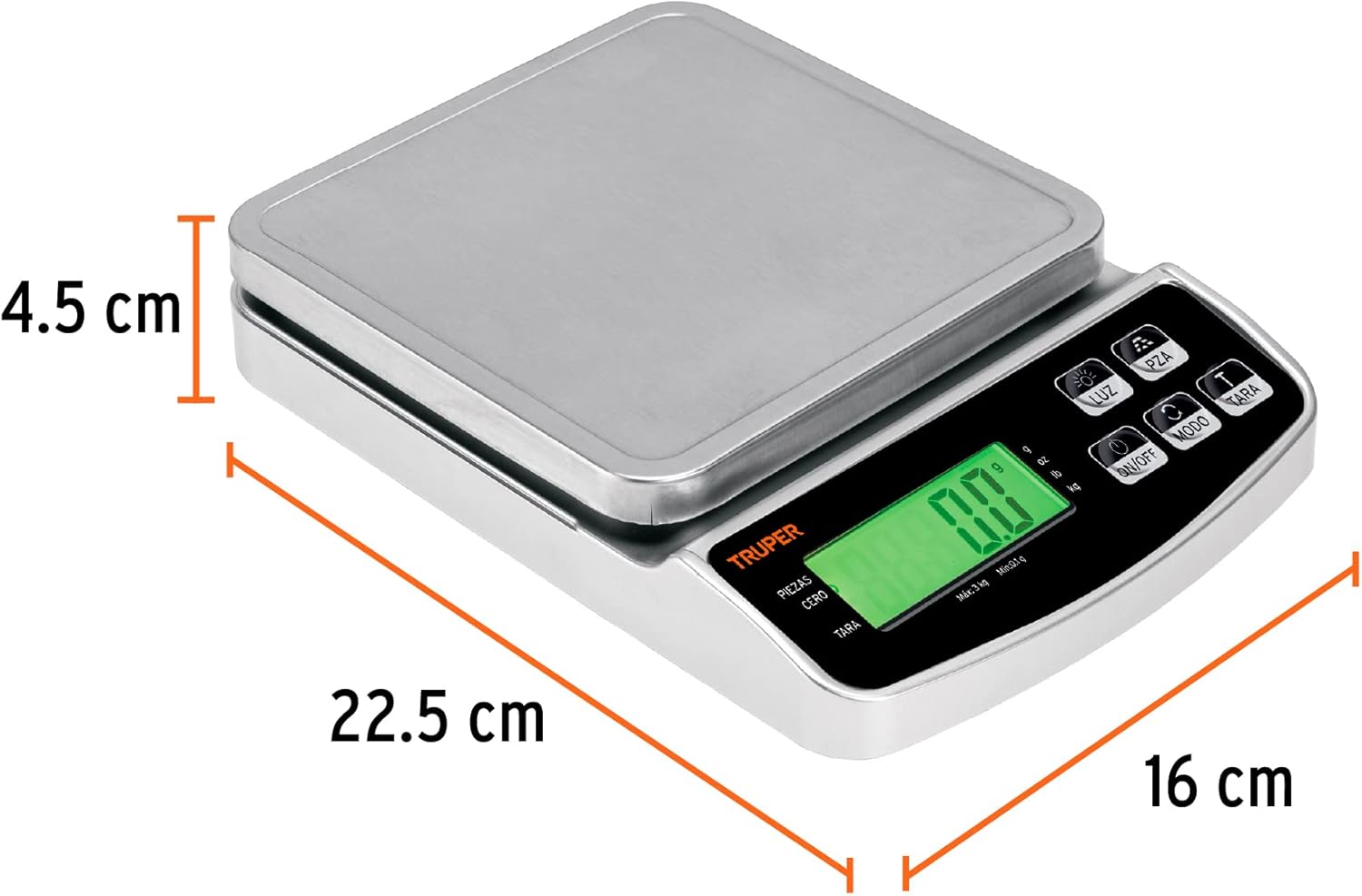
Image 2: The Truper BASE-3 Digital Precision Scale with its physical dimensions indicated for reference.
3. Quraşdırma
- Qablaşdırma: Carefully remove the scale from its packaging. Retain packaging for future storage or transport.
- Güc mənbəyi: The scale operates on a rechargeable battery and can also use standard batteries. Ensure the rechargeable battery is charged or insert fresh standard batteries if needed.
- Yerləşdirmə: Place the scale on a firm, flat, and stable surface to ensure accurate readings. Avoid placing it on soft or uneven surfaces.
- İlkin işə salınma: Press the 'ON/OFF' button to turn on the scale. The display should light up and show '0.00'.
4. Əməliyyat
4.1. Gücü yandırın/söndürün
- Tərəzi yandırmaq üçün düyməni basın ON/OFF düyməsi.
- Tərəzi söndürmək üçün düyməni basıb saxlayın ON/OFF button for a few seconds until the display turns off. The scale also features an auto-off function to conserve battery power.
4.2. Vahidin çevrilməsi
The scale supports multiple units of measurement. To change the unit:
- Tərəzi açıq vəziyyətdə, düyməni basın BİRLİK button (often labeled 'g/oz' or 'MODE').
- Each press will cycle through available units such as grams (g), kilograms (kg), pounds (lb), and ounces (oz).
- Select your desired unit before weighing.
4.3. Dara funksiyası
The Tare function allows you to weigh items in a container without including the container's weight.
- Place an empty container on the scale's stainless steel plate.
- Ekranın sabitləşməsini və qabın çəkisinin göstərilməsini gözləyin.
- düyməsini basın TARA düyməsinə basın. Ekran '0.00'-a sıfırlanacaq.
- Çəkmək istədiyiniz əşyaları qaba əlavə edin. Ekranda artıq yalnız əşyaların xalis çəkisi göstəriləcək.
- To clear the tare, remove all items and the container from the scale, then press the TARA button again if the display does not automatically return to '0.00'.
4.4. Parça Sayma Funksiyası
This function is useful for counting a large number of small, uniform items.
- Turn on the scale and ensure the display shows '0.00'.
- Place a known quantity of items (e.g., 10, 20, 50, or 100 pieces) on the scale.
- basın və saxlayın PCS (Piece Counting) button until a number (e.g., '25', '50', '100') appears on the display.
- istifadə edin BİRLİK s seçmək üçün düyməample size that matches the number of items you placed on the scale.
- düyməsini basın PCS button again to confirm. The display will now show the count of the sample.
- s çıxarınample items. The display should return to '0.00'.
- You can now place any quantity of the same items on the scale, and it will display the count.
Video 1: A close-up demonstration of a digital scale's basic functions, including power on, tare, and weighing items. This video illustrates general operation principles applicable to the Truper BASE-3 scale.
5. Baxım
- Təmizləmə: Tərəzi yumşaq bir parça ilə silin, damp cloth. Do not use abrasive cleaners or immerse the scale in water. The stainless steel plate can be removed for separate cleaning.
- Yaddaş: Store the scale in a cool, dry place. Avoid extreme temperatures and humidity.
- Batareyaya qulluq: If using standard batteries, remove them if the scale will not be used for an extended period to prevent leakage. For the rechargeable battery, ensure it is charged periodically to maintain its lifespan.
- İdarəetmə: Handle the scale with care. Avoid dropping it or subjecting it to strong impacts, as this can affect its precision.
6. Giderme
If you encounter issues with your Truper BASE-3 scale, consider the following:
- Qeyri-dəqiq oxunuşlar: Ensure the scale is on a flat, stable surface. Check if the battery is low and replace or recharge if necessary. Avoid placing the scale near strong electromagnetic fields.
- Ekran Yanmır: Verify that the batteries are correctly installed and have sufficient charge. If using the rechargeable battery, ensure it is charged.
- Scale Not Responding: Try turning the scale off and on again. If the issue persists, remove and reinsert the batteries (if applicable) or fully charge the rechargeable battery.
For persistent problems, please contact Truper customer support.
7. Spesifikasiyalar
| Xüsusiyyət | Spesifikasiya |
|---|---|
| İstehsalçı | Truper SA de CV |
| Model nömrəsi | 102317 |
| Rəng | Gümüş |
| Material | Paslanmayan Polad |
| Güc mənbəyi | AC/DC (Rechargeable battery and standard batteries) |
| Maksimum Çəki Tutumu | 3 kiloqram |
| Ekran tərzi | Yaşıl Arxa İşıqlı LCD |
| Xüsusi Xüsusiyyətlər | Tare Function, Piece Counting Function |
| Daxil olan komponentlər | Polad lövhə |
| Paket Ölçüləri | 23.9 x 17.5 x 5.2 sm |
| Paket Çəki | 660 q |
8. Zəmanət və Dəstək
The Truper BASE-3 Digital Precision Scale comes with a 1-year warranty from the date of purchase. For warranty claims, technical support, or any inquiries, please refer to the contact information provided on the product packaging or visit the official Truper websayt.
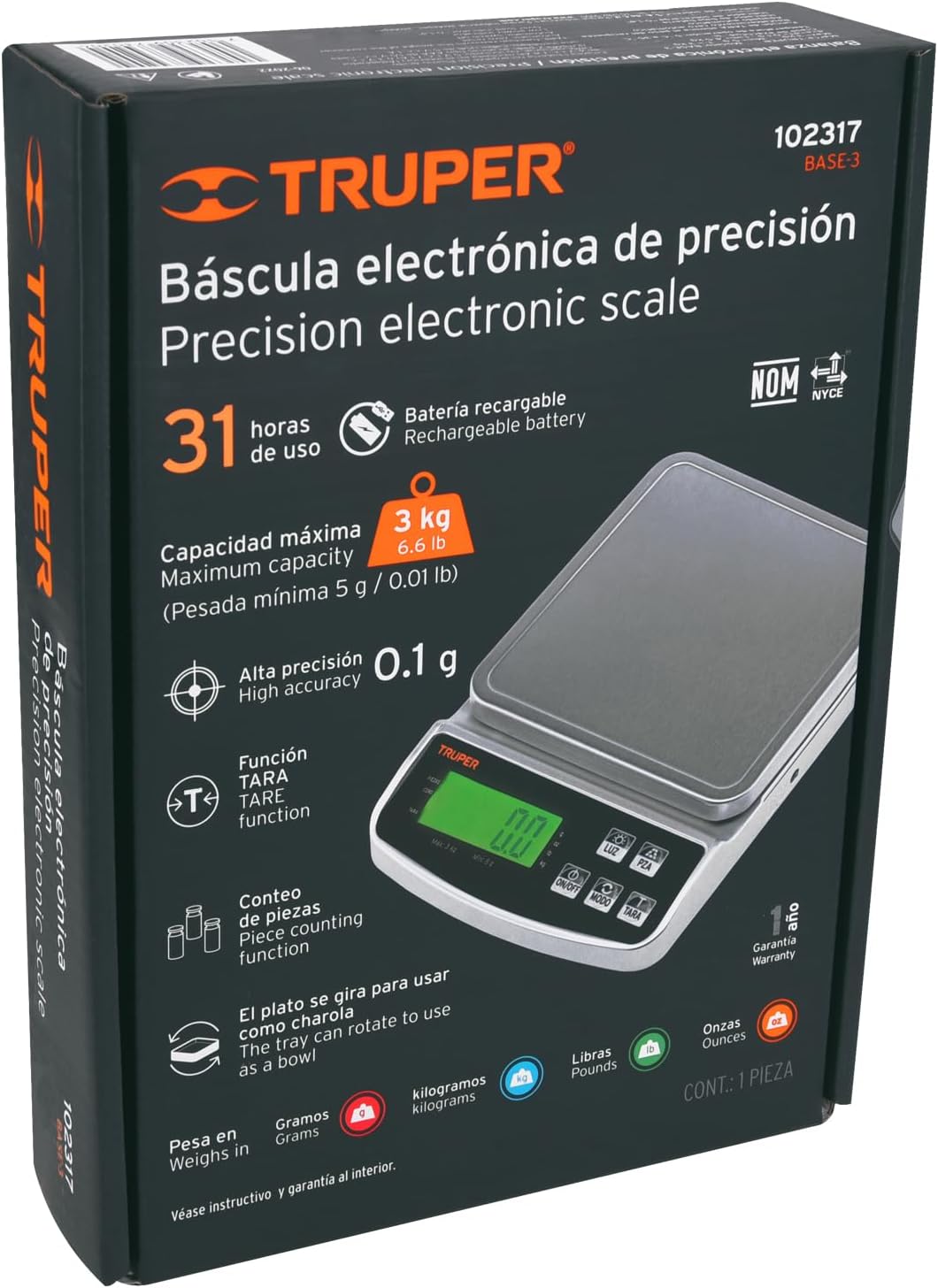
Image 3: Product packaging for the Truper BASE-3 scale, which typically contains detailed warranty and support information.