
1. Giriş
Aldığınız üçün təşəkkür edirikasing the SOAR XL ShockBox BTH6 Wireless Bluetooth Speaker. This speaker is designed to provide high-quality audio with versatile connectivity options, including Bluetooth 5.0, AM/FM radio, USB, and Aux inputs. Its portable and shockproof design, combined with dynamic multicolor LED lights, makes it suitable for various environments. Please read this manual carefully to ensure proper use and maintenance of your device.
2. Məhsul bitdiview
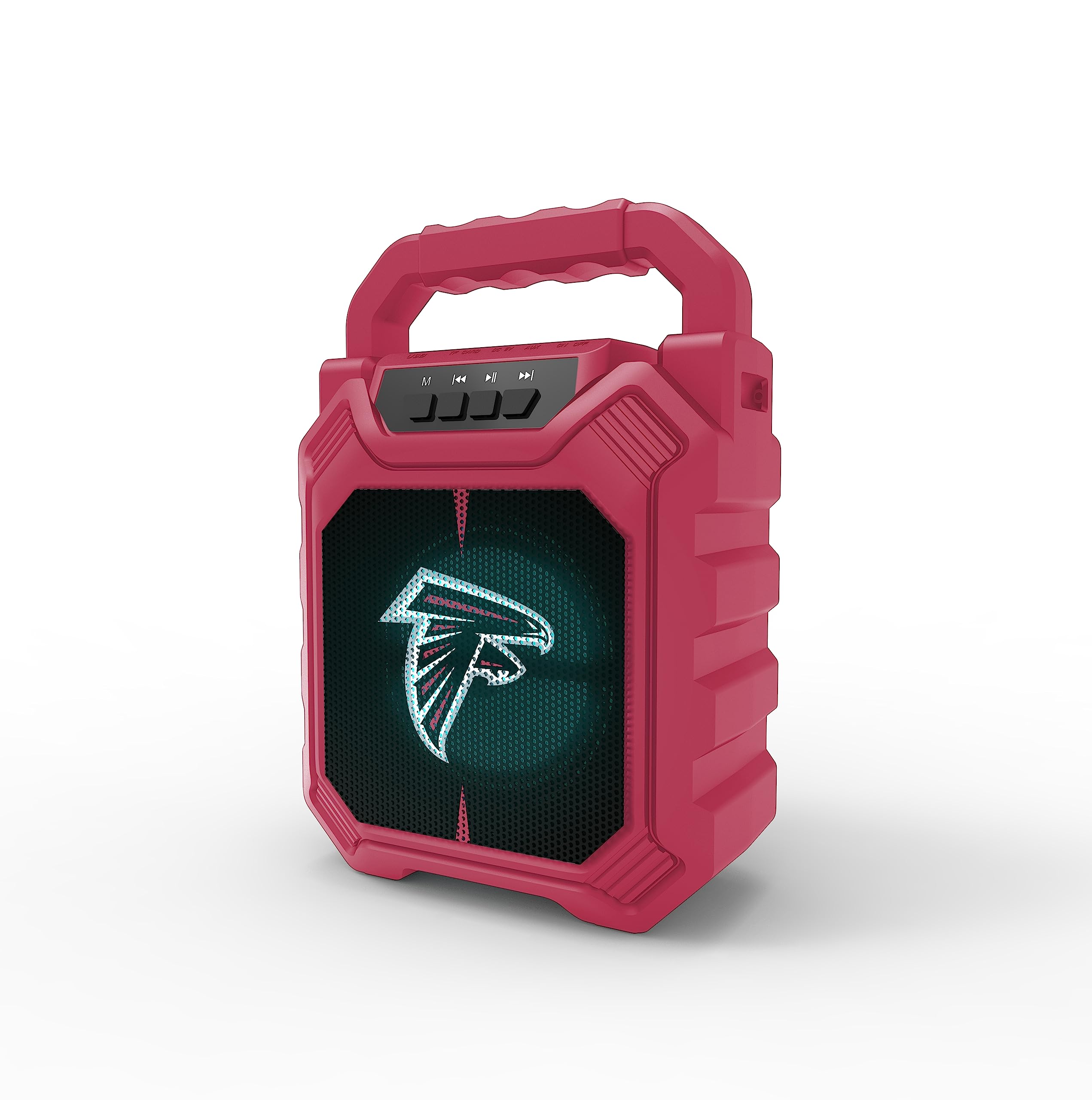
Şəkil 1: Ön view of the SOAR XL ShockBox BTH6 Wireless Bluetooth Speaker, featuring the Atlanta Falcons logo.
Əsas Xüsusiyyətlər:
- Bluetooth 5.0 Bağlantısı: For seamless wireless audio streaming.
- Çoxsaylı Audio Girişlər: Supports AM/FM radio, USB, and Aux connections.
- Portativ dizayn: Features a convenient top handle and shockproof construction.
- Uzun Batareya Ömrü: Provides over 5 hours of playback on a single charge.
- Dinamik LED İşıqları: Multicolor LED lights pulse with the music.
- Əsl Simsiz Stereo (TWS): Connect two speakers for enhanced stereo sound.
3. Nəzarət və Portlar

Image 2: Top panel of the speaker, illustrating the control buttons and various input ports.
Düymə funksiyaları:
- Güc düyməsi: Press and hold to turn the speaker ON/OFF. Short press to switch modes (Bluetooth, FM, USB, Aux).
- 'M' (Rejim) düyməsi: Short press to cycle through input modes (Bluetooth, FM Radio, USB, Aux).
- Previous Track / Volume Down: Short press for previous track (in Bluetooth/USB mode). Press and hold to decrease volume.
- Oynat/Pauza düyməsi: Short press to play or pause audio. In FM mode, short press to auto-scan and save stations.
- Next Track / Volume Up: Short press for next track (in Bluetooth/USB mode). Press and hold to increase volume.
Giriş Limanları:
- Micro-USB şarj portu: Dinamiki doldurmaq üçün.
- USB Port: USB flash sürücüsündən səs oxutmaq üçün.
- Aux-in Port (3.5mm): For connecting external audio devices via an auxiliary cable.
- MicroSD Kart Yuvası: For playing audio from a MicroSD card.
4. Quraşdırma və Əməliyyat
4.1 Dinamikin doldurulması
- Connect the provided micro-USB cable to the charging port on the speaker.
- Kabelin digər ucunu USB güc adapterinə (daxil deyil) və ya kompüterin USB portuna qoşun.
- Doldurma göstərici işığı yanacaq. Tam doldurulduqdan sonra işıq rəngini dəyişə və ya sönə bilər.
- A full charge provides over 5 hours of playback time.
4.2 Yandırma/Söndürmə
- To turn ON, press and hold the Power button until you hear an audible prompt.
- To turn OFF, press and hold the Power button again until the speaker powers down.
4.3 Bluetooth Qoşulması
- Dinamiki yandırın. O, avtomatik olaraq yanıb-sönən LED işığı və səsli xəbərdarlıqla göstərilən Bluetooth cütləşdirmə rejiminə daxil olacaq.
- Cihazınızda (smartfon, planşet və s.) Bluetooth-u aktivləşdirin və mövcud cihazları axtarın.
- Select "SOAR BTH6" from the list of devices.
- Cütləşdirildikdən sonra dinamik səsli təsdiq siqnalı verəcək və LED işığı yanıb-sönməyi dayandıracaq.
- Cihaz əhatə dairəsindədirsə və Bluetooth aktivdirsə, dinamik işə salındıqda avtomatik olaraq sonuncu qoşalaşmış cihaza yenidən qoşulacaq.
4.4 FM Radio Əməliyyatı
- Turn on the speaker and press the 'M' (Mode) button until you enter FM Radio mode.
- To auto-scan and save available FM stations, short press the Play/Pause button. The speaker will scan and store stations automatically.
- Use the Previous Track and Next Track buttons to navigate between saved stations.
4.5 USB and Aux Input
- USB giriş: Insert a USB flash drive into the USB port. The speaker will automatically switch to USB mode and begin playing audio files.
- Aux Giriş: Connect an external audio device (e.g., MP3 player) to the Aux-in port using a 3.5mm audio cable. Press the 'M' button to switch to Aux mode.
4.6 LED İşıqlandırma Rejimi

Image 3: The speaker displaying its dynamic LED lights in a vibrant setting.
The speaker features dynamic multicolor LED lights that pulse to the rhythm of the music. These lights activate automatically when the speaker is in use. There are no user-adjustable modes for the LED lights; they are designed to enhance the audio experience visually.
4.7 True Wireless Stereo (TWS) Qoşulması

Image 4: Two SOAR XL ShockBox BTH6 speakers paired together for True Wireless Stereo (TWS) sound.
Daha geniş səslərə nail olmaq üçüntage, you can pair two SOAR XL ShockBox BTH6 speakers together using the TWS function:
- Ensure both speakers are turned OFF.
- Turn ON both speakers. They will enter Bluetooth pairing mode.
- On one of the speakers (this will be your primary speaker), double-press the 'M' (Mode) button. The speakers will attempt to connect to each other.
- Once successfully paired, you will hear an audible confirmation. The LED lights on both speakers will synchronize.
- İndi cihazınızı 4.3 bölməsində təsvir edildiyi kimi Bluetooth vasitəsilə əsas dinamikə qoşun. Səs hər iki dinamikdən stereo rejimdə səslənəcək.
5. Baxım
- Təmizləmə: Dinamikin xarici hissəsini təmizləmək üçün yumşaq, quru parça istifadə edin. Aşındırıcı təmizləyicilərdən və ya həlledicilərdən istifadə etməyin.
- Yaddaş: Dinamiki birbaşa günəş işığından və həddindən artıq temperaturdan uzaq sərin, quru yerdə saxlayın.
- Batareyaya qulluq: Batareyanın ömrünü uzatmaq üçün, tez-tez istifadə edilməsə belə, dinamiki müntəzəm olaraq doldurun. Batareyanın uzun müddət tam boşaldılmasından çəkinin.
- Suya davamlılıq: While designed to be durable, avoid submerging the speaker in water.
6. Giderme
| Problem | Mümkün Həll |
|---|---|
| Dinamik açılmır. | Ensure the battery is charged. Connect the speaker to a power source using the micro-USB cable. |
| Bluetooth vasitəsilə cütləşdirmək mümkün deyil. | Make sure the speaker is in Bluetooth mode and within range (approx. 10 meters). Turn off and on your device's Bluetooth. Forget "SOAR BTH6" from your device's Bluetooth list and try pairing again. |
| Səs yoxdur və ya aşağı səs. | Həm dinamikdə, həm də qoşulmuş cihazınızda səs səviyyələrini yoxlayın. Düzgün giriş rejiminin seçildiyinə əmin olun. |
| FM radio qəbulu zəifdir. | Adjust the speaker's position. Ensure you are in an area with good signal strength. |
| TWS cütləşməsi uğursuz oldu. | Ensure both speakers are fully charged and not connected to any other Bluetooth devices. Follow the TWS pairing steps carefully. |
7. Spesifikasiyalar
| Xüsusiyyət | Detal |
|---|---|
| Model nömrəsi | BTH6 (Variant: NFL-BTH6-DLPH) |
| Bluetooth versiyası | 5.0 |
| Audio Girişi | Bluetooth, AM/FM Radio, USB, Aux-in, MicroSD |
| Oynama vaxtı | Over 5 hours (per charge) |
| Doldurma Portu | Mikro-USB |
| İstehsalçı | Prime Brands Group Inc |
| İlk Əlçatan Tarix | 6 sentyabr 2023-ci il |
8. Rəsmi Məhsul Videosu
Video 1: Rəsmi məhsul video nümayişiasing the features and dynamic LED lights of the SOAR BTH6 Wireless Bluetooth Speaker.
9. Zəmanət və Dəstək
For warranty information and customer support, please refer to the documentation included with your product or contact the manufacturer, Prime Brands Group Inc., directly. Details regarding specific warranty periods and support procedures are typically provided at the point of purchase or on the manufacturer's official websayt.