
1. Giriş
This manual provides instructions for the proper use and care of your Docooler Portable USB Cassette Player. This device allows you to play audio cassettes and convert their content into digital MP3 files via a USB connection to a computer. Please read this manual thoroughly before operating the device to ensure optimal performance and longevity.
2. Məhsul bitdiview
The Docooler Portable USB Cassette Player is a compact, handheld device designed for playing and digitizing audio cassettes. It features a transparent casing, allowing visibility of the internal mechanism.
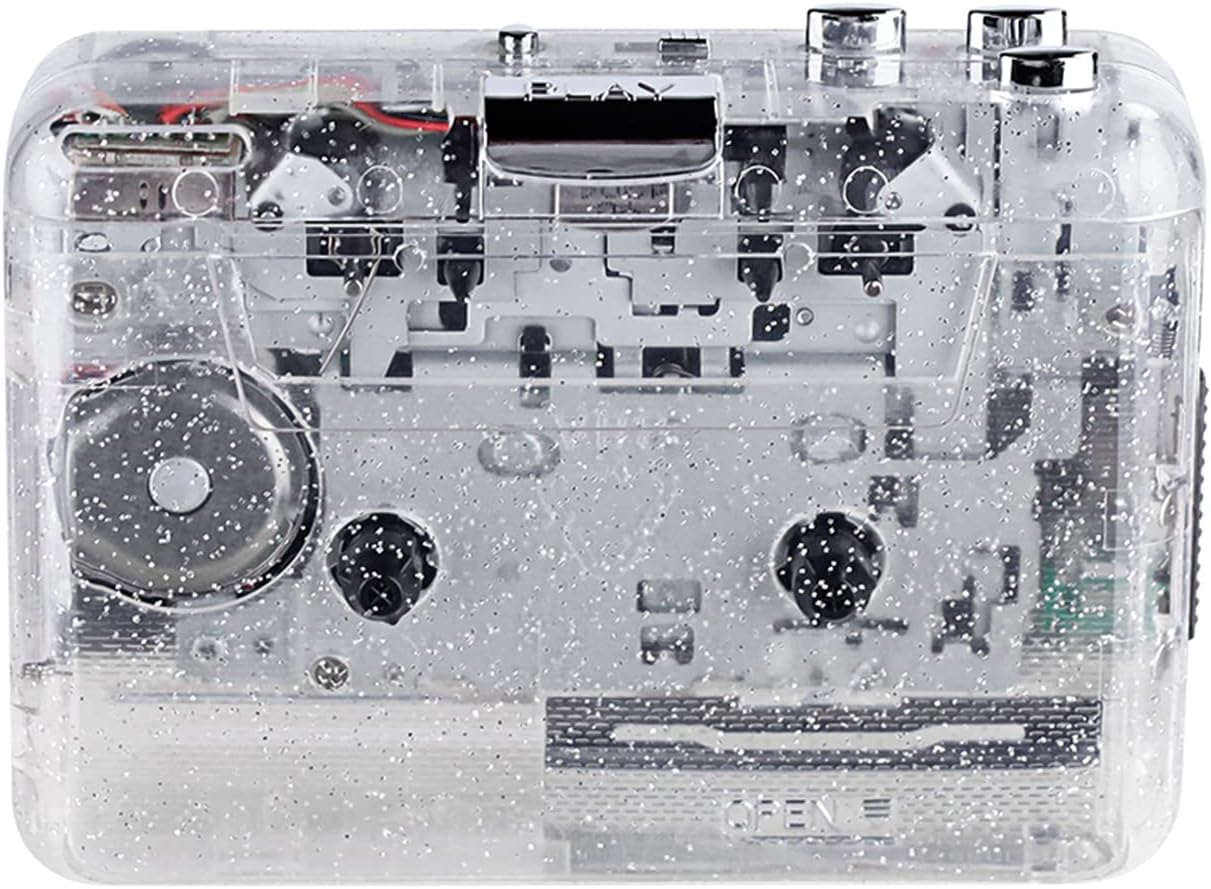
Şəkil 1: Ön view of the Docooler Portable USB Cassette Player, showcasinşəffaf dizaynı ilə.

Figure 2: Various angles of the cassette player, including top, side, and open views.
Paketin tərkibi:
- Docooler Portable USB Cassette Player
- USB kabel
- İstifadəçi Təlimatı (bu sənəd)
- Headphones (may vary by package)
3. Quraşdırma
3.1 Enerji təchizatı
The cassette player can be powered by either batteries or a USB connection.
Batareyanın quraşdırılması:
- Cihazda batareya bölməsini tapın.
- Batareya bölməsinin qapağını açın.
- Düzgün qütblüyü (+/-) təmin edərək 2 ədəd AA batareyası (daxil deyil) daxil edin.
- Batareya bölməsinin qapağını etibarlı şəkildə bağlayın.
USB Gücü:
Connect the provided USB cable to the player's USB port and the other end to a powered USB port on your computer or a USB wall adapter. The device will draw power from the USB connection.
4. Əməliyyat Təlimatları
4.1 Playing a Cassette Tape
- Open the cassette compartment cover.
- Insert an audio cassette tape with the open edge facing upwards.
- Close the cassette compartment cover firmly.
- Connect headphones or external speakers to the 3.5mm audio output jack.
- düyməsini basın OYNA oxutmaya başlamaq üçün düymə.
- istifadə edin STOP oxutmanı dayandırmaq üçün düymə.
- istifadə edin FF (Fast Forward) və REW (geri sarma) lentdə naviqasiya etmək üçün düymələr.
- Adjust the volume using the volume control dial.
- The "DIR" button allows you to quickly flip the tape direction. The "play mode" button can be used to reverse playback once or an unlimited number of times.

Figure 3: The cassette player in use, demonstrating tape insertion and playback setup.

Figure 4: Users listening to audio through headphones connected to the cassette player.
4.2 Converting Tapes to MP3 Files
The Docooler Portable USB Cassette Player can convert your analog cassette audio into digital MP3 files. This process requires a computer and compatible audio recording software (not included).
- Ensure the cassette player is powered (via batteries or USB).
- Connect the cassette player to your computer using the provided USB cable.
- Install and open your preferred audio recording software on your computer. Software such as Audacity (free and open-source) is commonly used for this purpose.
- Configure your recording software to recognize the cassette player as an audio input device.
- Insert the cassette tape you wish to convert into the player.
- Start recording in your software, then press the OYNA button on the cassette player.
- Monitor the recording process. Once the tape has finished playing, stop the recording in your software.
- Save the recorded audio as an MP3 file kompüterinizdə.

Figure 5: Illustration of the process to convert cassette audio to MP3 files using the player and a computer.
5. Baxım
5.1 Cihazın təmizlənməsi
- Pleyerin xarici hissəsini yumşaq, quru parça ilə silin.
- Do not use liquid cleaners or abrasive materials, as they may damage the surface.
- Periodically clean the tape heads and pinch rollers using a cotton swab lightly dampoptimal səs keyfiyyətini təmin etmək və lentin zədələnməsinin qarşısını almaq üçün izopropil spirti ilə təchiz edilmişdir.
5.2 Saxlama
- When not in use for extended periods, remove batteries to prevent leakage.
- Pleyeri birbaşa günəş işığından və həddindən artıq temperaturdan uzaq sərin, quru yerdə saxlayın.
6. Giderme
| Problem | Mümkün Səbəb | Həll |
|---|---|---|
| Güc yoxdur | Dead batteries; USB cable not connected properly. | Replace batteries; ensure USB cable is securely connected. |
| Səs yoxdur | Headphones/speakers not connected; volume too low; dirty tape heads. | Connect audio output device; increase volume; clean tape heads. |
| Poor sound quality (hissing, muffled) | Dirty tape heads; worn-out tape; low battery. | Clean tape heads; try a different tape; replace batteries. |
| Tape not playing or moving | Tape jammed; mechanism issue; low battery. | Check tape for damage; replace batteries. |
| Cannot convert to MP3 | USB connection issue; software not configured correctly; no recording software. | Ensure USB is connected; check software settings; install compatible recording software. |
7. Spesifikasiyalar
- Model: B0C69FDZF6
- Enerji təchizatı: 2 x AA Batteries or USB 5V DC
- İnterfeys: USB 2.0
- Audio Çıxış: 3.5 mm stereo jak
- Ölçülər: 7.2 x 5.91 x 1.54 düym (təxminən)
- Çəki: 9.6 unsiya (təxminən)
- İstehsalçı: Docooler
8. Təhlükəsizlik Məlumatı
- Cihazı suya və ya həddindən artıq nəmə məruz qoymayın.
- Cihazı yerə atmaqdan və ya güclü zərbələrə məruz qoymaqdan çəkinin.
- Cihazı özünüz sökməyə və ya təmir etməyə çalışmayın. İxtisaslı xidmət personalına müraciət edin.
- Uşaqların əli çatmayan yerdə saxlayın.
- Batareyaları yerli qaydalara uyğun atın.
9. Zəmanət və dəstək
For warranty information or technical support, please refer to the documentation included with your purchase or contact Docooler customer service through their official website or the retailer where the product was purchased. Please have your model number (B0C69FDZF6) and purchase date available when contacting support.