
DOACT DOACT9032k7umed
DOACT 433MHz Universal Garage Door Remote Control User Manual
Brand: DOACT | Model: DOACT9032k7umed
1. Giriş və yuxarıview
This manual provides detailed instructions for the DOACT 433MHz Universal Garage Door Remote Control. This device is designed to copy existing remote control signals, offering a convenient and reliable solution for operating various automated systems such as garage doors, automatic gates, windows, and car alarms. Its compact design and robust construction ensure ease of use and durability.
2. Məhsulun xüsusiyyətləri
- Davamlı tikinti: Made of high-quality plastic, providing a comfortable and secure grip.
- Genişləndirilmiş Aralıq: Capable of controlling devices from a significant distance with stable performance.
- Portativ dizayn: Equipped with a keychain and a clip for easy carrying, minimizing the risk of loss.
- Geniş Uyğunluq: Versatile application for auto doors, garage doors, windows, and car alarm systems.
- Uyğun Pult: PHOENIX 2, PHOENIX 4, PHOX 2, PHOX 4, TXC, TRC, TSC4, HAND.
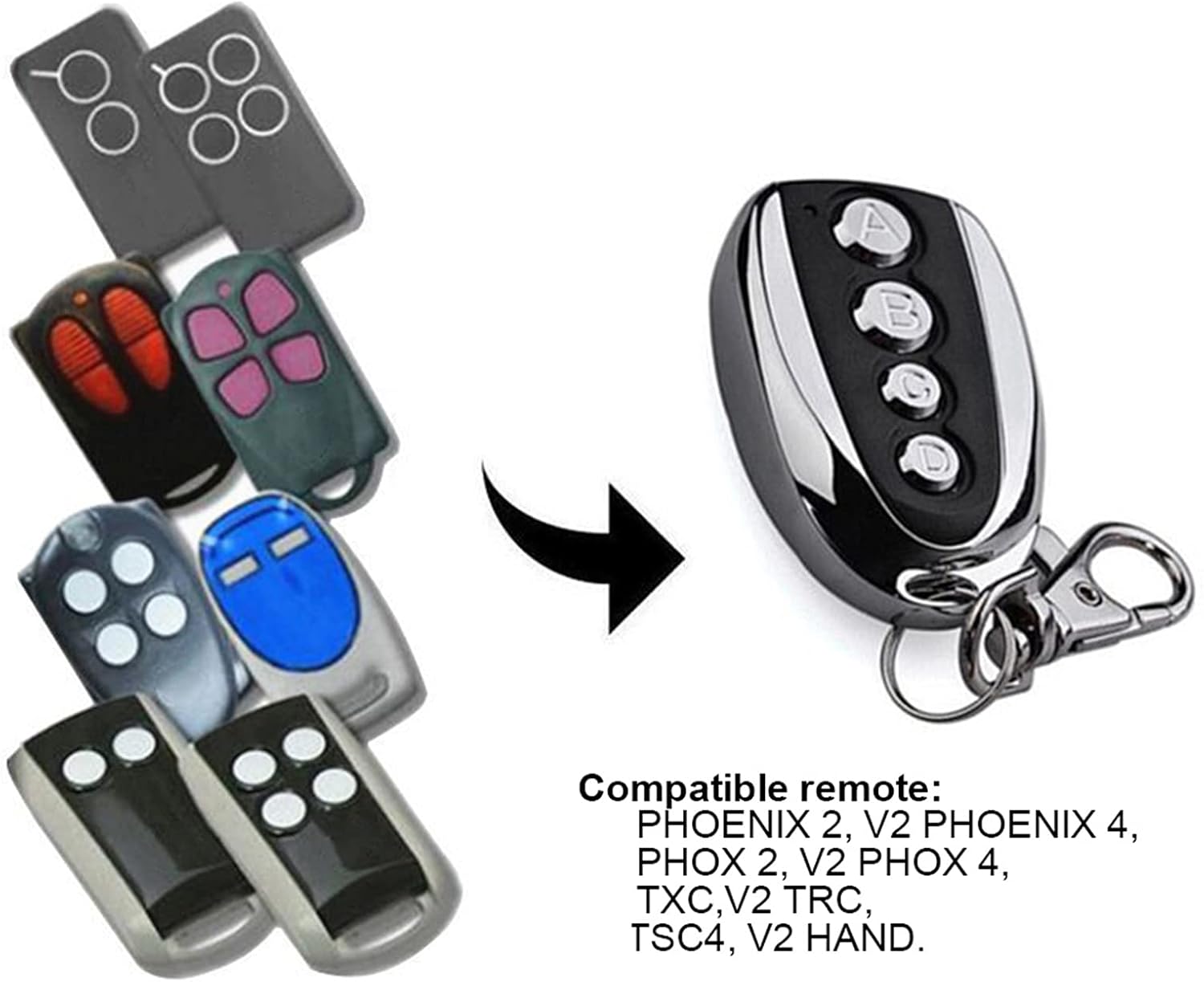
Figure 2.1: The DOACT remote control is compatible with a range of existing remote models, including PHOENIX 2, PHOENIX 4, PHOX 2, PHOX 4, TXC, TRC, TSC4, and HAND.
3. Spesifikasiyalar
| Atribut | Dəyər |
|---|---|
| Material | plastik |
| Güc | 10W |
| Tezlik | 433.92MHz |
| Dəqiqlik | ± 0.2MHz |
| Uzaq Məsafə | 100 metrə qədər (açıq hava) |
| İşçi cildtage | 12V 27A |
| İş cərəyanı | ≤12mA |
| Ölçülər (təxminən) | 5.3 cm / 2.1 inches (length) |
| Maddə Çəkisi | 1.38 unsiya |
| Paket Ölçüləri | 2.36 x 1.57 x 0.39 düym |

Şəkil 3.1: Pultun təxmini ölçüləri.
4. Setup: Copying Code from Original Transmitter
Follow these steps carefully to program your new DOACT remote control by copying the signal from an existing, compatible remote.
Step 1: Clear the History Code from the Duplicator
- Düymələri basıb saxlayın A və B simultaneously on the DOACT remote until the LED indicator flashes three times.
- Sərbəst buraxma düyməsi B (while continuing to press button A).
- Düyməni basın B slowly three times. The LED indicator will flash continuously.
- Sərbəst buraxma düyməsi A. The code clearance process is now complete.
Step 2: Copy Code from the Original Transmitter
- Place the DOACT remote control as close as possible to your original transmitter.
- Düyməni basıb saxlayın A on your original transmitter.
- While still holding button A on the original transmitter, press and hold button A on the DOACT remote control. Continue holding both buttons until the DOACT remote's LED indicator flashes rapidly.
- Release both buttons. The code for button A indi kopyalanır.
- Repeat the same process for other buttons (B, C, D) if desired, using the corresponding buttons on both the original and DOACT remotes.
Qeyd: Button A typically functions as the lock button, and Button B as the unlock button, but this can vary depending on the original remote's configuration.
Video 4.1: This video demonstrates the physical appearance of the remote control and its general use, providing a visual aid for understanding the device.
5. Əməliyyat Təlimatları
Once programmed, operating the DOACT remote control is straightforward:
- Aktivləşdirmə: Simply press the desired button (A, B, C, or D) that you have programmed to activate the corresponding function (e.g., open/close garage door, lock/unlock car).
- Aralığı: Ensure you are within the effective operating range of approximately 100 meters (in open air) for optimal performance. Environmental factors such as walls, structures, and electromagnetic interference can affect the actual range.

Figure 5.1: Using the remote control to operate a garage door.

Figure 5.2: The remote control can also be used for other automated entrances.
6. Baxım
To ensure the longevity and optimal performance of your DOACT remote control, consider the following maintenance tips:
- Təmizləmə: Wipe the remote with a soft, dry cloth. Avoid using abrasive cleaners or solvents.
- Yaddaş: Pultu quru yerdə, birbaşa günəş işığından və həddindən artıq temperaturdan uzaqda saxlayın.
- Batareyanın dəyişdirilməsi: The remote uses a 12V 27A battery. If the remote's range decreases significantly or the LED indicator does not light up, it may be time to replace the battery. To replace, carefully open the remote's casing (typically by unscrewing the back panel as shown in Figure 6.1), remove the old battery, and insert a new one, ensuring correct polarity.
- Fiziki zərərdən çəkinin: Protect the remote from drops, impacts, and excessive pressure.

Şəkil 6.1: Arxa view of the remote control, showing screws for accessing the battery compartment.
7. Giderme
If you encounter issues with your DOACT remote control, try the following troubleshooting steps:
- Pult Cavab Vermir:
- Ensure the remote is properly programmed. If unsure, repeat the code copying steps (Section 4).
- Check the battery. Replace it if it's low or dead (refer to Section 6 for battery replacement).
- Ensure you are within the effective operating range and there are no significant obstructions between the remote and the receiver.
- Short Operating Range:
- Replace the battery, as a weak battery can reduce range.
- Check for sources of interference (e.g., other wireless devices, large metal objects) near the receiver or the remote.
- Ensure the antenna on your receiver unit is unobstructed and properly positioned.
- LED Göstərici Yanmır:
- The battery is likely dead. Replace it immediately.
8. Zəmanət və Dəstək
DOACT is committed to providing high-quality products. While specific warranty details are not provided in this manual, please retain your proof of purchase for any warranty claims. For technical support, troubleshooting assistance, or inquiries regarding your DOACT remote control, please contact the seller or manufacturer directly through the platform where the product was purchased. They will be able to provide the most accurate and timely support.
Ask a question about this manual
Ask about setup, troubleshooting, compatibility, parts, safety, or missing instructions. Manuals+ will review the question and use this page’s manual context to help answer it.