
1. Giriş
This manual provides detailed instructions for the installation, operation, and maintenance of your WENMENGDE 10-inch Automatic Rotation Android Car Radio. Please read this manual thoroughly before using the product to ensure proper functionality and to prevent damage.

Figure 1.1: WENMENGDE 10-inch Automatic Rotation Android Car Radio. This image shows the main unit with its 10-inch display, featuring a user interface with various application icons. A rear-view camera module and a microphone are also visible, indicating included accessories.
2. Təhlükəsizlik Məlumatı
- Professional quraşdırma tövsiyə olunur: Due to the complexity of car electrical systems, professional installation is highly recommended. Incorrect wiring can cause damage to the unit or the vehicle.
- Enerji təchizatı: Cihazın mənfi torpaqlama ilə 12V DC enerji mənbəyinə qoşulduğundan əmin olun.
- Diqqəti yayındırmaqdan çəkinin: Do not operate the unit or watch videos while driving. Always prioritize road safety.
- Temperatur: Cihazı uzun müddət həddindən artıq temperaturda və ya birbaşa günəş işığında saxlamaqdan çəkinin.
- Təmizləmə: Təmizləmək üçün yumşaq, quru bir parça istifadə edin. Aşındırıcı təmizləyicilərdən və ya həlledicilərdən istifadə etməyin.
- Suya məruz qalma: Bu qurğu suya davamlı deyil. Suya və ya həddindən artıq nəmə məruz qalmaqdan çəkinin.
3. Paketin məzmunu
Aşağıda sadalanan bütün elementlərin paketinizə daxil olduğunu yoxlayın:
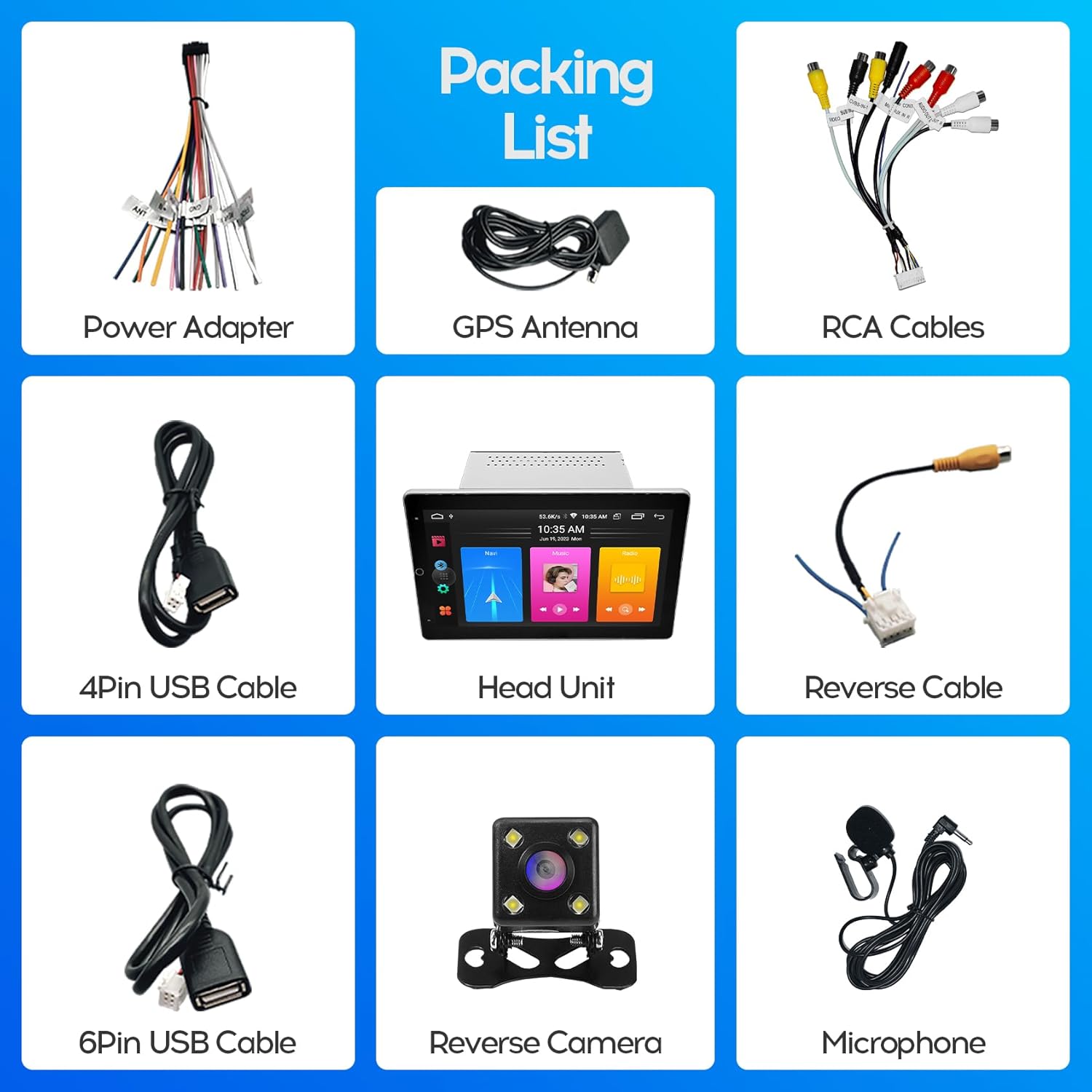
Figure 3.1: Included Accessories. This image displays the complete packing list, including the head unit, power adapter, GPS antenna, RCA cables, 4-pin USB cable, 6-pin USB cable, reverse cable, reverse camera, and microphone.
- WENMENGDE 10-inch Head Unit
- Güc Adapter Kabeli
- GPS antenası
- RCA kabelləri
- 4-Pinli USB Kabel
- 6-Pinli USB Kabel
- Ters kabel
- Reverse Camera (Waterproof Night Vision)
- Xarici Mikrofon
4. Quraşdırma təlimatı
This unit is designed for most general-purpose double DIN (2DIN) car center consoles. Ensure your vehicle has the appropriate installation space (178*100MM) before proceeding.
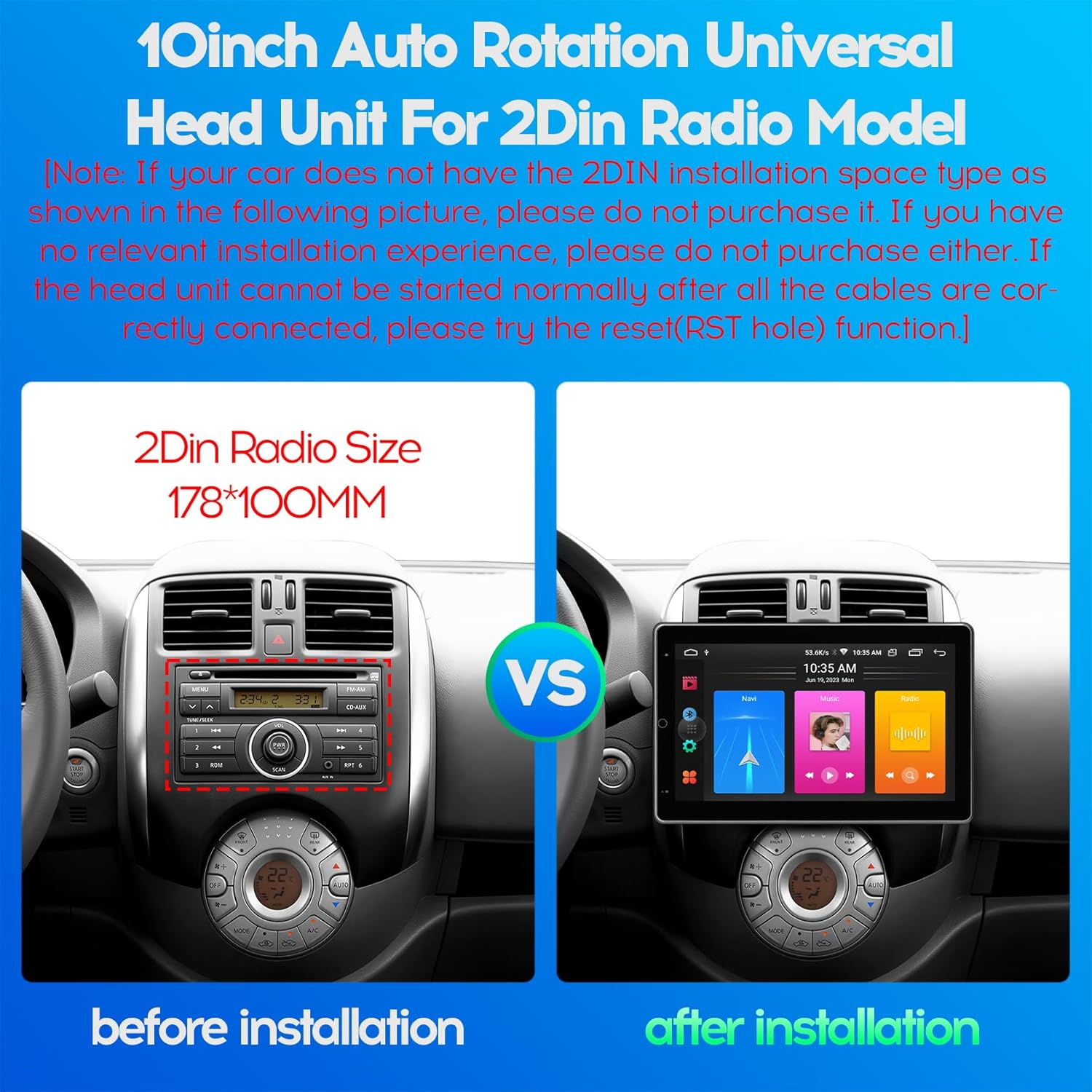
Figure 4.1: 2DIN Radio Size Comparison. This image illustrates the standard 2DIN radio slot dimensions (178x100mm) and how the WENMENGDE 10-inch unit fits into a compatible vehicle dashboard, showing a "before" and "after" installation view.
4.1. Elektrikli sxem
Refer to the following diagram for proper wiring connections. Incorrect wiring can lead to malfunction or damage.

Figure 4.2: Head Unit Port Functions and Wiring. This diagram details the various ports on the back of the head unit, including the power adapter, USB cables, RCA cables, reverse video cable, GPS antenna, and WiFi/BT antenna. A close-up of the main power harness shows pin assignments for power, speakers, steering wheel control (SWC), reverse, and antenna.
- Enerji bağlantısı:
- Yellow (B+): Sabit 12V gücə qoşun.
- Qırmızı (ACC): 12V güc açarına (alovlanma) qoşun.
- Qara (GND): Avtomobilin şassisinin yerə qoşulun.
- Dinamik Əlaqələri: Connect the speaker wires (FL+, FL-, FR+, FR-, RL+, RL-, RR+, RR-) to your vehicle's corresponding speaker outputs. Ensure correct polarity.
- Sükan İdarəetməsi (SWC): Connect KEY1 and KEY2 wires to your vehicle's steering wheel control wires. Manual learning may be required in the unit's settings.
- Arxa Kamera: Connect the reverse camera video input to the unit's "Reverse Video" port and the reverse trigger wire to the vehicle's reverse light signal.
- GPS Antenası: GPS antenasını qoşun və aydın bir yerə qoyun view səmanın.
- USB kabellər: Connect the provided USB cables for external devices or wired CarPlay/Android Auto.
- Radio antenası: Connect your vehicle's radio antenna to the unit's radio port.
4.2. Fiziki Quraşdırma
- Carefully remove your existing car radio or blank panel from the dashboard.
- Connect all necessary wiring harnesses to the WENMENGDE head unit according to the wiring diagram.
- Mount the head unit into the 2DIN slot in your dashboard. Ensure it is securely fastened.
- Test all functions (power, audio, radio, camera, etc.) before fully reassembling your dashboard.
- Alət panelinin bəzəyini yenidən yığın.
Note: If the head unit cannot be started normally after all cables are correctly connected, please try the reset (RST hole) function.
5. İlkin Quraşdırma
- Güc Aktivdir: Turn on your vehicle's ignition. The unit should power on automatically.
- Language and Time: -a keçin Parametrlər to set your preferred language, time zone, and date.
- Wi-Fi Bağlantısı: gedin Parametrlər > Şəbəkə və İnternet > Wi-Fi to connect to an available Wi-Fi network (e.g., your mobile hotspot) for online features and app downloads.
- Steering Wheel Control Learning: If your vehicle has steering wheel controls, go to Settings > Car Settings > Steering Wheel Learning (or similar) to program the buttons.
6. Əməliyyat Təlimatları
6.1. Automatic Screen Rotation
The unit features a 90° automatic rotation function, allowing the display to switch between horizontal and vertical orientations. This adjustment occurs automatically based on the unit's physical orientation.
6.2. CarPlay və Android Auto
The unit supports both Apple CarPlay and Android Auto, offering wireless and wired connectivity.
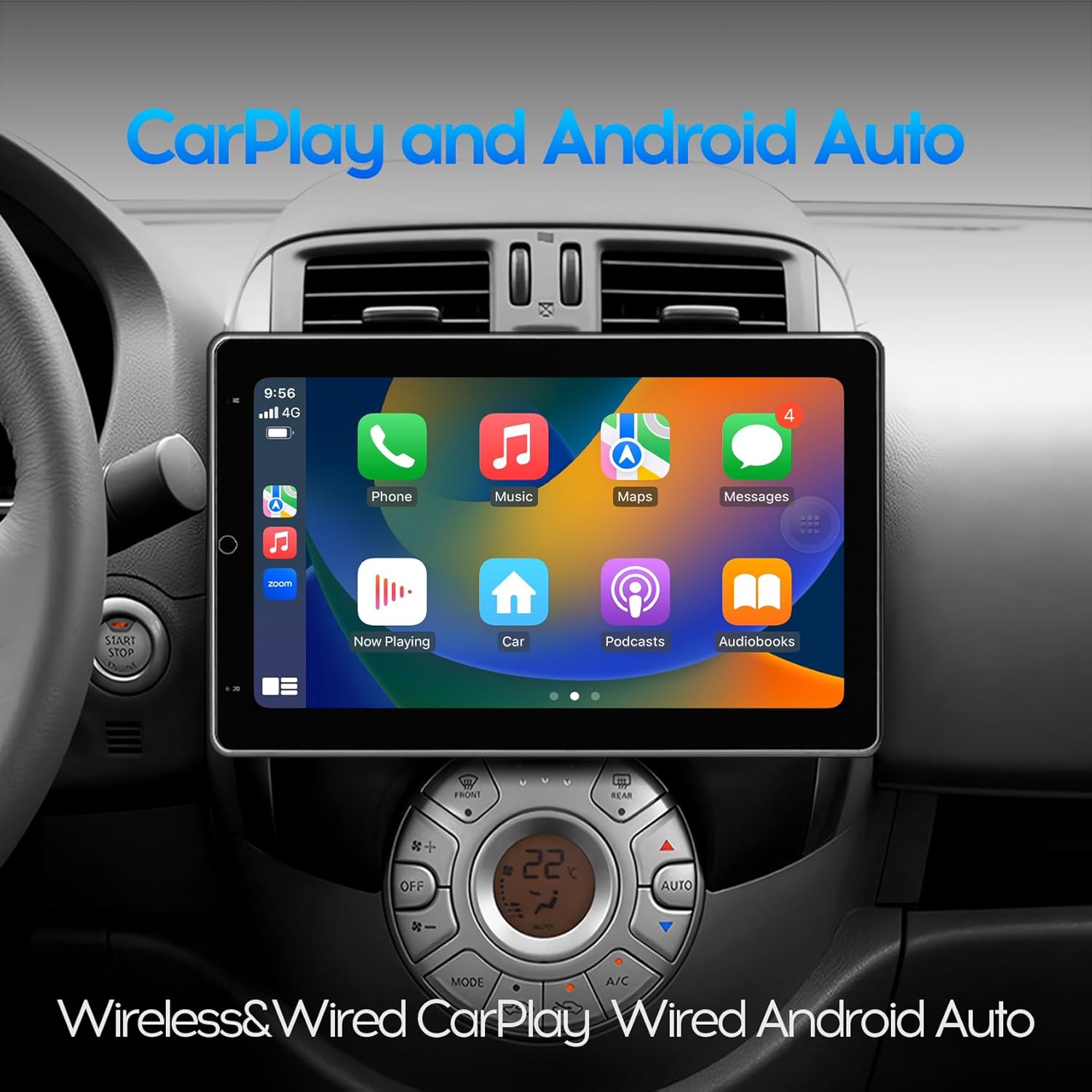
Figure 6.1: CarPlay Interface. This image shows the unit displaying the Apple CarPlay interface, featuring common applications like Phone, Music, Maps, and Messages, integrated into the car's dashboard.
- Simsiz Bağlantı:
- Cib telefonunuzda Bluetooth -u aktiv edin.
- Telefonunuzu Bluetooth vasitəsilə avtomobil radiosuna qoşun.
- Open the pre-installed application named "Zlink" on the car radio.
- Wait for the automatic connection to CarPlay or Android Auto.
- Simli Bağlantı:
- Connect your mobile phone to the car radio using a USB cable.
- The unit should automatically launch CarPlay or Android Auto.
6.3. GPS Naviqasiyası
The unit includes a built-in GPS module and comes with offline maps pre-installed via the "Maps" application. With a Wi-Fi connection, online maps and real-time traffic information are also available.

Figure 6.2: GPS Navigation. This image shows the unit displaying a navigation map with route details and estimated travel time, along with icons for various navigation applications.
To use GPS navigation:
- Tap the "Maps" icon on the home screen.
- Enter your destination.
- Follow the on-screen directions and voice prompts.
6.4. Bluetooth funksionallığı
The built-in Bluetooth 4.0 module supports hands-free calling, phone book synchronization, and music streaming (A2DP).
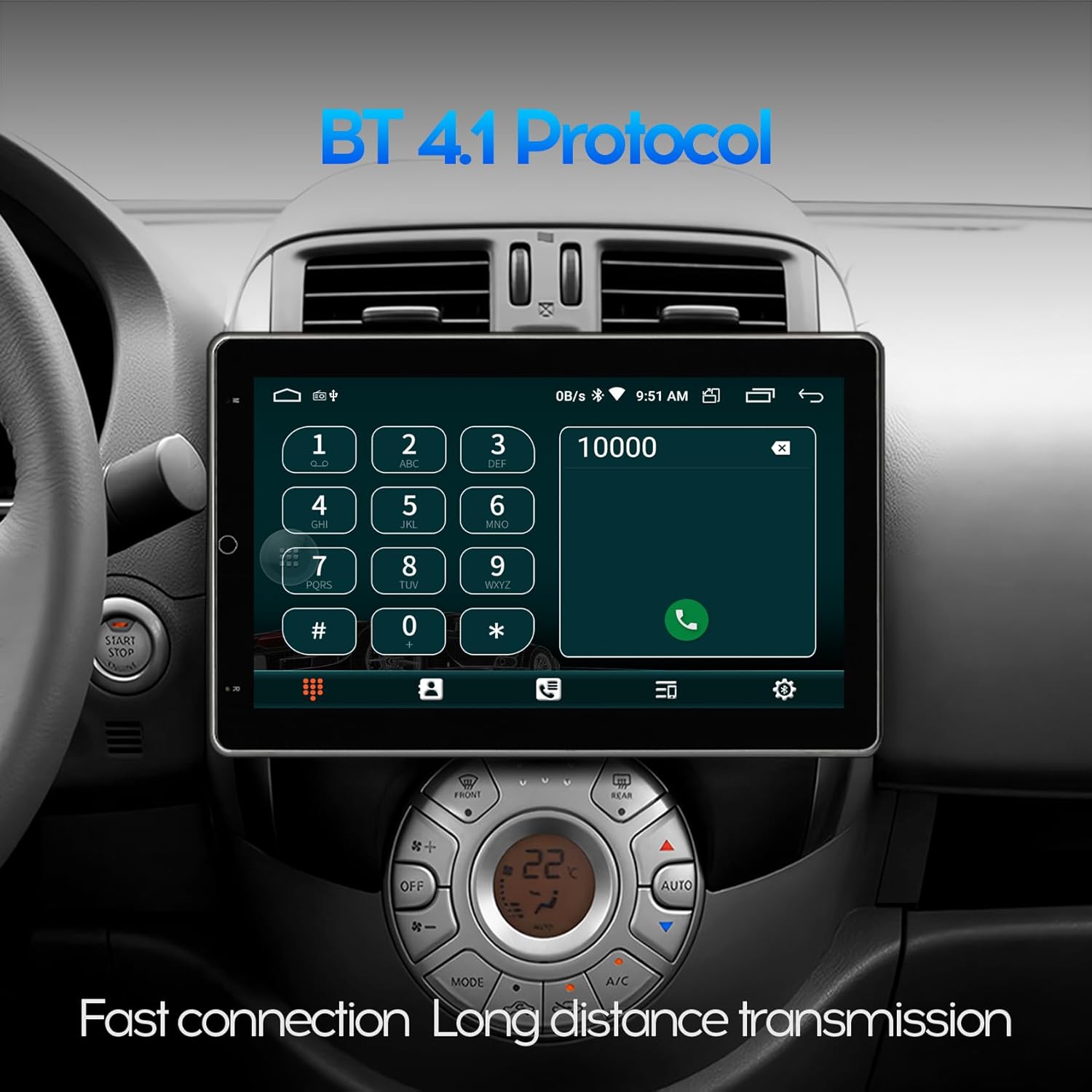
Figure 6.3: Bluetooth Dialer. This image displays the Bluetooth phone dialer interface on the unit, allowing users to make calls directly from the touchscreen.
- Cütləşmə:
- Go to the Bluetooth application on the unit.
- Enable Bluetooth on your mobile phone and search for available devices.
- Select the unit's Bluetooth name (e.g., "WENMENGDE Car Radio") and pair.
- Enter the PIN if prompted (usually "0000" or "1234").
- Səssiz Zəng: Once paired, you can make and receive calls directly from the unit's screen.
- Musiqi axını: Play audio from your phone through the car speakers via Bluetooth.
6.5. Arxa View Kamera funksiyası
The unit supports a rear view camera input. When the vehicle is shifted into reverse gear, the car stereo will automatically display the rear view image, providing assistance for parking and maneuvering.

Figure 6.4: Reverse Rear View. This image shows the unit displaying the feed from a rear-view camera, complete with dynamic parking guidelines, assisting with safe reversing.
6.6. Split Screen Mode
The split screen feature allows you to run two applications simultaneously on the display, such as navigation and music playback.
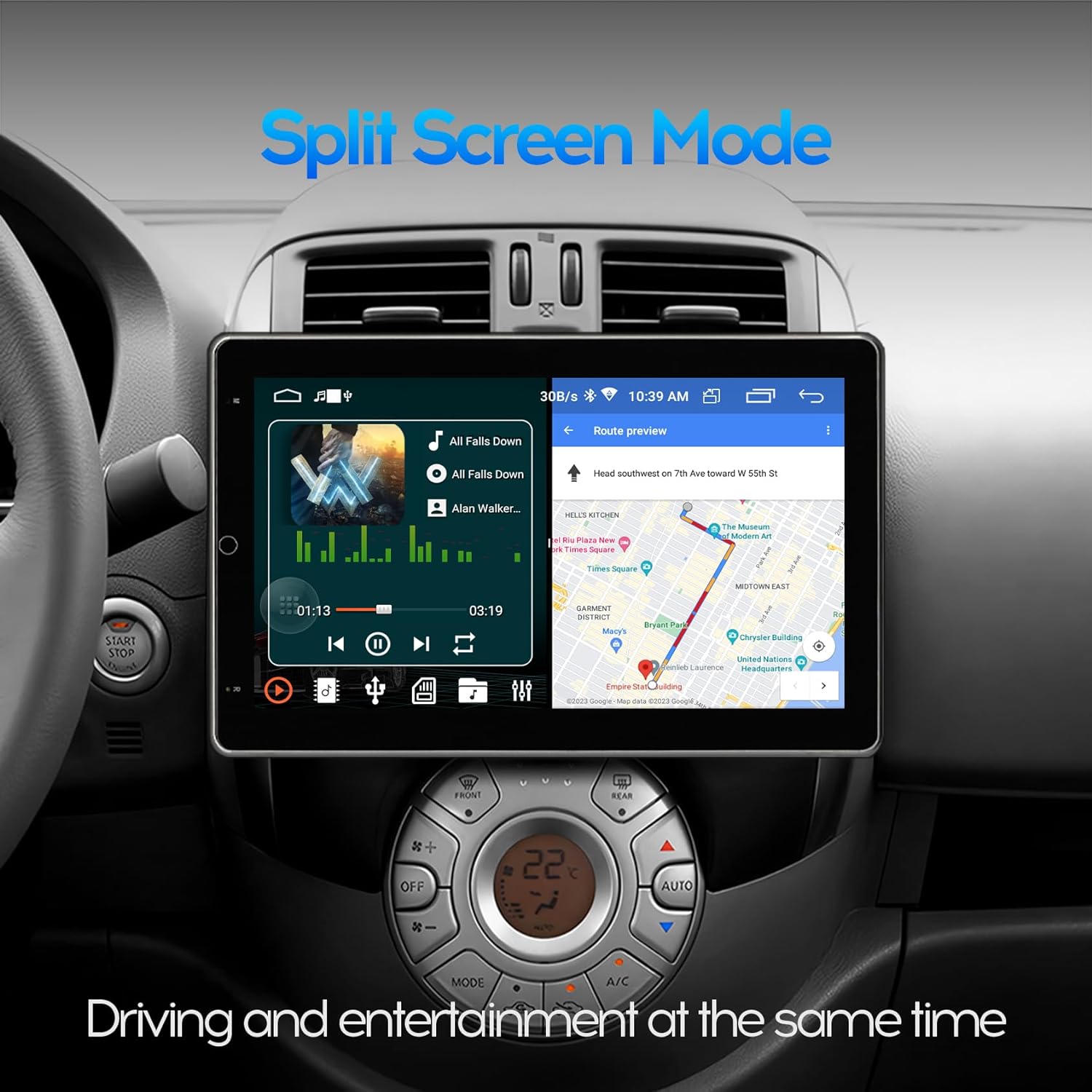
Figure 6.5: Split Screen Mode. This image demonstrates the unit's split-screen capability, showing a navigation application on one side and a music player on the other, allowing for simultaneous use.
To activate split screen:
- İstifadə etmək istədiyiniz ilk proqramı açın.
- Press and hold the recent apps button (usually a square icon) or swipe up from the bottom and hold, then drag the first app to one side of the screen.
- Select the second application from the recent apps list or app drawer to fill the other half of the screen.
6.7. Wi-Fi and App Installation
Connect the unit to a 2.4GHz Wi-Fi network (e.g., your mobile hotspot) to access online features and download applications from the Google Play Store.

Figure 6.6: Wi-Fi Network and App Downloads. This image shows the unit connected to a Wi-Fi network and displaying the Google Play Store interface, allowing users to download various applications like YouTube, TikTok, and Spotify.
Tətbiqləri yükləmək üçün:
- Ensure the unit is connected to Wi-Fi.
- Open the "Play Store" application.
- axtarın and install desired applications.
7. Baxım
7.1. Ekranın təmizlənməsi
Ekranı yumşaq, tüksüz bir parça ilə yumşaq bir şəkildə silin. İnadkar ləkələr üçün bir az təmizləyin.ampen the cloth with water. Avoid using harsh chemicals, alcohol, or abrasive materials, as these can damage the screen coating.
7.2. Software Updates (FOTA)
The unit supports Firmware Over-The-Air (FOTA) updates for system and CAN versions. Regularly check for updates to ensure optimal performance and access to new features.

Figure 7.1: FOTA Upgrade Interface. This image shows the unit's wireless update screen, indicating that the device's software is currently up to date, with options to check for new updates.
Yeniləmələri yoxlamaq üçün:
- Ensure the unit is connected to Wi-Fi.
- -a keçin Settings > About device > System update (və ya oxşar yol).
- Mövcud yeniləmələri yükləmək və quraşdırmaq üçün ekrandakı təlimatları izləyin.
8. Giderme
| Problem | Mümkün Səbəb | Həll |
|---|---|---|
| Cihaz işə düşmür. | Incorrect wiring (B+, ACC, GND), blown fuse, loose connection. | Check all power connections. Verify fuse. Press the RST (Reset) button. |
| Səs yoxdur. | Dinamik naqilləri səhv qoşulub, səs çox aşağıdır, səssiz rejim aktivdir. | Check speaker wiring polarity. Increase volume. Disable mute. |
| CarPlay/Android Auto qoşulmur. | Bluetooth not paired (wireless), faulty USB cable (wired), "Zlink" app not open. | Ensure Bluetooth is paired. Try a different USB cable. Open "Zlink" app. Restart phone and unit. |
| GPS siqnalı zəif və ya qeyri-dəqiqdir. | GPS antenna improperly placed, antenna faulty. | Relocate GPS antenna to a position with clear sky view. Check antenna connection. |
| Arxa view kamera göstərilmir. | Camera wiring incorrect, reverse trigger wire not connected. | Check camera video input and reverse trigger wire connection. |
| Toxunma ekranı cavab vermir. | Software glitch, temporary freeze. | Press the RST (Reset) button. Restart the unit. |
Bu həll yollarına cəhd etdikdən sonra problemlər davam edərsə, müştəri dəstəyi ilə əlaqə saxlayın.
9. Spesifikasiyalar

Figure 9.1: Product Dimensions. This image provides detailed measurements for the front, side, and back of the 10-inch head unit, including screen size (25.6cm / 10 inches diagonal) and chassis dimensions.

Figure 9.2: IPS Screen Technology. This image visually compares a non-IPS screen with the unit's 2.5D IPS screen, highlighting the superior visual experience and wider viewing angles of the IPS display.

Figure 9.3: Processor Architecture. This diagram illustrates the AC8227L SOC with its dual CPU architecture, including a Quad Core Cortex-A7 1.1GHz CPU, Quad Core ARM Mali 450 GPU, and a 400MHz ARM9 Coprocessor, indicating the unit's processing capabilities.
- Model: 10-inch Automatic Rotation Android Car Radio
- Ekran Ölçüsü: 10 düym (25.6 sm)
- Ekran növü: IPS Full Touch Screen, 2.5D Tempered Glass
- Qətnamə: 1024*600
- Əməliyyat sistemi: Android
- Prosessor: AC8227L SOC (Quad Core Cortex-A7 1.1GHz CPU, Quad Core ARM Mali 450 GPU, 400MHz ARM9 Coprocessor)
- Yaddaş/Yaddaş: 2 GB RAM + 32 GB ROM
- Bağlantı: Bluetooth 4.0, Wi-Fi (2.4GHz), USB
- Xüsusi Xüsusiyyətlər: Automatic Rotation, CarPlay (Wireless/Wired), Android Auto (Wireless/Wired), GPS Navigation, Split Screen, PIP, Rear View Camera Support, DVR Function Support, FOTA Upgrade
- Enerji təchizatı: 12V DC (mənfi torpaq)
- Maddə çəkisi: 5.49 funt (2.5 kq)
- Paket Ölçüləri: 11.5 x 10.9 x 8.7 düym
10. Müştəri dəstəyi
For technical assistance, warranty inquiries, or any questions regarding your WENMENGDE car radio, please contact our professional support team. We aim to reply within 24 hours.
Refer to your purchase documentation or the seller's contact information for specific support channels.