
1. Giriş
This manual provides detailed instructions for the installation, operation, and maintenance of your WENMENGDE 9.7" Vertical Screen Android Car Radio. Please read this manual thoroughly before using the product to ensure proper function and to prevent damage.
2. Məhsul bitdiview
The WENMENGDE 9.7" Vertical Screen Android Car Radio is a versatile multimedia system designed for vehicle integration. It features a 9.7-inch IPS vertical display with a resolution of 768*1024, powered by a Quad Core 1.1GHz CPU and Android 14 operating system. Key functionalities include wireless and wired CarPlay, Android Auto, GPS navigation, Wi-Fi connectivity, Bluetooth 4.1, and support for rear view kameralar.

Şəkil 2.1: Əsas Xüsusiyyətlər Bitdiview
3. Qutuda nə var
Quraşdırmaya başlamazdan əvvəl bütün komponentlərin mövcud olduğunu yoxlayın:
- 1x Head Unit
- 1x Enerji Adapteri
- 1x RCA kabelləri
- 1x GPS antenası
- 1x Reverse Cable
- 2x USB Kabellər
- 2x Metal Kronşteynlər
- 1x Ehtiyat Kamera
- 1x Mikrofon
- 1x İstifadəçi Təlimatı
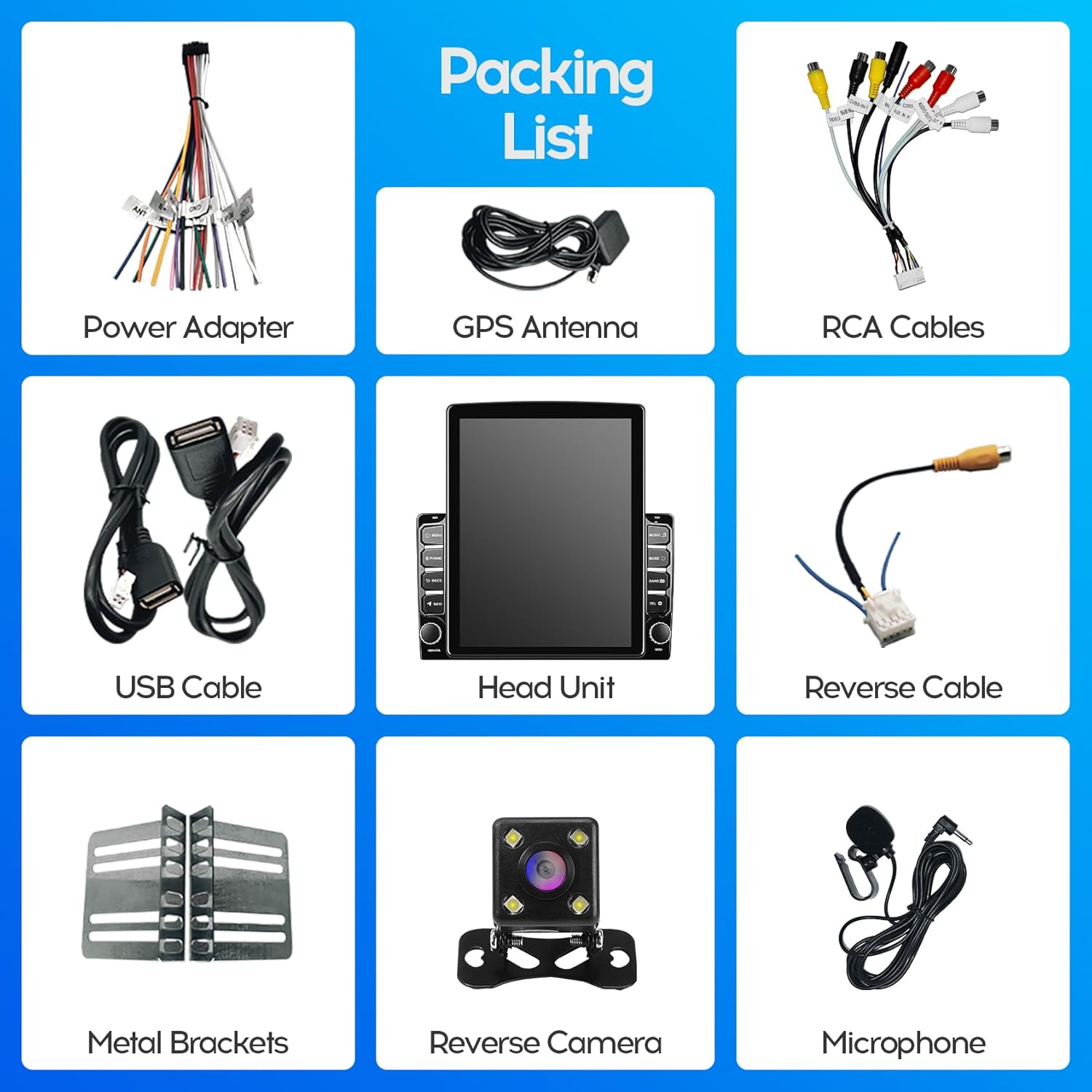
Figure 3.1: Included Components (Packing List)
4. Quraşdırma təlimatı
4.1 General Compatibility
This head unit is designed to fit most general-purpose 2-DIN car center consoles. Its vertical display style is compatible with dedicated 9-inch plastic frames, as the lower part of the head unit's back structure matches a 9-inch horizontal display style.
4.2 Fiziki Quraşdırma
The unit can be installed as a universal head unit into any car model with a 2-DIN size radio panel. Metal brackets are provided for secure fixing.

Figure 4.1: Universal 2-DIN Installation Example
Alternatively, it can be paired with a specific 9-inch or 10-inch special panel for specialized vehicle types, ensuring a seamless fit.

Figure 4.2: Installation with 9-inch Special Panel

Figure 4.3: Installation with 10-inch Special Panel
4.3 Naqil birləşmələri
Connect the provided power adapter, RCA cables, GPS antenna, reverse cable, and USB cables to their respective ports on the head unit and your vehicle's wiring harness. Refer to your vehicle's specific wiring diagram for accurate connections. Ensure all connections are secure to prevent intermittent issues.

Figure 4.4: Rear Panel Connections and Dimensions
5. Əməliyyat Təlimatları
5.1 Yandırma/Söndürmə
Press and hold the power button (usually a physical knob or button on the unit) to turn the device on or off. A short press typically mutes or unmutes the audio.
5.2 Sensorlu ekran interfeysi
The 9.7-inch capacitive 2.5D tempered glass touch screen allows for intuitive control. Navigate through menus, select applications, and adjust settings by tapping, swiping, and pinching.
5.3 Bluetooth bağlantısı
The unit features built-in Bluetooth 4.1 with A2DP. To connect your phone:
- Avtomobil radiosundakı Bluetooth parametrlərinə keçin.
- Enable Bluetooth on your mobile phone and search for available devices.
- Select the car radio from the list (e.g., "Car BT") and pair.
- Once connected, you can make hands-free calls, synchronize your phone book, and stream music.

Figure 5.1: Bluetooth Calling Interface
Video 5.1: Demonstration of the WENMENGDE 9.7 inch car radio's user interface, including music playback, radio tuning, Bluetooth pairing, and CarPlay functionality.
5.4 CarPlay və Android Auto
The device supports both Apple CarPlay and Android Auto, offering both wireless and wired connection options.
- Simsiz Bağlantı: Connect your mobile phone's Bluetooth to the car radio. Then, open the pre-installed application named "Zlink" on the head unit and wait for automatic connection.
- Simli Bağlantı: Connect your mobile phone to the head unit using a USB cable.

Figure 5.2: CarPlay Interface Display
5.5 GPS naviqasiyası
The car radio receiver includes a GPS module. Offline maps are available via the pre-installed "Maps" application. For online maps and real-time traffic updates, connect the unit to Wi-Fi.
5.6 Radio Functionality
The unit features an MT6625LN Radio Module for stable signal reception and clear sound. You can tune into FM radio stations and save your favorite frequencies as presets.
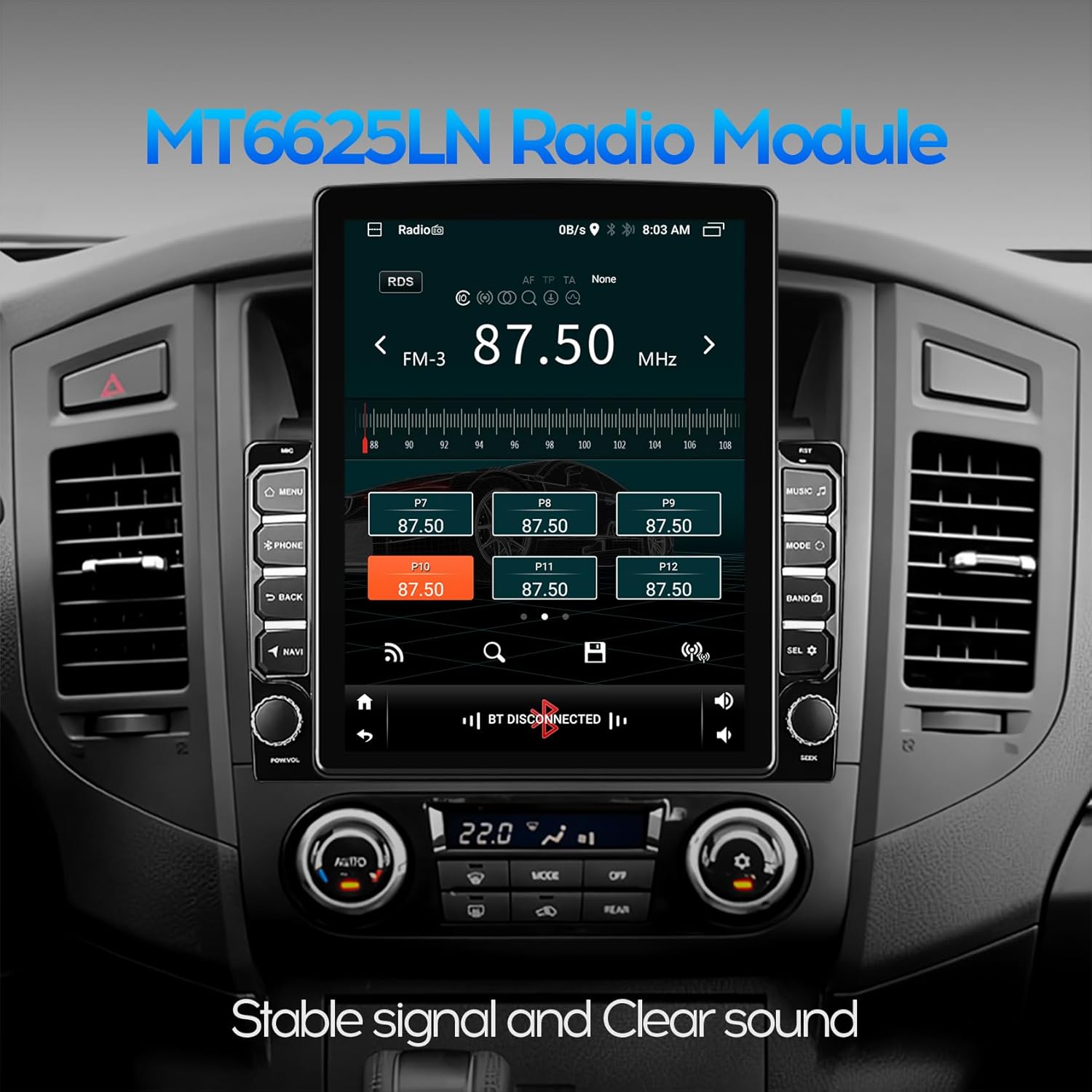
Şəkil 5.3: FM Radio İnterfeysi
5.7 Multimedia Oynatma
The Android system allows for playback of various audio and video formats. You can also download streaming applications like YouTube, TikTok, and Spotify via the Play Store when connected to Wi-Fi.
5.8 Arxa View Camera & DVR Function
The car radio is equipped to display images from a waterproof night vision reversing camera (included). When the vehicle is shifted into reverse gear, the car stereo will automatically display the rear view. The unit also supports video input for connecting a USB dash cam.

Figure 5.4: Reverse Rear View Ekran
5.9 Sükan İdarəetməsi (SWC)
The unit supports analog steering wheel controls. Manual learning is required to map your vehicle's steering wheel buttons to the radio functions. The two Key/SW wires are used for this purpose, enabling hands-free calling, music switching, and volume control.
5.10 Bölünmüş Ekran Rejimi
The split screen (PIP) feature allows you to run two applications simultaneously, such as navigation and music playback, enhancing convenience during driving.
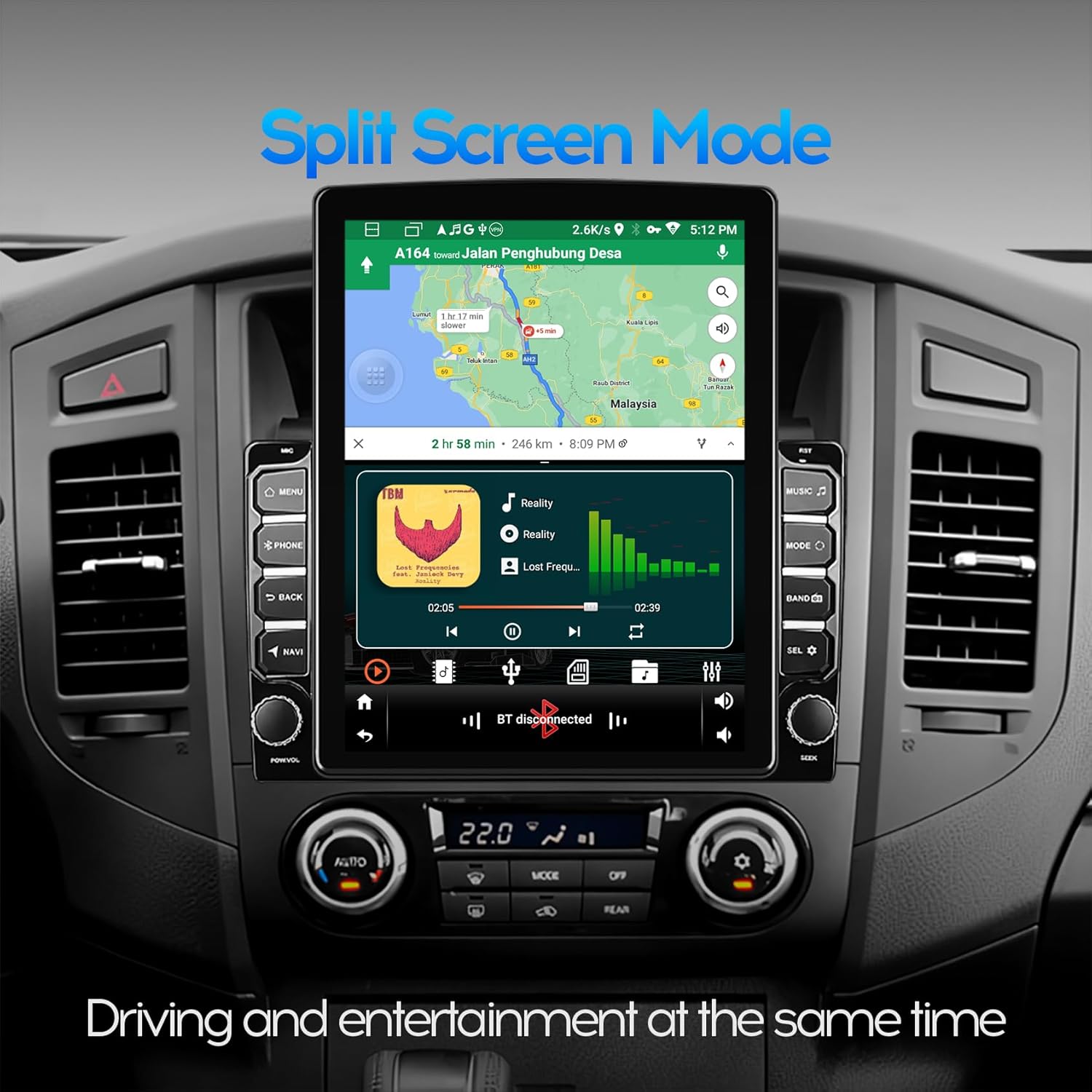
Figure 5.5: Split Screen Mode Display
6. Spesifikasiyalar
| Xüsusiyyət | Spesifikasiya |
|---|---|
| Ekran Ölçüsü | 9.7 düym |
| Qətnamə | 1024 x 600 |
| Əməliyyat sistemi | Android 14 |
| CPU | 4Core 1.1GHz |
| Yaddaş (RAM) | 2 GB |
| Yaddaş (ROM) | 32 GB |
| Bağlantı texnologiyası | Bluetooth 4.1, WiFi |
| Xüsusi Xüsusiyyətlər | Bluetooth, Touchscreen, CarPlay, Android Auto, GPS, Split Screen |
| Səs Çıxış Modu | Stereo |
| Montaj növü | Dashboard Mount (2-DIN compatible) |
| Maddə Çəkisi | 3.3 funt sterlinq |
| Paket Ölçüləri | 11.89 x 10.39 x 3.58 düym |
7. Giderme
- Güc yoxdur: Ensure all power cables are securely connected and the vehicle's fuse for the radio is intact.
- Səs yoxdur: Check speaker connections, volume levels, and audio output settings. Ensure the unit is not muted.
- Bluetooth/CarPlay/Android Auto Connection Issues:
- Ensure Bluetooth is enabled on both the phone and the head unit.
- For wireless connections, confirm the "Zlink" app is open and attempting to connect.
- For wired connections, try a different USB cable or port.
- Restart both the phone and the head unit.
- If connection remains spotty, ensure no other devices are interfering with the Bluetooth signal.
- GPS siqnal itkisi: Ensure the GPS antenna is properly installed and has a clear line of sight to the sky. Check GPS settings within the unit.
- Sükan çarxının idarəediciləri işləmir: Perform the manual learning process for steering wheel controls as described in section 5.9. Ensure the SWC wires are correctly connected.
- Ekran cavab vermir: Try restarting the unit. If the issue persists, a factory reset may be necessary (consult support).
8. Qulluq və Baxım
- Təmizləmə: Use a soft, dry cloth to clean the screen and exterior. For stubborn smudges, lightly dampsu ilə parça. Sərt kimyəvi maddələrdən və ya aşındırıcı materiallardan çəkinin.
- Temperatur: Cihazı həddindən artıq temperatura, uzun müddət birbaşa günəş işığına və ya yüksək rütubətə məruz qoymaqdan çəkinin.
- Proqram təminatı yeniləmələri: Optimal performansı və yeni funksiyalara çıxışı təmin etmək üçün proqram təminatı yeniləmələrini vaxtaşırı yoxlayın.
9. Zəmanət və Dəstək
For any questions or technical assistance with your WENMENGDE product, please contact the WENMENGDE professional support team. They are available to reply within 24 hours to address your concerns.
Xüsusi zəmanət şərtləri və şərtləri üçün satınalma sənədlərinizə baxın.