
TEYES CC3 2K
TEYES CC3 2K Car Radio Multimedia Video Player Navigation Stereo GPS Headunit User Manual
Model: CC3 2K
1. Giriş
This manual provides comprehensive instructions for the installation, operation, and maintenance of your TEYES CC3 2K Car Radio Multimedia Video Player Navigation Stereo GPS Headunit. Please read this manual thoroughly before using the product to ensure proper functionality and safety.

Şəkil: Ön view of the TEYES CC3 2K Headunit displaying its user interface.
2. Təhlükəsizlik Məlumatı
Yaralanmanın və ya cihazın zədələnməsinin qarşısını almaq üçün həmişə aşağıdakı təhlükəsizlik tədbirlərinə əməl edin:
- Cihazı sökməyə və ya dəyişdirməyə çalışmayın. Bu, zədələnməyə və zəmanətin ləğv edilməsinə səbəb ola bilər.
- Ensure all wiring connections are secure and correctly insulated to prevent short circuits.
- Avoid operating the device in extreme temperatures or high humidity.
- Cihazın havalandırma deliklərini bağlamayın.
- Hər hansı bir addımdan əmin deyilsinizsə, quraşdırma üçün bir mütəxəssislə məsləhətləşin.
3. Paketin məzmunu
Aşağıda sadalanan bütün əşyaların paketdə olduğunu yoxlayın:
- 1x Head unit (TEYES CC3 2K)
- 1x Elektrik kabeli
- 1x USB kabel
- 1x GPS antenası
- 1x AUX kabeli
- 1x 4G WiFi antenna
- 1x E-book (digital manual)
- 1x Frame (for BMW X5 E39 E53 1999-2006)
- 1x AHD 1080p rear camera
- 1x Təmizləmə bezi
- 1x Wiring diagram

Image: Visual representation of the TEYES CC3 2K Headunit and its included accessories.
4. Quraşdırma təlimatı
This section outlines the general steps for installing the TEYES CC3 2K head unit in compatible BMW X5 E39/E53 models (1999-2006). Professional installation is recommended.
4.1 Quraşdırmadan əvvəl yoxlanışlar
- Başlamazdan əvvəl avtomobilin alovlanmasının söndürüldüyünə və batareyanın ayrıldığına əmin olun.
- Verify compatibility with your specific BMW X5 model and year.
- Familiarize yourself with the vehicle's existing dashboard layout and wiring.

Image: Comparison of a BMW X5 dashboard before and after installation of the TEYES CC3 2K head unit.
4.2 Removal of Existing Unit
- Carefully remove the trim pieces surrounding the factory radio.
- Unscrew and pull out the existing head unit.
- Disconnect all wiring harnesses and antenna cables from the old unit.
4.3 Baş Blokun Quraşdırılması
- Attach the provided frame to the TEYES CC3 2K head unit.
- Connect the power cable, USB cables, GPS antenna, 4G WiFi antenna, and AUX cable to the corresponding ports on the new head unit. Refer to the included wiring diagram for detailed connections.
- Route the GPS and 4G WiFi antennas to an optimal location for signal reception, typically on the dashboard or under the windshield.
- If installing the rear camera, route its cable from the rear of the vehicle to the head unit and connect it to the designated input.
- Carefully slide the TEYES CC3 2K head unit with the frame into the dashboard opening.
- Secure the unit using the appropriate screws.
- Reattach the dashboard trim pieces.

Image: The OEM panel designed for integrating the TEYES CC3 2K head unit into the vehicle's dashboard.
4.4 Quraşdırmadan sonrakı
- Avtomobilin akkumulyatorunu yenidən qoşun.
- Baş bölmədə alovlanmanı və gücü yandırın.
- Perform initial setup, including language, time, and network settings.
- Test all functions: radio, navigation, Bluetooth, USB, and rear camera.
5. Əməliyyat Təlimatları
The TEYES CC3 2K operates on an Android system, offering a user-friendly interface. Navigate using the touchscreen and physical buttons (if applicable).
5.1 Əsas əməliyyat
- Yandırma/Söndürmə: Güc düyməsini basıb saxlayın.
- Səs səviyyəsinə nəzarət: Ekrandakı idarəetmə düymələrindən və ya sükan düymələrindən istifadə edərək tənzimləyin.
- Əsas Ekran: Əsas interfeysə qayıtmaq üçün ana səhifə simgesini vurun.
- Proqram Çekmecesi: Swipe up or tap the app icon to access all installed applications.

Image: Illustration of the head unit's compatibility with vehicle steering wheel controls for convenient operation.
5.2 Naviqasiya
- Access the pre-installed navigation application from the home screen or app drawer.
- Ekrandakı klaviatura və ya səs əmrindən istifadə edərək təyinat yerinizi daxil edin.
- The system supports various map types, including North America.
5.3 Multimedia Oynatma
- Radio: Select the "Radio" application to tune into FM/AM stations. Supports RDS.
- USB oxutma: Connect USB devices to the available USB ports for audio and video playback. The unit features 3 USB outputs for data transfer.
- Bluetooth Audio: Pair your smartphone via Bluetooth to stream music.
- Video oynatma: Supports various video formats.

Image: Screenshot of the premium local radio interface on the TEYES CC3 2K head unit.
5.4 Bağlantı
- Wi-Fi/Hotspot: Connect to a Wi-Fi network or use your phone's hotspot for internet access.
- 4G Internet: The unit supports 4G internet connectivity.
- Bluetooth: For hands-free calling and audio streaming, featuring an upgraded QCC3031QFN Qualcomm module.
- Simsiz Avtomobil Oyunu və Android Auto: Built-in support for seamless smartphone integration.

Image: Close-up of the three USB output ports provided for data transfer and device connectivity.
5.5 Qabaqcıl Xüsusiyyətlər
- Bölünmüş ekran rejimi: Utilize the "Freestyle Combination Split Screen Mode" to run two applications simultaneously.
- DSP Audio Processing: Features 2*DSP ADAU1701 + ROHM32107 for enhanced audio quality, including a 27-segment EQ, sound filtering, and optical/coaxial digital audio output.
- Arxa View Kamera: Real vaxt viewing of the vehicle's rear view and support for video recording with the included AHD 1080p rear camera.
- TEYES Vision & TEYES Yahu: Explore creative 3D software applications.

Image: The head unit displaying two applications simultaneously in split-screen mode.

Image: User interface for the DSP audio processing, highlighting the dual DSP chips.

Image: Display showing real-time rear view camera feed with video recording functionality.
6. Baxım
Proper maintenance ensures the longevity and optimal performance of your TEYES CC3 2K head unit.
- Təmizləmə: Use the provided cleaning cloth or a soft, dry cloth to wipe the screen and unit exterior. Avoid abrasive cleaners or solvents.
- Proqram təminatı yeniləmələri: Periodically check for and install software updates to ensure the latest features and bug fixes.
- Temperatur: Cihazı uzun müddət birbaşa günəş işığına və ya həddindən artıq temperatura məruz qoymaqdan çəkinin.
7. Giderme
Ümumi problemlər və onların həlli yolları üçün bu bölməyə baxın. Problem davam edərsə, müştəri dəstəyi ilə əlaqə saxlayın.
| Problem | Mümkün Səbəb | Həll |
|---|---|---|
| Cihaz işə düşmür. | Elektrik bağlantısı boşalıb, qoruyucu yanıb, avtomobilin akkumulyatoru ayrılıb. | Check power cable connections. Inspect vehicle fuses. Ensure battery is connected. |
| Səs çıxışı yoxdur. | Volume too low, audio cables disconnected, incorrect audio source selected. | Increase volume. Verify speaker wire connections. Select correct audio source (e.g., Radio, USB, Bluetooth). |
| GPS siqnalı zəifdir və ya itir. | GPS antenası səhv yerləşdirilib və ya qoşulmayıb. | Ensure GPS antenna is securely connected and placed in an unobstructed location. |
| Bluetooth bağlantısı problemləri. | Device not paired, Bluetooth off on phone/unit, interference. | Hər iki cihazda Bluetooth-un aktiv olduğundan əmin olun. Cihazı yenidən cütləşdirin. Vahidə yaxınlaşın. |

Image: An icon representing the Frequently Asked Questions (FAQ) section, indicating support resources.
8. Spesifikasiyalar
| Xüsusiyyət | Detal |
|---|---|
| Model nömrəsi | CC3 2K |
| Ekran Ölçüsü | 9.5 düym |
| Ekran Texnologiyası | 2K In-cell Display, Gamut Coverage 157% |
| Əməliyyat sistemi | Android 10 |
| Prosessor | 8 cores 2.0GHz |
| RAM | 6 GB |
| ROM | 128 GB |
| Bağlantı | Bluetooth (QCC3031QFN Qualcomm), USB, Wi-Fi, Hotspot, 4G Internet |
| Səs Çıxış Modu | Stereo |
| DSP | 2*DSP ADAU1701 + ROHM32107 |
| Audio Çıxış | Optical and coaxial digital audio output |
| Xüsusi Xüsusiyyətlər | Touchscreen, Built-in wireless CARPLAY and ANDROID AUTO, RDS support, TEYES Vision & TEYES Yahu software, Real-time rear view with recording. |
| Included Rear Camera | AHD 1080p |
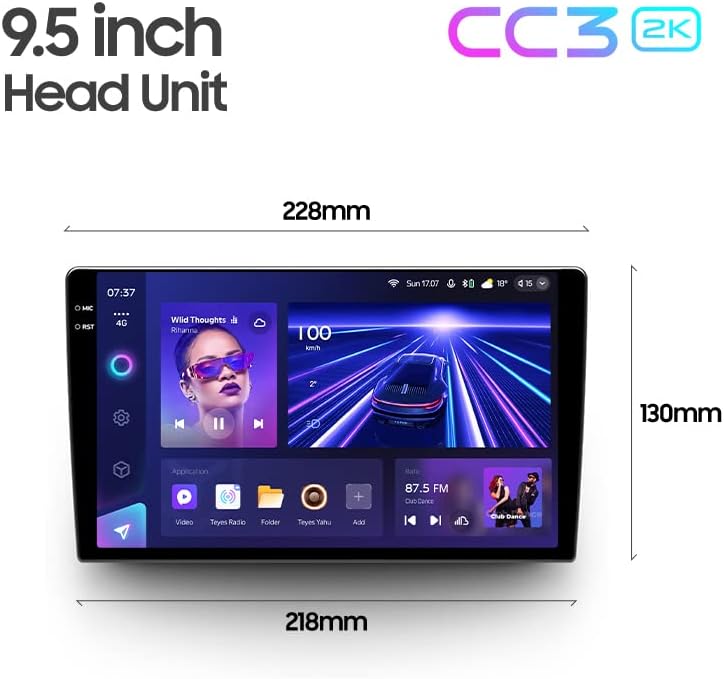
Image: Diagram showing the dimensions of the TEYES CC3 2K Headunit.
9. Zəmanət və Dəstək
The TEYES CC3 2K Headunit comes with a 1 il zəmanət satın alındığı tarixdən.
For technical support, warranty claims, or further assistance, please contact TEYES customer service through their official webməhsulun alındığı sayt və ya pərakəndə satış şirkəti. Zəmanətin təsdiqlənməsi üçün alış sənədinizi saxlayın.
Manufacturer: Shenzhen TEYES High tech Co., Ltd.
Ask a question about this manual
Ask about setup, troubleshooting, compatibility, parts, safety, or missing instructions. Manuals+ will review the question and use this page’s manual context to help answer it.