
1. Məhsul bitdiview
The OSALO 82MS II is a scientific calculator designed for a wide range of mathematical and scientific computations. It features a 2-line display and 240 functions, making it suitable for students and professionals in various fields including mathematics, science, algebra, trigonometry, and statistics.
Əsas xüsusiyyətlərə aşağıdakılar daxildir:
- 240 functions for comprehensive calculations.
- 2-line large LCD display for simultaneous viewing of input and results.
- Support for basic, scientific, memory, and statistical calculations.
- Solar and battery dual power supply for reliable operation.
- Sensitive keys and an ergonomically designed hard sliding cover for protection.

Figure 1: OSALO 82MS II Scientific Calculator
2. Quraşdırma və İlkin İstifadə
2.1. Enerji təchizatı
The OSALO 82MS II calculator operates on a dual power system: solar energy and an LR44 battery. The solar panel provides power in well-lit environments, while the LR44 battery ensures continuous operation in low-light conditions or when solar power is insufficient. The battery is pre-installed.
2.2. Yandırmaq və söndürmək
- Kalkulyatoru yandırmaq üçün düyməni basın ON açar.
- Kalkulyatoru söndürmək üçün basın SHIFT ardınca AC açar.
2.3. Keypad Layout
Familiarize yourself with the calculator's keypad layout. The main keys include numerical inputs, basic arithmetic operations, scientific functions, and mode selection keys.
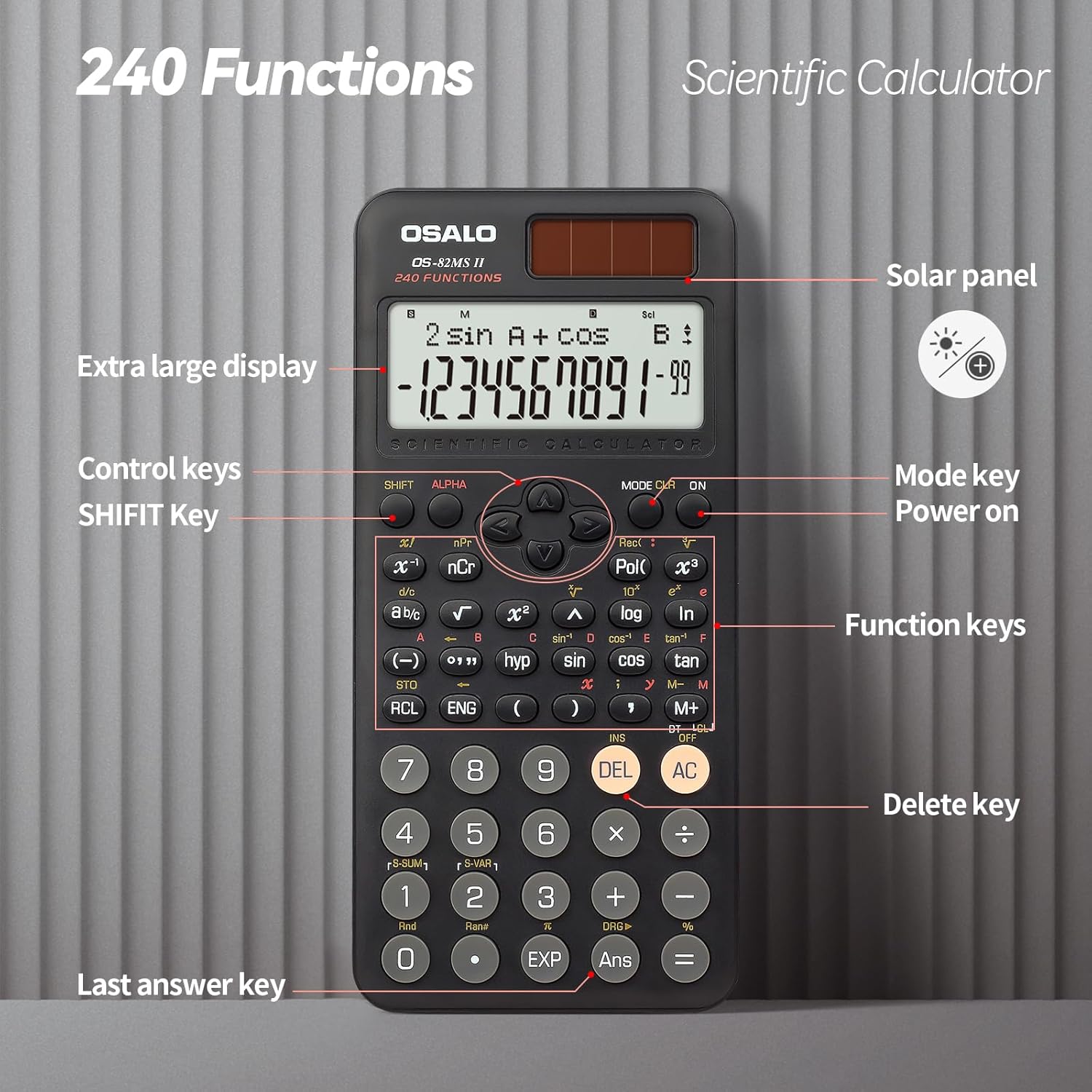
Figure 2: Keypad Layout and Components
3. Əməliyyat Təlimatları
3.1. Əsas Hesablamalar
To perform basic arithmetic operations, simply input the numbers and operators in sequence. Press = nəticəni əldə etmək üçün.
- Əlavə: [Number] + [Number] =
- Çıxarma: [Number] - [Number] =
- Çoxalma: [Number] × [Number] =
- Bölmə: [Number] ÷ [Number] =
3.2. Elmi funksiyalar
The calculator supports 240 scientific functions. Many functions are accessed by pressing the SHIFT key before the desired function key (indicated by text above the key).
- Triqonometrik funksiyalar: istifadə edin günah, cos, tan. For inverse functions, press SHIFT then the respective key (e.g., SHIFT + günah for sin-1).
- Loqarifmik Funksiyalar: istifadə edin log (10-cu baza) və ln (natural loqarifm).
- Güclər və Köklər: istifadə edin x², x³, √ (square root). For other roots or powers, use SHIFT with relevant keys.
- Angle Units: basın MODE multiple times to cycle through angle units (Degrees, Radians, Gradians).

Figure 3: Displaying Input and Output
3.3. Memory Calculations
The calculator includes 9 variable memories (A-F, X, Y, M) for storing and recalling values.
- Mağaza: Input a value, then press STO followed by the desired memory key (e.g., A).
- Xatırlayın: basın RCL followed by the desired memory key to recall the stored value.
- Yaddaş Artı/Mənfi: istifadə edin M+ to add the displayed value to memory M, and SHIFT + M+ (M-) to subtract.
3.4. Statistical Calculations
To enter statistical mode, press MODE and select the STAT option. Follow the on-screen prompts to input data and perform calculations such as standard deviation and regression analysis.
3.5. Ekran Parlaqlığının Tənzimlənməsi
The calculator features a brightness adjustment function to optimize visibility in different lighting conditions and reduce eye strain.

Figure 4: Brightness Adjustment Function
Refer to the full instruction manual for specific key combinations to adjust display brightness.
4. Baxım
4.1. Təmizləmə
To clean the calculator, wipe it gently with a soft, dry cloth. Do not use abrasive cleaners, solvents, or spray directly onto the calculator, as this may damage the surface or internal components.
4.2. Saxlama
Store the calculator in a cool, dry place away from direct sunlight and extreme temperatures. Always use the provided hard sliding cover to protect the display and keys from scratches and impacts when not in use.

Figure 5: Calculator with Protective Cover
4.3. Batareyanın dəyişdirilməsi
When the display becomes dim or the calculator functions erratically, it may be time to replace the LR44 battery. Carefully open the battery compartment on the back of the calculator, replace the old battery with a new LR44 battery, ensuring correct polarity, and close the compartment securely.
5. Giderme
- Kalkulyator açılmır:
- Ensure there is sufficient light for the solar panel.
- Check if the LR44 battery needs replacement.
- düyməsini basın ON key firmly.
- Ekran tutqun və ya boşdur:
- Increase ambient light for solar power.
- LR44 batareyasını dəyişdirin.
- Adjust display brightness settings (refer to section 3.5).
- Yanlış hesablama nəticələri:
- Verify the input values and operators.
- Check the current calculation mode (e.g., DEG/RAD/GRA for angles).
- Clear all memory and reset the calculator by pressing SHIFT + CLR (Rejim 3).
- Açarlar cavab vermir:
- Açarların altında heç bir zibil qalmadığından əmin olun.
- Clean the calculator surface.
6. Spesifikasiyalar
| Brend | OSALO |
| Model | OS-82MS II |
| Funksiyalar | 240 |
| Ekran növü | 2 xəttli LCD |
| Ekran Ölçüsü | 6 santimetr |
| Güc mənbəyi | Solar & Battery Supply (LR44) |
| Material | plastik |
| Məhsul Ölçüləri | 16.4 x 8 x 0.1 sm |
| Maddə Çəkisi | 190 q |
7. Zəmanət və Dəstək
For information regarding warranty coverage, technical support, or service, please contact OSALO customer service or refer to the official OSALO websayt. Satınalma qəbzini alışın sübutu olaraq saxlayın.


