
1. Giriş
Thank you for choosing TTQ Open Ear Headphones, Model CT26. These true wireless sports earbuds are designed to provide a comfortable listening experience while allowing you to remain aware of your surroundings. Featuring Bluetooth 5.3 connectivity, IPX7 waterproofing, and crystal-clear call quality, they are ideal for various activities including running, cycling, workouts, and driving. This manual will guide you through the setup, operation, and maintenance of your new headphones.
2. Paketin məzmunu
Zəhmət olmasa, paketinizdə bütün əşyaların olduğunu yoxlayın:
- TTQ Open Ear Headphones (Left and Right Earbuds)
- Doldurma qutusu
- USB-C şarj kabeli
- İstifadəçi təlimatı

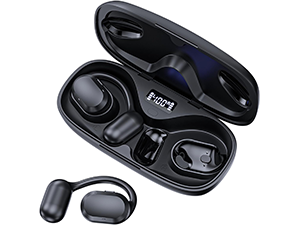
Şəkil: The TTQ Open Ear Headphones, Model CT26, displayed within their open charging case. The case features an LED digital power display indicating the battery level of both the case and the individual earbuds.
3. Məhsul bitdiview
The TTQ CT26 headphones feature an innovative open-ear design with flexible earhooks, ensuring comfort and stability during extended use. This design allows ambient sounds to be heard, enhancing safety in outdoor environments.

Şəkil: A person wearing the TTQ Open Ear Earbuds, demonstrating how the open-ear design sits comfortably outside the ear canal, allowing for situational awareness.

Şəkil: Two individuals cycling outdoors, both wearing TTQ Open Ear Headphones. This illustrates the product's suitability for sports and activities where awareness of surroundings is crucial for safety.
4. Quraşdırma
4.1 Qulaqlıqların və qutunun doldurulması
Before first use, fully charge the headphones and the charging case. Connect the provided USB-C charging cable to the charging port on the case and a power source. The LED display on the charging case will show the battery percentage, and individual earbud charge indicators will light up during charging.
- A full charge provides up to 8 hours of music playtime or 9 hours of call time for the earbuds.
- The charging case extends total playtime to up to 36 hours.

Şəkil: The TTQ charging case with its lid open, showcasing the digital LED display that indicates the battery percentage of the case and the charging status of the earbuds. A USB-C charging port is visible at the front.
4.2 Cihazınızla Qoşulma
- Qulaqlıqların doldurulduğundan əmin olun.
- Open the charging case. The earbuds will automatically enter pairing mode, indicated by a flashing light (if applicable, refer to product specific light indicators).
- Cihazınızda (smartfon, planşet, kompüter) Bluetooth parametrlərinə keçin və Bluetooth-u yandırın.
- axtarın available devices and select "CT26" from the list.
- Qoşulduqdan sonra qulaqcıqlar uğurlu qoşulmanı göstərəcək (məsələn, səsli bildiriş və ya sabit işıq).
Cihazda Bluetooth aktivləşdirilərsə, qulaqlıqlar qutudan çıxarıldıqda avtomatik olaraq sonuncu qoşalaşmış cihaza yenidən qoşulacaq.

Şəkil: A visual representation of Bluetooth 5.3 technology, showing a smartphone's Bluetooth settings screen with 'CT26' listed as a connected device, illustrating the stable and fast connection capability.
5. Əməliyyat Təlimatları
The TTQ CT26 headphones feature a physical button for easy control of various functions.
Şəkil: A diagram illustrating the single button controls on the earbud, detailing actions for pause/play, answer/hang up, rejection, volume adjustment, switching songs, and activating Siri.
5.1 Musiqi oxutma
- Oynat/Pauza: Press the button once (x1).
- Növbəti Mahnı: Press the button twice (x2).
- Əvvəlki Mahnı: Press the button three times (x3).
- Səs artır/aşağı: Press and hold the button for 2 seconds (Hold 2s).
5.2 Zənglərin idarə edilməsi
- Zəngə Cavab Vermək/Bitirmək: Press the button once (x1).
- Zəngi rədd edin: Press and hold the button for 2 seconds (Hold 2s).
The headphones feature dual-mic noise-cancelling technology for clearer calls by reducing environmental noise.

Şəkil: A man wearing TTQ Open Ear Headphones while holding a smartphone, illustrating the intelligent noise cancellation feature that boosts human voice and reduces environmental noise for clearer calls.
5.3 Səs köməkçisi
- Səs köməkçisini aktivləşdirin (Siri, Google köməkçisi və s.): Press the button three times (x3).
6. Baxım
To ensure the longevity and optimal performance of your TTQ Open Ear Headphones, follow these maintenance guidelines:
- Təmizləmə: Qulaqcıqları və şarj qutusunu mütəmadi olaraq yumşaq, quru və tüksüz bir parça ilə silin. Aşındırıcı materiallardan və ya sərt kimyəvi maddələrdən istifadə etməkdən çəkinin.
- Suya davamlılıq: The headphones are IPX7 waterproof, meaning they can withstand submersion in up to 1 meter of water for 30 minutes. They are resistant to sweat and rain, making them suitable for workouts. However, they are not designed for swimming or prolonged submersion. Ensure the charging port is dry before charging.
- Yaddaş: İstifadə edilmədikdə, qulaqlıqları tozdan və zədələnmədən qorumaq üçün şarj qutusunda saxlayın. Sərin, quru yerdə həddindən artıq temperaturdan uzaq saxlayın.

Şəkil: TTQ Open Ear Headphones and their charging case on a wet surface with water splashes, demonstrating their IPX7 waterproof rating, indicating resistance to rain and sweat.
7. Giderme
If you encounter issues with your TTQ Open Ear Headphones, please refer to the following common solutions:
- Səs yoxdur/aşağı səs:
- Qulaqlıqların düzgün qoşalandığından və cihazınıza qoşulduğundan əmin olun.
- Həm qulaqlıqlarda, həm də qoşulmuş cihazda səs səviyyəsini yoxlayın.
- Qulaqlıqların doldurulduğundan əmin olun.
- Cütləşmə Problemləri:
- Cihazınızda Bluetooth-un aktiv olduğundan əmin olun.
- Ensure the headphones are in pairing mode (flashing indicator).
- Qoşulmağa cəhd edə biləcək digər yaxınlıqdakı cihazlarda Bluetooth-u söndürün.
- Forget/remove "CT26" from your device's Bluetooth list and try pairing again.
- Restart both your device and the headphones (by placing them back in the case and taking them out).
- Doldurma Problemləri:
- Doldurma kabelinin həm korpusa, həm də enerji mənbəyinə etibarlı şəkildə qoşulduğundan əmin olun.
- Fərqli USB-C kabeli və güc adapterini sınayın.
- Ensure the charging contacts on the earbuds and in the case are clean and free of debris.
- Fasiləli Bağlantı:
- Ensure your device is within the Bluetooth range (up to 10 meters/33 feet).
- Avoid physical obstructions between the headphones and your device.
- Digər simsiz cihazların müdaxiləsini minimuma endir.
Bu addımları sınadıqdan sonra problem davam edərsə, zəhmət olmasa müştəri dəstəyi ilə əlaqə saxlayın.
8. Spesifikasiyalar
| Xüsusiyyət | Spesifikasiya |
|---|---|
| Model Adı | CT26 |
| Bağlantı texnologiyası | Simsiz (Bluetooth) |
| Simsiz Rabitə Texnologiyası | Bluetooth 5.3 |
| Bluetooth diapazonu | 10 Metrlər (33 Ayaq) |
| Suya davamlılıq səviyyəsi | IPX7 suya davamlı |
| Qulaqların Yerləşdirilməsi | Açıq Qulaq |
| Forma faktoru | Əsl Simsiz |
| Batareya Ömrü (Qulaqcıqlar) | 8 Hours (Music) / 9 Hours (Calls) |
| Şarj qutusu ilə ümumi oyun müddəti | 36 saata qədər |
| Audio sürücü növü | Dinamik sürücü |
| Audio sürücü ölçüsü | 16.2 Millimetr |
| Tezlik diapazonu | 20 Hz - 20,000 Hz |
| Səs-küyə Nəzarət | Aktiv Səs-küyün Ləğvi (zənglər üçün) |
| Nəzarət metodu | Fiziki Düymə |
| Doldurma Portu | USB-C |
| Maddə Çəkisi | 7.8 unsiya (0.22 Kiloqram) |
| Material | plastik |
| UPC | 717977781312 |
9. Müştəri dəstəyi
For any questions, concerns, or if you receive a defective product, please do not hesitate to contact TTQ customer support. We are committed to providing solutions within 24 hours.
Please visit the official TTQ store on Amazon for more information and support resources: TTQ Store