
1. Giriş
1.1 Məhsul Bitdiview
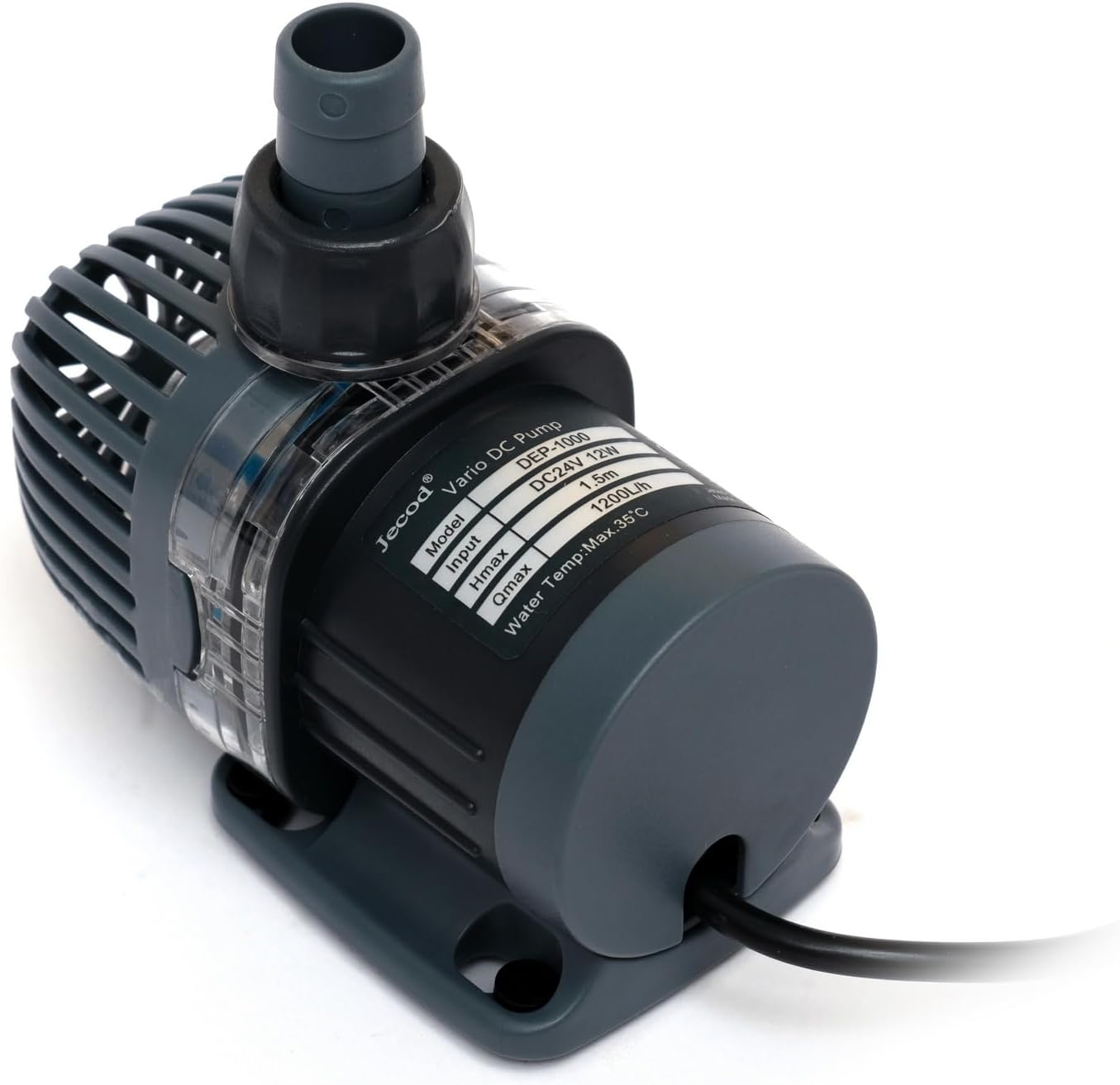
The Jebao DEP-1000 is a high-efficiency, energy-saving submersible DC pump designed for both saltwater and freshwater aquarium environments. It utilizes advanced frequency conversion electronic technology to achieve significant energy savings and operates with an ultra-quiet sine wave technology. The pump features a Bluetooth connection for APP control and a visual LCD display for manual adjustments. Key functionalities include a 10-minute feeding suspension and a delayed restart feature.
1.2 Əsas Xüsusiyyətlər
- Bluetooth connection for APP control.
- Manual and APP control system with a visual LCD display.
- Bottom-suction water intake for low water-level operation.
- Sine wave technology for ultra-quiet operation.
- IC electronic detection for dry/locked rotor protection.
- Feeding suspension function for 10 minutes.
- Suitable for saltwater and freshwater conditions without copper elements.
2. Təhlükəsizlik Təlimatları
Please read and understand all safety instructions before operating this pump. Failure to follow these instructions may result in electric shock, fire, or serious injury.
- Hər hansı bir texniki xidmət və ya quraşdırma yerinə yetirməzdən əvvəl həmişə enerji təchizatını ayırın.
- This pump is designed for submersible use only. Do not operate it dry.
- Ensure the power cord and plug are in good condition. Do not use if damaged.
- Do not use this pump in flammable liquids or environments.
- The pump is intended for indoor use in aquariums.
- Həcmi təmin edintage supplied matches the pump's requirements (110 volts).
- Keep the controller and power adapter away from water.
- Uşaqların cihazla oynamaması üçün onlara nəzarət edilməlidir.
3. Paketin məzmunu
Qutunu diqqətlə açın və bütün əşyaların mövcud olduğundan və yaxşı vəziyyətdə olduğundan əmin olun. Hər hansı bir əşya itkin düşərsə və ya zədələnərsə, zəhmət olmasa, satıcınızla əlaqə saxlayın.
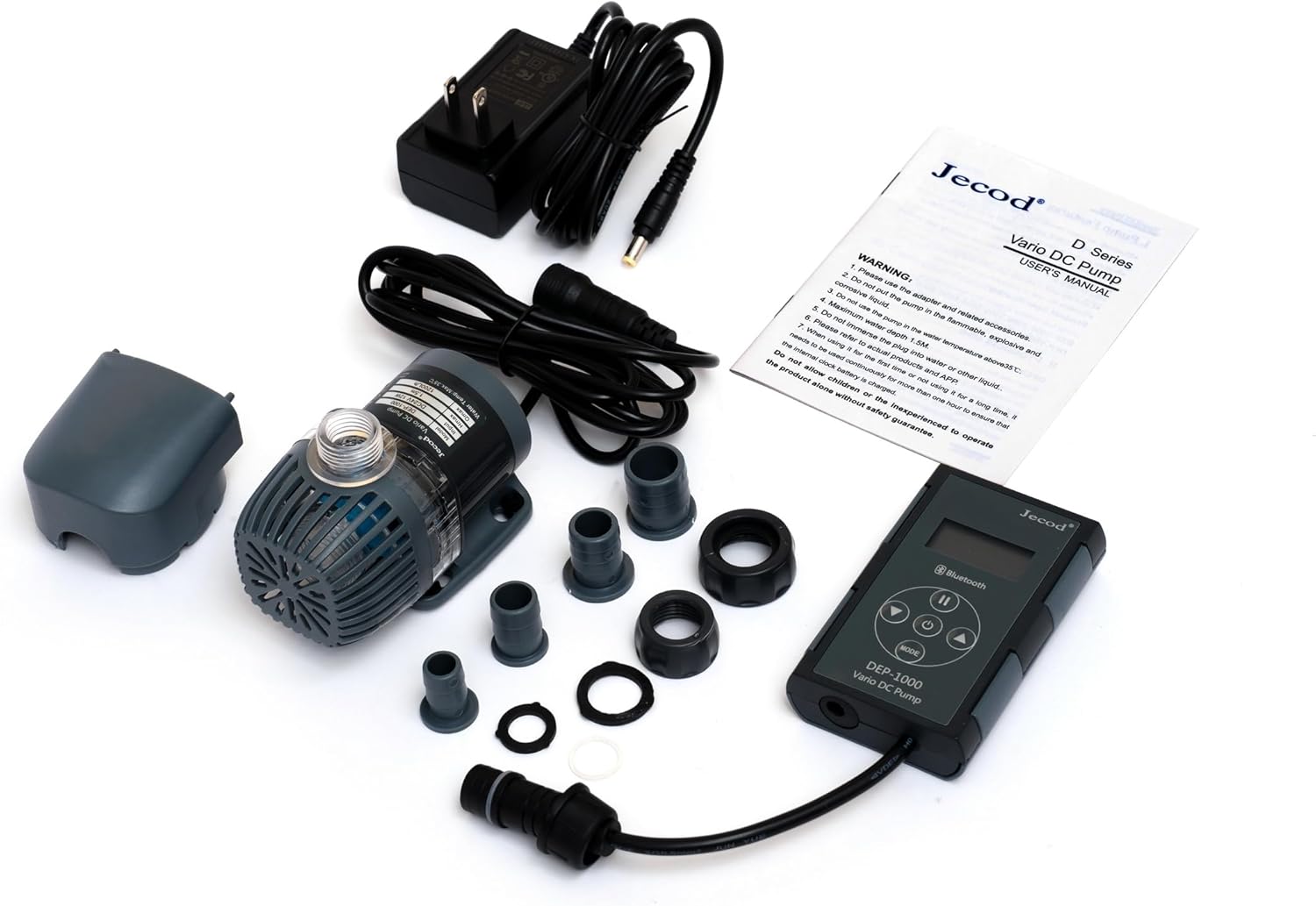
- Jebao DEP-1000 DC Pump
- LED Screen Display Controller with Bluetooth function
- Güc adapteri
- Hose Adapters (1/2", 5/8" for outlet; 3/4", 1" for intake)
- İstifadəçi təlimatı
4. Quraşdırma Bələdçisi
4.1 Pump Placement and Hose Connection
- Məkan seçin: Place the pump fully submerged in your aquarium or sump. Ensure it rests on a stable, flat surface. The bottom-suction design allows for operation in low water levels.
- Çıxış hortumu əlavə edin: Select the appropriate hose adapter (1/2" or 5/8") for your plumbing and securely attach it to the pump's outlet. Connect your return plumbing hose to this adapter.
- Attach Intake Hose (Optional): If using an intake hose, select the appropriate adapter (3/4" or 1") and attach it to the pump's intake.


4.2 Elektrik bağlantısı
- Connect the pump's cable to the LED screen display controller.
- Connect the power adapter to the LED screen display controller.
- Plug the power adapter into a standard 110-volt electrical outlet.
- Ensure a drip loop is formed with the power cord to prevent water from traveling along the cord and reaching the electrical outlet.
4.3 Bluetooth Pairing (APP Control)
- Download the official Jebao/Jecod APP from your device's app store.
- Mobil cihazınızda Bluetooth-un aktiv olduğundan əmin olun.
- Open the APP and follow the on-screen instructions to search for and pair with your DEP-1000 pump. The controller's LCD display will indicate successful pairing.
5. Əməliyyat Təlimatları
5.1 Yandırma/Söndürmə
- Once connected to power, the pump will automatically turn on and display its current settings on the LCD screen.
- To turn off the pump, press the power button on the controller or use the APP. Press again to turn on.
5.2 Adjusting Flow Rate
- Əl ilə idarəetmə: Use the '+' and '-' buttons on the controller to increase or decrease the flow rate. The LCD screen will show the current setting.
- APP Nəzarəti: Open the Jebao APP on your paired device. Navigate to the pump control interface and use the sliders or buttons to adjust the flow rate.
5.3 Feeding Suspension Function
The pump features a 10-minute feeding suspension mode to allow for feeding without water circulation. During this mode, the pump will temporarily stop and then automatically resume operation after 10 minutes.
- Aktivləşdirin: Press the 'FEED' button on the controller or select the feeding mode in the APP.
- Deaktiv edin: The pump will automatically restart after 10 minutes. To manually resume earlier, press the 'FEED' button again.
5.4 Delayed Restart
The pump incorporates a delayed restart function to prevent damage from power fluctuations or brief power outages. After a power interruption, the pump will wait a short period before restarting to ensure stable power supply.
6. Baxım
Mütəmadi texniki xidmət optimal performansı təmin edir və nasosunuzun ömrünü uzadır.
- Gücü ayırın: Always unplug the pump from the power outlet before performing any maintenance.
- Təmiz Pervane: Periodically remove the pump's front cover and impeller assembly. Clean any debris, algae, or calcium buildup from the impeller and its housing using a soft brush and warm water. For stubborn calcium deposits, a mild vinegar solution can be used. Rinse thoroughly.
- C-ni yoxlayınasing: Check the pump casing and intake screen for any blockages or damage. Clean as necessary.
- Bağlantıları yoxlayın: Ensure all hose connections are secure and free from leaks.
- Yenidən yığmaq: Carefully reassemble the pump, ensuring all parts are correctly seated.
7. Giderme
| Problem | Mümkün Səbəb | Həll |
|---|---|---|
| Nasos işləmir |
|
|
| Aşağı axın sürəti |
|
|
| Həddindən artıq səs-küy |
|
|
| Bluetooth bağlantısı problemləri |
|
|
8. Spesifikasiyalar
| Xüsusiyyət | Detal |
|---|---|
| Model nömrəsi | DEP-1000 |
| Brend | Jebao |
| Məhsulun Ölçüləri (U x G x Y) | 3.75" x 2.25" x 3" (Pump only) |
| Güc mənbəyi | Kabelli Elektrik |
| Cildtage | 110 volt |
| Enerji istehlakı | 12 vatt |
| Maksimum axın sürəti | 317 GPH (1200 L/saat) |
| Maximum Lifting Height (H-max) | 4.9 fut |
| Outlet Hose Adapter Sizes | 1/2", 5/8" |
| Intake Hose Adapter Sizes | 3/4", 1" |
| Material | plastik |
| Rəng | Qara |
| Uyğunluq | Saltwater and Freshwater |
9. Zəmanət Məlumatı
Specific warranty details for the Jebao DEP-1000 pump are not provided in this manual. For information regarding warranty coverage, duration, and claims, please refer to the product packaging or contact the manufacturer directly. Keep your proof of purchase for any warranty-related inquiries.
10. Müştəri dəstəyi
If you encounter any issues or have questions not covered in this manual, please contact Jebao customer support. Contact information can typically be found on the product packaging, the manufacturer's official websaytı və ya satıcınız vasitəsilə.
İstehsalçı: Jebao