
1. Təhlükəsizlik Məlumatı
Please read all instructions carefully before installation and operation. Failure to follow these instructions may result in damage to the product, vehicle, or personal injury. Keep this manual for future reference.
- Ensure the vehicle's ignition is off and the negative battery terminal is disconnected before installation to prevent electrical shorts.
- Hər hansı bir addımdan əmin deyilsinizsə, quraşdırma üçün bir mütəxəssislə məsləhətləşin.
- Cihazı sürücülükdən yayındıracaq şəkildə istifadə etməyin. Həmişə yol təhlükəsizliyinə üstünlük verin.
- Cihazı həddindən artıq temperatur, birbaşa günəş işığı və ya nəmə məruz qoymaqdan çəkinin.
- Yalnız müəyyən edilmiş elektrik kabellərindən və aksesuarlarından istifadə edin.
2. Paketin məzmunu
Quraşdırmaya davam etməzdən əvvəl bütün elementlərin paketdə olduğunu yoxlayın.

Image: Components included in the UNITOPSCI A3612A3 package, including the main unit, wiring harnesses, and accessories.
- UNITOPSCI A3612A3 Car Stereo Unit
- Power Cable & Speaker Cable Harnesses
- Sükan Çarxı Pultla İdarəetmə
- Mikrofon
- 12LED Arxa Kamera
- Antena
- İstifadəçi Təlimatı (bu sənəd)
- Montaj mötərizələri
3. Quraşdırma
Proper installation is crucial for optimal performance. Refer to the wiring diagram and consult a professional if needed.
3.1 Naqil sxemi

Image: Detailed wiring connections for the car stereo unit.
Connect the power and speaker cables according to the diagram. Ensure all connections are secure to prevent malfunctions.
- Qırmızı (ACC): Connect to ignition switch +12V.
- Yellow (BATTERY+): Connect to constant +12V.
- Qara (GND): Connect to vehicle ground.
- Blue (ANT): Connect to antenna power.
- Orange (ILLUMINATION): Connect to vehicle illumination wire.
- Pink (REVERSE): Connect to reverse light signal for backup camera activation.
- Brown (KEY): Connect to steering wheel control wire.
- Speaker wires (White, Gray, Green, Purple) should be connected to corresponding vehicle speakers (Front Left, Front Right, Rear Left, Rear Right).
3.2 Qurğunun quraşdırılması
Use the provided mounting brackets to secure the double din unit into your vehicle's dashboard opening. Ensure a snug fit to prevent vibrations.
3.3 Ehtiyat Kamerasının Quraşdırılması
Mount the backup camera at the rear of your vehicle. Connect its video output to the 'CAM IN' input on the stereo and its power to the reverse light circuit.
4. Quraşdırma
4.1 İlkin işə salınma
After installation, reconnect the vehicle battery. Turn on the ignition. The unit should power on and display the main interface.
4.2 Əsas Parametrlər
Navigate to the 'Settings' menu to configure basic parameters such as language, time, and date.
4.3 Display Backlight Adjustment
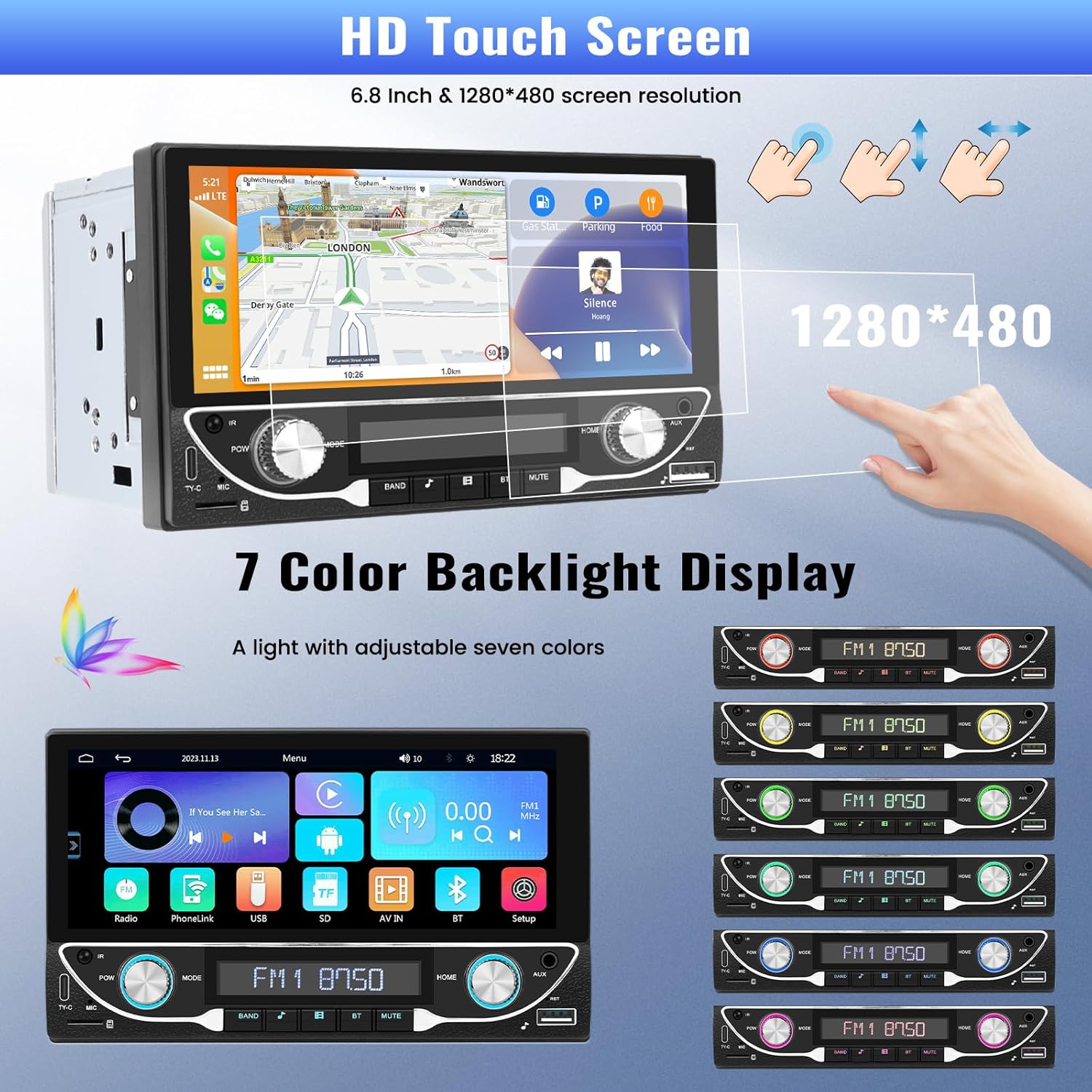
Image: The HD touchscreen and customizable 7-color backlight display options.
Access the display settings to adjust brightness and select from 7 available backlight colors for the physical buttons.
5. Əməliyyat Təlimatları
5.1 Simsiz Apple CarPlay və Android Auto
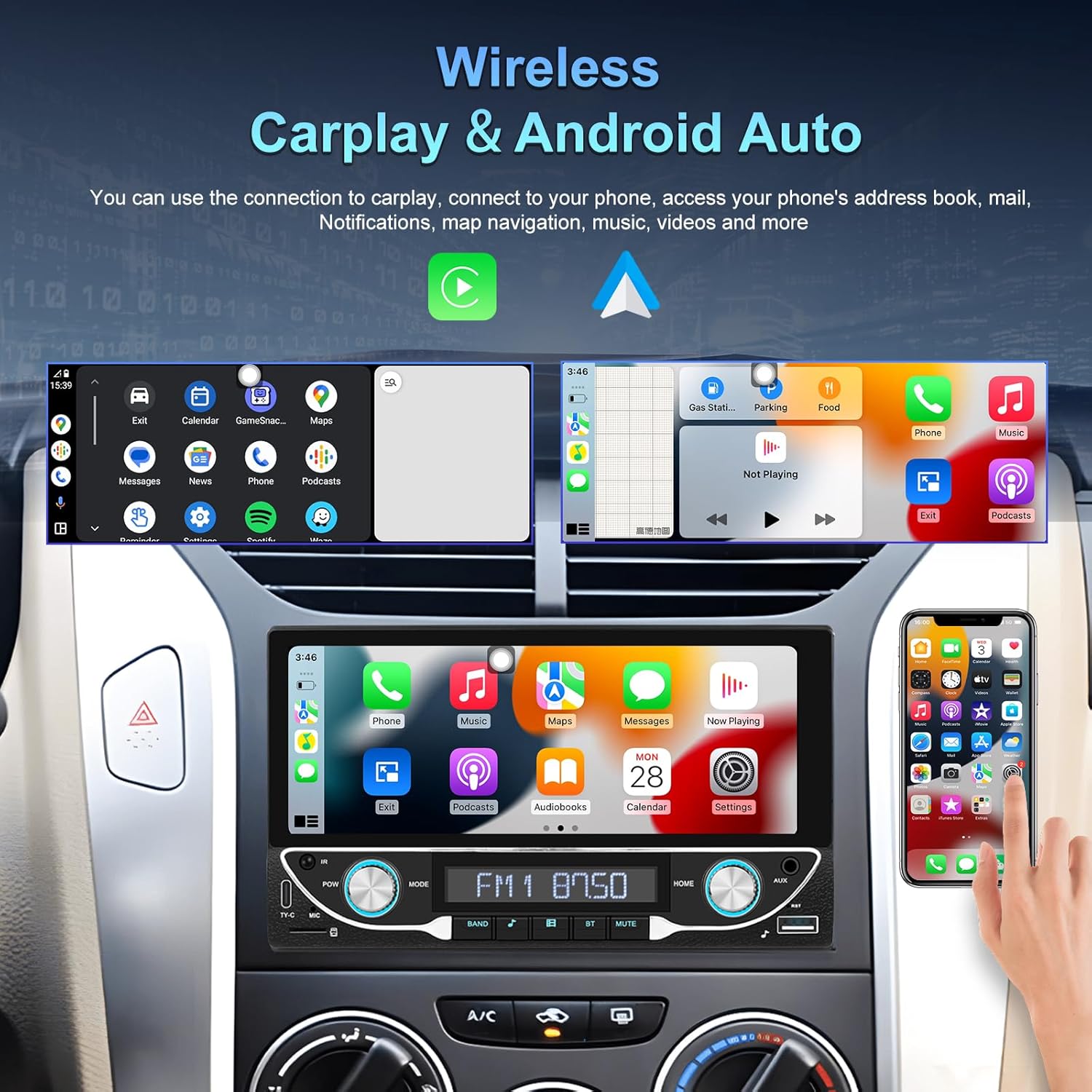
Image: The car stereo displaying both Apple CarPlay and Android Auto interfaces.
Connect your smartphone wirelessly to access Apple CarPlay or Android Auto. This allows for navigation, music, calls, and messages directly from the car stereo display.
- Smartfonunuzda Bluetooth və Wi-Fi-ın aktiv olduğundan əmin olun.
- On the car stereo, select the CarPlay or Android Auto icon.
- Cihazınızı qoşmaq üçün ekrandakı təlimatları izləyin.
5.2 Bluetooth 5.1 Bağlantı
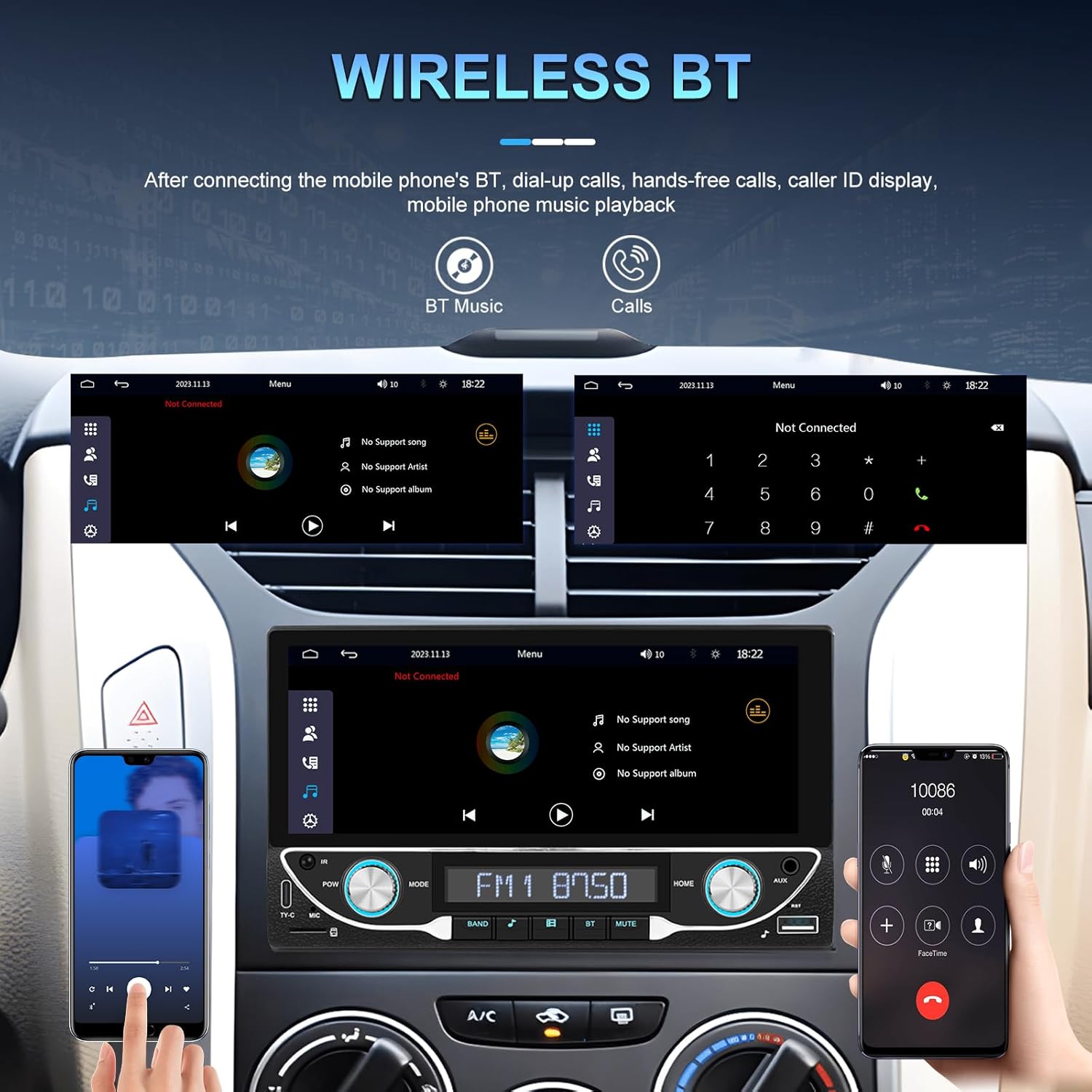
Image: Bluetooth interface for hands-free calling and music streaming.
Pair your phone via Bluetooth for hands-free calling and wireless audio streaming.
- Go to the 'Bluetooth' menu on the stereo.
- Telefonunuzda Bluetooth-u aktivləşdirin və mövcud cihazları axtarın.
- Select 'UNITOPSCI A3612A3' (or similar name) from your phone's list and confirm pairing.
- Use the built-in microphone for calls and stream music from your phone.
5.3 FM Radio Əməliyyatı

Image: FM radio interface with frequency display and sound quality DSP/EQ settings.
Select the 'FM' icon to access the radio tuner. Use the on-screen controls or physical buttons to scan for stations, save presets, and adjust frequency.
5.4 Audio & Video Playback (USB/TF/AUX/Type-C)

Image: Available input options for audio and video playback: USB, TF Card, Type-C, and AUX-in.
The unit supports various media inputs for audio and video playback:
- USB giriş: Connect a USB drive with media files.
- TF Kart Yuvası: Insert a TF (MicroSD) card with media files.
- AUX Giriş: Connect external audio devices using a 3.5mm audio cable.
- Type-C Port: For charging compatible devices and potentially data transfer.
Select the corresponding input source from the main menu to access your media.
5.5 Sükan çarxına nəzarət

Image: Steering wheel control setup interface on the car stereo.
If your vehicle supports steering wheel controls, connect the 'KEY' wire during installation. Access the 'Steering Wheel Control' settings to program the buttons for functions like volume, track change, and mode selection.
5.6 Arxa View Camera / HD Reversing Video
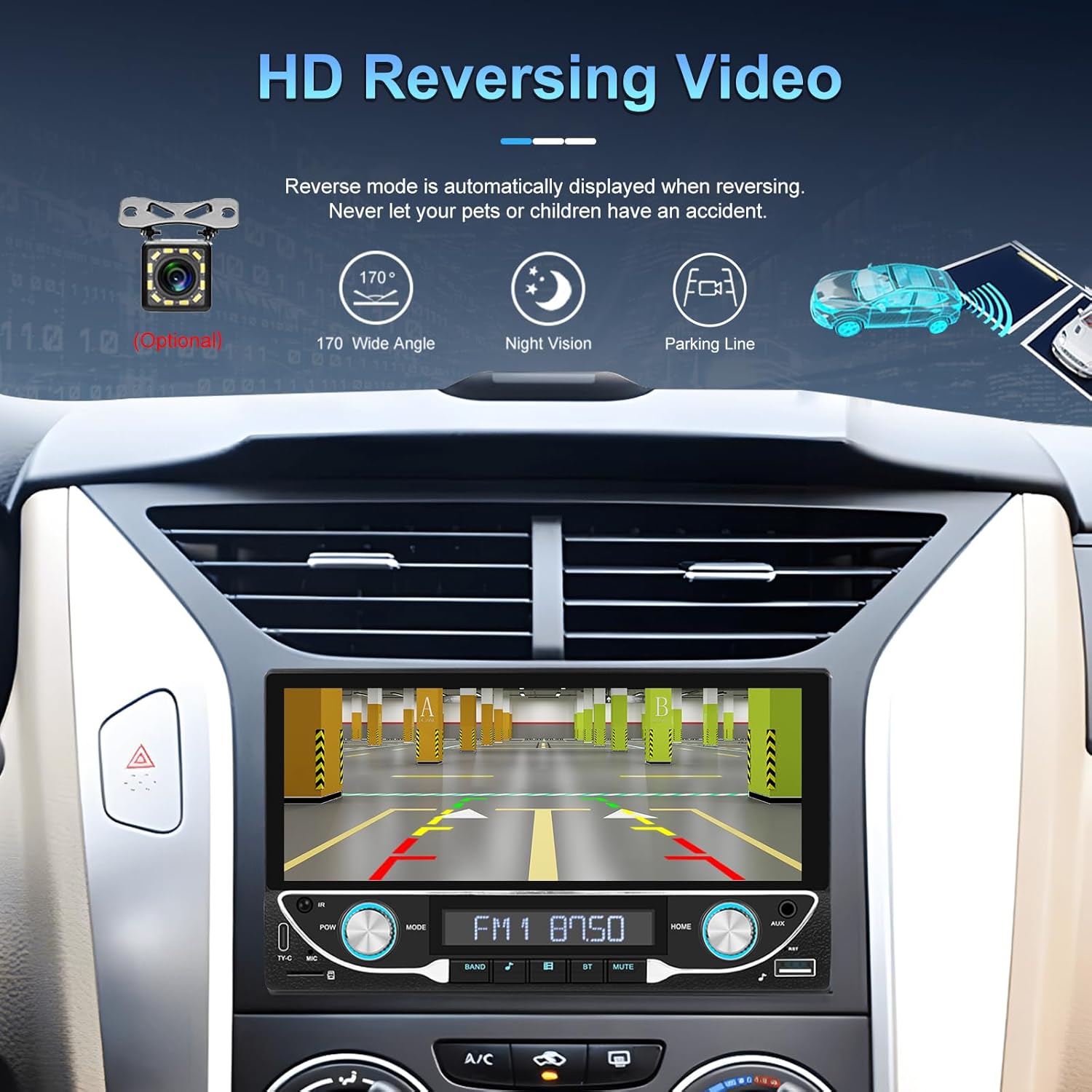
Image: High-definition reversing video display with parking guidelines.
Avtomobil geriyə keçirildikdə, stereo avtomatik olaraq arxanı göstərir view camera feed. The included camera offers a 170-degree wide angle and night vision capabilities, along with parking lines for assistance.
5.7 DVR Function Support
The unit supports an optional DVR (Digital Video Recorder) function. Connect a compatible USB DVR camera to the dedicated USB input on the rear of the car radio to record driving footage.
5.8 Güzgü Bağlantısı Funksiyası
Use the Mirror Link function to display your smartphone's screen directly on the car stereo. This feature is compatible with both Android and iOS devices, allowing you to view apps and content from your phone on the larger display.
5.9 Voice Control & GPS Navigation
When connected via Apple CarPlay or Android Auto, you can utilize voice commands (e.g., Siri, Google Assistant) for navigation, making calls, sending messages, and controlling music, enhancing driving safety and convenience.
5.10 Sound Quality (DSP & EQ)
The built-in Digital Sound Processor (DSP) and Equalizer (EQ) allow for precise audio customization. Access the 'EQ Setup' menu to adjust bass, treble, and other frequency bands to match your audio preferences. Pre-set EQ modes (e.g., Jazz, Rock, Pop) are also available.
6. Baxım
Avtomobil stereo cihazınızın uzunömürlülüyünü və optimal işləməsini təmin etmək üçün bu texniki xidmət qaydalarına əməl edin:
- Ekranın Təmizlənməsi: Use a soft, lint-free cloth to gently wipe the touchscreen. Avoid abrasive cleaners or solvents that could damage the display.
- Ümumi təmizləmə: Keep the unit free from dust and debris. Use a soft brush or compressed air for hard-to-reach areas.
- Proqram təminatı yeniləmələri: Periodically check the manufacturer's webperformansı yaxşılaşdırmaq və yeni funksiyalar əlavə etmək üçün hər hansı mövcud proqram yeniləmələri üçün sayt.
- Mayelərdən çəkinin: Do not spill liquids on the unit. If accidental spillage occurs, power off the unit immediately and allow it to dry completely before use.
7. Giderme
If you encounter issues with your UNITOPSCI A3612A3 car stereo, refer to the following common problems and solutions:
| Problem | Mümkün Səbəb | Həll |
|---|---|---|
| Güc yoxdur | Yanlış naqillər; Yanmış qoruyucu; Boş əlaqə. | Check power cable connections (ACC, BATTERY+, GND). Verify vehicle fuse and unit's fuse. Ensure all wires are securely connected. |
| Səs yoxdur | Speaker wires disconnected; Volume too low; Mute function active; Incorrect audio source. | Check speaker wire connections. Increase volume. Deactivate mute. Select correct audio source (FM, USB, BT, etc.). |
| Bluetooth Qoşulmur | Bluetooth off on phone/stereo; Device not in pairing mode; Interference. | Ensure Bluetooth is enabled on both devices. Put stereo in pairing mode. Delete previous pairings and try again. Move closer to the unit. |
| CarPlay/Android Auto işləmir | Wi-Fi/Bluetooth off; Phone not compatible; App issues. | Ensure Wi-Fi and Bluetooth are active on your phone. Restart phone and stereo. Check phone's settings for CarPlay/Android Auto permissions. |
| Arxa Kamera Göstərilmir | Camera not powered; Video cable loose; Reverse trigger wire not connected. | Check camera power connection. Ensure video cable is securely connected to 'CAM IN'. Verify Pink (REVERSE) wire connection. |
| Toxunma ekranı cavab vermir | Sistemin donması; Ekranda kir. | Restart the unit (if possible, by briefly disconnecting power). Clean the screen. |
If the problem persists after trying these solutions, please contact UNITOPSCI customer support for further assistance.
8. Spesifikasiyalar
Key technical specifications for the UNITOPSCI A3612A3 car stereo:
- Model nömrəsi: A3612A3
- Ekran Ölçüsü: 6.86 düym
- Ekran Çözünürlüğü: 1280 x 480 piksel
- Çıxış Wattage: 180 Watts (4 channels)
- Bluetooth versiyası: 5.1
- Dəstəklənən İnternet Xidmətləri: Maps (via CarPlay/Android Auto)
- Audio çıxış növü: Daxili
- Dəstəklənən Media Formatları: AVI, WAV, WMA
- Girişlər: USB, TF Card, AUX, Type-C
- Xüsusiyyətlər: Wireless Apple CarPlay, Wireless Android Auto, FM Radio, Mirror Link, DSP, EQ, Steering Wheel Control, Backup Camera Input, DVR Function Support, 7-Color Backlight.
Image: Front, rear, and side dimensions of the UNITOPSCI A3612A3 car stereo.
Ölçülər (təxmini):
- Front Panel: 17.8cm (7.0in) width x 10.3cm (4.0in) height
- Chassis: 17.8cm (7.0in) width x 10.0cm (3.9in) height x 11cm (4.3in) depth
9. Zəmanət və Dəstək
UNITOPSCI products are designed for reliability and performance. For warranty information and technical support, please refer to the warranty card included in your package or visit the official UNITOPSCI websayt.
When contacting support, please have your product model number (A3612A3) and purchase details ready.