Giriş
The Amazon Fire TV Soundbar Plus is a 3.1 channel all-in-one soundbar designed to enhance your home audio experience. It features integrated bass, clear dialogue, and supports advanced audio formats like Dolby Atmos and DTS:X, providing immersive sound for movies, music, and more. This manual provides detailed instructions for setting up, operating, maintaining, and troubleshooting your Fire TV Soundbar Plus.

Şəkil 1: Ön view of the Fire TV Soundbar Plus, highlighting its key audio technologies.
Quraşdırma
Paketin məzmunu
Başlamazdan əvvəl, qutuda bütün əşyaların olduğundan əmin olun:
- Fire TV Soundbar Plus
- Uzaqdan idarəetmə
- HDMI 2.0 kabel
- AC güc kabeli
- 2 AAA batareya
- Duvara montaj dəsti
- Tez Başlanğıc Bələdçisi

Figure 2: Contents included in the Fire TV Soundbar Plus package and product dimensions.
Fiziki Yerləşdirmə
The soundbar measures approximately 6.4 cm (height) x 94 cm (width) x 13.2 cm (depth) and weighs 4 kg. For optimal audio performance, place the soundbar centrally in front of your television. Ensure there are no obstructions in front of the soundbar. The included wall mount kit allows for wall installation if preferred.
Soundbarın qoşulması
Follow these steps to connect your Fire TV Soundbar Plus to your television:
- HDMI (eARC/ARC) Connection: Connect one end of the included HDMI 2.0 cable to the HDMI (eARC/ARC) port on the back of the soundbar. Connect the other end to the HDMI eARC/ARC port on your television. This connection ensures optimal audio quality and allows your TV remote to control the soundbar's volume.
- Enerji bağlantısı: Connect the AC power cable to the Power port on the soundbar and then plug it into a wall outlet.
- Optical Connection (Optional): If your TV does not have an HDMI eARC/ARC port, you can use an optical cable (not included) to connect the soundbar to your TV's optical audio output.
- USB-A Portu: The USB-A port is typically used for service or firmware updates and is not for general user connection.

Şəkil 3: Arxa view of the soundbar displaying available connection ports.
İlkin Güc Aktivdir
Once connected, the soundbar will typically power on automatically with your TV if using the HDMI eARC/ARC connection. If not, press the Power button on the included remote control.
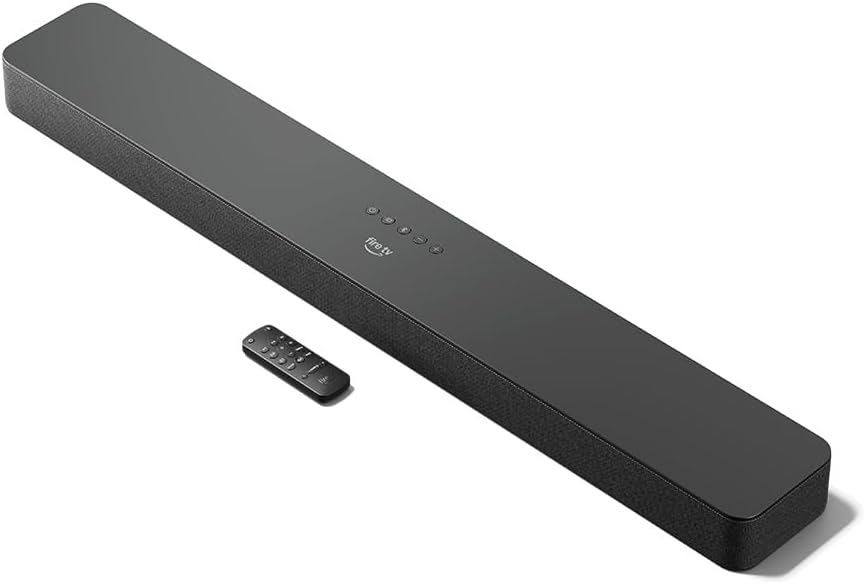
Figure 4: The Fire TV Soundbar Plus and its compact remote control.
Soundbar-ın işlədilməsi
Əsas Nəzarətlər
Use the included remote control to manage your soundbar's functions:
- Güc düyməsi: Səs panelini yandırır və ya söndürür.
- Səs artır/aşağı: Əsas səs səviyyəsini tənzimləyir.
- Səssiz düymə: Səsi söndürür və ya açar.
- Giriş seçimi: Switches between HDMI, Optical, and Bluetooth inputs.
- Səs rejimləri: Cycles through optimized audio presets.
Səs rejimləri
The Fire TV Soundbar Plus offers several equalizer modes to optimize audio for different content types:
- Film rejimi: Enhances cinematic soundscapes with dynamic range and surround effects.
- Musiqi rejimi: Provides balanced audio for music playback, emphasizing clarity and bass.
- İdman rejimi: Optimizes audio for sports broadcasts, often enhancing commentary and crowd noise.
- Gecə rejimi: Reduces dynamic range to prevent sudden loud sounds, ideal for late-night viewing.
The soundbar features a dedicated central channel for dialogue, ensuring clear conversations in all modes, especially beneficial for movies and TV shows.

Figure 5: Internal components illustrating the integrated speakers, tweeters, and subwoofer for rich sound.

Figure 6: The soundbar delivering immersive audio with Dolby Atmos and DTS:X in a home environment.
Bluetooth axını
You can stream audio from your phone or tablet to the Fire TV Soundbar Plus via Bluetooth. To connect:
- Press the Bluetooth button on the remote control or select Bluetooth input.
- On your mobile device, go to Bluetooth settings and select "Fire TV Soundbar Plus" from the list of available devices.
- Once paired, audio from your device will play through the soundbar.

Figure 7: Connecting a mobile device via Bluetooth to stream music or podcasts.
Fire TV Integration
For seamless integration with Fire TV devices (sold separately), you can control both your TV and the soundbar with a single remote. Audio settings can be customized directly within the Fire TV interface on selected models.
Baxım
To ensure the longevity and optimal performance of your Fire TV Soundbar Plus, follow these maintenance guidelines:
- Təmizləmə: Use a soft, dry cloth to clean the surface of the soundbar. Do not use liquid cleaners or abrasive materials, as they may damage the finish.
- Havalandırma: Həddindən artıq istiləşmənin qarşısını almaq üçün səs panelinin havalandırma deliklərinin bağlanmadığından əmin olun.
- Proqram təminatı yeniləmələri: Periodically check for firmware updates to ensure your soundbar has the latest features and performance improvements. Updates are typically delivered automatically when connected to a Fire TV device or can be performed via USB if available.
Problemlərin aradan qaldırılması
If you encounter issues with your Fire TV Soundbar Plus, refer to the following common problems and solutions:
| Problem | Mümkün Səbəb | Həll |
|---|---|---|
| Soundbar-dan səs yoxdur. |
|
|
| Səs təhrif və ya aydın deyil. |
|
|
| Pult işləmir. |
|
|
| Bluetooth cütləşdirmə problemləri. |
|
|
Spesifikasiyalar
| Xüsusiyyət | Detal |
|---|---|
| Soundbar Dimensions (LxWxH) | 94 sm x 13.2 sm x 6.4 sm |
| Soundbar Çəkisi | 4 kg (Actual dimensions and weight may vary based on configuration and manufacturing process) |
| Dinamik Kanallar | 3.1 (integrated subwoofer) |
| Ekvalayzer rejimləri | Movie, Music, Sport, Night |
| Ətraf Səs Dəstəyi | Dolby Atmos, DTS: X |
| Limanlar | HDMI (eARC/ARC), Optical, AC Power, USB-A |
| Bluetooth dəstəyi | Bəli |
| Uyğunluq | Axın media pleyerləri olan ağıllı televizorlar və televizorlar |
| Qutuya daxildir | Fire TV Soundbar Plus, remote control, HDMI 2.0 cable, 1 AC power cable, 2 AAA batteries, wall mount kit, Quick Start Guide |
Zəmanət və Dəstək
The Fire TV Soundbar Plus comes with a one-year limited warranty provided by the manufacturer. This limited warranty is in addition to, and does not compromise, consumer rights. Consumers may have additional rights provided by law even after the limited warranty expires. Use of the Fire TV Soundbar Plus is subject to the terms indicated by Amazon.
For further assistance, please refer to the official Amazon support channels or the Quick Start Guide included with your product.