
1. Giriş
Thank you for choosing the MECHEN H1-Pro Bluetooth MP3 Player with WiFi. This device is designed to provide a versatile and enjoyable audio and video experience. Featuring a 4-inch touchscreen and running on Android 9.0, it supports various applications and connectivity options. This manual provides essential information for setting up, operating, and maintaining your device.
2. Paketin məzmunu
Aşağıda sadalanan bütün elementlərin paketinizə daxil olduğunu yoxlayın. Hər hansı bir element əskik və ya zədələnmişsə, müştəri dəstəyi ilə əlaqə saxlayın.
- MECHEN H1-Pro MP3 Player
- USB kabel
- Qulaqlıqlar
- Qoruyucu film
- Qoruyucu qutu
- İstifadəçi təlimatı

Image: The MECHEN H1-Pro MP3 Player displayed with its accessories, including a USB cable, headphones, protective film, and a clear protective case.
3. Cihaz bitdiview
Familiarize yourself with the physical components and controls of your MECHEN H1-Pro MP3 Player.
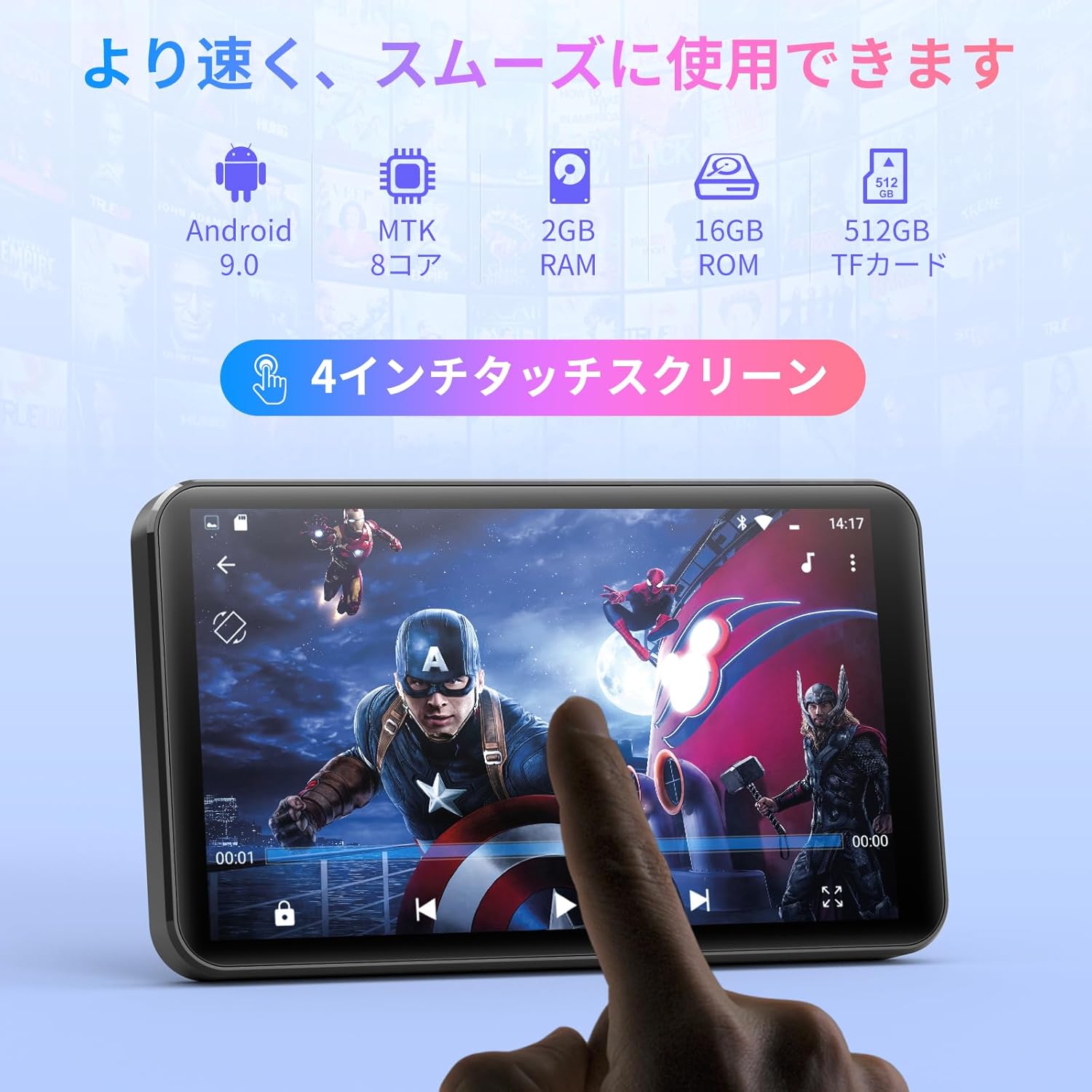
Şəkil: Ön view of the MECHEN H1-Pro MP3 Player, showcasing its 4-inch touchscreen display.

Şəkil: Yan view of the MECHEN H1-Pro MP3 Player, highlighting the power button and volume controls.

Şəkil: yuxarı və aşağı views of the MECHEN H1-Pro MP3 Player, illustrating the USB-C charging port, headphone jack, and Micro SD card slot.
4. Quraşdırma
4.1 İlkin Doldurma
Before first use, fully charge the device. Connect the provided USB cable to the player's USB-C port and the other end to a USB power adapter (not included) or a computer's USB port. The charging indicator will show the charging status.
4.2 Yandırma/Söndürmə
- Yandırmaq üçün: Press and hold the Power button on the side of the device until the screen lights up.
- Söndürmək üçün: Press and hold the Power button until a power-off menu appears on the screen. Select 'Power Off' to shut down the device.
4.3 Wi-Fi şəbəkəsinə qoşulma
To access online features and download apps, connect your device to a Wi-Fi network.
- gedin Parametrlər > Şəbəkə və İnternet > Wi-Fi.
- Wi-Fi-ı dəyişin On.
- Siyahıdan istədiyiniz Wi-Fi şəbəkəsini seçin.
- Tələb olunduqda parolu daxil edin və vurun Qoşun.

Image: The MECHEN H1-Pro MP3 Player screen showing Wi-Fi settings and available networks.
4.4 Micro SD kartın daxil edilməsi
The device supports Micro SD cards for expanded storage. Locate the Micro SD card slot on the side of the device. Gently insert the card with the gold contacts facing down until it clicks into place.
5. Əməliyyat Təlimatları
5.1 Basic Navigation (Touchscreen)
The MECHEN H1-Pro features a responsive 4-inch touchscreen. Use standard touch gestures:
- Klikləyin: Element seçmək və ya proqramı açmaq üçün.
- Çalmak: Siyahıları sürüşdürmək və ya ekranlar arasında keçid etmək üçün.
- Çimdik: To zoom in or out (in supported applications).
5.2 Musiqi oxutma
The device supports various audio formats including MP3, WAV, WMA, APE, OGG, and FLAC for high-fidelity music playback.
- açın Musiqi tətbiq.
- Browse your music library by artist, album, song, or playlist.
- Oxutmağa başlamaq üçün mahnıya toxunun.
- Use the on-screen controls for play/pause, skip tracks, and volume adjustment.

Image: The MECHEN H1-Pro MP3 Player screen showing a music playback interface with album art and controls.
5.3 Video oynatma
Enjoy 720P/1080P full-format HD video playback without conversion. Supported formats include RM, RMVB, FLV, MP4, DAT, MKV, MPG, MOV, TS, etc.
- açın Video pleyer tətbiq.
- Video seçin file from your storage.
- Tap to play. Use on-screen controls for playback options.

Image: The MECHEN H1-Pro MP3 Player screen showing a video playing in full-screen mode.
5.4 Bluetooth bağlantısı
Connect to Bluetooth headphones, speakers, or other compatible devices.
- gedin Parametrlər > Qoşulmuş cihazlar > Bluetooth.
- Bluetooth-u dəyişin On.
- Bluetooth aksesuarınızın cütləşmə rejimində olduğundan əmin olun.
- Select the accessory from the list of available devices to pair.

Image: The MECHEN H1-Pro MP3 Player shown alongside a pair of wireless headphones, indicating Bluetooth connectivity.
5.5 Wi-Fi Connectivity & App Downloads
With Android 9.0 and Wi-Fi, you can download and install various applications from the Google Play Store.
- Ensure the device is connected to Wi-Fi (see Section 4.3).
- açın Play Store tətbiq.
- Google hesabınızla daxil olun.
- axtarın and download desired applications (e.g., Spotify, Amazon Music, Audible).

Image: The MECHEN H1-Pro MP3 Player screen showing a variety of installed applications, including music streaming services and web brauzerlər.
5.6 FM Radio
Listen to your favorite FM radio stations.
- Connect wired headphones to the 3.5mm audio jack; they act as the antenna.
- açın FM Radio tətbiq.
- Use the on-screen controls to scan for stations or tune manually.
5.7 File İdarəetmə
Daxili istifadə edin file təşkil etmək üçün menecer files on internal storage and the Micro SD card.
- açın File menecer tətbiq.
- Navigate through folders to view, copy, move, or delete files.
6. Baxım
6.1 Təmizləmə
Cihazı yumşaq, quru və tüksüz bir parça ilə silin. Maye təmizləyicilərdən və ya aşındırıcı materiallardan istifadə etməyin.
6.2 Saxlama
Cihazı sərin, quru və birbaşa günəş işığından və həddindən artıq temperaturdan uzaq yerdə saxlayın. Uzun müddət saxlayarkən, batareyanın ömrünü uzatmaq üçün onun qismən doldurulduğundan (təxminən 50%) əmin olun.
6.3 Batareya Baxımı
To maximize battery life, avoid fully discharging the battery frequently. Use the original charging cable for optimal performance.
7. Giderme
| Problem | Mümkün Həll |
|---|---|
| Cihaz işə düşmür. | Ensure the battery is charged. Connect to a charger for at least 30 minutes. If unresponsive, perform a hard reset by holding the power button for 10-15 seconds. |
| Wi-Fi-a qoşulmaq mümkün deyil. | Check if Wi-Fi is enabled. Verify the Wi-Fi password. Restart your router and the MP3 player. |
| Bluetooth cihazı qoşalaşmır. | Ensure Bluetooth is enabled on both devices and the accessory is in pairing mode. Move devices closer together. |
| Tətbiqlər yavaşlayır və ya sıradan çıxır. | Close unnecessary background apps. Clear app cache (Settings > Apps > [App Name] > Storage > Clear Cache). Restart the device. Too many apps can lead to slowdowns. |
| Qulaqlıqdan səs gəlmir. | Check headphone connection. Ensure volume is not muted or too low. Test with different headphones. |
8. Spesifikasiyalar
| Xüsusiyyət | Detal |
|---|---|
| Brend | MECHEN |
| Model Adı | H1-Pro (EU-H11) |
| Əməliyyat sistemi | Android 9.0 |
| Prosessor | MTK 8-core |
| RAM | 2 GB |
| Daxili yaddaş | 16 GB |
| Genişləndirilə bilən yaddaş | Micro SD (512 GB-a qədər) |
| Ekran Ölçüsü | 4 düym |
| Ekran Texnologiyası | LCD |
| Bağlantı | Bluetooth, USB, Wi-Fi |
| Xüsusi Xüsusiyyətlər | FM Radio, Equalizer, Video Playback |
| Dəstəklənən Audio Formatlar | MP3, WAV, WMA, APE, OGG, FLAC |
| Dəstəklənən Video Formatları | RM, RMVB, FLV, MP4, DAT, MKV, MPG, MOV, TS, etc. |
| Batareya Tutumu | 2000 mAh |
| Batareya Ömrü (Musiqi) | 50 saata qədər |
| Batareya Ömrü (Video) | 8 saata qədər |
| Ölçülər (D x G x Y) | 10.5 x 6.2 x 1.2 sm (4.14 x 2.44 x 0.46 düym) |
| Maddə Çəkisi | 97.5 qram (3.45 unsiya) |

Image: The MECHEN H1-Pro MP3 Player shown with its physical dimensions and weight specifications.
9. Zəmanət və Dəstək
For warranty information and technical support, please refer to the warranty card included in your package or visit the official MECHEN websayt. Satınalma qəbzinizi zəmanət iddiaları üçün satınalmanın sübutu kimi saxlayın.