
Next YE-65GFSG8-QLED
Next YE-65GFSG8-QLED 65-inch UHD 4K QLED Google TV User Manual
Model: YE-65GFSG8-QLED
1. Giriş
Aldığınız üçün təşəkkür edirikasing the Next YE-65GFSG8-QLED 65-inch UHD 4K QLED Google TV. This manual provides essential information for setting up, operating, and maintaining your new television. Please read it thoroughly before use and keep it for future reference.

Şəkil 1.1: Ön view of the Next YE-65GFSG8-QLED 65-inch QLED Google TV.
2. Təhlükəsizlik Məlumatı
Please observe the following safety precautions to prevent damage and ensure safe operation:
- Televizoru yağışa və ya nəmə məruz qoymayın.
- Havalandırma deliklərini bağlamayın.
- Elektrik birləşmələri üçün düzgün torpaqlama təmin edin.
- Keep the TV away from direct sunlight, heat sources, and open flames.
- Yalnız televizorla birlikdə verilən elektrik kabelindən istifadə edin.
- Do not attempt to service the TV yourself. Refer all servicing to qualified personnel.
- Televizoru sabit, düz bir səthə qoyun və ya divara möhkəm bir şəkildə bərkidin.
3. Paketin məzmunu
Bütün əşyaların paketdə olduğunu yoxlayın:
- Next YE-65GFSG8-QLED 65-inch UHD 4K QLED Google TV
- Uzaqdan İdarəetmə
- Elektrik kabeli
- İstifadəçi Təlimatı (bu sənəd)
- Televizor stendinin komponentləri (əgər varsa)
- Screws for Stand Assembly (if applicable)
4. Quraşdırma
4.1. Stand Assembly (Optional)
Əgər siz televizoru divara quraşdırmırsınızsa, stendi aşağıdakı kimi əlavə edin:
- Ekranın zədələnməsinin qarşısını almaq üçün televizoru diqqətlə yumşaq, təmiz səthə üzü aşağı qoyun.
- Stend komponentlərini televizorun altındakı montaj dəlikləri ilə hizalayın.
- Verilmiş vintlərdən istifadə edərək stendi bərkidin. Həddindən artıq sıxmayın.
- Televizoru ehtiyatla dik vəziyyətdə sabit bir səthə qaldırın.
4.2. Cihazları birləşdirmək
Xarici cihazlarınızı televizorun arxasındakı müvafiq portlara qoşun.
Şəkil 4.1: Arxa view of the TV with connection ports labeled.
- HDMI (3 ports, one with ARC): Connect Blu-ray players, game consoles, set-top boxes, etc. Use the HDMI (ARC) port for audio return channel functionality with compatible sound systems.
- USB (2 port): Media oxutma və ya proqram yeniləmələri üçün USB yaddaş cihazlarını birləşdirin.
- DVB-S / DVB-T (TV 1, TV 2): Connect satellite (DVB-S) or terrestrial (DVB-T) antenna cables for broadcast TV reception.
- CI Module: Insert a Conditional Access Module (CAM) for encrypted digital TV services.
- Mini AV-IN: Connect older devices using an AV adapter cable (not always included).
- Optik Çıxış: Rəqəmsal səs çıxışı üçün səs panelinə və ya audio qəbulediciyə qoşun.
- Ethernet: Simli internet bağlantısı üçün Ethernet kabelini qoşun.
4.3. Güc Bağlantısı
Plug the power cord into the TV's power input, then into a wall outlet. The TV will enter standby mode.
5. Əməliyyat Təlimatları
5.1. İlk Dəfə Quraşdırma
When you power on the TV for the first time, follow the on-screen instructions to:
- Dilinizi və bölgənizi seçin.
- Connect to a Wi-Fi network or use the wired Ethernet connection.
- Sign in with your Google account to access Google TV features.
- Scan for available TV channels (if using antenna/satellite).

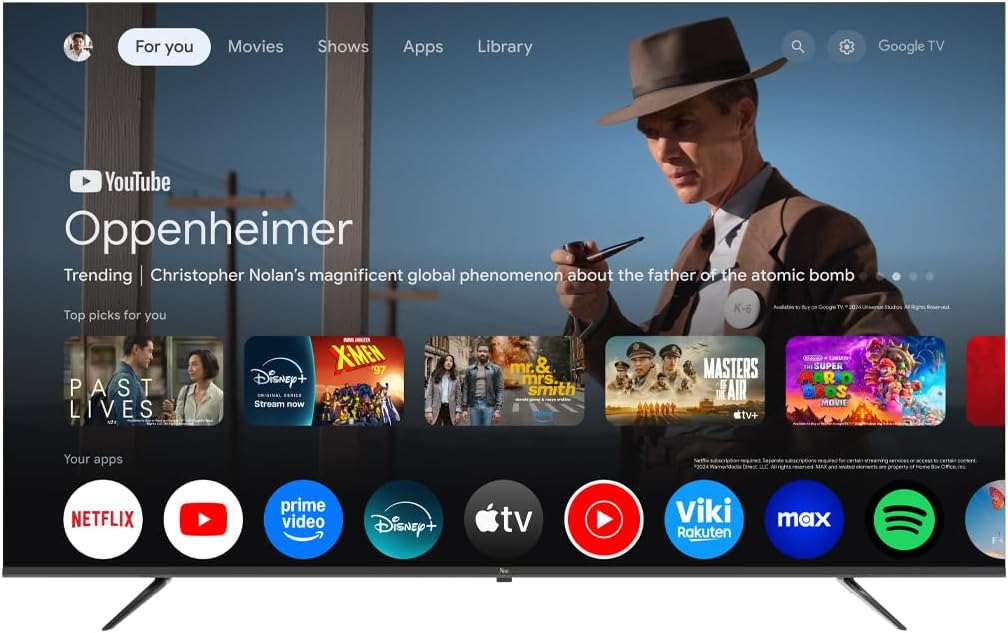
Image 5.1: Google TV interface on the Next QLED TV.
5.2. Google TV Xüsusiyyətləri
Your TV runs on Google TV, providing access to a wide range of content and smart features:
- Fərdiləşdirilmiş Tövsiyələr: Get suggestions based on your viewtarixə girmək.
- Səslə Nəzarət: Use the built-in Google Assistant via the remote control to search for content, control smart home devices, and more.
- Tətbiq Girişi: Download and stream from popular services like YouTube, Netflix, Disney+, and more via the Google Play Store.
- Daxili Chromecast: Uyğun mobil cihazlarınızdan məzmunu birbaşa TV-yə yayımlayın.
5.3. QLED Display Technology
The QLED display technology in your TV offers enhanced picture quality:
- Canlı Rənglər: Quantum Dot technology produces a wider color gamut and higher color saturation.
- High Parlaqlıq: Experience brighter images with improved contrast.
- HDR Dəstəyi: High Dynamic Range (HDR) content delivers greater detail in both bright and dark scenes.

Image 5.2: Visual representation of QLED technology's enhanced color saturation.

Image 5.3: Visual representation of HDR technology's improved dynamic range.
5.4. Uzaqdan idarəetmə
The included remote control allows you to navigate the TV's interface, adjust settings, and access smart features. Refer to the remote control diagram (if available in the physical manual) for specific button functions.
5.5. Məhsul bitdiview Video
Watch this video for a brief overview of the Next QLED Google TV's key features, including QLED technology, Ultra HD quality, Google TV integration, and frameless design.
Video 5.1: Bitdiview of Next QLED Google TV features.
6. Baxım
Televizorunuzun uzunömürlülüyünü və optimal işləməsini təmin etmək üçün:
- Ekranın təmizlənməsi: Ekranı yumşaq, tüysüz bir parça ilə yumşaq bir şəkildə silin. İnadkar izlər üçün birbaşa ekrana deyil, parçaya tətbiq olunan ekrana xas təmizləyici məhluldan istifadə edin.
- Şkafın təmizlənməsi: Televizor şkafını silmək üçün yumşaq, quru parça istifadə edin. Aşındırıcı təmizləyicilərdən və ya həlledicilərdən istifadə etməyin.
- Havalandırma: Həddindən artıq istiləşmənin qarşısını almaq üçün havalandırma dəliklərinin toz və maneələrdən təmiz olduğundan əmin olun.
- Söndürmək: Disconnect the TV from the power outlet during electrical storms or when it will be unused for extended periods.
7. Giderme
Televizorunuzla bağlı problemlərlə qarşılaşsanız, aşağıdakı ümumi həll yollarına müraciət edin:
| Problem | Mümkün Həll |
|---|---|
| Güc yoxdur | Elektrik kabelinin həm televizora, həm də divar rozetkasına etibarlı şəkildə qoşulduğunu yoxlayın. Çıxışın işlək olduğundan əmin olun. |
| Şəkil yoxdur, amma səs var | Düzgün giriş mənbəyinin seçildiyini yoxlayın. Xarici cihazlara kabel bağlantılarını yoxlayın. |
| Səs yoxdur, amma şəkil var | Səs səviyyəsini və səssiz rejim statusunu yoxlayın. Audio kabellərin düzgün qoşulduğundan əmin olun. Televizorun audio çıxış parametrlərini yoxlayın. |
| Pult işləmir | Batareyaları dəyişdirin. Pultla televizorun IR sensoru arasında heç bir maneə olmadığından əmin olun. |
| Zəif şəkil keyfiyyəti | Antena/kabel birləşmələrini yoxlayın. Şəkil parametrlərini tənzimləyin (parlaqlıq, kontrast, kəskinlik). Mənbə məzmununun yüksək keyfiyyətli olduğundan əmin olun. |
| Wi-Fi-a qoşulmaq mümkün deyil | Restart your router. Ensure the Wi-Fi password is correct. Move the TV closer to the router or use a wired Ethernet connection. |
Bu həlləri sınadıqdan sonra problem davam edərsə, müştəri dəstəyi ilə əlaqə saxlayın.
8. Spesifikasiyalar
Key technical specifications for the Next YE-65GFSG8-QLED 65-inch UHD 4K QLED Google TV:
| Xüsusiyyət | Detal |
|---|---|
| Model | YE-65GFSG8-QLED |
| Ekran Ölçüsü | 65 düym (165 sm) |
| Ekran Texnologiyası | QLED |
| Qətnamə | 4K UHD (Ultra Yüksək Təsvir) |
| Yeniləmə dərəcəsi | 60 Hz |
| Əməliyyat sistemi | Google TV |
| Bağlantı | Bluetooth, Ethernet, HDMI (3 ports), USB (2 ports), Wi-Fi |
| Aspekt nisbəti | 16:9 |
| Məhsulun Ölçüləri (D x G x Y) | 27.8D x 144.6W x 88.9H sm |
| Məhsul Çəkisi | 16.3 kiloqram |
| Daxil olan komponentlər | Uzaqdan İdarəetmə |
| Xüsusi Xüsusiyyət | Çərçivəsiz dizayn |
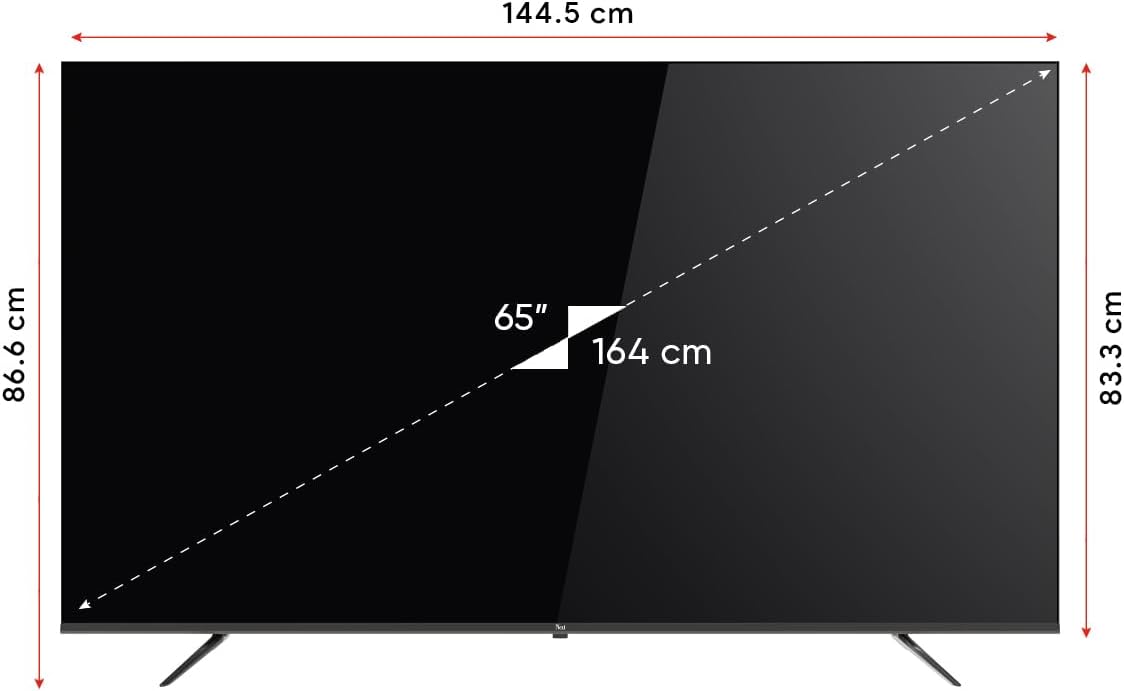
Image 8.1: TV dimensions (144.5 cm width, 86.6 cm height, 65" / 164 cm diagonal).
9. Zəmanət və Dəstək
Your Next YE-65GFSG8-QLED TV comes with a manufacturer's warranty:
- Zəmanət müddəti: 2 Years Manufacturer Warranty.
- Dəstək: For technical assistance, warranty claims, or further inquiries, please refer to the contact information provided in your warranty card or visit the official Next websayt.
Ask a question about this manual
Ask about setup, troubleshooting, compatibility, parts, safety, or missing instructions. Manuals+ will review the question and use this page’s manual context to help answer it.