
CIO CIO-G120W2C-N2
CIO NovaPort DUOⅡ 120W Charger
İstifadəçi təlimatı
Giriş
Thank you for choosing the CIO NovaPort DUOⅡ 120W charger. This ultra-compact, high-output USB charger is designed for rapid charging of devices such as MacBook Pro, high-power Windows PCs (like Lenovo/Let's note), and other devices requiring 96W-87W class power. With its dual USB-C ports, you can simultaneously charge a 65W class laptop and a high-end smartphone, or two 45W class laptops. The NovaPort DUOⅡ incorporates advanced technologies like NovaIntelligence for optimal power distribution, NovaEngine for enhanced efficiency and heat suppression, and NovaSafety 2.0 for advanced safety features, ensuring stable and efficient charging.

Image: The CIO NovaPort DUOⅡ 120W charger in black, showcasing its compact design with two USB-C ports and foldable prongs.
Quraşdırma
The NovaPort DUOⅡ features a retractable plug for convenience and portability. To set up your charger:
- Fişini açın: Gently pull out the foldable AC prongs from the charger body until they lock into place.
- Elektrik rozetkasına qoşulun: Insert the charger's prongs into a standard wall outlet. The flat design ensures a snug fit against the wall, preventing obstruction.
- Cihazları birləşdirin: Use compatible USB-C cables (not included) to connect your devices to the charger's USB-C ports.

Image: The CIO NovaPort DUOⅡ charger plugged into a wall outlet, demonstrating its flat design that sits flush against the wall.
Əməliyyat Təlimatları
The NovaPort DUOⅡ is equipped with NovaIntelligence technology, which automatically adjusts power output to connected devices for the fastest possible charging. You do not need to worry about which port to use.
Tək Port Doldurma:
When using a single USB-C port, the charger can deliver a maximum output of 100W. This is ideal for rapidly charging high-power devices like laptops.

Image: A laptop being charged via a single USB-C port, illustrating the 100W maximum output.
İkiqat Portlu Eyni Zamanlı Şarj:
When both USB-C ports are in use, the total output of 120W is optimally distributed. Common power distribution scenarios include:
- 90W + 30W: məsələnample, charging a high-power laptop (90W) and a smartphone (30W).
- 60W + 60W: məsələnample, simultaneously charging two laptops or tablets that require similar power.
The NovaIntelligence system automatically detects the connected devices and allocates power accordingly. Refer to the quick charge table for detailed power distribution.

Image: A laptop charging at 90W and a smartphone at 30W simultaneously, demonstrating the 90W+30W power distribution.
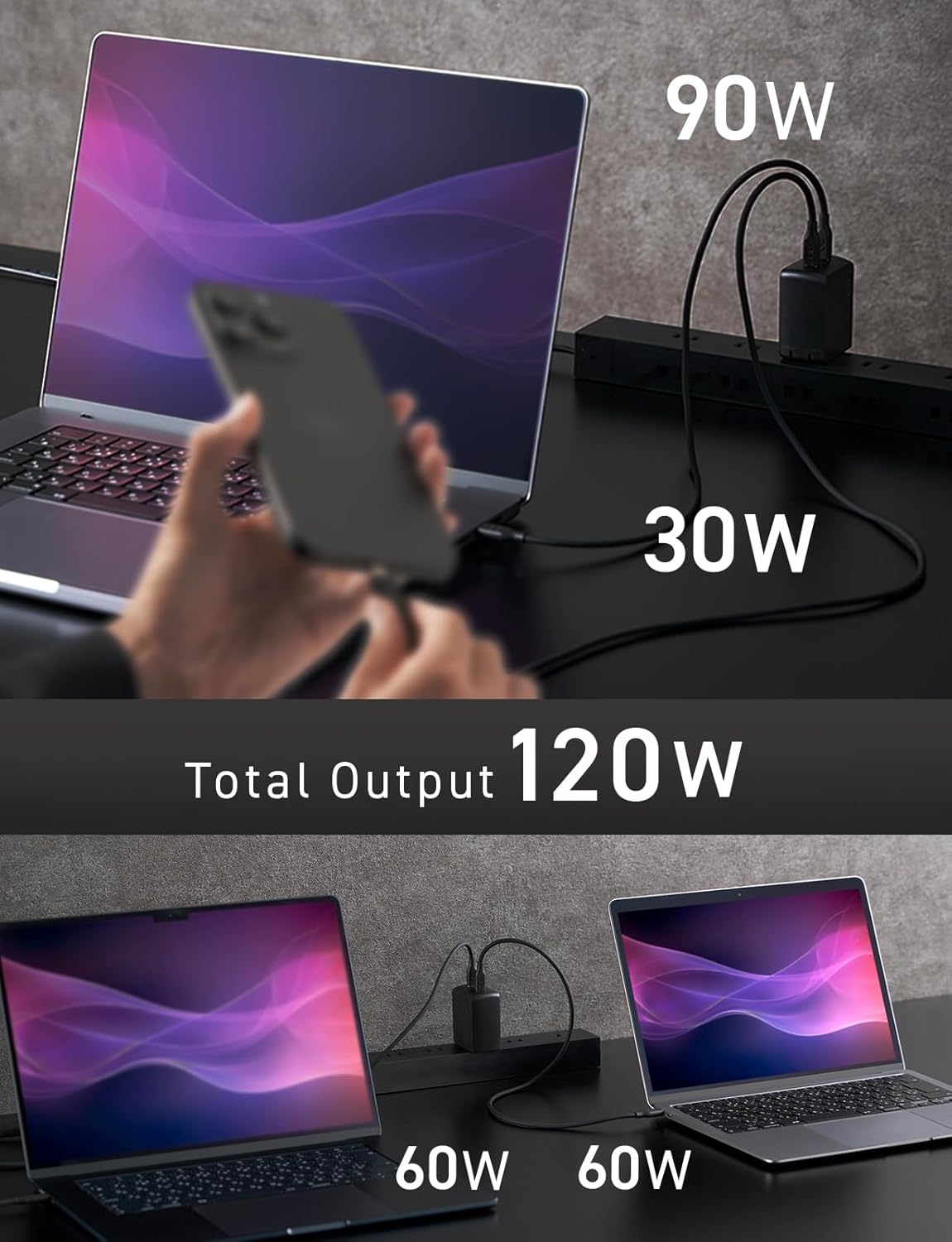
Image: Two laptops charging simultaneously at 60W each, demonstrating the 60W+60W power distribution.
Baxım
To ensure the longevity and optimal performance of your NovaPort DUOⅡ charger, follow these maintenance guidelines:
- Təmizləmə: Wipe the charger with a soft, dry cloth. Avoid using harsh chemicals or abrasive materials that could damage the surface.
- Yaddaş: Store the charger in a cool, dry place when not in use. The foldable plug makes it easy to store without taking up much space.
- Çizilməyə davamlı bitirmə: The charger features a textured, scratch-resistant finish designed to maintain its aesthetic appearance over time.
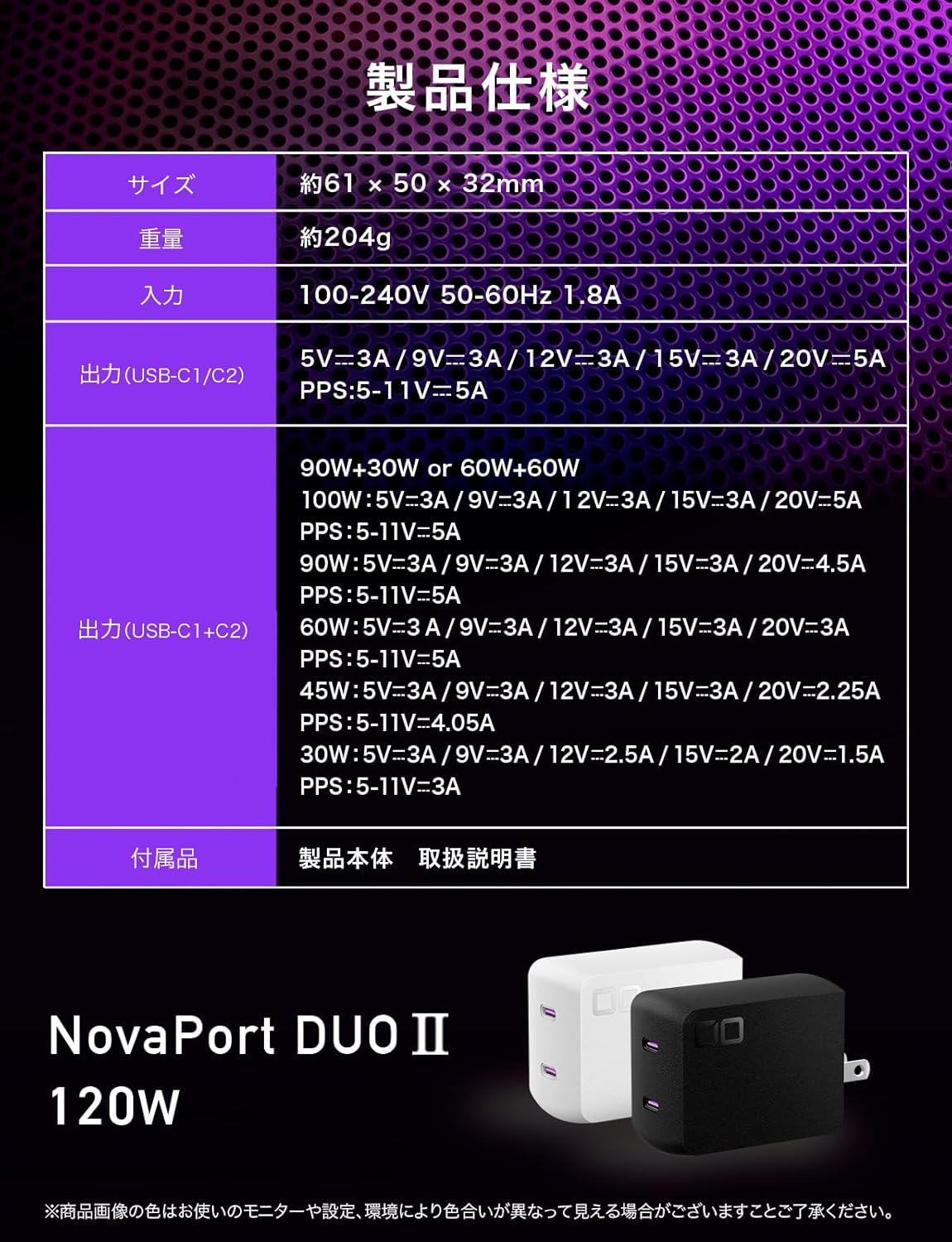
Image: A hand placing the CIO NovaPort DUOⅡ charger into a pouch, highlighting its compact size and textured, scratch-resistant surface.
Problemlərin aradan qaldırılması
If you encounter issues with your NovaPort DUOⅡ charger, consider the following:
- Doldurulmur:
- Şarj cihazının işləyən elektrik rozetkasına etibarlı şəkildə qoşulduğundan əmin olun.
- Verify that the USB-C cable is properly connected to both the charger and your device.
- Try a different USB-C cable or device to rule out cable or device issues.
- Yavaş doldurma:
- Confirm your device supports fast charging and that the cable is rated for the required power.
- NovaIntelligence automatically optimizes power. If charging multiple devices, the power is distributed, which might result in lower individual device charging speeds compared to single-device charging.
- Şarj cihazının həddindən artıq istiləşməsi:
The NovaPort DUOⅡ features NovaSafety 2.0, which constantly monitors product temperature. During high load or high temperature conditions, it automatically adjusts power and manages heat. If the charger feels excessively hot, disconnect it and allow it to cool down before resuming use.

Şəkil: Daxili view of the CIO NovaPort DUOⅡ charger, highlighting the NovaSafety 2.0 technology for temperature monitoring and automatic power adjustment.
- Temporary Power Interruption (Instantaneous Cut-off):
Previous fast chargers might experience a momentary power cut-off when a new device is connected. NovaSafety 2.0 in NovaPort DUOⅡ is designed to suppress this "instantaneous cut-off," providing a smoother charging experience without resetting connected devices.
Spesifikasiyalar
| Xüsusiyyət | Detal |
|---|---|
| Model nömrəsi | CIO-G120W2C-N2 |
| Ölçülər (G×Y×D) | Təxminən. 61 x 50 x 32 mm |
| Çəki | təqribən. 204 q |
| Giriş | 100-240V ~ 50-60Hz 1.8A |
| USB Portları | 2 x USB-C |
| Single Port Output (USB-C1 or C2) | Max 100W (5V=3A / 9V=3A / 12V=3A / 15V=3A / 20V=5A, PPS: 5-11V=5A) |
| Dual Port Output (USB-C1 + C2) | Total Max 120W (e.g., 90W+30W or 60W+60W) |
| Xüsusiyyətlər | Retractable Plug, High-Speed Charging, NovaIntelligence, NovaEngine, NovaSafety 2.0 |
| Uyğun Cihazlar | Smartphones, Tablets, Laptops (e.g., iPhone 11-16 series, Macbook Pro/Air, Xperia, Galaxy, Huawei, Zenfone, AQUOS, Nintendo Switch) |
| Daxil Aksesuarlar | Main Unit, User Manual |

Image: A visual representation of the product specifications, including size, weight, input, and output details for the CIO NovaPort DUOⅡ 120W charger.
Zəmanət və Dəstək
CIO, as a Japanese manufacturer, provides reliable warranty support for its products. If you experience any initial defects or product malfunctions during use, please contact us first.
- Dəstək ilə əlaqə: When contacting support, please provide your Amazon order number for a smoother process.
- Charger Recycling Service: CIO promotes proper recycling and disposal of chargers. We offer a collection service for unwanted AC chargers (both CIO and other brands). Please access our official HP to apply for this service. As a token of appreciation, we may issue coupons for future purchases.
We aim to provide a convenient and forward-looking lifestyle through our products and services, fostering a society where more people can experience excitement. Collected chargers will be maintained and then redistributed to companies and local governments that agree to their reuse.
Ask a question about this manual
Ask about setup, troubleshooting, compatibility, parts, safety, or missing instructions. Manuals+ will review the question and use this page’s manual context to help answer it.