
1. Məhsul bitdiview
The MOBAPAD N1 HD is a versatile wireless controller designed for an enhanced gaming experience across multiple platforms. It features advanced technologies such as Hall Effect Joysticks for precise control, ALPS Dual-Axis Motors for immersive HD vibration, and six-axis motion control. This controller is compatible with Nintendo Switch, PC, iOS, and Android devices, offering seamless connectivity and responsive performance.

Şəkil: Ön view of the MOBAPAD N1 HD Wireless Controller, showcasing onun erqonomik dizaynı və düymə düzümü.
2. Əsas Xüsusiyyətlər
- Çox Platforma Uyğunluğu: Fully compatible with Nintendo Switch, PC, iOS, and Android devices, ensuring broad usability.
- Hall Effektli Joystiklər: Provides smooth, precise, and durable control with minimal wear, ideal for accurate gaming.
- ALPS Dual-Axis Motors with HD Vibration: Delivers realistic and immersive haptic feedback for enhanced gameplay.
- Altı Oxlu Hərəkətə Nəzarət: Built-in gyroscope enables enhanced motion control for compatible games.
- NFC for Amiibo Scanning: Supports NFC technology for scanning Amiibo figures on Nintendo Switch.

Image: The controller illustrating its immersive motion control capabilities with swirling lines around it.

Image: The controller positioned in front of a collection of Amiibo figures, highlighting its NFC scanning function.

Image: The controller shown alongside icons for Switch, Android/iOS, and PC, demonstrating its multi-device compatibility.
3. Quraşdırma və Bağlantı
Follow these steps to connect your MOBAPAD N1 HD controller to your desired device.
3.1. Connecting to Nintendo Switch
- HOME Menyusundan seçin Nəzarətçilər, sonra Tutma / Sifarişi dəyişdirin.
- While the screen is displaying "Press L + R on the controller", press and hold the Ev düyməsi on the MOBAPAD N1 HD controller for 3-5 seconds until the player LEDs begin to flash.
- Once connected, the player LED(s) corresponding to the controller number will remain lit.
3.2. Kompüterə qoşulma (Windows)
- Connect the controller to your PC using a USB-C cable. The controller will be recognized as a wired controller.
- For wireless connection, ensure your PC has Bluetooth enabled. Go to Bluetooth & other devices settings.
- Select "Add Bluetooth or other device" and choose "Bluetooth".
- basın və saxlayın Ev düyməsi on the controller until the LEDs flash rapidly, indicating pairing mode.
- Select "MOBAPAD N1 HD" from the list of available devices.
3.3. Connecting to iOS/Android Devices
- iOS və ya Android cihazınızda Bluetooth-u aktivləşdirin.
- Go to Bluetooth settings and search for new devices.
- basın və saxlayın Ev düyməsi on the controller until the LEDs flash rapidly.
- Select "MOBAPAD N1 HD" from the list of available devices to pair.
4. Nəzarətçinin İşləməsi
Familiarize yourself with the controller's layout and functions for optimal gameplay.
4.1. Button Layout
- Sol Analoq Çubuq: For movement and camera control. Features Hall Effect technology.
- Sağ Analoq Çubuq: For camera control and aiming. Features Hall Effect technology.
- D-Pad: Directional input for menu navigation and specific game actions.
- A/B/X/Y Düymələri: Standart hərəkət düymələri.
- Sol/Or düymələri: Çiyin düymələri.
- ZL/ZR Düymələri: Tetik düymələri.
- Mənfi (-) düyməsi: Typically for opening in-game menus or specific functions.
- Plus (+) düyməsi: Typically for opening in-game menus or specific functions.
- Ev düyməsi: Returns to the system's home screen. Also used for pairing and NFC scanning.
- Çəkmə düyməsi: Takes screenshots or video clips (Nintendo Switch).
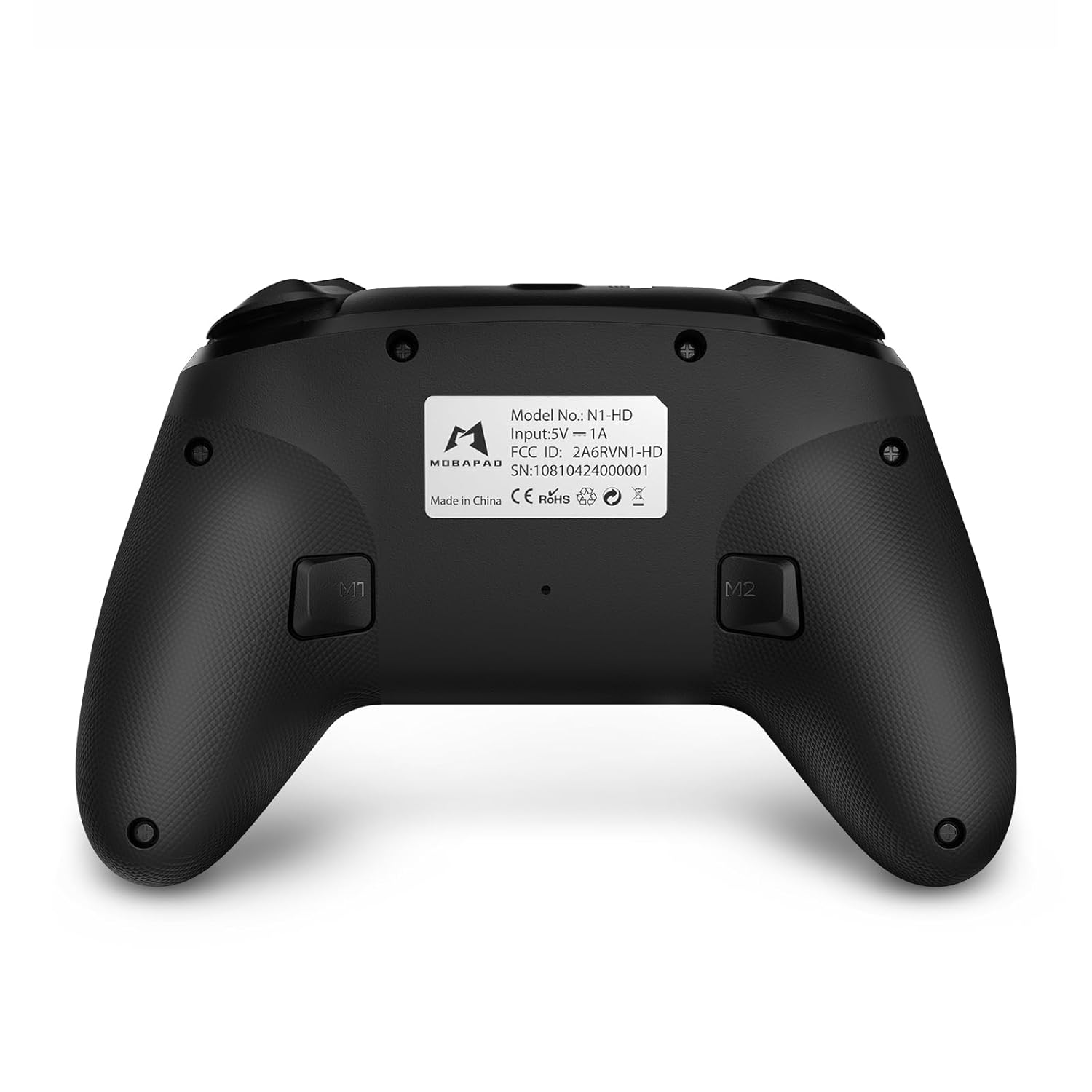
- M1/M2 Düymələr: Programmable back buttons for custom macros or remapping.
Şəkil: Ətraflı ön view of the MOBAPAD N1 HD controller, showing all buttons and joysticks.

Şəkil: Geri view of the MOBAPAD N1 HD controller, highlighting the M1 and M2 programmable buttons and product label.
4.2. NFC Functionality (Amiibo Scanning)
To use the NFC function for Amiibo scanning on Nintendo Switch:
- Ensure your controller is connected to the Nintendo Switch.
- In a compatible game, when prompted to scan an Amiibo, place the Amiibo figure directly over the Ev düyməsi area on the controller.
- Hold the Amiibo in place until the game registers the scan.
5. Baxım və qulluq
Proper maintenance ensures the longevity and optimal performance of your controller.
- Təmizləmə: Kontrolleri silmək üçün yumşaq, quru bir parça istifadə edin. İnadkar çirk üçün bir azampsu ilə parça. Sərt kimyəvi maddələrdən və ya aşındırıcı materiallardan çəkinin.
- Yaddaş: Kontrolleri birbaşa günəş işığından və həddindən artıq temperaturdan uzaq sərin, quru yerdə saxlayın.
- Batareyaya qulluq: The controller contains a Lithium Ion battery. Avoid fully discharging the battery frequently. If storing for extended periods, charge the battery to about 50% to prolong its lifespan. Do not expose the battery to fire or extreme heat.
- İdarəetmə: Daxili komponentlərə zərər verə biləcəyi üçün idarəetmə cihazını yerə salmaqdan və ya güclü zərbələrə məruz qoymaqdan çəkinin.
6. Giderme
If you encounter issues with your MOBAPAD N1 HD controller, refer to the following common solutions.
| Problem | Mümkün Səbəb | Həll |
|---|---|---|
| Nəzarətçi qoşulmur. | Low battery, out of range, incorrect pairing mode, interference. | Charge the controller fully. Ensure it is within range of the device. Re-enter pairing mode (hold Home button). Move closer to the device or away from other wireless devices. |
| Düymələr və ya joystiklər cavab vermir. | Software glitch, physical obstruction, damage. | Restart the controller and the connected device. Check for any debris around the buttons/joysticks. If issues persist, contact customer support. |
| Vibration is weak or absent. | Vibration setting off, game does not support vibration, motor issue. | Check in-game settings and system settings to ensure vibration is enabled. Verify if the game supports vibration feedback. |
| NFC scanning fails. | Incorrect placement, game not prompting scan, controller not connected. | Ensure the Amiibo is placed directly over the Home button area. Confirm the game is prompting for an Amiibo scan. Verify controller is properly connected to the Switch. |
7. Spesifikasiyalar
| Xüsusiyyət | Detal |
|---|---|
| Model nömrəsi | Mobapad N1 HD Black |
| Ölçülər (U x G x Y) | 5.91 x 2.36 x 3.94 düym |
| Çəki | 7.05 unsiya |
| Batareya növü | 1 litium-ion batareya (daxildir) |
| Bağlantı | Wireless (Bluetooth), USB-C (wired) |
| Uyğunluq | Nintendo Switch, PC, iOS, Android |
| Xüsusi Xüsusiyyətlər | Hall Effect Joysticks, ALPS Dual-Axis Motors, HD Vibration, Six-Axis Gyroscope, NFC |
8. Zəmanət və Dəstək
For warranty information or technical support, please contact MOBAPAD customer service. Refer to the official MOBAPAD webxüsusi zəmanət şərtləri və əlaqə məlumatları üçün sayt və ya satınalma sənədləriniz.
You can visit the official MOBAPAD store on Amazon for more information: MOBAPAD Store