
1. Giriş
Welcome to the user manual for your Emerson CKSS7071 Sunrise Smartset Alarm Clock Radio. This device is designed to enhance your daily routine with its unique features, including a sunrise simulation, soothing sound options, Bluetooth connectivity, and an 8-color dimmable LED display. Please read this manual thoroughly to understand the full functionality and ensure proper use and care of your new alarm clock radio.
Film 1: Bitdiview of the Emerson CKSS7071 Sunrise Smartset Alarm Clock Radio. This video demonstrates the key features and design of the product.
2. Əhəmiyyətli Təhlükəsizlik Məlumatı
- Cihazı işlədmədən əvvəl bütün təlimatları oxuyun.
- Bu təlimatları gələcək istinad üçün saxlayın.
- Bu cihazı suyun yaxınlığında istifadə etməyin.
- Yalnız quru parça ilə təmizləyin.
- Heç bir ventilyasiya açılışını bağlamayın. İstehsalçının göstərişlərinə uyğun olaraq quraşdırın.
- Radiatorlar, istilik registrləri, sobalar və ya digər aparatlar (o cümlədən) kimi istilik mənbələrinin yaxınlığında quraşdırmayın. ampistilik əmələ gətirən qaldırıcılar).
- Elektrik kabelini, xüsusən də tıxaclarda, prizlərdə və onların aparatdan çıxdığı yerdə gəzməkdən və ya sıxılmaqdan qoruyun.
- Yalnız istehsalçı tərəfindən göstərilən qoşmalardan/aksesuarlardan istifadə edin.
- İldırım fırtınası zamanı və ya uzun müddət istifadə edilmədikdə bu cihazı elektrik şəbəkəsindən ayırın.
- Bütün xidmətlər üçün ixtisaslı xidmət personalına müraciət edin. Aparat hər hansı şəkildə zədələndikdə, məsələn, enerji təchizatı kabeli və ya tıxacı zədələndikdə, maye töküldükdə və ya cihazın içərisinə əşyalar düşdükdə, cihaz yağışa və ya nəmə məruz qaldıqda, normal işləmədikdə xidmət tələb olunur. , ya da atılıb.
3. Paketin məzmunu
Paketi açarkən bütün əşyaların mövcud olduğunu yoxlayın:
- Emerson CKSS7071 Sunrise Smartset Alarm Clock Radio
- AC Güc Adapteri
- İstifadəçi təlimatı
4. Məhsul bitdiview
4.1 Ön View

Şəkil 1: Ön view of the alarm clock, featuring the digital time display and the sunrise simulation light panel.
The front of the unit features the main 1.2-inch LED time display and the large circular light panel for sunrise simulation and ambient lighting. Indicators for AM/PM, Alarm 1/2, and Bluetooth status are also visible.
4.2 Yan View (Nəzarət)
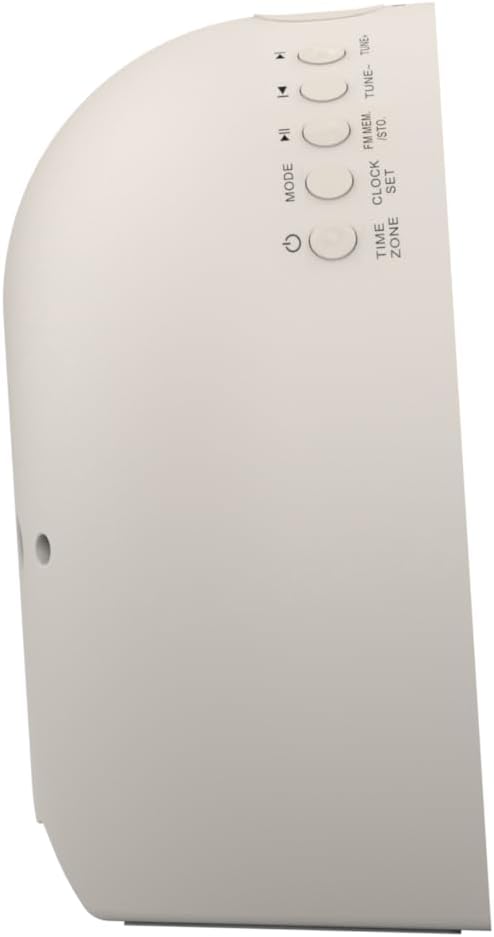
Şəkil 2: Yan view müxtəlif funksiyalar üçün idarəetmə düymələrini vurğulayan zəngli saatın.
The side panel houses the primary control buttons, including Power, Mode, Clock Set, Time Zone, Tune/Skip, and Volume controls. These buttons are used for setting time, alarms, and navigating audio functions.
4.3 Arxa View

Şəkil 3: Arxa view of the alarm clock, showing the speaker grille and power connection port.
The rear of the unit features the main speaker grille and the power input port for connecting the AC adapter.
5. Quraşdırma
5.1 Enerji Bağlantısı
- Plug the AC power adapter into the DC IN jack located on the back of the unit.
- Plug the other end of the adapter into a standard wall outlet (AC 100-240V, 50/60Hz).
- Cihaz avtomatik olaraq işə düşəcək.
5.2 SmartSet Automatic Time Setting
The SmartSet system automatically sets the correct time and date as soon as you plug in the unit. It also maintains time and alarm settings during power disruptions or outages, provided the button cell battery is installed.
5.3 Batareya Ehtiyat Quraşdırılması
A button cell battery (CR2032, included) is required for battery backup. This ensures that time and alarm settings are retained during a power outage.
- Cihazın altındakı batareya bölməsini tapın.
- Batareya bölməsinin qapağını açın.
- Insert one CR2032 button cell battery, ensuring the correct polarity (+/-).
- Batareya bölməsinin qapağını etibarlı şəkildə bağlayın.
6. Əməliyyat Təlimatları
6.1 Setting the Clock Manually
- basın və saxlayın SAAT DƏSTİ düyməsi. Saat rəqəmləri yanıb-sönəcək.
- istifadə edin TUNE -/+ saatı tənzimləmək üçün düymələr. basın SAAT DƏSTİ təsdiq etmək.
- Dəqiqə rəqəmləri yanıb-sönəcək. İstifadə edin TUNE -/+ buttons to adjust the minutes. Press SAAT DƏSTİ təsdiq etmək.
- Continue this process to set the year, month, and day.
- basın SAAT DƏSTİ Vaxt tənzimləmə rejimindən çıxmaq üçün yenidən basın.
6.2 Siqnalların Qurulması (Siqnal 1 və Siqnal 2)
The unit features dual alarms. Follow these steps for each alarm:
- basın və saxlayın Siqnal 1 or Siqnal 2 düyməsi. Zəngli saat rəqəmləri yanıb-sönəcək.
- istifadə edin TUNE -/+ buttons to adjust the alarm hour. Press the respective ALARM təsdiq etmək üçün düymə.
- The alarm minute digits will flash. Use the TUNE -/+ buttons to adjust the alarm minutes. Press the respective ALARM təsdiq etmək üçün düymə.
- Select the alarm source (Buzzer, FM Radio, or Soothing Sound). Press the respective ALARM təsdiq etmək üçün düymə.
- Siqnalın səs səviyyəsini tənzimləyin VOL -/+ buttons. Press the respective ALARM təsdiq etmək üçün düymə.
- The alarm is now set. The alarm indicator (AL1 or AL2) will appear on the display.
6.3 Günəşin çıxması simulyasiyası
The sunrise simulation feature gradually brightens the light panel before your set alarm time, mimicking a natural sunrise to gently wake you.
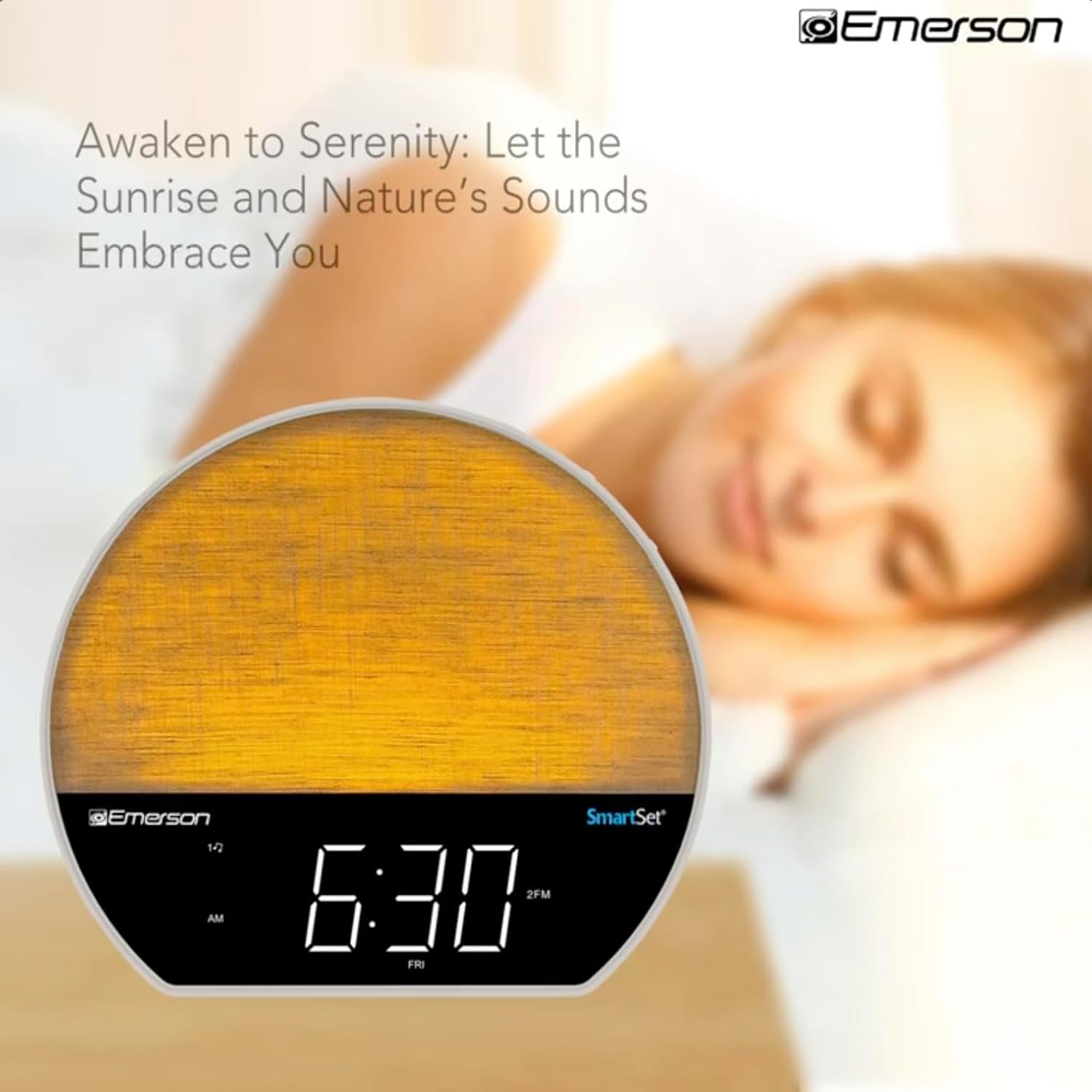
Şəkil 4: The alarm clock simulating a sunrise with a warm, increasing işıq intensivliyi.
To activate, ensure the sunrise option is selected during alarm setup. The light will begin to brighten 30 minutes before the alarm sounds.
6.4 Soothing Sounds and White Noise
The unit includes 6 soothing sounds and white noise to help with relaxation or waking up.
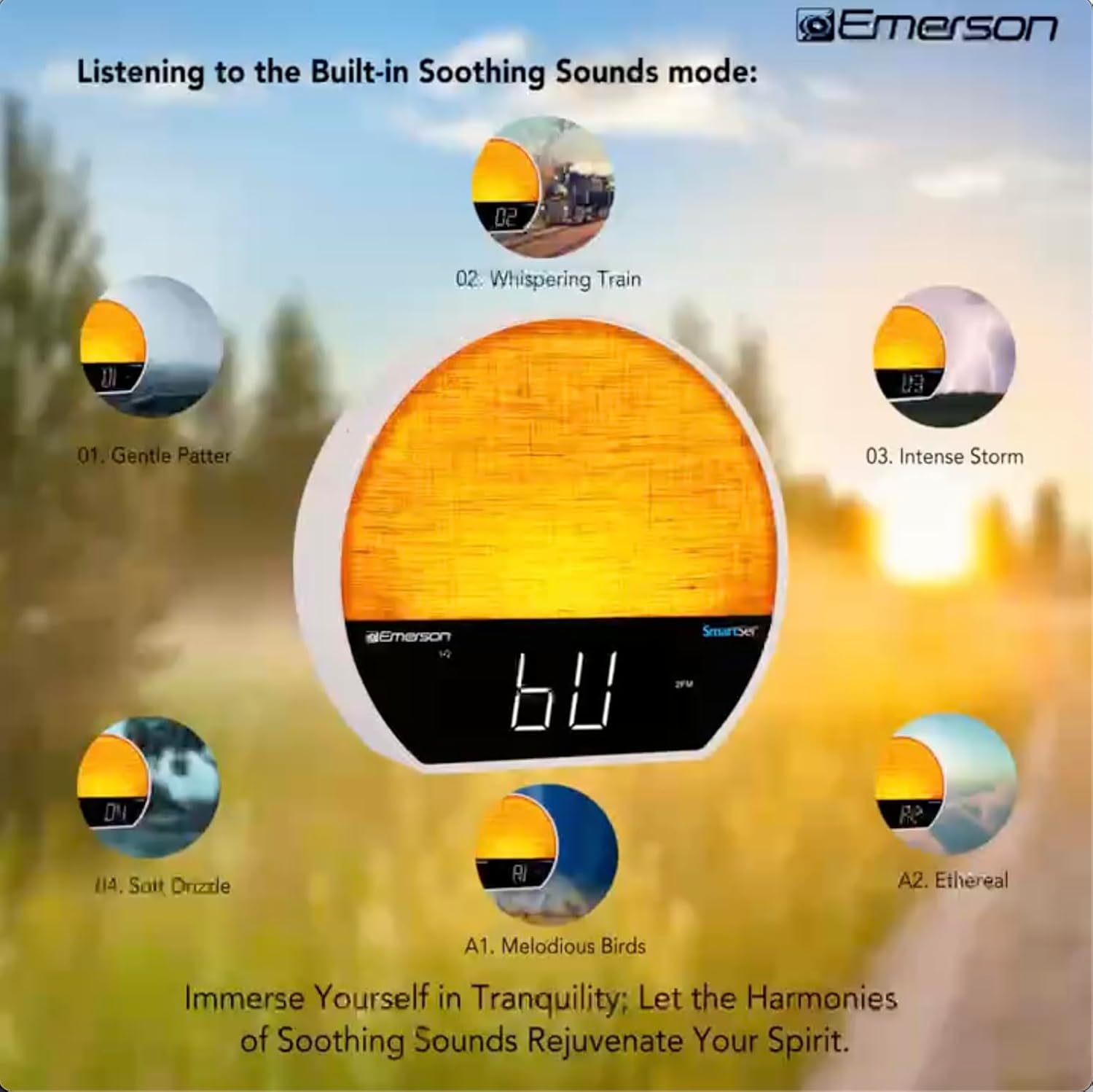
Şəkil 5: Visual representation of the six soothing sound modes available on the alarm clock.
- düyməsini basın MODE button repeatedly until the Soothing Sound mode is selected.
- istifadə edin TUNE -/+ buttons to cycle through the available sounds (e.g., Gentle Patter, Whispering Train, Intense Storm, Soft Drizzle, Melodious Birds, Ethereal, White Noise).
- Səs səviyyəsini VOL -/+ düymələri.
6.5 Bluetooth Dinamik funksiyası
Səs yayımını simsiz olaraq həyata keçirmək üçün smartfonunuzu və ya digər Bluetooth dəstəkli cihazınızı qoşun.

Şəkil 6: The alarm clock in Bluetooth mode, paired with a mobile device for audio streaming.
- düyməsini basın MODE button until 'BT' appears on the display, indicating Bluetooth mode.
- On your device, enable Bluetooth and search for 'Emerson CKSS7071'.
- Select the device to pair. A confirmation tone will sound upon successful pairing.
- You can now play audio from your device through the alarm clock's speaker.
6.6 FM Radio Əməliyyatı
Sevimli FM radio stansiyalarınızı dinləyin.
- düyməsini basın MODE Ekranda 'FM' görünənə qədər düyməni basın.
- düyməsini basın TUNE -/+ buttons briefly to manually tune to a station.
- basın və saxlayın TUNE -/+ növbəti mövcud stansiyanı avtomatik skan etmək üçün düymələr.
- Stansiyanı saxlamaq üçün düyməni basıb saxlayın FM MEM Əvvəlcədən təyin edilmiş rəqəm yanıb-sönənə qədər düyməni basın. TUNE -/+ Əvvəlcədən təyin edilmiş nömrəni seçmək üçün basın FM MEM saxlamaq üçün yenidən.
6.7 LED Decor and Dimmer Control
Customize the ambient light with 8 different colors and adjust the brightness.

Şəkil 7: The alarm clock demonstrating its 8-color dimmable LED decor options.
- düyməsini basın İŞIQ button to cycle through the 8 available colors or turn the light off.
- To adjust the brightness of the LED decor light, press and hold the İŞIQ button. The brightness will cycle through 5 levels. Release the button at your desired brightness.
6.8 Display Dimmer Control
Adjust the brightness of the 1.2-inch LED time display.

Şəkil 8: The alarm clock illustrating the five distinct levels of display luminescence.
düyməsini basın DİMMER button (often combined with another function, refer to button labels) to cycle through 4 levels of display brightness (Bright, Moderate, Dim, Faint).
6.9 Yuxu Taymeri
Set a timer for the audio to automatically turn off after a specified duration.

Şəkil 9: The alarm clock set for a sunset sleep timer, providing a harmonious end to the day.
- While audio is playing (FM or Soothing Sound), press the YUXU düyməsi.
- təkrar-təkrar basın YUXU button to cycle through available sleep timer durations (e.g., 15, 30, 60, 90 minutes, or OFF).
- The audio will automatically turn off after the selected time.
6.10 Mürgülə atma funksiyası
Siqnal səsləndikdə düyməsini basın YUXUR button (usually a large button on top) to temporarily silence the alarm for a few minutes. The alarm will sound again after the snooze period.
7. Baxım
7.1 Təmizləmə
- Təmizləməzdən əvvəl həmişə cihazı elektrik rozetkasından ayırın.
- Xarici səthləri təmizləmək üçün yumşaq, quru bir parça istifadə edin.
- Do not use liquid cleaners, abrasive cleaners, or chemical sprays, as these may damage the finish.
7.2 Batareyanın dəyişdirilməsi
Əgər elektrik kəsilməsi zamanı vaxt və siqnalizasiya parametrləri saxlanılmazsatage, the button cell backup battery may need to be replaced. Follow the instructions in section 5.3 to replace the CR2032 battery.
8. Giderme
| Problem | Mümkün Səbəb | Həll |
|---|---|---|
| Cihaz işə düşmür. | Enerji adapteri qoşulmayıb və ya nasazdır. | AC adapterinin cihaza və işləyən divar rozetkasına etibarlı şəkildə qoşulduğundan əmin olun. |
| Elektrik kəsildikdən sonra vaxt/Siqnal parametrləri itirilditage. | Ehtiyat batareyası boşdur və ya quraşdırılmayıb. | Install or replace the CR2032 button cell battery (see section 5.3). |
| Siqnal səslənmir. | Siqnal aktivləşdirilməyib və ya səs çox aşağıdır. | Ensure the alarm is set and activated (AL1/AL2 indicator on). Increase alarm volume. |
| Bluetooth cihazı qoşa bilməz. | Unit not in Bluetooth mode or device too far. | Ensure the unit is in Bluetooth mode ('BT' displayed). Move your device closer to the unit. Try unpairing and re-pairing. |
| Zəif FM radio qəbulu. | Antenna uzadılmadı və ya müdaxilə edilmədi. | Extend the FM wire antenna fully and reposition it for better reception. Avoid placing near other electronic devices. |
| Ekran çox parlaq/tutqundur. | Display dimmer setting needs adjustment. | düyməsini basın DİMMER button to cycle through brightness levels (see section 6.8). |
9. Spesifikasiyalar
| Xüsusiyyət | Detal |
|---|---|
| Model nömrəsi | CKSS7071 |
| Güc mənbəyi | AC 100-240V, 50/60Hz (via AC adapter) |
| Batareyanın ehtiyat nüsxəsi | 1 x CR2032 Button Cell Battery (included) |
| Ekran növü | 1.2-inch LED Display |
| Bluetooth versiyası | V5.4 |
| Sakitləşdirici Səslər | 6 Nature Sounds + White Noise |
| LED Decor Colors | 8 Dimmable Colors |
| Məhsul Ölçüləri (G x D x Y) | 7.09" x 3.15" x 6.37" |
| Çəki | Müəyyən edilməyib |
10. Zəmanət Məlumatı
Emerson products are manufactured to the highest quality standards. This product is covered by a limited warranty against defects in materials and workmanship for a period of one (1) year from the original date of purchase. This warranty does not cover damage caused by misuse, accident, unauthorized modification, or normal wear and tear. Proof of purchase is required for all warranty claims. Please retain your receipt.
11. Müştəri dəstəyi
If you have any questions, require assistance, or experience issues with your Emerson CKSS7071 Sunrise Smartset Alarm Clock Radio, please contact our customer support team.
- Websayt: Rəsmi Emersonu ziyarət edin webTez-tez verilən suallar və dəstək resursları üçün sayt.
- E-poçt: Məhsulunuzun qablaşdırılmasına və ya rəsmi şəxsə müraciət edin website for customer service email contact.
- Telefon: Məhsulunuzun qablaşdırılmasına və ya rəsmi şəxsə müraciət edin webmüştəri xidməti telefon nömrələri üçün sayt.
Please have your model number (CKSS7071) and proof of purchase ready when contacting support.