
1. Məhsul bitdiview
The Warm Audio WA-8000 is a large-diaphragm tube condenser microphone designed to deliver rich, detailed, and smooth sound. This limited-edition gold version comes bundled with an On-Stage Stands MS7701B microphone stand and a professional XLR cable, providing a complete solution for high-quality audio capture.
Əsas Xüsusiyyətlər:
- Custom All-Brass K67-Style Capsule: Engineered for exceptional clarity and a rich tonal character.
- NOS 6AU6 Tube: Provides a classic, warm, and harmonically rich tone.
- External Heat Sink Assembly: Ensures optimal tube performance and facilitates easy tube replacement.
- İkili Qütb Nümunələri: Offers both cardioid and omnidirectional pickup patterns for versatile recording applications.
- On-Stage MS7701B Microphone Stand: Features adjustable height and a 30-inch boom arm for flexible positioning.
- Durable Tripod Base: Provides stability for the microphone stand during use.
- 20-Foot Professional XLR Cable: Ensures high-quality audio connection with minimal signal loss.

2. Qutuda nə var
Upon opening your Warm Audio WA-8000 package, you should find the following components:
- Warm Audio WA-8000 Large-Diaphragm Tube Condenser Microphone
- Xarici Enerji Təchizatı Bölməsi
- 7-Pin XLR Cable (for connecting microphone to power supply)
- XLR Cable (20-foot, for connecting power supply to audio interface)
- Şok Dağı
- On-Stage Stands MS7701B Microphone Stand with Boom Arm
- Wooden Storage Box for Microphone
- Hard Carrying Case for entire system

3. Quraşdırma
3.1 Microphone and Shock Mount Assembly
- Carefully remove the WA-8000 microphone from its wooden storage box.
- Attach the shock mount to the microphone stand. Ensure it is securely tightened.
- Gently insert the WA-8000 microphone into the shock mount. The shock mount is designed to isolate the microphone from vibrations and handling noise.
3.2 Microphone Stand Assembly
- Unfold the tripod base of the On-Stage Stands MS7701B microphone stand for stability.
- Adjust the height of the main stand pole to your desired level using the clutch.
- Attach the boom arm to the top of the main stand pole and adjust its length and angle as needed.

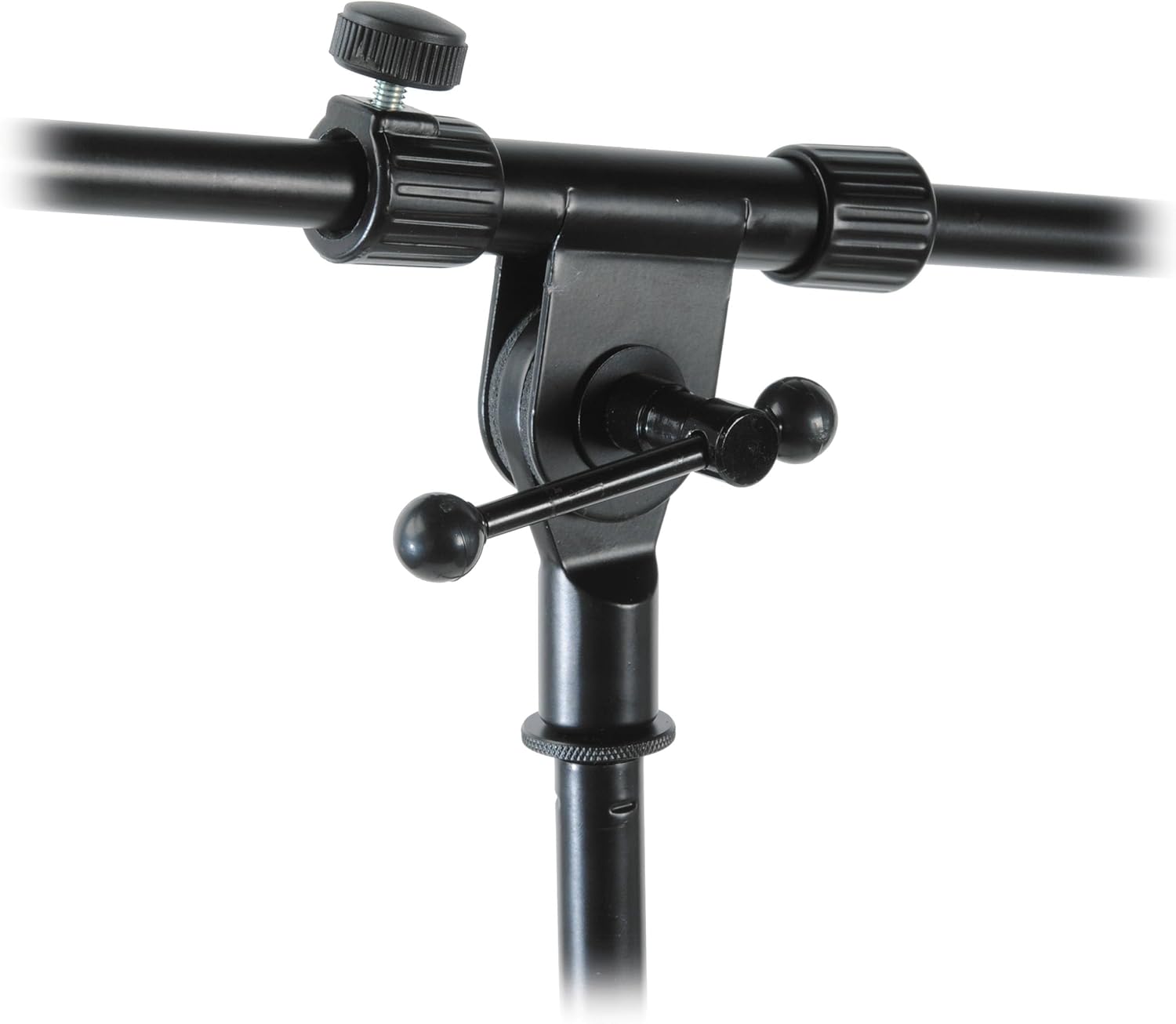
3.3 Connecting to an Audio Interface
- Connect the 7-pin XLR cable from the WA-8000 microphone to the input on the external power supply unit.
- Connect the 20-foot professional XLR cable from the output of the external power supply unit to an available XLR input on your audio interface or mixer.
- Ensure your audio interface or mixer has phantom power capability (typically +48V) and activate it for the connected input. The WA-8000 requires phantom power from its dedicated power supply, which in turn receives power from a standard AC outlet.
- Connect the external power supply unit to a standard AC power outlet.
4. Əməliyyat Təlimatları
4.1 Powering the Microphone
Once all connections are made as described in the Setup section, turn on the external power supply unit. Allow the microphone a few minutes to warm up for optimal performance, as it contains a vacuum tube.
4.2 Selecting Polar Patterns
The WA-8000 offers two selectable polar patterns: cardioid and omnidirectional. A switch located on the microphone body allows you to select between these patterns.
- Kardioid: This pattern picks up sound primarily from the front of the microphone, rejecting sound from the sides and rear. It is ideal for isolating a sound source, such as a vocalist or a single instrument, in a studio environment.
- Çox istiqamətli: This pattern picks up sound equally from all directions. It is suitable for capturing room ambiance, group vocals, or instruments where a natural, open sound is desired.

4.3 Optimal yerləşdirmə
Microphone placement is crucial for achieving the best sound. Experiment with different distances and angles relative to the sound source. For vocals, a pop filter is recommended to reduce plosives. For instruments, consider the acoustics of your recording space and the desired sonic character.
5. Baxım
- Təmizləmə: Use a soft, dry cloth to clean the microphone body. Avoid using liquid cleaners or solvents, as they may damage the finish or internal components.
- Yaddaş: When not in use, store the WA-8000 in its wooden box and then in the hard carrying case to protect it from dust, moisture, and physical damage.
- Boru Baxımı: The NOS 6AU6 tube has a finite lifespan. If you notice a degradation in sound quality or increased noise, the tube may need replacement. Refer to a qualified technician for tube replacement to ensure proper handling and calibration.
- Şok montajı: Periodically check the shock mount's elastic bands for wear and tear. Replace them if they become loose or broken to maintain effective vibration isolation.
6. Giderme
- Səs yoxdur:
- Ensure all cables (7-pin XLR, standard XLR, power) are securely connected.
- Verify that the external power supply unit is plugged in and turned on.
- Confirm that phantom power (+48V) is activated on your audio interface/mixer for the correct input channel.
- Check input gain levels on your audio interface/mixer.
- Zəif Səs Keyfiyyəti/Səs-küy:
- Zədələnmiş kabelləri yoxlayın.
- Ensure the microphone is properly seated in the shock mount to minimize vibrations.
- Verify that the selected polar pattern is appropriate for your recording environment and source.
- Allow sufficient warm-up time for the tube.
- If persistent noise or degradation occurs, the internal tube may need inspection or replacement by a qualified technician.
- Fasiləli Siqnal:
- Inspect all cable connections for looseness.
- Test with different cables if possible.
7. Spesifikasiyalar
| Xüsusiyyət | Detal |
|---|---|
| Model nömrəsi | WA-8000 Gold |
| Brend | Warm Audio (Manufactured by StreamEye) |
| Mikrofon növü | Large-Diaphragm Tube Condenser |
| Kapsul | Custom All-Brass K67-Style |
| boru | NOS 6AU6 |
| Qütb nümunələri | Kardioid, Hərtərəfli |
| Bağlantı texnologiyası | XLR |
| Bağlayıcı növü | XLR |
| Xüsusi Xüsusiyyət | Includes Microphone Stand |
| Uyğun Cihazlar | Audio interfeys |
| Daxil olan komponentlər | MS7701B Microphone Stand, XLR Cable, External Power Supply, Shock Mount, Wooden Box, Hard Case |
| UPC | 345629732186 |
8. Zəmanət və Dəstək
For warranty information and technical support, please refer to the documentation provided with your purchase or visit the official Warm Audio websayt. Hər hansı bir zəmanət iddiası üçün satınalma sübutunuzu saxlayın.