1. Giriş
Thank you for choosing the Taiahiro Bk6301 Wireless Mechanical Gaming Keyboard and Mouse Combo. This manual provides detailed instructions for setting up, operating, and maintaining your new peripheral devices. This combo offers versatile connectivity options including 2.4G wireless, Bluetooth 5.0, and wired USB-C, ensuring compatibility with various devices.
2. Paketin məzmunu
Zəhmət olmasa, paketinizdə bütün əşyaların olduğunu yoxlayın:
- Taiahiro Bk6301 Wireless Mechanical Gaming Keyboard
- Taiahiro Wireless Gaming Mouse
- USB 2.4G Receiver (stored in mouse battery compartment)
- USB-C - USB-A Şarj/Data Kabel
- İstifadəçi təlimatı
- 1 AA Battery (for mouse, may be pre-installed or included separately)

Image 2.1: Contents of the Taiahiro Bk6301 Keyboard and Mouse Combo package, including the keyboard, mouse, USB receiver, and USB-C cable.
3. Məhsul bitdiview
3.1 Klaviatura Xüsusiyyətləri
- 98-Açar Düzen: Compact design with a full numeric keypad.
- Mexaniki Mavi Açarları: Provide tactile and audible feedback for typing.
- RGB arxa işıqlandırma: Özelleştirilebilir işıqlandırma effektləri.
- Adjustable Keyboard Stand: Allows for ergonomic positioning.
- Multi-Mode Connectivity: Supports 2.4G wireless, Bluetooth 5.0, and wired USB-C.
- Yenidən doldurulan batareya: Built-in 2000mAh battery for wireless operation.
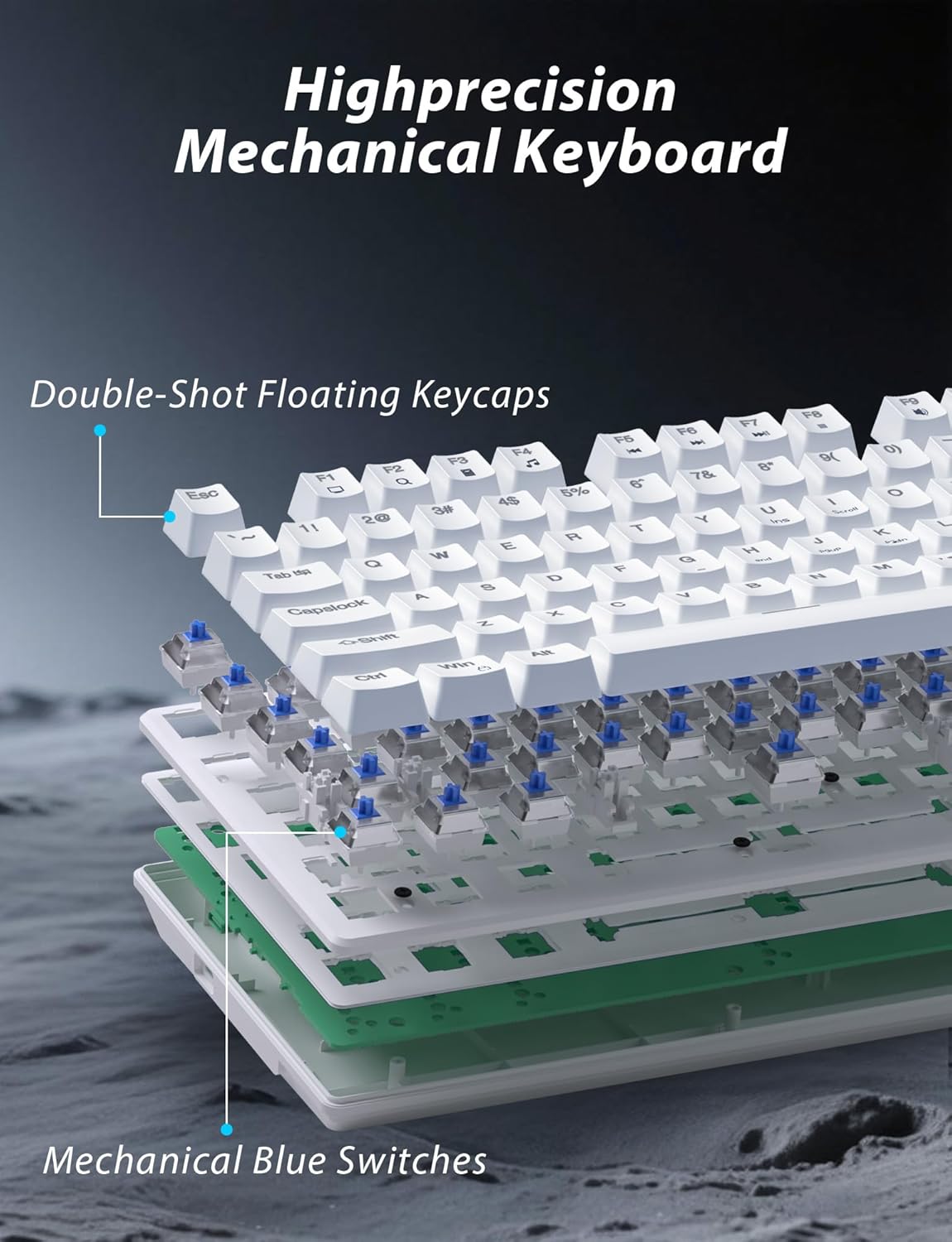
Şəkil 3.1: Partladı view illustrating the internal structure of the mechanical keyboard, highlighting the double-shot floating keycaps and mechanical blue switches.

Şəkil 3.2: Yan view of the keyboard demonstrating its ergonomic design and adjustable stand for comfortable use.
3.2 Siçan Xüsusiyyətləri
- Erqonomik Dizayn: Shaped for comfortable grip.
- Tənzimlənən DPI: Four levels (800/1600/2400/3200) for precision control.
- İrəli/Geri Düymələr: Convenient side buttons for navigation.
- İkili rejimli əlaqə: Supports 2.4G wireless and Bluetooth.

Image 3.3: The wireless gaming mouse, highlighting its ergonomic shape and four adjustable DPI levels.
4. Quraşdırma Təlimatları
4.1 Keyboard Connection
The keyboard supports three connection modes: 2.4G wireless, Bluetooth, and wired USB-C.

Image 4.1: The keyboard displaying its three connectivity options: Bluetooth, 2.4GHz wireless, and USB-C wired connection.
2.4G Simsiz rejimi:
- Locate the USB 2.4G receiver, typically stored in the mouse's battery compartment.
- USB qəbuledicisini kompüterinizdə mövcud olan USB portuna daxil edin.
- On the keyboard, slide the mode switch (usually located on the top edge or bottom) to the '2.4G' position.
- Klaviatura avtomatik qoşulmalıdır.
Bluetooth rejimi:
- Slide the mode switch on the keyboard to the 'BT' (Bluetooth) position.
- The keyboard's indicator light will flash, indicating it is in pairing mode.
- On your device (computer, laptop, smartphone), open Bluetooth settings and search for new devices.
- Select "Taiahiro Bk6301" or a similar name from the list of available devices to pair.
- Once paired, the indicator light will become solid.
Wired USB-C Mode:
- Təqdim olunan USB-C kabelini klaviaturanın USB-C portuna qoşun.
- Connect the other end (USB-A) to an available USB port on your computer.
- The keyboard will function as a wired device and will charge simultaneously.
4.2 Mouse Connection
The mouse supports 2.4G wireless and Bluetooth connectivity.

Image 4.2: The underside of the mouse, illustrating the battery compartment for one AA battery and the storage slot for the tiny USB receiver.
Batareyanın quraşdırılması:
- Siçanın altındakı batareya bölməsini açın.
- Insert one AA battery, ensuring correct polarity.
- Batareya bölməsini bağlayın.
2.4G Simsiz rejimi:
- Ensure the USB 2.4G receiver is plugged into your computer.
- Siçanın alt tərəfindəki rejim düyməsini '2.4G' vəziyyətinə sürüşdürün.
- Siçan avtomatik olaraq qoşulmalıdır.
Bluetooth rejimi:
- Siçanın alt tərəfindəki rejim düyməsini 'BT' (Bluetooth) vəziyyətinə sürüşdürün.
- The mouse will enter pairing mode.
- On your device, open Bluetooth settings and search for new devices.
- Select "Taiahiro Mouse" or a similar name from the list to pair.
5. Əməliyyat Təlimatları
5.1 Klaviatura funksiyaları
Arxa İşığa Nəzarət:
The keyboard features customizable RGB backlighting.
- Arxa İşıq Rejimini Dəyişdirin: basın Fn + Ev to cycle through 18 different lighting effects.
- Parlaqlığı tənzimləyin: basın Fn + ↑ (Yuxarı Ox) or Fn + ↓ (Aşağı Ox) to adjust between 5 brightness levels.
- Sürəti tənzimləyin: basın Fn + ← (Sol Ox) or Fn + → (Sağ Ox) to adjust between 5 lighting speed levels.

Image 5.1: Keyboard layout highlighting the function key combinations for controlling backlight modes, brightness, and speed.
Multimedia funksiyaları:
düyməsini basaraq multimedia idarəetmələrinə daxil olun Fn key in combination with the designated F-keys (F1-F12).
- Fn+F1: Media pleyer
- Fn+F2: Səsi azaldın
- Fn+F3: Səs artır
- Fn+F4: Səssiz
- Fn+F5: Dayan
- Fn+F6: Əvvəlki Track
- Fn+F7: Oynat/Pause
- Fn+F8: Növbəti Track
- Fn+F9: E-poçt
- Fn+F10: Web Brauzer
- Fn+F11: Mənim Kompüterim
- Fn+F12: Kalkulyator
5.2 Siçan funksiyaları
DPI Tənzimlənməsi:
düyməsini basın DPI düyməsi (located behind the scroll wheel) to cycle through the four DPI settings: 800, 1600, 2400, and 3200. Each press changes the sensitivity, allowing you to adjust cursor speed to your preference.
6. Baxım
6.1 Təmizləmə
- Klaviatura: Use a soft, dry cloth to wipe the surface. For deeper cleaning, use compressed air to remove debris from between keys. Avoid using harsh chemicals or abrasive materials.
- Siçan: Siçanın səthini yumşaq, bir az yumşaldılmış bir parça ilə silinamp cloth. Ensure no liquid enters the internal components.
6.2 Batareyanın idarə edilməsi
- Klaviatura: The keyboard has a built-in rechargeable battery. Connect the USB-C cable to a power source (e.g., computer USB port, USB wall adapter) to charge. The indicator light will show charging status.
- Siçan: The mouse uses one AA battery. Replace the battery when the mouse performance degrades or it stops responding. Ensure proper polarity when inserting a new battery.
7. Giderme
If you encounter issues with your Taiahiro keyboard and mouse combo, please refer to the following solutions:
| Problem | Mümkün Həll |
|---|---|
| Keyboard/Mouse not responding (2.4G) |
|
| Keyboard/Mouse not connecting (Bluetooth) |
|
| Keyboard backlight not working or stuck |
|
| Düymələr cavab vermir və ya ikiqat yazır |
|
8. Spesifikasiyalar
| Xüsusiyyət | Detal |
|---|---|
| Model nömrəsi | Bk6301 |
| Bağlantı | Bluetooth 5.0, 2.4G Simsiz, USB-C Simli |
| Klaviatura növü | Mexanik Oyun Klaviaturası |
| Açar Düzeni | 98 Keys (with Numeric Keypad) |
| Keçid Tipi | Mexanik Mavi açarlar |
| Klaviatura arxa işığı | RGB (18 modes, 5 brightness, 5 speed levels) |
| Klaviatura batareyası | 2000mAh Şarj oluna bilər |
| Siçan DPI Səviyyələri | 800/1600/2400/3200 |
| Siçan batareyası | 1 x AA Batareya |
| Uyğun Cihazlar | Personal Computer, Laptop, Smartphone |
| Maddə Çəkisi | 2.72 pounds (combo) |
| Paket Ölçüləri | 15 x 5.59 x 3.11 düym |
9. Zəmanət və Dəstək
9.1 Zəmanət Məlumatı
Taiahiro products are covered by a limited warranty from the date of purchase. Please refer to the warranty card included in your package or visit the official Taiahiro website for detailed warranty terms and conditions. This warranty typically covers manufacturing defects and material faults under normal use.
9.2 Müştəri dəstəyi
For technical assistance, troubleshooting, or any questions regarding your Taiahiro Bk6301 combo, please contact our customer support team. You can find contact information on the Taiahiro official website or through your purchase platform. When contacting support, please have your product model number (Bk6301) and purchase details ready.