
1. Giriş
This manual provides detailed instructions for the installation, operation, and maintenance of your RSNAVI Android Car Stereo. This unit is designed to integrate advanced multimedia and navigation features into your Chrysler Grand Voyager (2011-2015 model years).
Please read this manual thoroughly before installation and use to ensure proper functionality and to maximize your experience with the device.

Şəkil 1.1: RSNAVI Android Car Stereo with included accessories.
This image displays the RSNAVI 9-inch Android Car Stereo unit integrated into a vehicle's dashboard, specifically designed for the Chrysler Grand Voyager. Surrounding the main unit are various accessories: a rearview camera for enhanced visibility, an external microphone for clear audio input during calls, and a cooling fan to maintain optimal operating temperature. The screen shows a map interface and various application icons, indicating its multimedia and navigation capabilities.
2. Compatibility and Package Contents
2.1 Nəqliyyat Vasitəsinin Uyğunluğu
This RSNAVI Android Car Stereo is specifically designed for the Chrysler Grand Voyager manufactured between 2011 və 2015. Before installation, confirm the year, size, and shape of your vehicle's center console to ensure proper fitment.
2.2 Paketin məzmunu
Standart paket aşağıdakı komponentləri əhatə edir:
- RSNAVI Android Car Stereo Head Unit
- Canbus Dekoder
- Elektrik kabeli
- RCA Cable
- Radio Antenası
- GPS antenası
- USB Cables (Dual USB interface)
- Xarici Mikrofon
- Arxaview Camera (AHD/CVBS compatible)
- Installation Frame (if applicable for specific models)
3. Quraşdırma və Quraşdırma
3.1 Quraşdırmadan əvvəl yoxlanış
- Elektrik işlərinə başlamazdan əvvəl avtomobilin alışma sisteminin söndürüldüyünə və batareyanın ayrıldığına əmin olun.
- Verify all components listed in Section 2.2 are present.
- Familiarize yourself with your vehicle's dashboard removal process. Online video tutorials specific to the Chrysler Grand Voyager 2011-2015 can be helpful.
3.2 Naqillər və Qoşulma
The car stereo comes with dedicated wiring harnesses designed for your vehicle. Connect the power cord, RCA cables, radio antenna, GPS antenna, USB cables, external microphone, and rearview camera to their respective ports on the head unit and to the vehicle's wiring system.
- Elektrik kabeli: Connect to the vehicle's power supply, ensuring correct polarity. The included Canbus decoder facilitates integration with vehicle systems.
- RCA Kabelləri: Audio/video giriş/çıxış əlaqələri üçün (məsələn, xarici amplifier, additional monitors).
- Antenlər: Connect the radio antenna for FM/RDS reception and the GPS antenna for navigation functionality. Position the GPS antenna in a location with a clear view səmanın.
- USB interfeysləri: Use the dual USB interfaces for connecting USB drives, charging devices, or for wired CarPlay/Android Auto connections.
- Xarici Mikrofon: Connect for improved call quality and voice commands.
- Arxaview Kamera: Connect the camera to the 'Inverted Input' (AHD/CVBS) port. Ensure proper routing of the camera cable to the rear of the vehicle.

Şəkil 3.1: Included wiring harness and installation frame.
This image displays the specific wiring harness and a custom-fit frame provided with the RSNAVI car stereo. The harness includes various connectors for power, speakers, and data, designed to integrate seamlessly with the Chrysler Grand Voyager's electrical system. The frame ensures a flush and secure installation of the 9-inch head unit into the vehicle's dashboard opening.

Şəkil 3.2: Dashboard before and after stereo installation.
This image set illustrates the visual transformation of a Chrysler Grand Voyager dashboard. The top-left panel shows the original factory radio. The other panels demonstrate the RSNAVI Android Car Stereo installed, displaying various interfaces such as a navigation map, a media player, and the main application screen, highlighting the integrated appearance and functionality.
3.3 Quraşdırmadan sonrakı yoxlamalar
- Avtomobilin akkumulyatorunu yenidən qoşun.
- Baş bölmədə alovlanmanı və gücü yandırın.
- Test all functions: radio, Bluetooth, GPS, USB, steering wheel controls, and rearview kamera.
- If any issues arise, refer to the Troubleshooting section or recheck connections.
4. Əməliyyat Təlimatları
4.1 Sistem bitdiview
The RSNAVI car stereo operates on an Android system, providing a familiar and customizable user interface via its 9-inch touchscreen. The system supports various applications and features, similar to a smartphone or tablet.
4.2 Simsiz CarPlay / Android Auto
Connect your smartphone wirelessly to access Apple CarPlay or Android Auto. This feature allows for hands-free calls, access to phone contacts, emails, notifications, map navigation, music, and video playback directly on the car stereo display. This integration is designed to enhance driving safety by minimizing phone interaction.
- Smartfonunuzda Bluetooth və Wi-Fi-ın aktiv olduğundan əmin olun.
- On the car stereo, open the CarPlay or Android Auto application.
- Cihazınızı qoşmaq üçün ekrandakı təlimatları izləyin.
- Once connected, your phone's compatible apps will appear on the stereo display.

Şəkil 4.1: CarPlay, Android Auto, and Mirror Link interfaces.
This image illustrates the various smartphone integration options available with the RSNAVI car stereo. It shows the user interfaces for Wireless CarPlay and Android Auto, displaying familiar app icons for navigation, music, and communication. Additionally, it demonstrates the Mirror Link function, which allows the display of an iOS or Android phone screen directly onto the car stereo, enabling full control of the phone's interface.
4.3 GPS naviqasiyası
The unit features a dual navigation system supporting both offline and online maps. A built-in offline map is provided, but internet data download is required for initial setup or updates. Online maps require a Wi-Fi connection.
- GPS anteninin düzgün quraşdırıldığından və aydın bir siqnal verdiyindən əmin olun.
- To use offline maps, navigate to the map application and download the necessary regional data via a Wi-Fi connection.
- For online navigation, connect the unit to a Wi-Fi hotspot.
4.4 WiFi bağlantısı
Connect the car stereo to a Wi-Fi hotspot (e.g., from your smartphone) to access online features. This enables app installation from the Play Store, online navigation, and streaming media.
- Go to the system settings and select 'Wi-Fi'.
- Wi-Fi-ı yandırın və istədiyiniz şəbəkəni seçin.
- Tələb olunduqda parolu daxil edin.

Şəkil 4.2: GPS Navigation and WiFi Hotspot features.
This image highlights the navigation and connectivity capabilities of the RSNAVI car stereo. The top section displays a detailed GPS map with route guidance, indicating distance and estimated travel time. The bottom section illustrates the WiFi Hotspot feature, showing a screen filled with various streaming applications like Netflix, Hulu, and YouTube, demonstrating the unit's ability to access online content when connected to a network.
4.5 Bluetooth Funksionallığı
The integrated Bluetooth module allows for hands-free calling, phone book synchronization, and audio streaming from your smartphone.
- Smartfonunuzda Bluetooth-u aktiv edin və onu aşkar olun.
- On the car stereo, open the Bluetooth application and search for devices.
- Select your phone from the list and confirm the pairing code.
- Qoşulduqdan sonra zəng edə/qəbul edə və simsiz olaraq musiqi dinləyə bilərsiniz.
4.6 FM/RDS Radiosu
The unit includes an FM/RDS radio tuner for clear channel reception and low noise. RDS (Radio Data System) provides additional information such as station name and program type.
- Open the Radio application.
- Use the scan function to automatically find and save available stations.
- Manually tune to frequencies or select from saved presets.
4.7 Səs Ekvalayzeri (EQ)
Adjust the audio output using the built-in equalizer to customize the sound profile. This includes settings for bass, treble, and mid-range frequencies, as well as various sound field modes.
- EQ parametrlərinə əsas menyudan və ya audio parametrlərindən daxil olun.
- Select a preset or manually adjust the frequency bands to your preference.
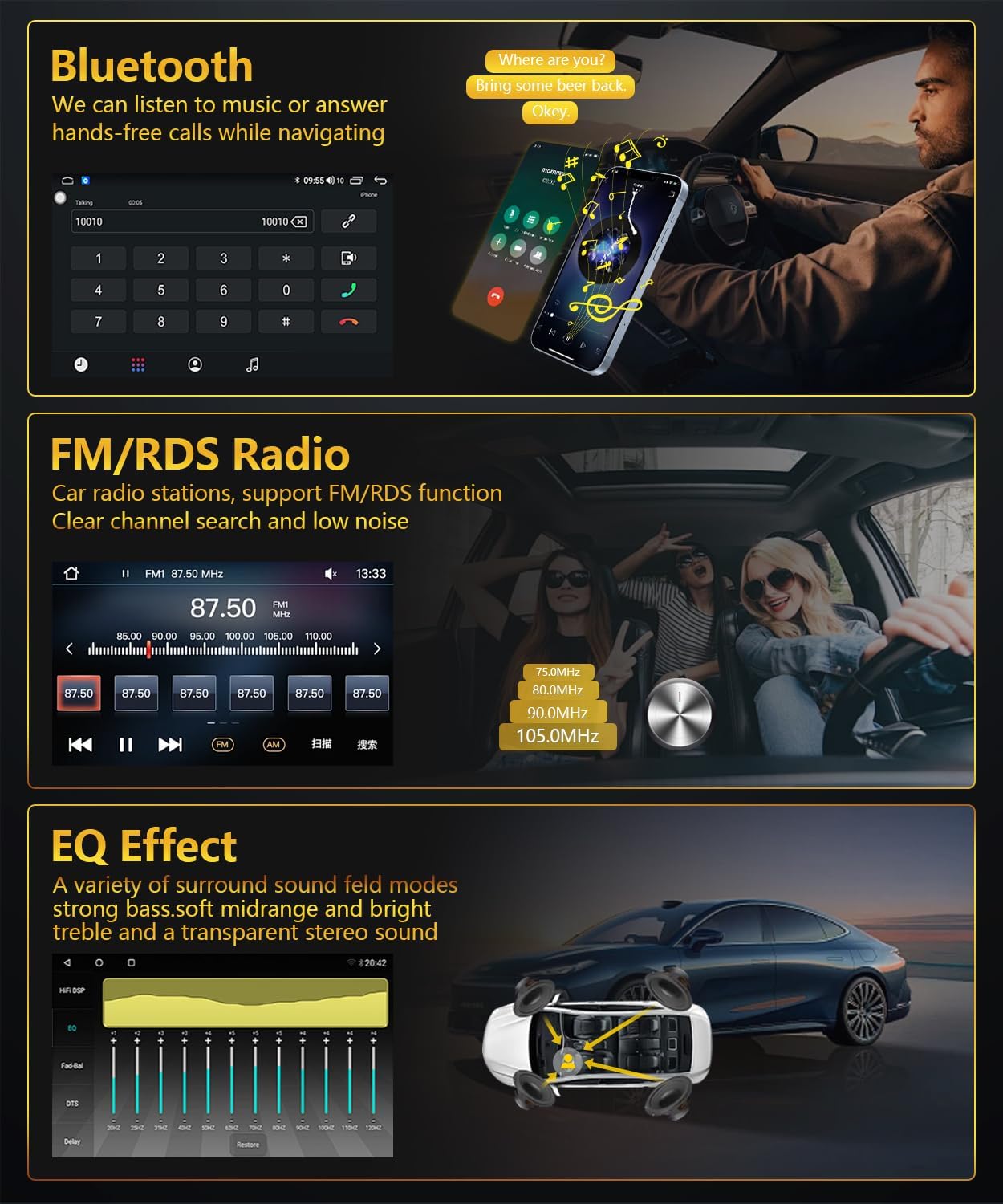
Şəkil 4.3: Bluetooth, FM/RDS Radio, and EQ Effect features.
This image showcases three key audio features of the RSNAVI car stereo. The top section displays the Bluetooth calling interface, showing a dial pad and contact information. The middle section illustrates the FM/RDS radio tuner, with frequency display and station presets. The bottom section presents an audio equalizer (EQ) interface, allowing users to fine-tune sound characteristics like bass, mid-range, and treble, accompanied by a diagram showing speaker placement in a car for optimal sound distribution.
4.8 Reversing Camera Display
The unit supports a rearview camera input. When the vehicle is shifted into reverse gear, the screen automatically switches to display the camera feed, aiding in safe maneuvering. The included camera is waterproof and features night vision and a wide-angle view.
- Arxasını təmin edinview camera is correctly installed and connected to the 'Inverted Input'.
- Shift the vehicle into reverse gear; the display will automatically show the camera view.
4.9 Sükan çarxına nəzarət
If your vehicle has original steering wheel control buttons, they can be configured to operate the car radio, providing convenient and safe control while driving.
- Access the 'Steering Wheel Control' settings in the system menu.
- Follow the on-screen instructions to map the vehicle's steering wheel buttons to the desired functions on the car stereo.

Şəkil 4.4: Reversing Display and Steering Wheel Control.
This image highlights two important safety and convenience features. The top section illustrates the rearview camera system, detailing its HD image quality, waterproof design, night vision, and wide-angle capabilities, with a visual representation of the camera's field of view. The bottom section displays the car stereo's interface for configuring steering wheel controls, showing various button functions like volume, track skip, and call management, allowing for seamless operation without taking hands off the wheel.
5. Baxım
5.1 Ümumi qulluq
To ensure the longevity and optimal performance of your car stereo, follow these general maintenance guidelines:
- Ekranın təmizlənməsi: Toxunma ekranını yumşaq bir şəkildə silmək üçün yumşaq, tüysüz parçadan istifadə edin. İnadkar ləkələr üçün, bir az dampparçanı su və ya ekran təmizləyicisi ilə örtün. Sərt kimyəvi maddələrdən və ya aşındırıcı materiallardan çəkinin.
- Toz Təmizləmə: Periodically clean dust from the unit's vents and openings using a soft brush or compressed air to prevent overheating.
- Temperatur: Cihazı uzun müddət həddindən artıq temperaturlara məruz qoymaqdan çəkinin. İşləmə temperaturu diapazonu -20℃ ilə 75℃ arasındadır.
- Proqram təminatı yeniləmələri: Check for available software updates periodically to ensure the system has the latest features and bug fixes.
6. Giderme
This section addresses common issues you might encounter with your RSNAVI Android Car Stereo.
6.1 Ümumi məsələlər və həll yolları
- Güc yoxdur:
- Bütün güc bağlantılarını və qoruyucuları yoxlayın.
- Ensure the vehicle battery is properly connected.
- Səs yoxdur:
- Dinamiklərin qoşulmalarını yoxlayın.
- Check volume levels and mute settings.
- Düzgün səs mənbəyinin seçildiyinə əmin olun.
- GPS siqnal itkisi:
- Ensure the GPS antenna is securely connected and placed in a location with a clear view səmanın.
- If using offline maps, ensure map data has been fully downloaded.
- Bluetooth Bağlantı Problemləri:
- Həm stereoda, həm də telefonunuzda Bluetooth-un aktiv olduğundan əmin olun.
- Delete previous pairings and attempt to re-pair.
- Hər iki cihazı yenidən başladın.
- Poor UI Responsiveness:
- Lazımsız fon proqramlarını bağlayın.
- Sistemi yenidən başladın.
- Sükan çarxının idarəediciləri işləmir:
- Verify the Canbus decoder is correctly installed.
- Reconfigure the steering wheel control settings in the system menu.
6.2 Zavod parametrləri
If persistent issues occur, a factory reset may resolve them. The factory setting keyword is 3368. Use this option with caution as it will erase all user data and settings.
7. Spesifikasiyalar
| Xüsusiyyət | Spesifikasiya |
|---|---|
| Sistem | Android |
| Çipset | UIS81411 |
| Ekran Ölçüsü | 9 düym |
| Yaddaş (RAM + ROM) | 2GB (RAM) + 64GB (ROM) |
| Ekran həlli | 1280*720 |
| Radio çipi | UIS |
| Güc Çıxışı | 4 x 45 Vt |
| İşləmə temperaturu | -20 ℃ ilə 75 ℃ arasında |
| Güc Ampqaldırıcı çip | TDA7388 |
| Radio Qrupu | FM/RDS |
| Video Çıxışı | Dəstəklənir |
| Inverted Input | AHD/CVBS (Rearview Kamera) |
| Xarici Mikrofon | Dəstəklənir |
| Split-Ekran | Dəstəklənir |
| Xəritə | Built-in offline map (Internet download data required) |
| WIFI | Dəstəklənir |
| USB | İkiqat USB interfeysi |
| Bağlantı texnologiyası | Bluetooth, USB, Wi-Fi |
| Səs Çıxış Modu | Stereo |
| Daxil olan komponentlər | Canbus, Car Radio, Power cord, RCA Cable, Radio Antenna |
| Məhsul Ölçüləri | 33.02 x 27 x 11.02 sm; 1 kq |
| Model nömrəsi | 4 Core 2G-64G CAM |
8. Zəmanət və Müştəri Dəstəyi
RSNAVI is committed to providing quality products and support. Your purchase includes:
- 30 Günlük Pul Geri Zəmanəti: Alışınız sizi qane etmirsə, tam geri qaytarmaq üçün 30 gün ərzində onu geri qaytara bilərsiniz.
- 24 Aylıq Zəmanət: The product is covered by a 24-month warranty against manufacturing defects.
- Ömürlük Texniki Dəstək: RSNAVI offers lifetime technical assistance for any questions regarding installation or use.
For any questions or assistance, please contact our customer service team via email. We aim to respond and address your concerns within 24 hours.